
Introduction
Thank you for choosing the LEPOWER 3500LM Dusk to Dawn Flood Light. This manual provides essential information for the safe installation, operation, and maintenance of your new outdoor LED security light. Please read these instructions thoroughly before installation and retain them for future reference.

An overview of the LEPOWER 3-head flood light, showcasing its design and color.
Safety Information
WARNING: Risk of electric shock. Disconnect power at the fuse or circuit breaker before installing or servicing.
- All wiring connections must be in accordance with local and national electrical codes. If you are unfamiliar with proper wiring connections, consult a qualified electrician.
- Do not install this fixture with wet hands or while standing on a wet or damp surface.
- Ensure the supply voltage is correct (120V AC).
- This product is designed for outdoor use and is IP65 waterproof. However, ensure all connections are properly sealed during installation to maintain water resistance.
- Do not look directly into the LED light source when the fixture is illuminated.
Package Contents
Verify that all components are present before beginning installation:
- LEPOWER 3500LM Dusk to Dawn Flood Light (Model YY02B-BR)
- Mounting Hardware (bracket, nuts, screws)
- Instruction Manual
Product Features
- 3500 LM Super Bright & Energy Saving: Powered by premium LED beads and professional filter lenses, providing a warm white light that is brighter and softer than average flood lights.
- Dusk to Dawn Outdoor Flood Lights: Features a built-in photocell sensor that automatically turns the light on at dusk and off at dawn.
- Enduring & IP65 Waterproof: Constructed from aluminum with a multi-groove radiator for excellent cooling. IP65-rated for resistance against rainstorms, sleet, or snow.
- 3 Adjustable Heads: Offers up to a 270° wide lighting angle for shadowless illumination, enhancing safety in various outdoor areas.
- Easy to Install: Comes with all necessary accessories for convenient and straightforward wiring and mounting.
Brightness and Design

A detailed view of the light's internal components, including the branded LED beads and professional filter lenses, which contribute to its 3500 lumen output.

This image highlights the durable die-cast aluminum construction and multi-groove radiator design, ensuring efficient heat dissipation and product longevity.
Weather Resistance

The image shows the flood light functioning effectively during rainfall, illustrating its IP65 waterproof and weather-resistant capabilities.
Installation Guide
Before You Begin
- Turn off power at the circuit breaker or fuse box.
- Ensure the mounting surface is structurally sound and can support the fixture's weight.
- Gather necessary tools: screwdriver, wire strippers, electrical tape, safety glasses.
Mounting Instructions
- Attach the mounting bracket to the junction box using the provided screws. Ensure the bracket is securely fastened.
- Connect the electrical wires: Connect the black wire from the fixture to the black (live) wire from the supply, the white wire from the fixture to the white (neutral) wire from the supply, and the green/ground wire from the fixture to the ground wire from the supply. Secure connections with wire nuts and electrical tape.
- Carefully tuck the wires into the junction box.
- Align the fixture with the mounting bracket and secure it with the central screw and gasket, ensuring a tight seal to prevent water intrusion.
- Adjust the three light heads to your desired angles.
- Restore power at the circuit breaker.

This diagram provides key dimensions of the flood light and illustrates the included mounting bracket and hardware, simplifying the installation process.
Operating Instructions
Dusk to Dawn Mode
The flood light is equipped with a built-in photocell sensor. In this mode, the light will automatically turn on when ambient light levels drop (at dusk) and turn off when ambient light levels rise (at dawn). This mode is active by default.

This image illustrates the automatic dusk-to-dawn functionality, where the light activates at night and deactivates at dawn using its integrated sensor.
Switch Controlled Mode
To operate the light manually via a wall switch, cover the photocell sensor with the provided silicone cap. Once the sensor is covered, the light will respond to the connected wall switch, allowing you to turn it on or off as needed, regardless of ambient light conditions.
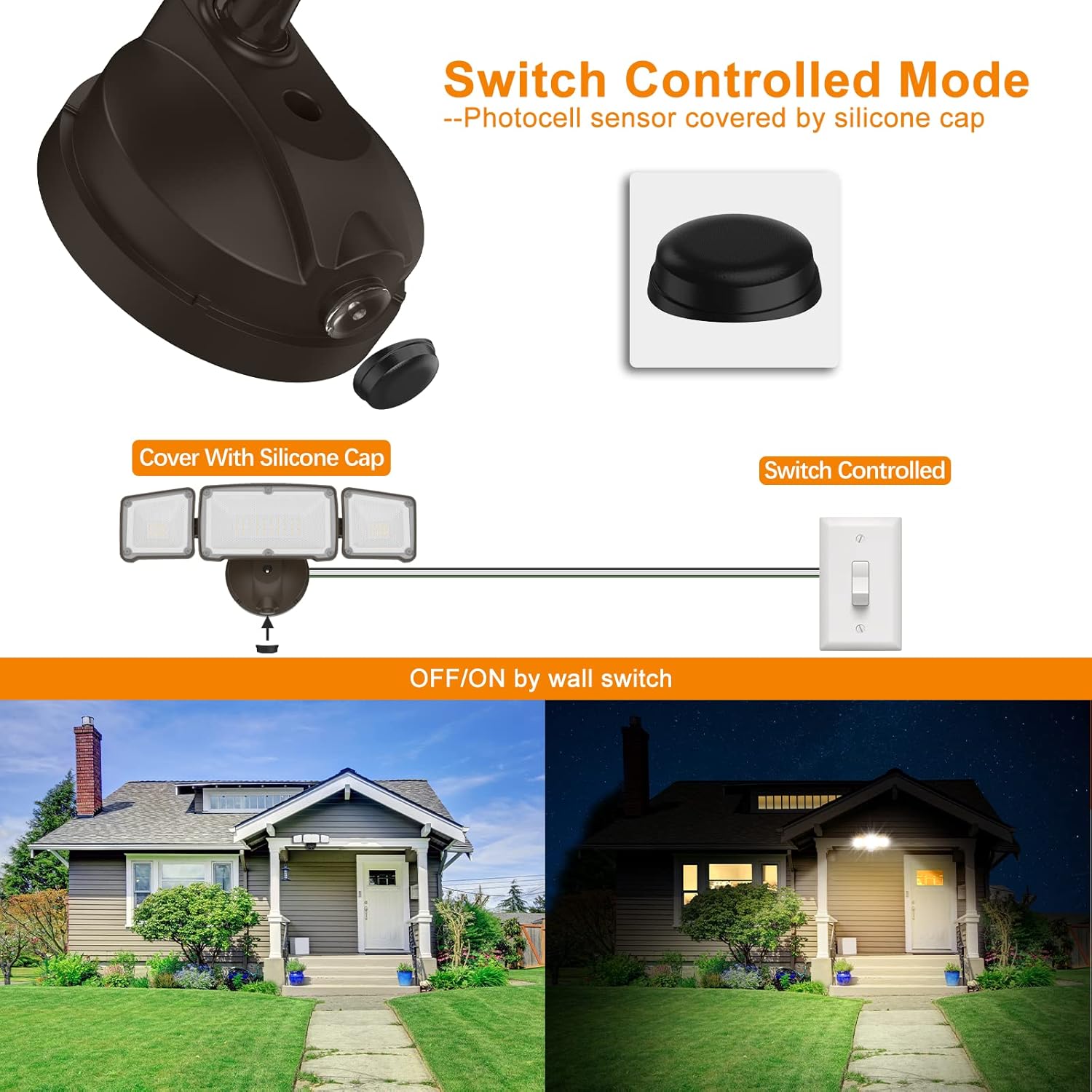
This image demonstrates how to switch from dusk-to-dawn mode to manual switch control by covering the photocell sensor with the provided silicone cap.
Maintenance
- Cleaning: Periodically clean the fixture with a soft, damp cloth. Do not use abrasive cleaners or solvents. Ensure power is off before cleaning.
- Inspection: Regularly inspect the fixture for any signs of damage, loose wiring, or wear. Address any issues promptly to ensure safe operation.
- Photocell Sensor: Keep the photocell sensor clean and free from obstructions (e.g., dirt, leaves) to ensure proper dusk-to-dawn functionality.
Troubleshooting
| Problem | Possible Cause | Solution |
|---|---|---|
| Light does not turn on at night. | 1. Power is off. 2. Photocell sensor is obstructed or faulty. 3. Wiring error. | 1. Check circuit breaker/fuse. 2. Clean sensor, remove obstructions. If using switch-controlled mode, ensure cap is on. 3. Consult a qualified electrician to check wiring. |
| Light stays on during the day. | 1. Photocell sensor is covered or in a dark location. 2. Light from another source is hitting the sensor. | 1. Ensure sensor is exposed to daylight. Remove silicone cap if in dusk-to-dawn mode. 2. Reposition the fixture or shield the sensor from other light sources. |
| Light flickers. | 1. Loose wiring connection. 2. Unstable power supply. | 1. Turn off power and check all wiring connections. 2. Consult an electrician to check power supply stability. |
Technical Specifications
| Specification | Detail |
|---|---|
| Brand | LEPOWER |
| Model Number | YY02B-BR |
| Brightness | 3500 Lumen |
| Wattage | 35 Watts |
| Light Color | Warm White (3200K) |
| Voltage | 120 Volts |
| Material | Metal (Die-cast Aluminum) |
| Water Resistance Level | IP65 Waterproof |
| Control Method | Photocell (Dusk to Dawn) / Wall Switch |
| Installation Type | Wall Mount |
| Dimensions (L x W x H) | 14.7"L x 5.3"W x 5.4"H |
Warranty and Customer Support
This LEPOWER flood light comes with a 1-year manufacturer's warranty. This warranty covers defects in materials and workmanship under normal use.
For technical assistance, warranty claims, or general inquiries, please visit the official LEPOWER store or contact their customer support through the retailer where the product was purchased. You can find more information at the LEPOWER Brand Store.
Product Video
An official product video demonstrating the features and benefits of the LEPOWER Dusk to Dawn Flood Light, including its design, brightness, adjustability, and waterproof rating.


