
Introduction

Image: LEPOWER 3000LM Dusk to Dawn LED Security Light.
This manual provides detailed instructions for the installation, operation, and maintenance of your LEPOWER 3000LM Dusk to Dawn LED Security Light. Please read this manual thoroughly before installation and retain it for future reference. This 28W LED flood light features a built-in photocell sensor, offering two operational modes, and is designed for outdoor use with an IP65 waterproof rating.
Product Features
- Two Optional Modes: Features a built-in dusk to dawn sensor for automatic operation (on at dusk, off at dawn). A silicone cap is included to disable the sensor, allowing for switch-controlled operation.
- High Brightness & Energy Saving: Delivers up to 3000 lumens of 5500K white light using premium LED beads and professional filter lenses, while consuming only 28W.
- Durable Construction: Constructed from full aluminum material with a multi-groove designed radiator on the back for excellent heat dissipation, ensuring a lifespan of up to 50,000 hours.
- Weatherproof Design: IP65 waterproof rating protects against rain, sleet, and snow, making it suitable for various outdoor environments.

Image: LEPOWER LED Security Light demonstrating IP65 waterproof capability.
- Adjustable Coverage: Two adjustable light heads provide up to a 270° wide lighting angle for shadow-free illumination.
- Easy Installation: Designed for quick and easy installation with included accessories, requiring no complicated wiring steps. ETL certified for safety.
What's in the Box
- LEPOWER 3000LM Dusk to Dawn LED Security Light (Model YY01B-WH)
- Mounting Hardware (screws, wire nuts, gasket, bracket)
- Silicone Cap (for photocell sensor)
- Instruction Manual
Setup and Installation
Safety First: Before beginning installation, ensure the power to the circuit is turned OFF at the circuit breaker or fuse box to prevent electrical shock.
Installation Steps:
- Prepare the Mounting Surface: If replacing an existing fixture, carefully remove the old light fixture, mounting screws, and wire nuts. Ensure the mounting surface is clean and secure.
- Install the Mounting Bracket: Attach the new mounting bracket to the junction box or desired surface using the provided screws. Ensure it is firmly secured.
- Apply Gasket: Peel off the paper backing from the self-adhesive gasket and apply it to the mounting surface or the back of the light fixture base to create a watertight seal.
- Wire Connections: Connect the electrical wires according to standard wiring practices:
- Connect the black (live/hot) wire from the fixture to the black wire from the power supply using a wire nut.
- Connect the white (neutral) wire from the fixture to the white wire from the power supply using a wire nut.
- Connect the green (ground) wire from the fixture to the ground wire from the power supply (or the ground screw on the mounting bracket) using a wire nut.

Image: Wiring connections for the LEPOWER LED Security Light.
- Mount the Fixture: Carefully push the wired fixture onto the mounting bracket. Secure it with the final screw, ensuring the light sensor (photocell) is positioned on top for optimal dusk-to-dawn functionality.
- Adjust Light Heads: Loosen the adjustment screws on the light heads and pivot them to the desired angles to cover the intended area. Tighten the screws to secure the position.
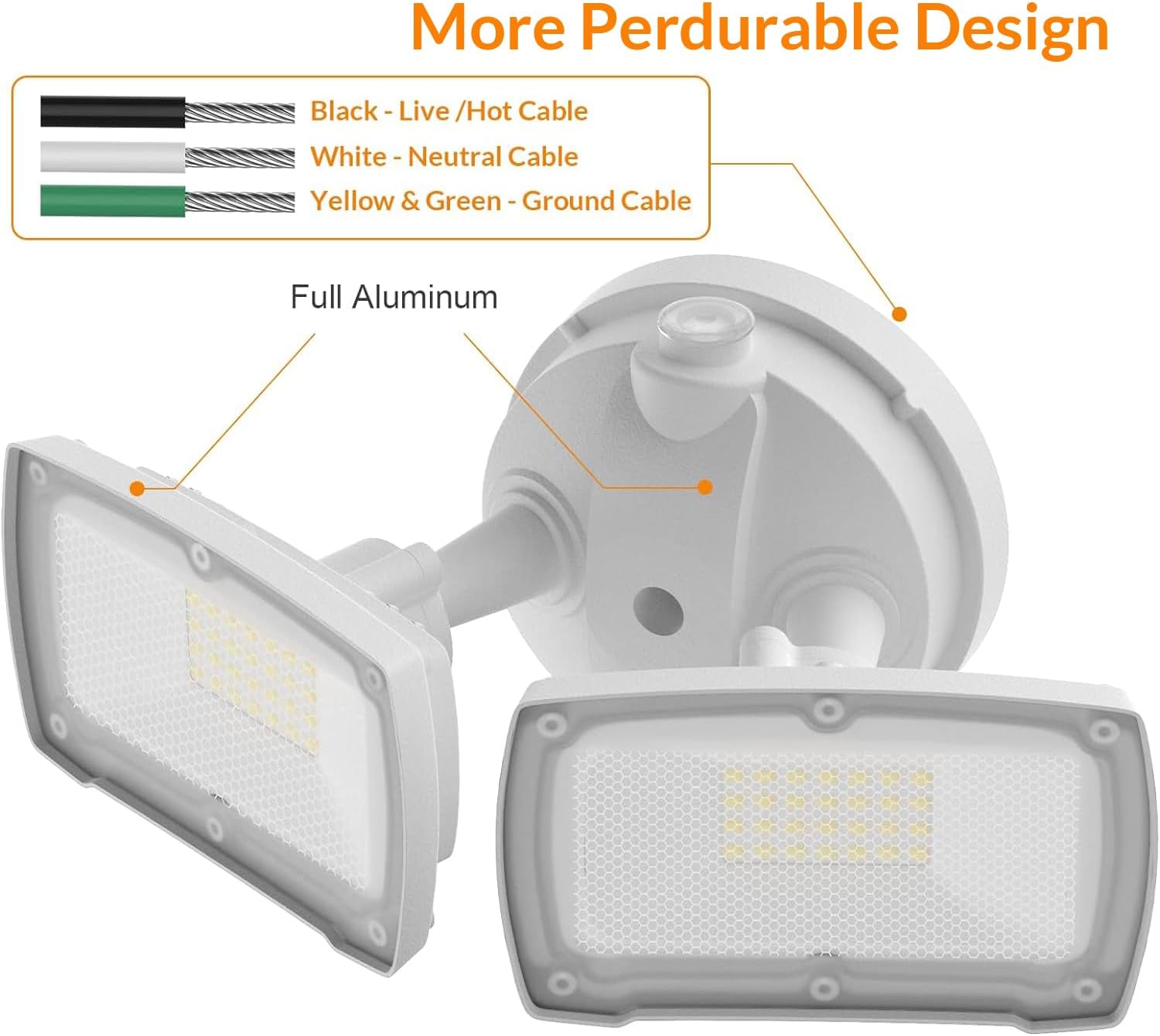
Image: Adjustable light heads and photocell sensor.
Note: For safety, it is recommended that installation be performed by a qualified electrician.
Operating Instructions
Your LEPOWER LED Security Light offers two operational modes:
1. Dusk to Dawn Mode (Automatic)
In this mode, the built-in photocell sensor automatically detects ambient light levels. The light will turn on at dusk when it gets dark and turn off at dawn when sufficient natural light is present. Ensure the photocell sensor is unobstructed for proper operation.

Image: Automatic Dusk to Dawn operation.
2. Switch-Controlled Mode (Manual)
To operate the light manually via a wall switch, place the provided silicone cap over the photocell sensor. This will block the sensor from detecting light, allowing you to control the fixture with a standard ON/OFF wall switch.

Image: Using the silicone cap for switch-controlled operation.
Maintenance
The LEPOWER LED Security Light is designed for durability and long-term performance with minimal maintenance. The full aluminum construction and efficient heat dissipation contribute to its 50,000-hour lifespan.
- Cleaning: Periodically clean the light heads and photocell sensor with a soft, damp cloth to remove dirt, dust, or debris that may accumulate. Ensure the power is off before cleaning. Avoid using abrasive cleaners or solvents.
- Inspection: Regularly inspect the fixture for any signs of damage, loose connections, or wear. Address any issues promptly to ensure continued safe operation.
- LEDs: The integrated LED units are not replaceable. The fixture is designed for a long operational life.
Troubleshooting
If you encounter issues with your LEPOWER LED Security Light, refer to the following common troubleshooting steps:
- Light Does Not Turn On:
- Check the power supply: Ensure the circuit breaker is ON and there is power to the fixture.
- Verify wiring connections: Confirm all wires are securely connected as per the installation instructions.
- Photocell sensor: If in Dusk to Dawn mode, ensure the photocell sensor is not covered or obstructed by debris, shadows, or other light sources. If in Switch-Controlled mode, ensure the silicone cap is properly placed and the wall switch is ON.
- Test in darkness: The light will only activate in low light conditions when in Dusk to Dawn mode.
- Light Stays On During Daytime:
- Photocell sensor obstruction: The photocell sensor may be obstructed by dirt, debris, or positioned in a location that does not receive sufficient daylight. Clean the sensor and ensure it has clear exposure to natural light.
- External light interference: Strong artificial light sources (e.g., streetlights, other floodlights) shining directly onto the photocell sensor can prevent it from turning off. Reposition the fixture or shield the sensor from direct external light.
- Silicone cap: If in Switch-Controlled mode, ensure the silicone cap is correctly installed over the photocell sensor.
- Light Flickers or Operates Intermittently:
- Loose wiring: Check all electrical connections for tightness.
- Power fluctuations: Ensure stable power supply to the fixture.
If these steps do not resolve the issue, please contact LEPOWER customer support for further assistance.
Specifications
| Brand | LEPOWER |
| Model Number | YY01B-WH |
| Power Source | Corded Electric |
| Wattage | 28 Watts |
| Brightness | 3000 Lumens |
| Color Temperature | 5500 Kelvin (White Light) |
| Light Source Type | LED |
| Material | Metal (Full Aluminum) |
| Water Resistance Level | IP65 Waterproof |
| Product Dimensions | 5.3"L x 10"W x 5.5"H |
| Item Weight | 1.76 Pounds |
| Special Features | Aluminum Design, Dusk to Dawn Sensor, IP65 Waterproof, Superior Brightness & Energy Saving, Two Optional Modes |
| Certifications | ETL Certified, FCC Listed |

Image: Product dimensions.
Warranty and Support
This LEPOWER product comes with a seller warranty. For specific warranty details, claims, or technical support, please contact the seller directly through your purchase platform. Ensure you have your purchase details and model number (YY01B-WH) available when contacting support.
Product Overview Video
Watch this video for a visual overview of the LEPOWER 3000LM Dusk to Dawn LED Security Light's features and design.
Video: Overview of the LEPOWER 28W 3000LM Dusk to Dawn LED Security Light, highlighting its features and design.


