
Fitkit FT063
Fitkit FT063 DC-Motorized Treadmill User Manual
Model: FT063 | Brand: Fitkit
1. Important Safety Guidelines
Please read this manual thoroughly before operating the Fitkit FT063 Treadmill. Retain this manual for future reference. Adherence to these guidelines ensures safe operation and prolongs the life of your equipment.
General Safety Precautions:
- Always consult a physician before starting any new exercise program.
- Keep children and pets away from the treadmill during operation.
- Ensure the treadmill is placed on a flat, stable surface with adequate clearance around it (at least 2 meters behind and 0.6 meters on each side).
- Always attach the safety key clip to your clothing before beginning your workout. The treadmill will stop if the safety key is disengaged.
- Do not operate the treadmill if it is damaged or malfunctioning.
- Wear appropriate athletic footwear and clothing.
- Connect the treadmill to a grounded power outlet. A voltage stabilizer is recommended to protect the motor from power fluctuations.
- Do not use the treadmill outdoors or in areas with high humidity.
2. Product Overview
The Fitkit FT063 is a DC-motorized treadmill designed for home use, offering a range of features to enhance your fitness routine.
Components Diagram:

Figure 2.1: Labeled components of the Fitkit FT063 Treadmill, including the Console, LCD Display, Safety Key, Heart Rate Sensor, Upright Column, Motor Cover, Running Belt, End Cap, Massager, and Side Rail.
Key Features:
- Motor: 3HP Peak DC-Motorized for smooth and consistent performance.
- Speed Range: 1-14 km/hr, suitable for walking, jogging, and running.
- Inclination: Auto-inclination with 15 levels for varied workout intensity.
- Max User Weight: Supports up to 100 kg.
- Running Belt: Spacious 1230x420 mm belt for comfortable strides.
- Foldable Design: Hydraulic folding mechanism for easy storage.
- Display: LCD display for tracking workout metrics.
- Pre-set Programs: 12 built-in workout programs.
- Additional Features: Massager (optional), transportation wheels, auto-lubrication system, heart rate sensor, bottle holder, Hi-Fi speaker.

Figure 2.2: The Fitkit FT063 DC-Motorized Treadmill, showcasing its compact and functional design.

Figure 2.3: Close-up view of the integrated massager for muscle relaxation and the dumbbell holder for strength training, enhancing the versatility of the Fitkit FT063 Treadmill.
3. Setup and Installation
The Fitkit FT063 Treadmill comes with free home installation services across India. It is highly recommended to utilize this service for proper setup.
Pre-Installation Checklist:
- Location: Choose a flat, stable surface away from direct sunlight and moisture. Ensure sufficient space around the treadmill for safe operation and access.
- Power Supply: Verify that a grounded power outlet is available. Consider installing a voltage stabilizer to protect the motor.
- Unpacking: Carefully remove all components from the packaging. Check against the included components list (User manual, Tool Kit, Warranty Card).
Assembly (For Self-Installation, if applicable):
While professional installation is provided, basic assembly typically involves:
- Attaching the upright columns to the base frame.
- Securing the console to the upright columns.
- Connecting any necessary cables (refer to the detailed diagram in the physical user manual for specific connections).
- Ensuring all bolts and nuts are tightened securely.
Initial Power-Up:
- Plug the power cord into a grounded outlet.
- Turn on the main power switch, usually located near the front of the treadmill.
- The LCD display should illuminate, indicating the treadmill is ready for use.
4. Operating Instructions
Control Panel Functions:
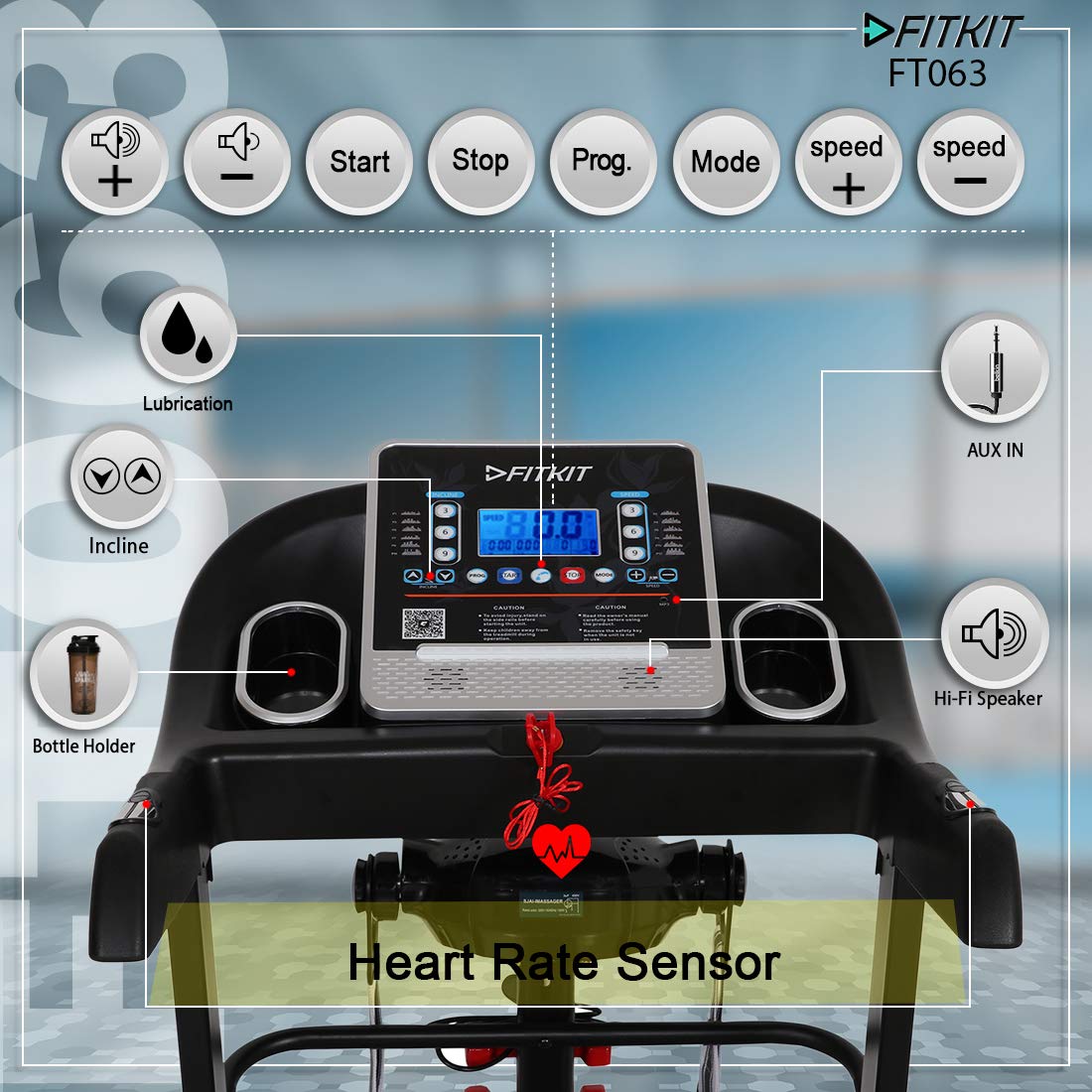
Figure 4.1: Detailed view of the Fitkit FT063 control panel, showing buttons for speed, incline, start, stop, program selection, mode, lubrication, AUX input, bottle holder, Hi-Fi speaker, and heart rate sensor.
- Start/Stop: Press Start to begin the treadmill belt movement. Press Stop to halt the belt.
- Speed +/-: Adjust the running speed from 1 km/hr to 14 km/hr.
- Incline +/-: Control the automatic incline level from 0 to 15.
- Prog. (Program): Select from 12 pre-set workout programs. Each program has varying speed and incline profiles.
- Mode: Switch between different display modes (e.g., time, distance, calories, speed, heart rate).
- Heart Rate Sensor: Grip the handrail sensors to display your heart rate on the LCD.
- AUX In: Connect your audio device to play music through the built-in Hi-Fi speakers.
Using Pre-set Programs:
To use a pre-set program, press the Prog. button repeatedly until your desired program number is displayed. Press Start to begin the program. The treadmill will automatically adjust speed and incline according to the program's profile.
Smart Features and App Connectivity:
The Fitkit FT063 Treadmill integrates with various smart fitness platforms for an enhanced workout experience.
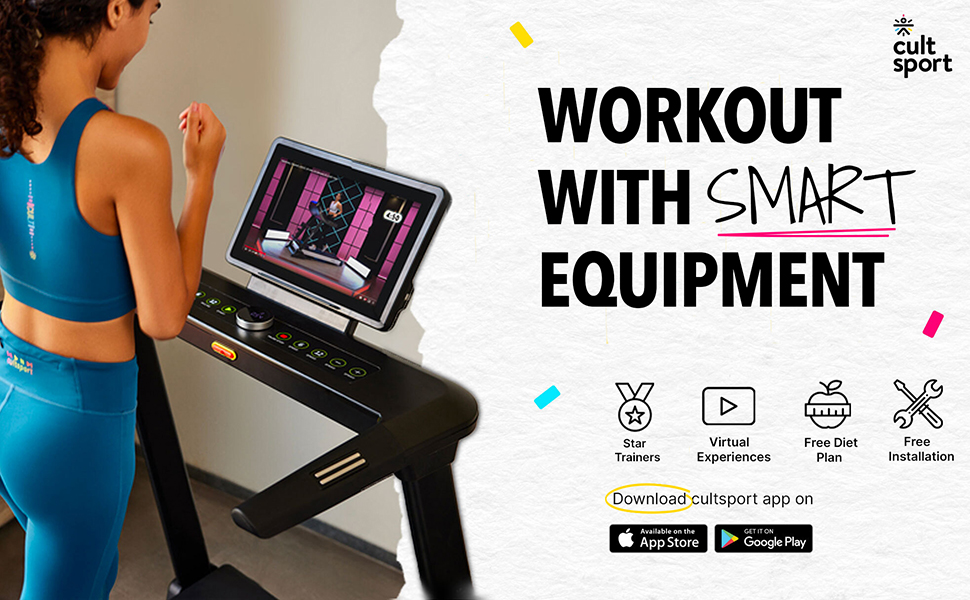
Figure 4.2: The cultsport app allows users to access trainer-led sessions, virtual experiences, and personalized diet plans, enhancing the interactive workout experience with the treadmill.
- Fitplus App: Syncs workout data from the treadmill to your phone via Bluetooth. It also integrates with Google Fit.
- cultsport App: Access trainer-led sessions, virtual workouts, and meditation sessions. Connect your treadmill to participate in immersive fitness games and earn Healthcoins.
- Amazon Alexa Integration: Control your treadmill with voice commands. Examples include "Alexa, Open OneFitPlus App," "Alexa, Increase Speed to 8," or "Alexa, Increase Inclination to 6."

Figure 4.3: The Fitkit FT063 Treadmill supports Amazon Alexa voice commands for convenient control of speed and inclination, and app interaction.
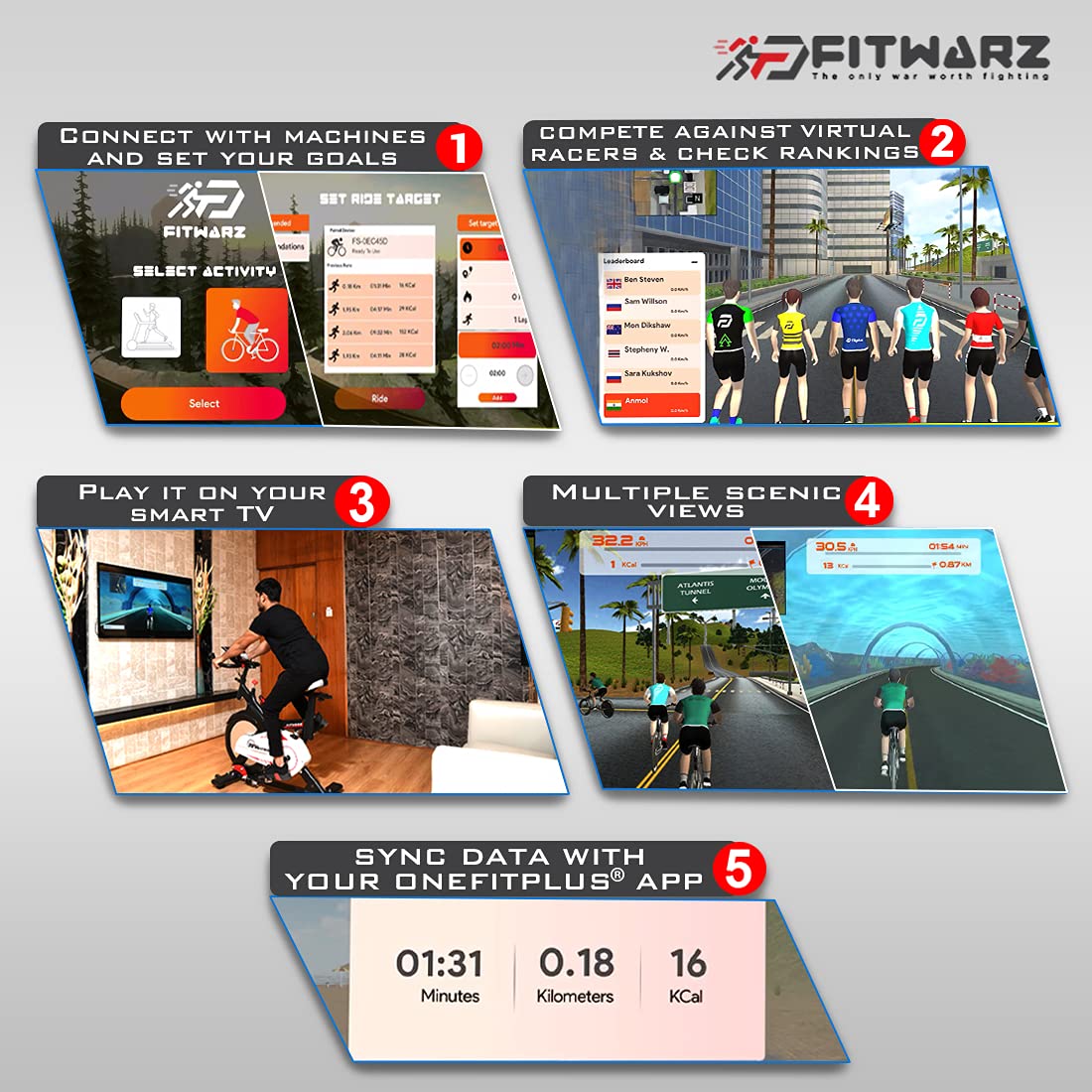
Figure 4.4: The Fitwarz app allows users to connect with machines, set ride targets, compete against virtual racers, check rankings, play on smart TV, view multiple scenic routes, and sync data with the OneFitPlus app.
5. Maintenance
Regular maintenance ensures the longevity and optimal performance of your Fitkit FT063 Treadmill.
Lubrication:
- The treadmill features an auto-lubrication system. Ensure the lubrication reservoir is filled with the recommended silicone oil.
- Check the oil level periodically and refill as needed. Refer to the physical manual for specific instructions on accessing the reservoir.

Figure 5.1: The Fitkit FT063 Treadmill features an auto-lubrication system, simplifying maintenance and ensuring smooth operation of the running belt.
Cleaning:
- Wipe down the treadmill surfaces with a damp cloth after each use to remove sweat and dust.
- Periodically vacuum under the treadmill to prevent dust buildup from affecting motor performance.
- Do not use abrasive cleaners or solvents.
Running Belt Adjustment:
- If the running belt starts to slip or drift to one side, it may need adjustment.
- Refer to the detailed instructions in your physical user manual for proper belt tensioning and centering procedures using the provided tool kit.
6. Troubleshooting
This section addresses common issues you might encounter with your treadmill. For problems not listed here, please contact customer support.
| Problem | Possible Cause | Solution |
|---|---|---|
| Treadmill does not power on. | Power cord not plugged in; main power switch off; safety key not in place. | Ensure power cord is securely plugged in. Turn on the main power switch. Insert the safety key fully into its slot. |
| Running belt slips or hesitates. | Belt tension too loose; insufficient lubrication. | Adjust belt tension (refer to manual). Apply lubrication if needed (check auto-lubrication system). |
| Unusual noise during operation. | Loose components; motor issue; belt misalignment. | Check for and tighten any loose bolts. Ensure the belt is centered. If noise persists, contact customer support. |
| Heart rate reading is inaccurate or absent. | Hands not properly placed on sensors; dry hands. | Ensure both hands are firmly gripping the sensors. Lightly moisten hands if they are too dry. |
7. Technical Specifications
| Feature | Specification |
|---|---|
| Brand | Fitkit |
| Model | FT063 |
| Motor Horsepower | 3 HP (Peak) |
| Motor Type | DC-Motorized |
| Speed Range | 1 - 14 km/hr |
| Maximum Weight Support | 100 Kilograms |
| Running Belt Size | 1230 x 420 mm |
| Inclination Type | Auto |
| Inclination Levels | 15 |
| Pre-set Programs | 12 |
| Foldable | Hydraulic |
| Lubrication | Auto |
| Display Type | LCD |
| Product Dimensions (L x W x H) | 170D x 70.5W x 129H Centimeters |
| Item Weight | 63 Kilograms |
| Material | Alloy Steel |
| Included Components | User manual, Tool Kit, Warranty Card |

Figure 7.1: Dimensions of the Fitkit FT063 Treadmill (1700mm length, 705mm width, 1290mm height) and its maximum user weight capacity of 100 kg.
8. Warranty and Customer Support
Warranty Information:
- Motor: 1 Year warranty against manufacturing defects.
- Frame: 3 Year warranty against manufacturing defects.
- Please retain your purchase receipt and warranty card for any claims.
Customer Support and Installation:
Fitkit provides active post-sales and customer support, including free at-home installation services across 650+ cities in India.
- For installation support after delivery, please contact the toll-free number provided on your warranty card or product packaging.
- Customer support working hours: Monday to Saturday, 9 AM to 6 PM.
- Service schedule may vary by location.
- You may also receive free diet and fitness plans, doctor consultations, and personal video training sessions as part of your purchase.
Related documentsFT063

Ask a question about this manual
Ask about setup, troubleshooting, compatibility, parts, safety, or missing instructions. Manuals+ will review the question and use this page’s manual context to help answer it.