
1. Introduction
The Supersonic SC-143 is a compact, portable 4-inch digital television designed for personal entertainment. It features a built-in digital TV tuner, USB connectivity for media playback, and an integrated rechargeable lithium battery, allowing for use in various locations without a constant power source.
2. Safety Information
WARNING: This product contains chemicals known to the State of California to cause cancer and birth defects or other reproductive harm. Please handle with care and refer to local regulations for disposal.
- Do not expose the device to extreme temperatures, direct sunlight, or high humidity.
- Avoid dropping or subjecting the device to strong impacts.
- Do not attempt to disassemble or repair the unit yourself. Refer all servicing to qualified personnel.
- Keep the device away from water and other liquids.
3. Package Contents
Please check the package for the following items:
- Supersonic SC-143 Portable 4 Inch Digital TV Unit
- Remote Control
- Power Adapter (not explicitly listed but implied for charging)
4. Product Overview
4.1 Front and Side Views

Image: Front view of the Supersonic SC-143 Portable TV, showing the 4-inch screen and control buttons on the right side.

Image: Angled view highlighting the side ports and front panel buttons for control.

Image: Side view detailing the DC 12V power input, USB port, and SD card slot.
4.2 Rear View with Kickstand

Image: Rear view of the TV, illustrating the built-in kickstand for tabletop viewing.
4.3 Remote Control
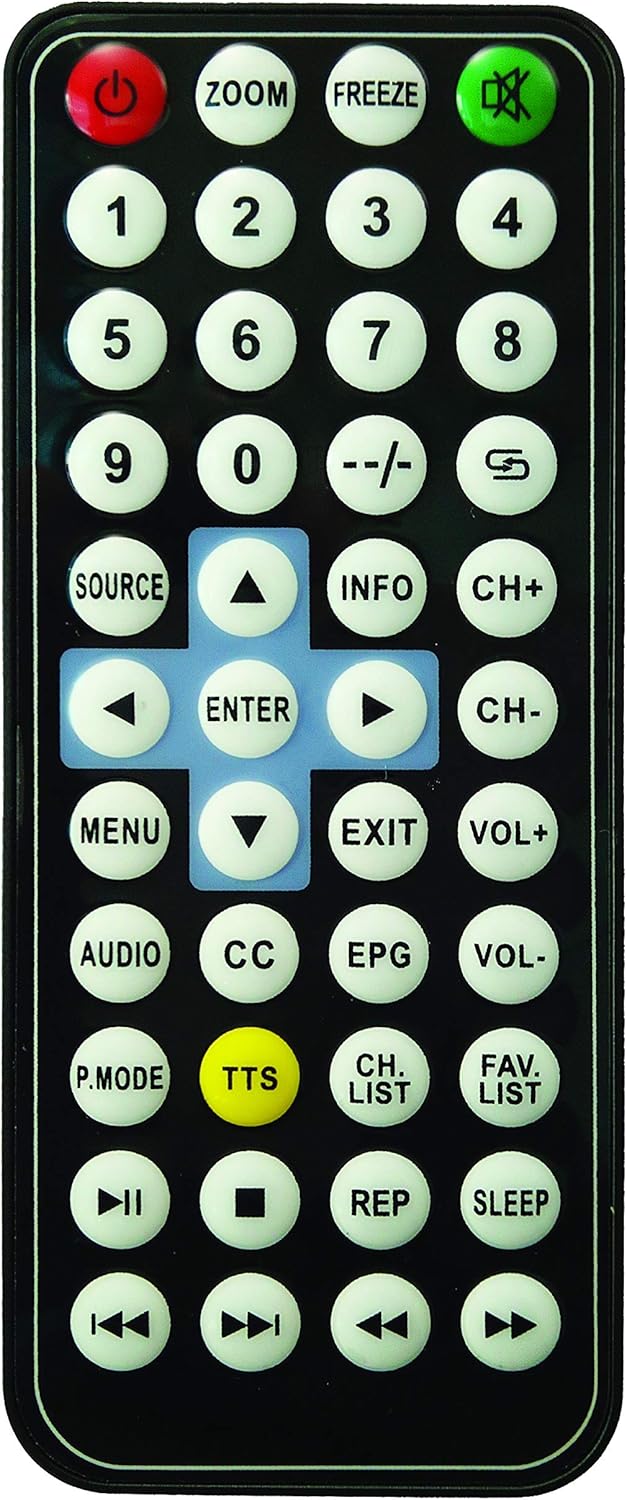
Image: The remote control for the Supersonic SC-143, featuring power, channel, volume, menu, and media playback buttons.
5. Setup
5.1 Charging the Device
- Connect the provided power adapter to the DC+12V port on the side of the TV.
- Plug the adapter into a standard electrical outlet.
- Allow the device to charge fully before first use. The charging indicator (if present) will typically change color or turn off when charging is complete.
5.2 Initial Power On and Channel Scan
- Extend the telescopic antenna fully for optimal reception.
- Press and hold the power button on the device or the remote control to turn on the TV.
- Upon first use, the TV may prompt you to perform an automatic channel scan. Follow the on-screen instructions to scan for available digital channels. This process may take several minutes.
- Ensure you are in an area with good digital TV signal coverage for best results.
6. Operating Instructions
6.1 Basic TV Operation
- Power On/Off: Press the power button on the TV or remote.
- Channel Selection: Use the CH+ / CH- buttons on the TV or remote to change channels. You can also use the number buttons on the remote for direct channel input.
- Volume Adjustment: Use the VOL+ / VOL- buttons on the TV or remote to adjust the sound level.
- Menu Navigation: Press the MENU button to access the on-screen menu. Use the arrow buttons (up, down, left, right) to navigate and the OK/ENTER button to confirm selections. Press EXIT to leave the menu.
- Mode Selection: Press the MODE button on the TV or SOURCE button on the remote to switch between TV and media playback modes (USB/SD).
6.2 Media Playback (USB/SD)
- Insert a USB flash drive into the USB port or an SD card into the SD card slot.
- Switch the input source to USB or SD mode using the MODE/SOURCE button.
- Navigate through your media files (videos, music, photos) using the remote control's arrow and OK/ENTER buttons.
- Select a file to begin playback.
Supported file formats may vary. Refer to the device's on-screen menu for specific compatibility details.
7. Maintenance
7.1 Cleaning
- Gently wipe the screen and exterior surfaces with a soft, dry, lint-free cloth.
- For stubborn marks, slightly dampen the cloth with water or a mild, non-abrasive screen cleaner.
- Do not use harsh chemicals, solvents, or abrasive materials, as these can damage the finish.
7.2 Battery Care
- To prolong battery life, avoid fully discharging the battery frequently.
- If storing the device for an extended period, charge the battery to approximately 50% and store in a cool, dry place. Recharge every few months to prevent deep discharge.
8. Troubleshooting
- No Power:
- Ensure the device is charged or connected to a power source.
- Check the power adapter and outlet for proper connection.
- No Signal / Poor Reception:
- Extend the antenna fully and try repositioning the TV.
- Perform a channel scan again.
- Ensure you are in an area with adequate digital TV broadcast coverage.
- No Sound:
- Increase the volume using the VOL+ button.
- Check if the device is muted. Press the MUTE button on the remote if available.
- USB/SD Card Not Recognized:
- Ensure the USB drive or SD card is inserted correctly.
- Verify the file system of the storage device (e.g., FAT32).
- Check if the media files are in supported formats.
- Remote Control Not Working:
- Replace the battery in the remote control (1 required).
- Ensure there are no obstructions between the remote and the TV's IR sensor.
9. Specifications
| Model Name | SC-143 |
| Screen Size | 4 Inches |
| Display Technology | LED |
| Resolution | 4K |
| Refresh Rate | 60 Hz |
| Aspect Ratio | 4:3 |
| Tuner Type | ATSC Digital Tuner |
| Connectivity | USB |
| Audio Input | USB |
| Total USB Ports | 1 |
| Built-in Speakers | Basic built-in speakers |
| Power Source | 1 Lithium Ion battery (included) |
| Voltage | 3.7 Volts |
| Power Consumption | 0.49 Watts |
| Item Weight | 14.4 Ounces |
| Color | Black |
| Control Method | Remote Control |
| Operating System | Roku OS |
| Model Year | 2000 |
Note: Some specifications, such as '4K Resolution' and 'Roku OS' for a 4-inch portable TV from Model Year 2000, may reflect data entry discrepancies. Please refer to the product packaging for the most accurate and up-to-date information.
10. Warranty Information
This Supersonic SC-143 Portable 4 Inch Digital TV comes with a 90-day Limited Warranty from the date of purchase. This warranty covers manufacturing defects under normal use. It does not cover damage caused by misuse, accidents, unauthorized modifications, or normal wear and tear. Please retain your proof of purchase for warranty claims.
11. Support
For technical support, warranty claims, or further assistance, please refer to the official Supersonic website or contact their customer service department. Contact information can typically be found on the product packaging or the manufacturer's official website.


