
1. Introduction
The FreedConn T-COMVB is a versatile Bluetooth intercom headset designed for motorcycle helmets, enabling communication, music playback, and call management for riders. It supports connectivity for up to 3 riders and offers robust features for a clear and reliable audio experience on the road.

Figure 1.1: FreedConn T-COMVB Bluetooth Intercom Headset.

Figure 1.2: Key features of the T-COMVB unit, highlighting its capabilities such as multi-rider intercom, phone connectivity, FM radio, and noise control.
2. Setup and Installation
2.1 Package Contents
Before installation, ensure all components are present in your package:

Figure 2.1: Contents of the FreedConn T-COMVB package and a visual guide for easy installation.
2.2 Helmet Compatibility and Speaker Installation
The T-COMVB is designed to fit various helmet types, including full-face, half-face, open-face, 3/4 face, motocross, and retro helmets. It comes with both hard and soft microphones to accommodate different helmet designs.

Figure 2.2: Guide to selecting the appropriate microphone and installation method for various helmet types.
2.3 Device Pairing
The T-COMVB supports pairing with mobile phones, GPS devices, and other Bluetooth intercoms.
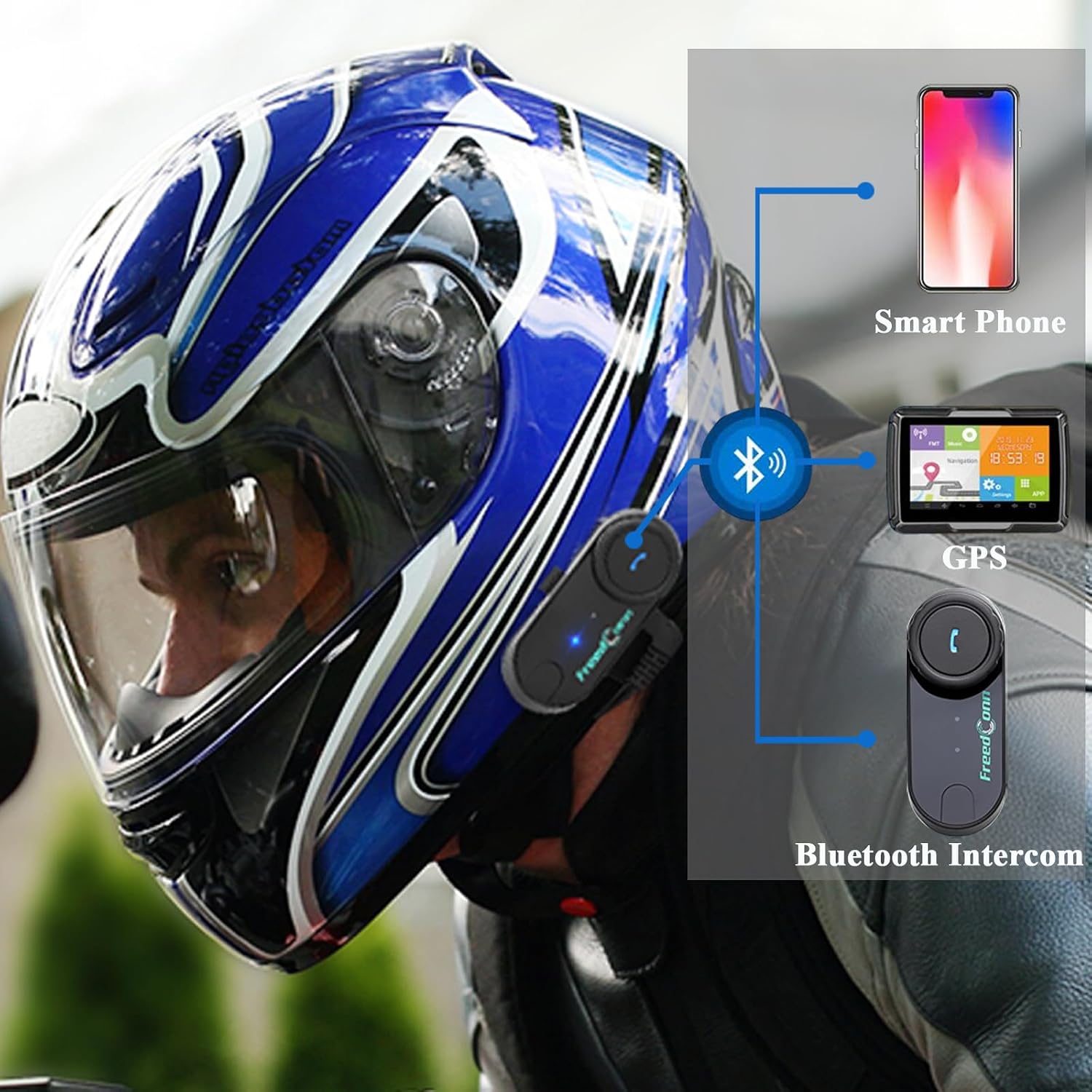
Figure 2.3: Connectivity options for the FreedConn T-COMVB, including smartphones and GPS systems.
Video 2.1: Demonstrates how to pair the FreedConn T-COMVB with a cellphone. It shows pressing the On/Off and Intercom buttons for 8 seconds until red and blue lights flash alternatively, indicating pairing status. Then, search for 'T-COM' on your phone's Bluetooth settings to connect. A successful pairing is indicated by regular blue light flashes.
Video 2.2: Illustrates the pairing process for multiple FreedConn intercom units. It shows how to pair two TCOM-VB units together, and then how to pair three TCOM-SC units in a chain (A-B, B-C, then A-C) for group communication.
3. Operating Instructions
3.1 Music Playback
Enjoy music from your connected phone through the headset.
- Play/Pause: Press the Multi-Function Button (MFB) once to start or stop music.
- Volume Adjustment: Turn the jog wheel anticlockwise and hold to increase volume. Turn the jog wheel clockwise and hold to decrease volume. A long beep indicates maximum or minimum volume.
- Switch Songs: Turn the jog wheel clockwise to skip to the next song. Turn the jog wheel counter-clockwise to go back to the previous song.
Video 3.1: Demonstrates music playback controls including play/pause, volume adjustment using the jog wheel, and switching between songs by turning the jog wheel clockwise or counter-clockwise.

Figure 3.1: Music sharing capability between two FreedConn Bluetooth intercoms, allowing riders to enjoy the same music.
3.2 Call Management
Manage incoming and outgoing calls hands-free.
- Auto Answering: The incoming call will answer automatically after 15 seconds if the MFB is not pressed.
- Hang Up: Press the MFB once to end an active call.
- Reject Call: Press and hold the MFB for 2 seconds until you hear a beep to reject an incoming call.
- Redial Last Number: Press and hold the MFB for 2 seconds until you hear a "bee" sound, then release to redial the last number.

Figure 3.2: The automatic call answering feature, allowing hands-free communication while riding.
Video 3.2: Demonstrates call management features including auto-answering incoming calls, hanging up a call, rejecting an incoming call, and redialing the last number called.
3.3 FM Radio
Listen to your favorite FM radio stations on the go.
- Turn On/Off: Double press the MFB to start or stop the FM Radio. This function is available when there is no active call or intercom.
- Channel Switching: Turn the jog wheel clockwise to switch to the next channel. Turn the jog wheel counter-clockwise to return to the previous channel.
Video 3.3: Shows how to turn on and off the FM radio function by double-pressing the MFB, and how to switch between radio channels using the jog wheel.
3.4 Intercom Functionality
Communicate with other riders using the intercom feature.
- Two-Rider Intercom: Supports duplex intercom communication between two riders up to 800 meters in open space.
- Three-Rider Intercom: Allows pairing for three riders, with two riders able to communicate simultaneously.
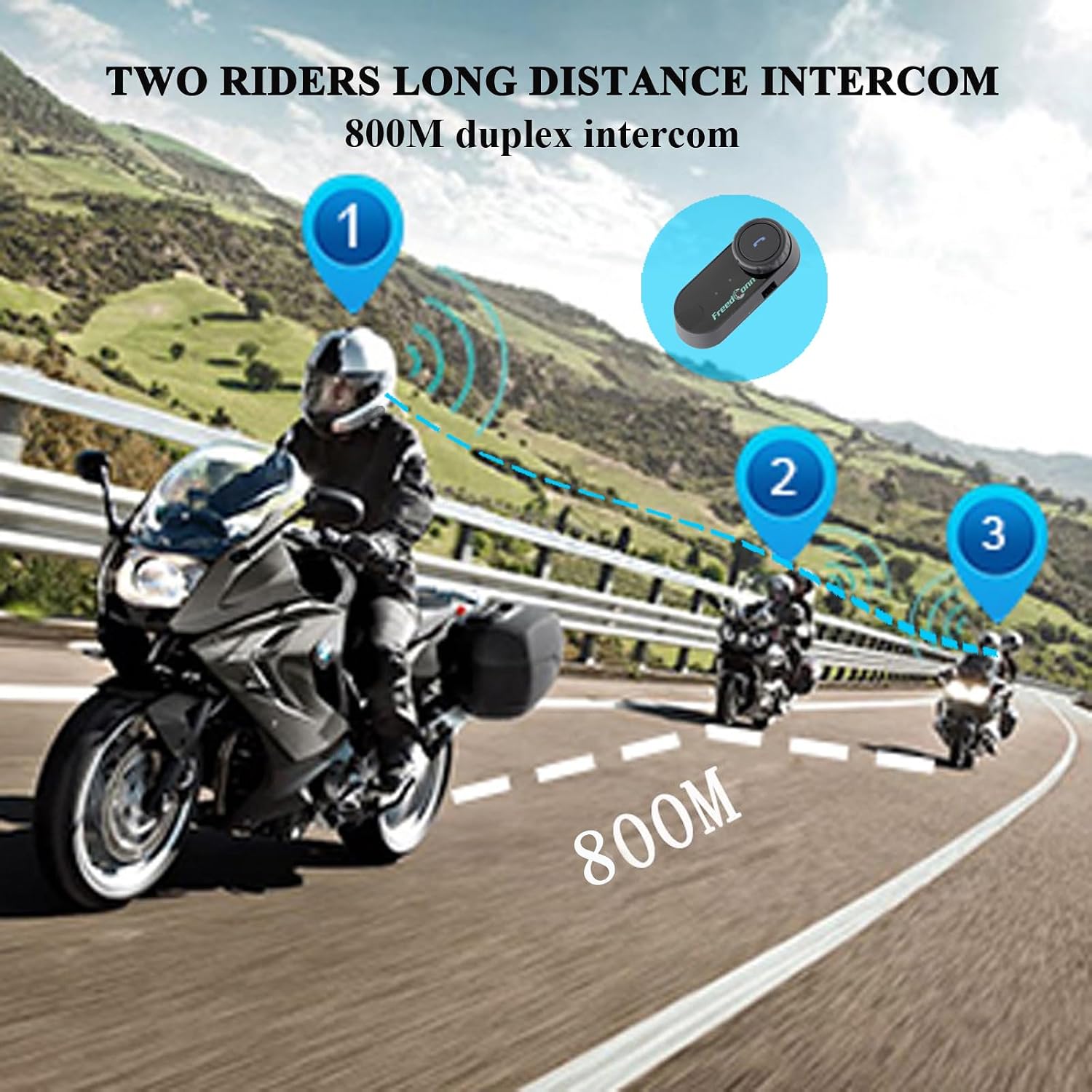
Figure 3.3: Illustration of the two-rider long-distance intercom capability, supporting communication up to 800 meters.

Figure 3.4: Group intercom functionality for 2 to 3 riders, enhancing communication during group rides.
Video 3.5: Demonstrates the pairing process for multiple FreedConn intercom units. It shows how to pair two TCOM-VB units together, and then how to pair three TCOM-SC units in a chain (A-B, B-C, then A-C) for group communication.
4. Maintenance and Care
To ensure the longevity and optimal performance of your FreedConn T-COMVB headset, follow these maintenance guidelines:
- Water and Sun Protection: The unit is designed with water-proof and sun-proof functions. However, avoid prolonged exposure to extreme weather conditions.
- Cleaning: Use a soft, damp cloth to clean the unit. Do not use harsh chemicals or abrasive cleaners.
- Storage: When not in use for extended periods, store the headset in a cool, dry place.
- Charging: Use the provided USB cable for charging. Ensure the charging port is dry before connecting.

Figure 4.1: The IP65 deep waterproof design protects the internal wiring from rain and dust, ensuring durability in various conditions.
5. Troubleshooting
If you encounter issues with your FreedConn T-COMVB headset, try the following solutions:
- No Power: Ensure the battery is charged. Connect the unit to a power source using the USB cable.
- Cannot Pair: Make sure the unit is in pairing mode (red and blue lights flashing alternately). Ensure other Bluetooth devices are not interfering. Try resetting the unit.
- No Sound/Low Volume: Check the volume level on both the headset and the connected device. Ensure speakers are properly connected and positioned within the helmet.
- Intercom Not Working: Verify that both intercom units are properly paired. Ensure they are within the effective range.
- Poor Audio Quality: Check for obstructions to the microphone. Ensure the unit is securely mounted and not vibrating excessively. DSP echo cancellation and noise suppression technology should provide clear quality in high-speed environments.
6. Specifications
| Feature | Description |
|---|---|
| Model Name | TCOM-VB |
| Connectivity Technology | Wireless (Bluetooth) |
| Bluetooth Version | 3.0 |
| Intercom Range | Up to 800m (open space) |
| Max Speed Support | Up to 120km/h (75mph) |
| Intercom Riders | 3 riders pairing, 2 riders simultaneous intercom |
| Battery Type | 1 Lithium Ion battery required |
| Battery Capacity | 400 mAh |
| Intercom Time | Up to 5 hours |
| Talking Time | Up to 10 hours |
| Music Time | 10 hours |
| Charging Time | 2.5 hours |
| Standby Time | Up to 300 hours |
| Water Resistance Level | Water Resistant (IP65 Deep Waterproof) |
| Noise Control | Active Noise Cancellation (DSP technology) |
| Item Weight | 1.59 ounces (45 Grams) |
| Product Dimensions | 4.53 x 6.5 x 1.77 inches |

Figure 6.1: Battery life details for the FreedConn T-COMVB, highlighting its long standby and operating times.

Figure 6.2: Detailed battery specifications and performance metrics.
7. Warranty and Support
For warranty information or technical support, please refer to the official FreedConn website or contact their customer service directly. Keep your purchase receipt as proof of purchase.