
Introduction
The Dreambaby Dual Fit Outlet Cover Box is designed to enhance child safety by preventing access to electrical outlets and plugs. This manual provides essential information for proper installation, usage, and maintenance to ensure a safe environment for children.
Key Features:
- Enhanced Child Safety: Helps keep your home hazard-free by effectively blocking access to electrical plugs, ensuring little fingers stay safer from potential dangers.
- Keep Items Plugged In: Allows you to cover both unused and used outlets, so you can keep your appliances plugged in while still babyproofing your space.
- Easy Access for Parents: Offers full accessibility for parents. Simply remove the top cover to plug or unplug devices, then easily secure it back in place.
- Universal Fit: Each package includes two outlet plug covers that fit both standard and Decora outlets, protecting various types of outlets throughout your home.
- Product Details: Each Electrical Outlet Cover package comes with 2 standard size dual fit plug & electrical outlet covers. Suitable for all types of outlets, and will work with standard cords. Not compatible with horizontal or large block style plugs.
What's in the Box
- 2 x Outlet Covers
- 2 x Wall Plate Adapters
- 4 x Screws
Setup and Installation
Follow these steps for proper installation of your Dreambaby Dual Fit Outlet Cover Box:
- Prepare the Outlet: Ensure the power to the electrical outlet is turned off at the circuit breaker before beginning installation.
- Remove Faceplate Screw(s): The base installs directly over the existing faceplate. Choose between standard or Decora installation. For standard outlets, use the additional insert. Do NOT remove the existing faceplate.
- Attach the Base: Secure the provided wall plate adapter over your existing outlet faceplate using the included screws. Ensure it is firmly attached.
- Plug in Device (Optional): If you intend to use the outlet, plug in your device's cord before attaching the cover. The cover accommodates up to two devices, but only one if using oversized adapters.
- Attach the Cover: Align the cover with the installed base and snap it into place. Ensure both locking tabs engage securely.
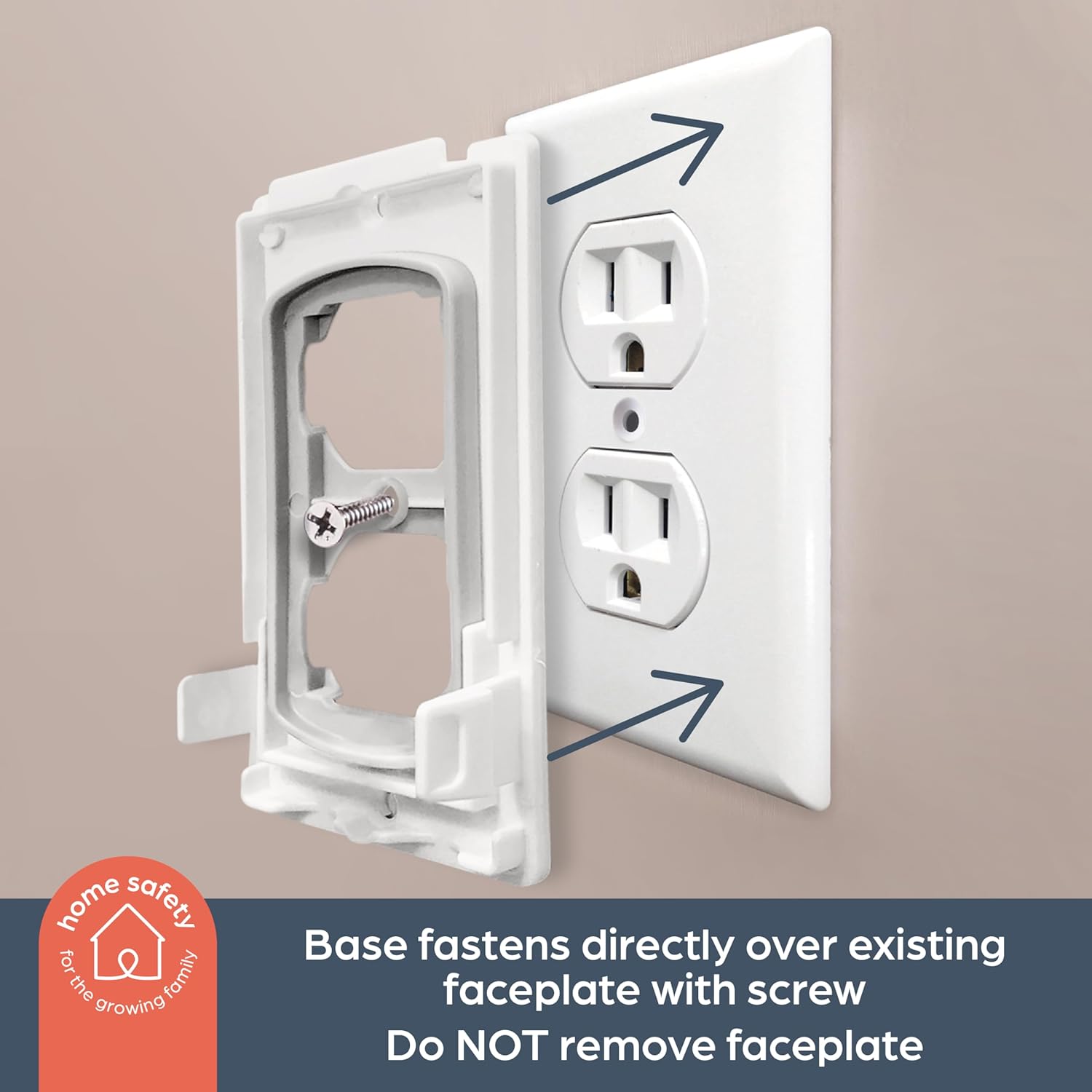
Figure 1: The base fastens directly over the existing faceplate with a screw. Do NOT remove the faceplate.
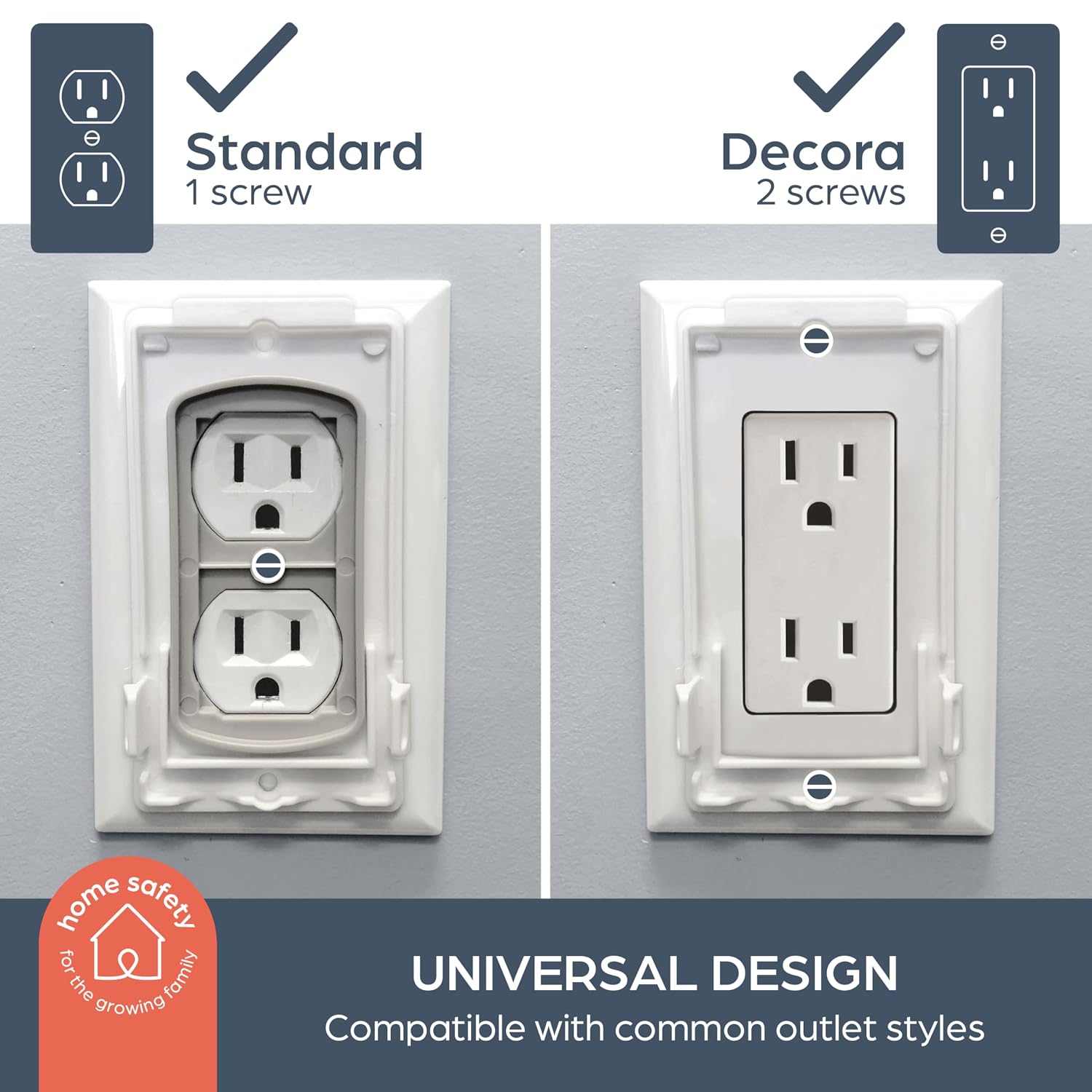
Figure 2: Universal design compatible with common outlet styles (Standard with 1 screw, Decora with 2 screws).
Video 1: This video demonstrates the installation process of the Dreambaby Dual Fit Outlet Cover, showing how to attach the base to the existing outlet and secure the cover.
Video 2: This video provides a demonstration of installing the Dreambaby Dual Fit Outlet Cover, highlighting its features for child safety.
Operation and Usage
The Dreambaby Dual Fit Outlet Cover Box is designed for simple operation by adults while remaining child-resistant.
- Opening the Cover: To access the outlet or unplug a device, firmly depress the locking tabs on both sides of the cover simultaneously and pull the cover forward.
- Closing the Cover: After plugging in or unplugging a device, align the cover with the base and push it back until both locking tabs click into place. Ensure it is securely fastened.
- Cord Management: The cover features openings at the bottom to allow cords to pass through neatly, keeping them out of reach of children.

Figure 3: Depress the double locking tabs for adult access.

Figure 4: The cover effectively deters children from accessing the outlet.
Video 3: This video shows the functionality of the Dreambaby Dual Fit Outlet Cover, including how to open and close it to access the plugs while maintaining child safety.
Video 4: This video demonstrates the ease of use for adults to open and close the Dreambaby Dual Fit Outlet Cover, while emphasizing its child-resistant design.
Specifications
| Brand Name | Dreambaby |
| Model Number | L907 |
| Material Type | Plastic |
| Finish Types | Painted |
| Item Dimensions (W x H) | 2.25"W x 4.25"H |
| Item Weight | 3.2 ounces |
| Installation Type | Screw-In |
| Configuration | Double |
| Switch Type | Decorator |
| Color | White |
Safety Information
- Always ensure the power to the outlet is off before installation or maintenance.
- Regularly check the outlet cover for any signs of damage or wear. Replace immediately if damaged.
- This product is a deterrent and not a substitute for adult supervision.
- Ensure cords are routed safely and are not accessible to children.
- Not compatible with horizontal or large block style plugs.
Maintenance
- Clean the outlet cover with a soft, damp cloth. Do not use abrasive cleaners or solvents.
- Periodically check that the screws are tight and the cover is securely attached to the wall.
Troubleshooting
- Cover not snapping securely: Ensure the wall plate adapter is correctly aligned and fully screwed into the outlet. Check for any obstructions.
- Cords not fitting: Verify that your cords are standard size. Large block-style plugs or horizontal plugs are not compatible.
- Cover feels loose: Re-tighten the screws holding the wall plate adapter to the outlet. If the issue persists, inspect the adapter and cover for damage.
Warranty and Support
For warranty information or customer support, please refer to the contact details provided on the product packaging or visit the official Dreambaby website. Keep your purchase receipt for warranty claims.