
YING RAY DG11J1-10, DG11J1-01, DG11J1-09
Contents
YING RAY Universal AC A/C Remote Control User Manual
Models: DG11J1-10, DG11J1-01, DG11J1-09
Introduction
This manual provides detailed instructions for the setup, operation, and maintenance of your YING RAY Universal AC A/C Remote Control. This remote is designed to be compatible with various air conditioning units, specifically models DG11J1-10, DG11J1-01, and DG11J1-09. Please read this manual thoroughly before use to ensure proper functionality and extend the lifespan of your device.
Setup
Battery Installation
The remote control requires two AAA batteries (not included). Follow these steps to install them:
- Locate the battery compartment cover on the back of the remote control.
- Slide the cover downwards or press the latch to open it.
- Insert two AAA batteries, ensuring the positive (+) and negative (-) terminals align correctly with the markings inside the compartment.
- Replace the battery compartment cover by sliding it back into place until it clicks securely.
Note: Remove batteries if the remote control will not be used for an extended period to prevent leakage.
Initial Configuration (Code Setting)
As a universal remote, it may require pairing with your specific air conditioner unit. Refer to your air conditioner's manual for specific pairing instructions if the remote does not function immediately. Common methods include:
- Automatic Search: Some universal remotes have an auto-search function. Press and hold the "SET" or "CODE SEARCH" button (if available) until the air conditioner responds.
- Manual Code Entry: If your air conditioner brand has a specific code list, enter the corresponding code using the remote's number buttons.
- Brand-Specific Pairing: Some air conditioners require a specific sequence of button presses on the remote to pair.
If the remote does not operate your AC unit after battery installation, consult the original air conditioner manual for remote control compatibility and pairing procedures.
Operating Instructions
This section details the functions of each button on the YING RAY Universal AC A/C Remote Control.
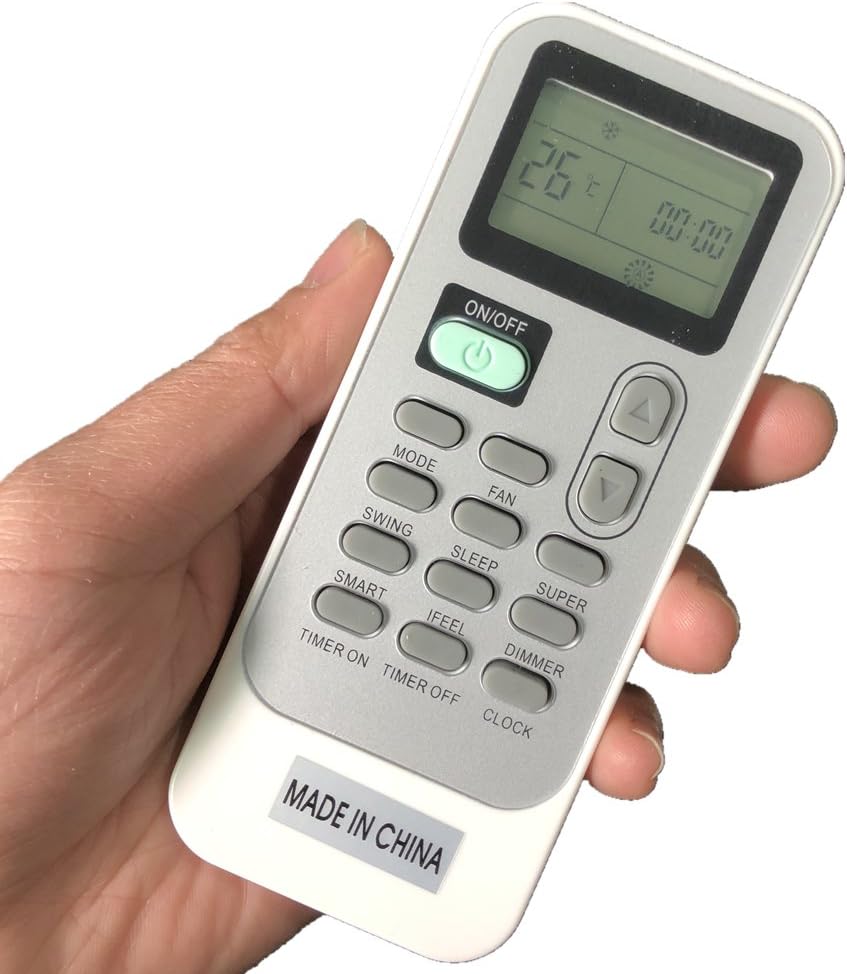
Image: The YING RAY Universal AC A/C Remote Control. The remote is white with grey buttons and a black LCD screen displaying "26°C" and "00:00". Key buttons visible include ON/OFF, MODE, FAN, SWING, SLEEP, SUPER, SMART, IFEEL, DIMMER, TIMER ON, TIMER OFF, and CLOCK. The bottom of the remote has a "MADE IN CHINA" label.
Button Functions
- ON/OFF: Press to turn the air conditioner unit on or off.
- MODE: Cycles through operating modes such as Cool, Heat, Fan, Dry, Auto.
- FAN: Adjusts the fan speed (e.g., Auto, Low, Medium, High).
- SWING: Activates or deactivates the automatic swing function of the air conditioner's louvers.
- SLEEP: Engages the sleep mode, which typically adjusts temperature gradually for comfortable sleep and energy saving.
- SUPER: Activates a powerful cooling or heating function for rapid temperature change.
- SMART: Automatically selects the optimal operating mode based on the room temperature.
- IFEEL: Activates a function where the remote control's built-in sensor measures the ambient temperature and sends it to the air conditioner for more precise temperature control.
- DIMMER: Adjusts the brightness of the air conditioner's display panel.
- TIMER ON: Sets a specific time for the air conditioner to turn on automatically.
- TIMER OFF: Sets a specific time for the air conditioner to turn off automatically.
- CLOCK: Sets the current time on the remote control's display.
- Temperature Up (▲): Increases the set temperature.
- Temperature Down (▼): Decreases the set temperature.
Maintenance
Proper maintenance ensures the longevity and optimal performance of your remote control.
- Cleaning: Wipe the remote control with a soft, dry cloth. Do not use liquid cleaners, abrasive cleaners, or chemical solvents, as these can damage the surface or internal components.
- Battery Replacement: Replace batteries when the remote's range decreases or the display becomes dim. Always replace both batteries at the same time with new ones of the same type.
- Storage: Store the remote in a cool, dry place away from direct sunlight and extreme temperatures.
- Avoid Drops: Protect the remote from physical impact, as drops can damage internal circuitry.
Troubleshooting
If you encounter issues with your remote control, refer to the table below for common problems and their solutions.
| Problem | Possible Cause | Solution |
|---|---|---|
| Remote not responding. | Dead or incorrectly inserted batteries. | Replace batteries, ensuring correct polarity. |
| Remote not controlling AC unit. | Remote not paired or incorrect code. | Re-attempt pairing or code entry as per "Initial Configuration" section. Ensure line of sight to AC unit's receiver. |
| Limited range. | Low batteries or obstruction. | Replace batteries. Remove any obstacles between the remote and the AC unit. |
| Display is dim or blank. | Low batteries. | Replace batteries. |
Specifications
- Brand: YING RAY
- Model Numbers: DG11J1-10, DG11J1-01, DG11J1-09
- Special Feature: Universal compatibility
- Color: As per item picture (typically white/grey)
- Max Number of Supported Devices: 1 (per remote)
- Compatible Devices: Air Conditioner
- Power Source: 2 x AAA Batteries (not included)
Warranty and Support
For warranty information or technical support, please refer to the documentation provided with your original purchase or contact the seller directly. As this is a universal replacement remote, specific warranty terms may vary.
For further assistance, you may also visit the YING RAY brand page on Amazon.
Ask a question about this manual
Ask about setup, troubleshooting, compatibility, parts, safety, or missing instructions. Manuals+ will review the question and use this page’s manual context to help answer it.