
1. Introduction
The PCE Instruments PCE-VE 200SV1 is an industrial borescope designed for visual inspections in various applications. It features a flexible probe with a camera head, a 3.5-inch LCD display for real-time viewing, and capabilities for image and video capture. This manual provides essential information for the safe and effective operation, maintenance, and troubleshooting of your device.
2. Safety Information
Please read all safety instructions carefully before using the PCE-VE 200SV1 borescope. Failure to follow these instructions may result in injury or damage to the device.
- Do not use for medical purposes: This device is strictly for industrial visual inspection and is not intended for medical or internal human/animal examination.
- Avoid extreme temperatures: Do not expose the main unit to temperatures outside -10 to 50°C (14 to 122°F). The probe can withstand -10 to 50°C (14 to 122°F) in air and 5 to 50°C (41 to 122°F) in water.
- Fluid resistance: The probe is IP67 rated for water, oil, and dust. The main unit is resistant to rain when the battery compartment is closed but is not submersible. Avoid prolonged exposure to corrosive liquids.
- Battery safety: Use only the specified Li-ion battery. Do not disassemble, puncture, or expose the battery to high temperatures or fire.
- Electrical safety: Do not use the device if any part is damaged. Keep the device away from strong electromagnetic fields.
- Cleaning: Disconnect power before cleaning. Use a soft, dry cloth for the main unit. The probe can be cleaned with a damp cloth.
3. Product Overview
The PCE-VE 200SV1 consists of a main display unit and a flexible probe with an integrated camera and LED lighting. The main unit features a 3.5-inch LCD display, control buttons, and ports for connectivity and storage.
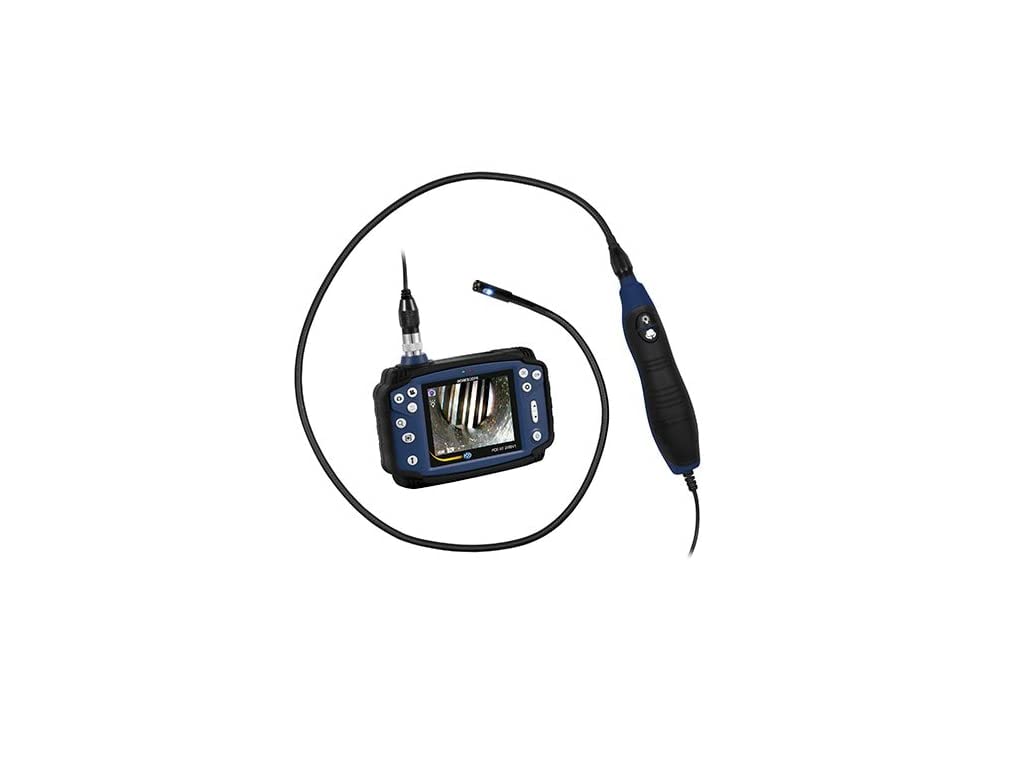
Figure 1: PCE-VE 200SV1 Industrial Borescope. Shows the main display unit connected to the flexible probe, which has a camera head with LED lighting, and a control handle.
Components:
- Main Display Unit: 3.5" LCD screen, control buttons, Micro USB 2.0 port, TV out port, Micro SD card slot.
- Flexible Probe: 1 m / 3.3 ft length, 9 mm / 0.4 in diameter, malleable soft metal.
- Camera Head: 1/8" CMOS chip, 640 x 480 pixels resolution, 4 front LEDs, 2 side LEDs.
- Control Handle: Integrated with the probe for easy manipulation and brightness adjustment.
- Li-ion Battery: 2600-mAh capacity.
4. Setup
4.1 Charging the Battery
- Connect the provided USB cable to the Micro USB port on the main unit.
- Connect the other end of the USB cable to a suitable USB power adapter (not included) or a computer USB port.
- The charging indicator will illuminate. Allow sufficient time for a full charge (approximately 3-4 hours).
4.2 Inserting the Micro SD Card
- Locate the Micro SD card slot on the main unit.
- Gently insert a Micro SD card (up to 32GB, not included) into the slot until it clicks into place. Ensure the card is oriented correctly.
- To remove, push the card in slightly until it springs out.
4.3 Connecting the Probe
- Align the connector of the flexible probe with the corresponding port on the main display unit.
- Push the connector firmly into place and secure it by tightening the threaded collar.
4.4 Powering On/Off
- To Power On: Press and hold the power button on the main unit until the display illuminates.
- To Power Off: Press and hold the power button until the display turns off.
5. Operating Instructions
5.1 Basic Operation
- Live View: Once powered on, the display will show the live feed from the camera probe.
- Adjusting LED Brightness: Use the dedicated brightness control buttons on the probe's handle to increase or decrease the intensity of the camera's LED lights.
- Image Capture: Press the 'Photo' button on the main unit to take a still image. The image will be saved to the Micro SD card.
- Video Recording: Press the 'Video' button to start recording. Press it again to stop recording. Videos are saved in AVI format to the Micro SD card.
5.2 Menu Navigation and Settings
Use the navigation buttons (Up, Down, Left, Right, OK/Menu) on the main unit to access and adjust settings.
- Language Settings: Navigate to the 'System Settings' menu to select your preferred language (English, German, Spanish, French, Russian, Japanese, Simplified Chinese, Traditional Chinese).
- Image Rotation and Mirror: Access these functions from the menu to adjust the orientation of the live image or captured media. The device supports 180° rotation and mirror functions.
- Zoom Function: Use the zoom buttons to magnify the image up to 4 times.
5.3 Viewing Stored Media
- Enter 'Playback Mode' from the main menu.
- Use the navigation buttons to browse through captured images (JPEG) and videos (AVI).
- Select an item to view it on the display.
5.4 Connecting to External Devices
- USB Connection: Connect the borescope to a computer using the Micro USB cable to transfer files from the Micro SD card.
- TV Output: Use a compatible AV cable (not included) to connect the 'TV out' port to a television for a larger display. The TV output format is PAL.
6. Maintenance
6.1 Cleaning
- Main Unit: Wipe with a soft, dry, lint-free cloth. Do not use abrasive cleaners or solvents.
- Probe and Camera Head: After use, especially in dirty or wet environments, gently wipe the probe and camera lens with a soft, damp cloth. For stubborn dirt, a mild detergent can be used, ensuring no liquid enters the main unit.
6.2 Battery Care
- To prolong battery life, fully charge the device before first use and after extended periods of storage.
- If storing for a long time, charge the battery to approximately 50% every 3-6 months.
6.3 Storage
- Store the borescope in a cool, dry place, away from direct sunlight and extreme temperatures.
- Keep the device and its accessories in the original packaging or a protective case to prevent damage.
7. Troubleshooting
| Problem | Possible Cause | Solution |
|---|---|---|
| Device does not power on | Low battery; Loose battery connection; Device malfunction | Charge the battery; Ensure battery is properly inserted; Contact support if issue persists |
| No image on display | Probe not connected properly; Camera lens dirty; Probe damaged | Reconnect the probe securely; Clean the camera lens; Contact support |
| Cannot save images/videos | No Micro SD card inserted; SD card full; SD card error | Insert a Micro SD card; Delete old files or use a new card; Format the SD card (backup data first) |
| Poor image quality | Insufficient lighting; Dirty lens; Incorrect focus distance | Adjust LED brightness; Clean the camera lens; Ensure object is within sight depth (15-100mm front, 3-50mm side) |
8. Specifications
| Feature | Specification |
|---|---|
| Display | 3.5" LCD |
| Video Resolution | AVI (640x480) |
| Picture Resolution | JPEG (1600x1200) |
| Image Rotation | 180° rotation and mirror function |
| Zoom | Up to 4 times |
| Storage Medium | Micro SD card (max. 32GB) |
| Menu Languages | English, German, Spanish, French, Russian, Japanese, Simplified Chinese, Traditional Chinese |
| Interfaces | Micro USB 2.0, TV out, Micro SD card slot |
| TV Output | PAL |
| Power Supply | Li-ion battery |
| Battery Capacity | 2600-mAh |
| Operating Conditions (Main Unit) | -10 ... 40°C / 14 ... 104°F, rel. Humidity <75% |
| Cable Diameter | 9 mm / 0.4 in |
| Image Sensor | 1/8" CMOS chip |
| Camera Resolution | 640 x 480 pixels |
| Camera Lighting | 4 LEDs on front, 2 LEDs on side |
| Field of View / Angle of View | 90° |
| Brightness Control | Manually |
| Sight Depth (Front Camera) | 15 ... 100 mm / 0.6 ... 3.9 in |
| Sight Depth (Side Camera) | 3 ... 50 mm / 0.1 ... 2 in |
| Length of Camera Tube | 1 m / 3.3 ft |
| Pushcable Material | Malleable, soft metal |
| Operating Temperature (Probe in Air) | -10 ... 50°C / 14 ... 122°F |
| Operating Temperature (Probe in Water) | 5 ... 50°C / 41 ... 122°F |
| Relative Humidity (Probe & Main Unit) | 15 ... 90% |
| Fluid Resistance (Probe & Main Unit) | Machine oil, light oil or saline 5% |
| Ingress Protection (Probe) | IP67 (Water, oil, dust) |
| Ingress Protection (Main Unit) | Rain in wind (battery compartment closed), Not submersible |
| Product Dimensions | 14.17 x 9.45 x 6.69 inches |
| Item Weight | 4.41 pounds |
9. Warranty and Support
For warranty information, technical support, or service inquiries, please contact PCE Instruments directly. Refer to your purchase documentation or the official PCE Instruments website for the most current contact details and warranty terms applicable to your region.
What's in the Box:
- PCE-VE 200SV1 Industrial Borescope Unit


