
1. Introduction
This manual provides essential instructions for the safe and efficient use of your SLLEA AC/DC Adapter Charger. This adapter is designed to provide power to compatible devices, specifically the Affinity LE2459D LED HDTV Combo DVD. Please read this manual thoroughly before using the product and retain it for future reference.
2. Safety Instructions
To ensure safe operation and prevent damage, please observe the following safety precautions:
- Voltage Compatibility: Ensure the adapter's input voltage (100-240 VAC, 50/60Hz) matches your local power supply.
- Device Compatibility: Only use this adapter with devices that require the specified output voltage and current, such as the Affinity LE2459D LED HDTV Combo DVD. Using it with incompatible devices may cause damage.
- Avoid Overloading: Do not connect the adapter to devices that exceed its maximum power output.
- Proper Ventilation: Do not cover the adapter during use, as this can lead to overheating. Ensure adequate airflow around the unit.
- Environmental Conditions: Keep the adapter away from water, moisture, high temperatures, and direct sunlight. Do not use in wet environments.
- Cable Care: Do not bend, twist, or pull the power cord excessively. Avoid placing heavy objects on the cord. Inspect the cord regularly for any signs of damage.
- Disconnection: Always grasp the plug, not the cord, when disconnecting the adapter from the power outlet or the device.
- Maintenance: Do not attempt to open or repair the adapter. Refer all servicing to qualified personnel.
3. Setup and Connection
Follow these steps to properly connect your SLLEA AC/DC Adapter Charger:
- Identify Components: Unpack the adapter and identify the main adapter unit, the AC input cable (for wall outlet), and the DC output cable with the connector plug.
- Connect AC Cable: Insert the AC input cable into the corresponding port on the adapter unit.
- Connect DC Cable: Ensure the DC output cable is securely attached to the adapter unit (if detachable) and that its connector plug is ready for your device.
- Connect to Device: Carefully insert the DC connector plug into the power input port of your Affinity LE2459D LED HDTV Combo DVD. Ensure a snug fit.
- Connect to Power Outlet: Plug the AC input cable into a standard wall power outlet (100-240 VAC).

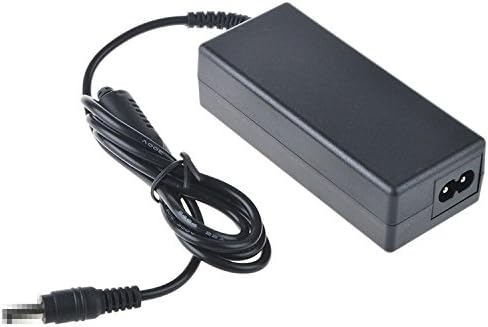
Once connected, your device should receive power. Refer to your device's manual for specific power-on procedures.
4. Operating Instructions
The SLLEA AC/DC Adapter Charger operates automatically once connected to a power source and a compatible device. It converts the AC wall current to the appropriate DC voltage required by your Affinity LE2459D LED HDTV Combo DVD.
- Continuous Power: The adapter is designed for continuous power supply to your device.
- Disconnection: To power off your device, either use the device's power button or disconnect the adapter from the wall outlet. For prolonged periods of non-use, it is recommended to unplug the adapter from the wall outlet.
5. Maintenance and Care
Proper maintenance ensures the longevity and reliable performance of your adapter:
- Cleaning: Disconnect the adapter from all power sources and devices before cleaning. Use a soft, dry cloth to wipe the exterior. Do not use liquid cleaners or solvents.
- Storage: When not in use, store the adapter in a cool, dry place, away from direct sunlight and extreme temperatures. Avoid tightly coiling the cables to prevent damage.
- Inspection: Periodically inspect the adapter and cables for any signs of wear, cuts, or damage. If damage is found, discontinue use immediately and replace the adapter.
6. Troubleshooting
If you encounter issues with your adapter, refer to the following common problems and solutions:
- No Power to Device:
- Ensure the adapter is securely plugged into a working wall outlet.
- Verify that the DC connector is firmly inserted into your device's power port.
- Check if the wall outlet is functional by plugging in another device.
- Inspect the adapter and cables for any visible damage. If damaged, replace the adapter.
- Device Not Charging/Powering On Correctly:
- Confirm that your device (Affinity LE2459D LED HDTV Combo DVD) is compatible with this specific adapter model.
- Ensure the device's power input requirements match the adapter's output specifications.
- Try restarting your device.
- Adapter Overheating:
- Ensure the adapter is not covered and has adequate ventilation.
- Disconnect the adapter and allow it to cool down.
- If overheating persists, discontinue use and contact support.
If these steps do not resolve the issue, please contact SLLEA customer support.
7. Specifications
| Feature | Detail |
|---|---|
| Input Voltage | 100 - 240 VAC |
| Input Frequency | 50/60 Hz |
| Cable Length | Total 4 FT (approx. 1.2 meters) |
| Connector Type | Round (DC Output) |
| Compatible Devices | Affinity LE2459D LED HDTV Combo DVD |
| Certifications | CE Certified |
| Safety Features | Over Voltage Protection, Over Heat Protection |
8. Warranty and Support
This SLLEA AC/DC Adapter Charger is manufactured to high-quality standards. While specific warranty details are not provided in this manual, SLLEA products typically come with a manufacturer's warranty covering defects in materials and workmanship.
For warranty claims, technical support, or any inquiries regarding your product, please contact SLLEA customer service through their official channels. Please have your product model (AC/DC Adapter B07CKTNZYX) and purchase information ready when contacting support.
You can often find support contact information on the SLLEA brand store on Amazon or through their official website.