
Introduction
This manual provides instructions for the safe and effective use of your PK Power DC Extension Power Cord Cable. This cable is designed to extend the reach of your power adapter for various Panasonic NV-DS Series DV Camcorders and VCRs. Please read this manual thoroughly before use and retain it for future reference.
Setup Instructions
Follow these steps to properly connect your DC extension cable:
- Identify Connectors: The extension cable features a male DC barrel connector on one end and a female DC barrel connector on the other. Ensure these match the connectors on your power adapter and device.
- Connect to Power Adapter: Insert the male end of the PK Power DC Extension Cord into the DC output port of your compatible power adapter. Ensure a firm and secure connection.
- Connect to Device: Insert the female end of the PK Power DC Extension Cord onto the DC input port of your Panasonic NV-DS Series DV Camcorder or VCR. Ensure a firm and secure connection.
- Verify Connection: Once both ends are connected, ensure there are no loose connections. The cable should sit snugly in both ports.

Image: The PK Power DC Extension Cable, showing its coiled form and male-to-female connectors.
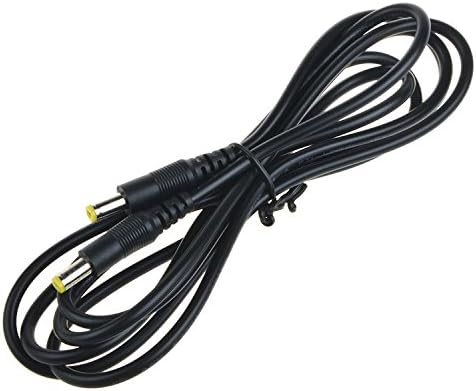
Image: The PK Power DC Extension Cable, partially uncoiled, highlighting the male and female DC barrel connectors.
Operating Instructions
Once the extension cable is securely connected between your power adapter and your device, you can proceed with normal operation of your camcorder or VCR. The cable simply extends the reach of your existing power supply.
- Power On: Ensure your power adapter is plugged into a wall outlet and then power on your device as usual.
- Secure Placement: Route the cable in a way that prevents tripping hazards or accidental disconnections. Avoid placing heavy objects on the cable.
- Environmental Conditions: Use the cable in dry environments. Avoid exposure to moisture, extreme temperatures, or direct sunlight.
Maintenance
Proper care will ensure the longevity and reliable performance of your extension cable:
- Cleaning: Disconnect the cable from all power sources and devices before cleaning. Wipe the cable and connectors with a soft, dry cloth. Do not use liquid cleaners or solvents.
- Storage: When not in use, coil the cable loosely and store it in a cool, dry place away from direct sunlight and extreme temperatures. Avoid sharp bends or kinks in the cable.
- Inspection: Periodically inspect the cable for any signs of damage, such as cuts, fraying, or bent connectors. If damage is observed, discontinue use immediately.
Troubleshooting
If you experience issues with your DC extension cable, refer to the following common problems and solutions:
- No Power to Device:
- Ensure both ends of the extension cable are securely connected to the power adapter and the device.
- Verify that the power adapter itself is functioning correctly and is plugged into a live electrical outlet.
- Check the extension cable for any visible damage. If damaged, replace the cable.
- Intermittent Power:
- Check for loose connections at both the power adapter and the device.
- Ensure the cable is not being bent or stressed at the connection points.
If troubleshooting steps do not resolve the issue, please contact customer support.
Product Specifications
| Feature | Description |
|---|---|
| Input Voltage Compatibility | 100-240V 50-60Hz (Dependent on connected power adapter) |
| Connector Gender | Male-to-Female DC Barrel |
| Protection Features | OVP (Over Voltage output Protection), OCP (Over Current output Protection), SCP (Short Circuit output Protection) |
| Certifications | CE / FCC / RoHS certified |
| Plug Format | Type A (for power adapter connection) |
| UL Listed | Yes |
| Brand | PKPOWER |
Warranty and Support
PK-Power products are designed for reliability and performance. Our friendly and reliable customer service team is available to assist you with any questions or concerns.
- Customer Service: For support, please refer to the contact information provided with your purchase or visit the official PKPOWER website. Our team aims to respond within 24 hours.
- Return Policy: Please refer to the retailer's return policy for details regarding returns and replacements.