
Malibu 8100-9045-01
Malibu 45W Low Voltage Landscape Transformer User Manual
Model: 8100-9045-01
1. Introduction
The Malibu 45W Low Voltage Landscape Transformer converts standard household 120V AC to a safe 12V AC, suitable for various low voltage outdoor lighting systems. It features a built-in photo sensor and multiple timer functions for automated operation, enhancing the convenience and safety of your outdoor lighting.
2. Safety Information
Please read and understand all safety instructions before installation and operation to prevent injury or damage.
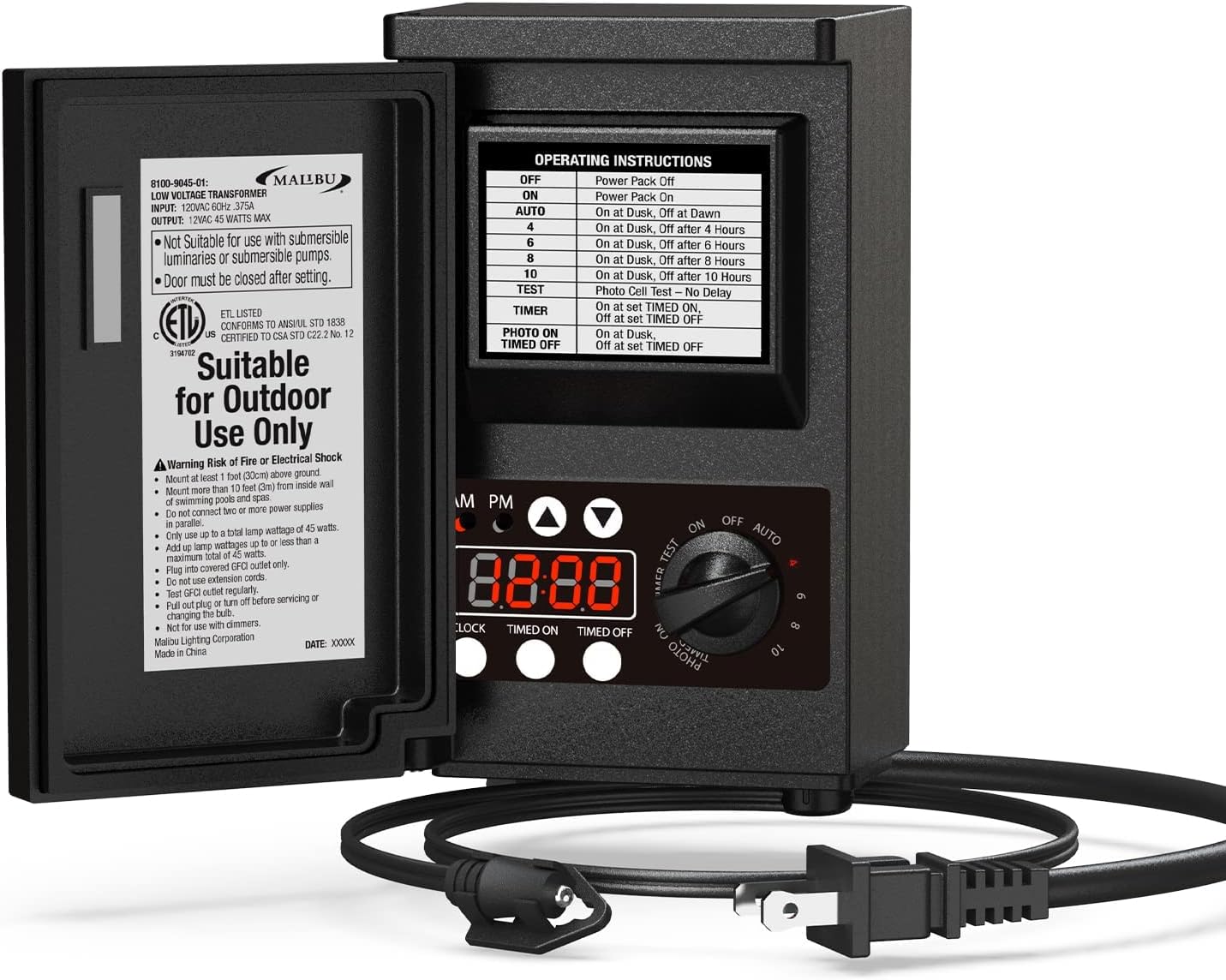
- Mount the transformer at least 1 foot (0.305m) above ground level.
- Do not immerse the transformer in water.
- Do not connect two or more power supplies in parallel.
- Ensure the total wattage of connected lights does not exceed 45 watts.
- This transformer is not suitable for use with dimmers.
- Install the unit away from hot and humid areas to ensure optimal performance and longevity.
- The control panel door must be closed after setting to protect the transformer from adverse weather conditions like rain and snow.
- Always disconnect power by pulling out the plug or turning off the circuit breaker before servicing the unit or changing light bulbs.
- This product is designed for outdoor use only. It is not suitable for submersible luminaires or pumps.
3. Package Contents
Verify that all items are present in the package:
- 1 x Malibu 45W Low Voltage Landscape Transformer
- 1 x Integrated Photo Sensor
- 1 x Instruction Manual (this document)
- Mounting Screws
4. Installation
The transformer is designed for straightforward installation. Follow these steps for proper setup:
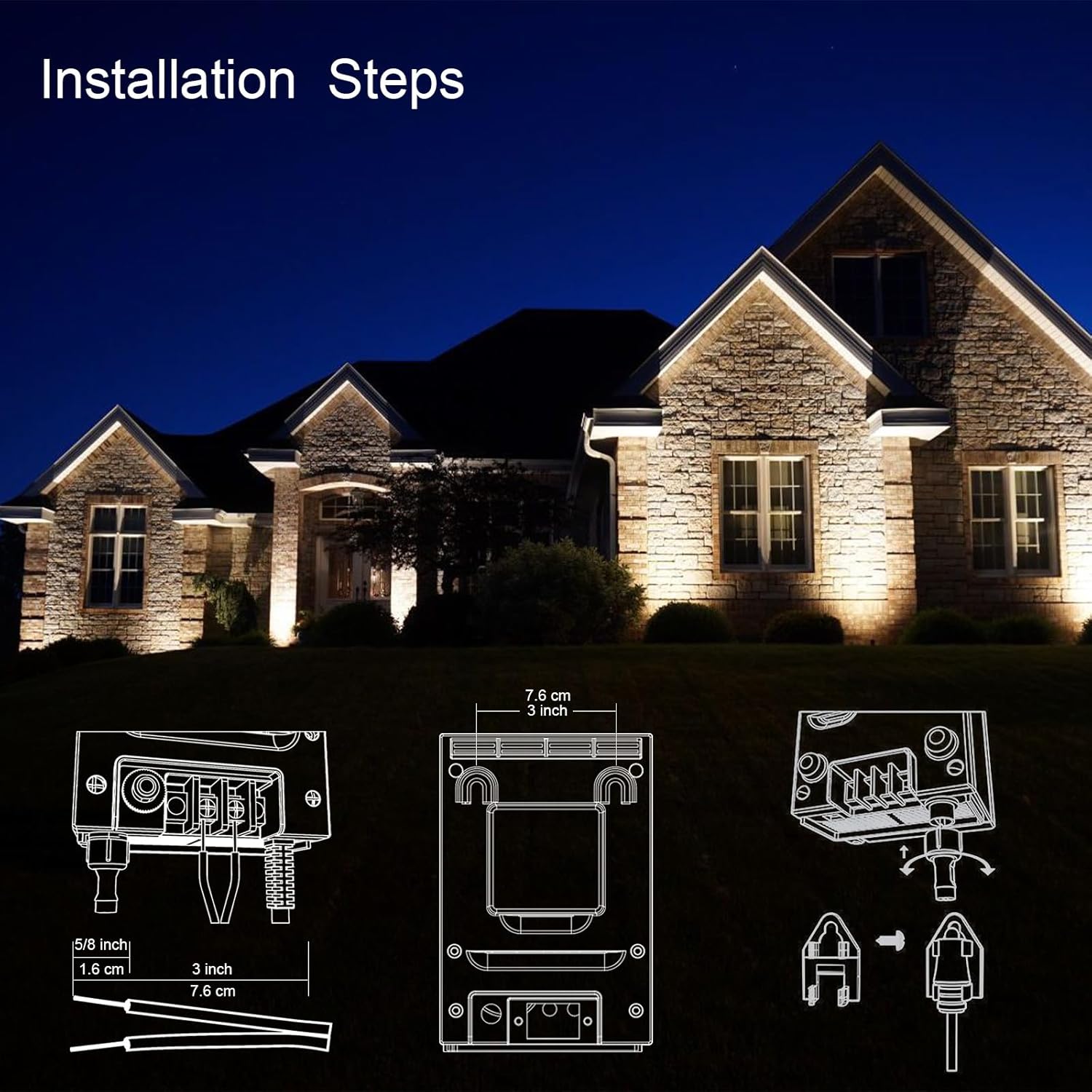
- Choose Location: Select a suitable outdoor location for mounting. Ensure it is at least 1 foot (0.305m) above ground and protected from direct exposure to extreme heat or humidity.
- Mount Transformer: Use the provided mounting screws to securely attach the transformer to a wall or sturdy surface.
- Connect Low-Voltage Cable: Connect the low-voltage cable from your landscape lighting system directly to the output port located at the bottom of the transformer. Ensure connections are secure.
- Power Connection: Insert the transformer's 120V plug into a standard outdoor household power outlet.
- Close Door: After installation and setting the desired operating mode, ensure the control panel door is securely closed to protect internal components from weather.

5. Operating Instructions
The transformer features a control dial and buttons for setting various operating modes and the internal clock.
Setting the Clock
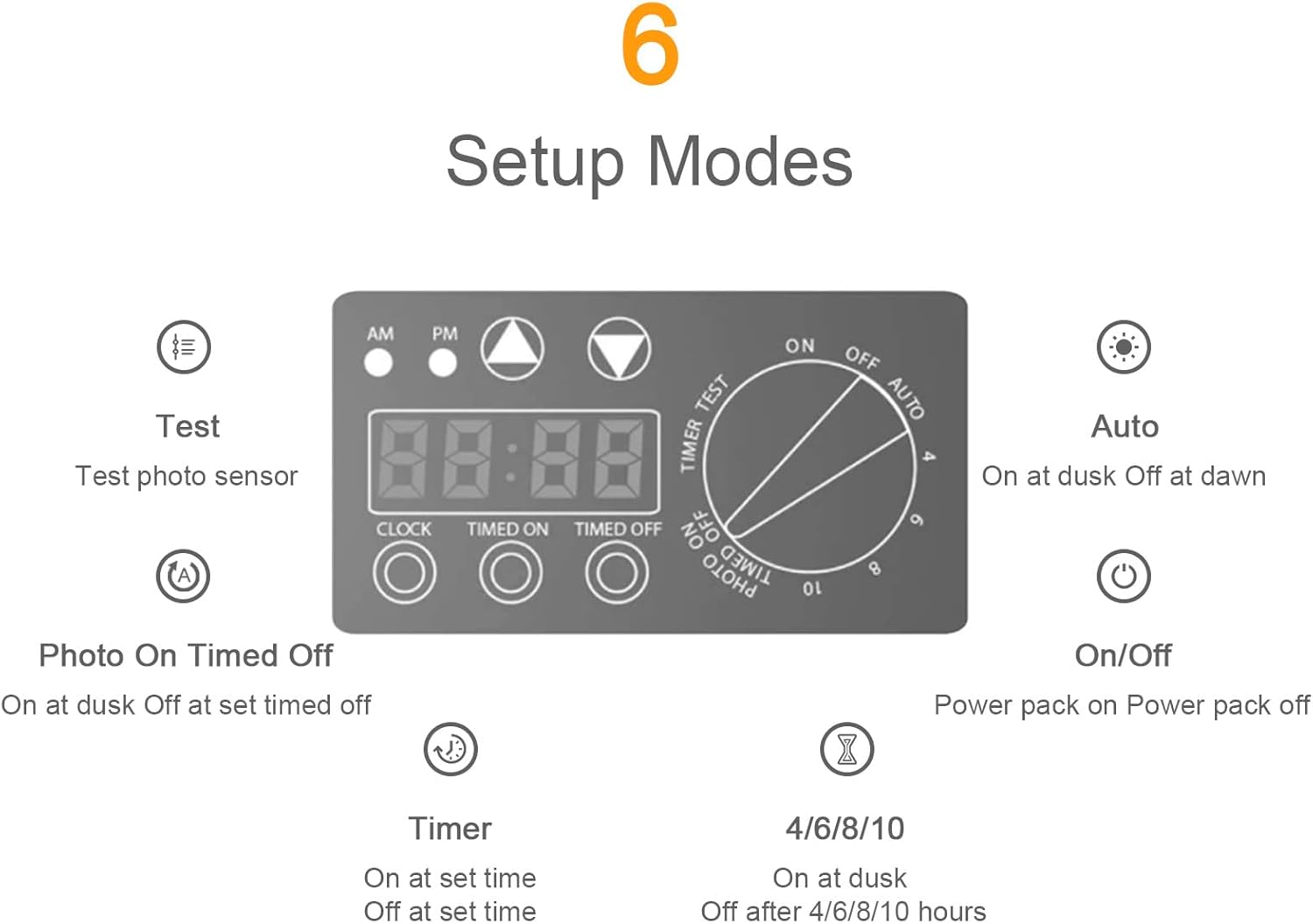
Use the 'CLOCK' button and the 'AM/PM' and arrow buttons to set the current time. The digital display will show the set time.
Operating Modes
Rotate the dial to select one of the following operating modes:
- OFF: The power pack is turned off.
- ON: The power pack is continuously on.
- AUTO: The transformer turns on at dusk (detected by the photo sensor) and turns off at dawn.
- 4/6/8/10 Hours: The transformer turns on at dusk and automatically turns off after 4, 6, 8, or 10 hours, depending on the selected setting.
- TIMER: The transformer turns on at a set timed 'ON' time and turns off at a set timed 'OFF' time. Use the 'TIMED ON' and 'TIMED OFF' buttons to configure these times.
- PHOTO ON/TIMED OFF: The transformer turns on at dusk and turns off at a set timed 'OFF' time.
- TEST: This mode allows you to test the photo sensor without delay.
6. Maintenance
The Malibu 45W Low Voltage Landscape Transformer is designed for durability and ease of maintenance. Regular checks ensure optimal performance:
- Regular Inspection: Periodically inspect the transformer unit and all wiring for any signs of damage, wear, or loose connections.
- Weather Protection: Always ensure the control panel door is securely closed to protect the internal electronics from rain, snow, and other environmental elements.
- Cleaning: Gently wipe the exterior of the transformer with a damp cloth to remove dirt or debris. Do not use harsh chemicals or abrasive cleaners.
- Power Disconnection: Before performing any maintenance, inspection, or changing light bulbs, always disconnect the transformer from the main power supply by unplugging it.
7. Troubleshooting
If you encounter issues with your transformer, consider the following common troubleshooting steps:
- Lights Not Turning On:
- Check if the transformer is plugged into a live 120V outlet.
- Verify that the operating mode is correctly set (e.g., ON, AUTO, or a specific timer setting).
- Inspect the low-voltage wiring connections to ensure they are secure.
- Confirm that the light bulbs in your landscape fixtures are functional.
- Lights Not Turning Off:
- Recheck the selected operating mode and its settings (e.g., timer duration, timed off setting).
- Ensure the photo sensor is not obstructed or covered, which could prevent it from detecting daylight.
- Intermittent Operation:
- Ensure the transformer is not exposed to excessive heat or moisture.
- Check for any loose wiring connections.
If these steps do not resolve the issue, please refer to the Warranty and Support section for further assistance.
8. Specifications
| Model Number | 8100-9045-01 |
| Input Voltage | 120V AC |
| Output Voltage | 12V AC |
| Maximum Compatible Wattage | 45 Watts |
| Item Weight | 3.68 Pounds |
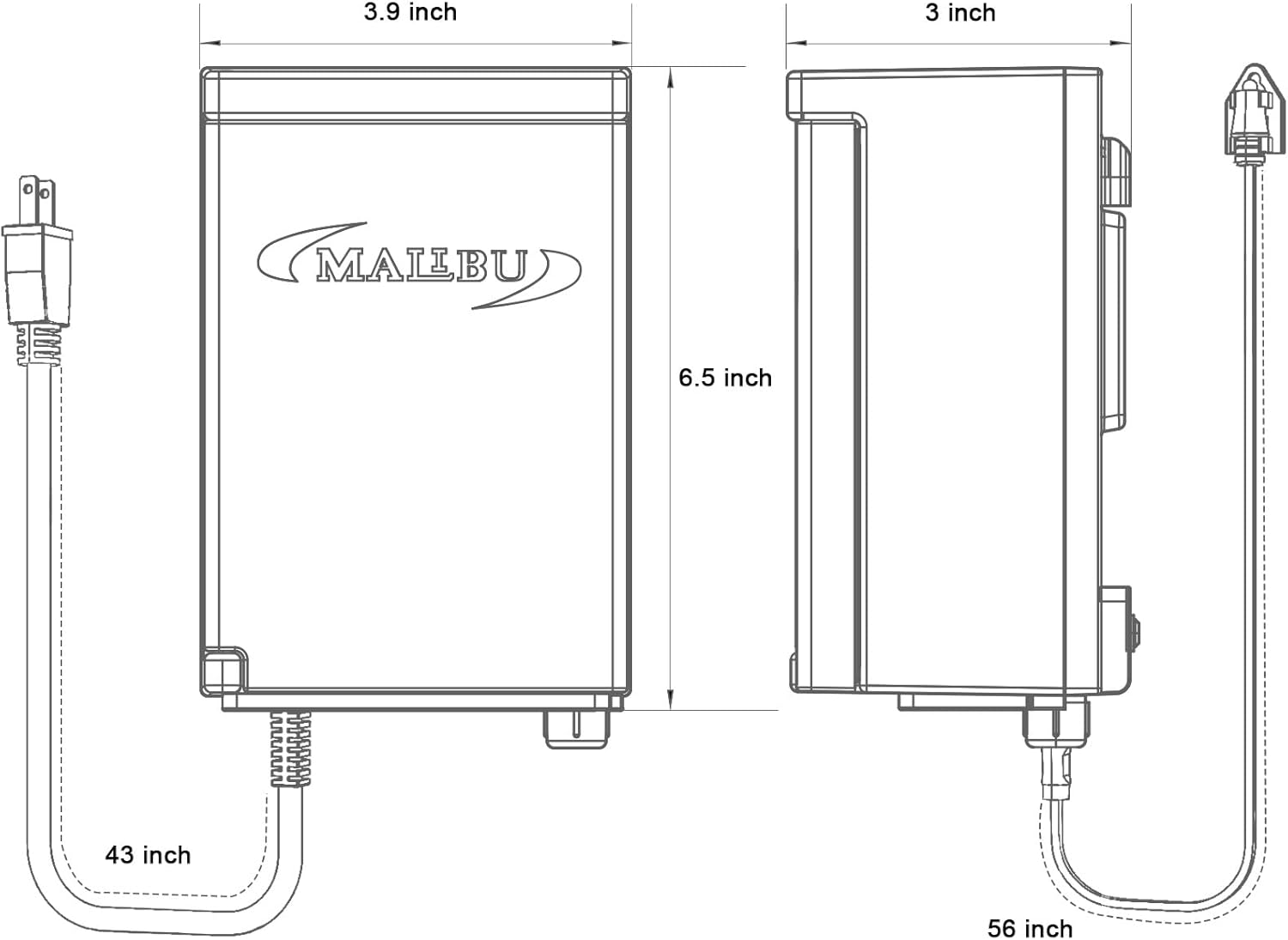
| Product Dimensions (L x W x H) | 3.5 x 3 x 6.9 inches |
| Material | Plastic |
| Specific Uses | Outdoor use only |
| Special Features | Integrated Timer, Photo Sensor, Weatherproof Shield |
| UPC | 705300897021 |
9. Warranty and Support
Please note that based on available information, the original manufacturer, Malibu, may no longer be actively in business, and direct customer support or warranty services from the manufacturer may not be available. For any product-related inquiries, troubleshooting assistance, or potential warranty claims, please contact the retailer from whom you purchased this product.
Related documents8100-9045-01


Ask a question about this manual
Ask about setup, troubleshooting, compatibility, parts, safety, or missing instructions. Manuals+ will review the question and use this page’s manual context to help answer it.