
1. Product Overview
The LUITON NAR6595_N is a short, stubby antenna designed for use with various Motorola APX series two-way radios. This antenna operates within the 764-870 MHz frequency band and includes GPS capabilities. Its compact design is particularly suitable for radios worn on a belt, offering convenience without compromising performance.
Key Features:
- Frequency Range: 764-870 MHz (700/800 MHz Band)
- Type: Stubby 4-inch design
- Integrated GPS: Supports GPS functionality on compatible radios.
- Durable Construction: Manufactured from high-quality materials for longevity and lightweight use.

Image 1.1: Full view of the LUITON NAR6595_N short antenna, showcasing its compact, stubby design.
2. Compatibility
This antenna is compatible with a range of Motorola APX series radios and other specified models. Ensure your radio model is listed below for proper functionality.
Compatible Radio Models:
- Motorola APX 6000
- Motorola APX 6000XE
- Motorola APX 1000
- Motorola APX 4000
- Motorola APX 7000
- Motorola APX 8000XE
- Motorola SRX 2200
- Motorola DP3400, DP3401
- Motorola DP3600, DP3601
- Motorola DP4400, DP4401
- Motorola DP4600, DP4601
- Motorola DP4800, DP4801

Image 2.1: Visual representation of compatible Motorola APX radio models.
3. Installation (Setup)
Follow these steps to properly install the LUITON NAR6595_N antenna onto your compatible two-way radio.
- Identify the Antenna Connector: Locate the threaded connector at the base of the antenna. This is designed to screw directly into your radio's antenna port.
- Align the Antenna: Carefully align the antenna's threaded connector with the antenna port on your radio. Ensure it is straight to avoid cross-threading.
- Screw On the Antenna: Gently turn the antenna clockwise until it is securely fastened. Do not overtighten, as this can damage the antenna or the radio's port. The connection should be firm but not excessively tight.
- Verify Connection: After installation, ensure the antenna is stable and does not wobble. A secure connection is crucial for optimal radio performance.

Image 3.1: Close-up of the antenna's threaded connector for attachment.

Image 3.2: Detail of the antenna base, illustrating the connection point.
4. Operation
The LUITON NAR6595_N antenna is a passive component that works in conjunction with your two-way radio. Proper operation primarily involves ensuring the antenna is correctly installed and maintained.
- Secure Attachment: Always ensure the antenna is securely attached to the radio before use to prevent signal loss or damage.
- Optimal Positioning: For best reception and transmission, avoid obstructing the antenna with your hand or other objects during radio operation.
- GPS Functionality: If your radio supports GPS, the integrated GPS capability of this antenna will function automatically once connected. Ensure clear line of sight to the sky for best GPS signal acquisition.
5. Maintenance
To ensure the longevity and optimal performance of your LUITON NAR6595_N antenna, follow these simple maintenance guidelines:
- Regular Cleaning: Wipe the antenna with a soft, dry cloth to remove dust and dirt. Avoid using harsh chemicals or abrasive cleaners.
- Inspect for Damage: Periodically check the antenna for any signs of physical damage, such as cracks, bends, or loose connections.
- Avoid Excessive Force: Do not bend, twist, or apply excessive force to the antenna, as this can damage its internal components or the radio's antenna port.
- Storage: When not in use, store the antenna in a clean, dry place away from extreme temperatures.
6. Troubleshooting
If you experience issues with your LUITON NAR6595_N antenna, consider the following common troubleshooting steps:
- Poor Reception/Transmission:
- Ensure the antenna is securely tightened to the radio.
- Check for any physical damage to the antenna or its connector.
- Verify that you are within the operational range of your radio system.
- Confirm that the antenna's frequency band (764-870 MHz) matches your radio's operating frequency.
- Antenna Feels Loose:
- Gently retighten the antenna clockwise until it is firm. Do not overtighten.
- Inspect the radio's antenna port for any damage or debris that might prevent a secure connection.
- No GPS Signal:
- Ensure the antenna is properly connected.
- Confirm your radio model supports GPS functionality with this antenna.
- Operate in an open area with a clear view of the sky to facilitate GPS signal acquisition.
If issues persist after attempting these steps, please refer to the Customer Support section.
7. Specifications
Detailed technical specifications for the LUITON NAR6595_N Short Antenna.
| Feature | Detail |
|---|---|
| Model Number | NAR6595_N |
| Frequency Range | 764-870 MHz (700/800 MHz) |
| Antenna Type | Stubby |
| Length | 4 inches (approx. 10.16 cm) |
| Product Dimensions | 4"L x 0.6"W x 0.6"H (approx. 10.16 x 1.52 x 1.52 cm) |
| Item Weight | 0.528 ounces (approx. 15 grams) |
| Impedance | 50 Ohms |
| GPS Capability | Yes |
| Color | Black |
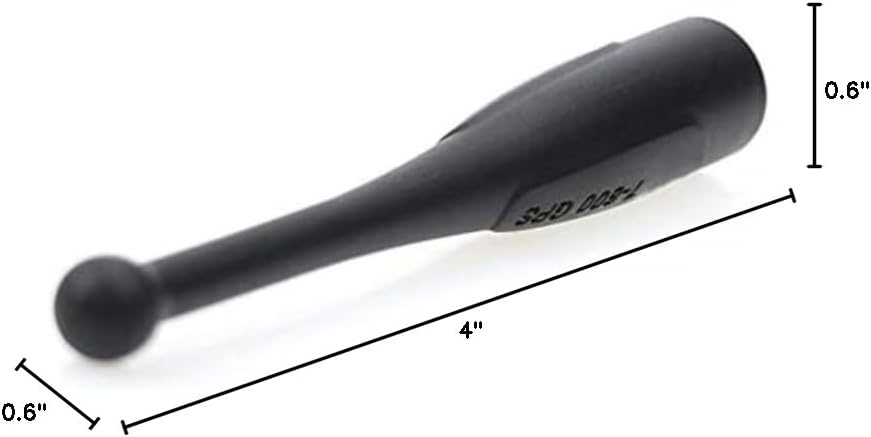
Image 7.1: Dimensions of the LUITON NAR6595_N short antenna.
8. Warranty Information
The LUITON NAR6595_N antenna comes with a 12-month warranty from the date of purchase. This warranty covers manufacturing defects and ensures product satisfaction. For warranty claims or returns, please follow the simple and convenient return process provided by your retailer.
9. Customer Support
For further assistance, technical inquiries, or support regarding your LUITON NAR6595_N antenna, please contact the manufacturer or your point of purchase. Provide your product model number (NAR6595_N) and a detailed description of your issue for efficient service.
Manufacturer: Bond Telecom co.,ltd.