
Introduction
Thank you for purchasing the Nobsound Little Bear MC403 Mini 4-IN-3-OUT Audio Selector Box. This device is designed to provide flexible audio routing for your home audio system, allowing you to switch between multiple audio sources and outputs. It features 3.5mm AUX, RCA, and Bluetooth inputs, with 3.5mm AUX and RCA outputs. Please read this manual carefully before use to ensure proper operation and to maximize the performance of your device.
Safety Information
- Do not expose this device to rain, moisture, or extreme temperatures.
- Avoid placing the device near heat sources or in direct sunlight.
- Do not open the casing; there are no user-serviceable parts inside.
- Use only the provided power adapter or one with identical specifications (5V DC, 200mA).
- Ensure all connections are secure before powering on any connected audio equipment.
- Keep out of reach of children.
Package Contents
Please check the package for the following items:
- 1 x Nobsound Little Bear MC403 Audio Selector Box
- 1 x Power Adapter (for Bluetooth function)
- 1 x Bluetooth Antenna
Product Overview
Front Panel
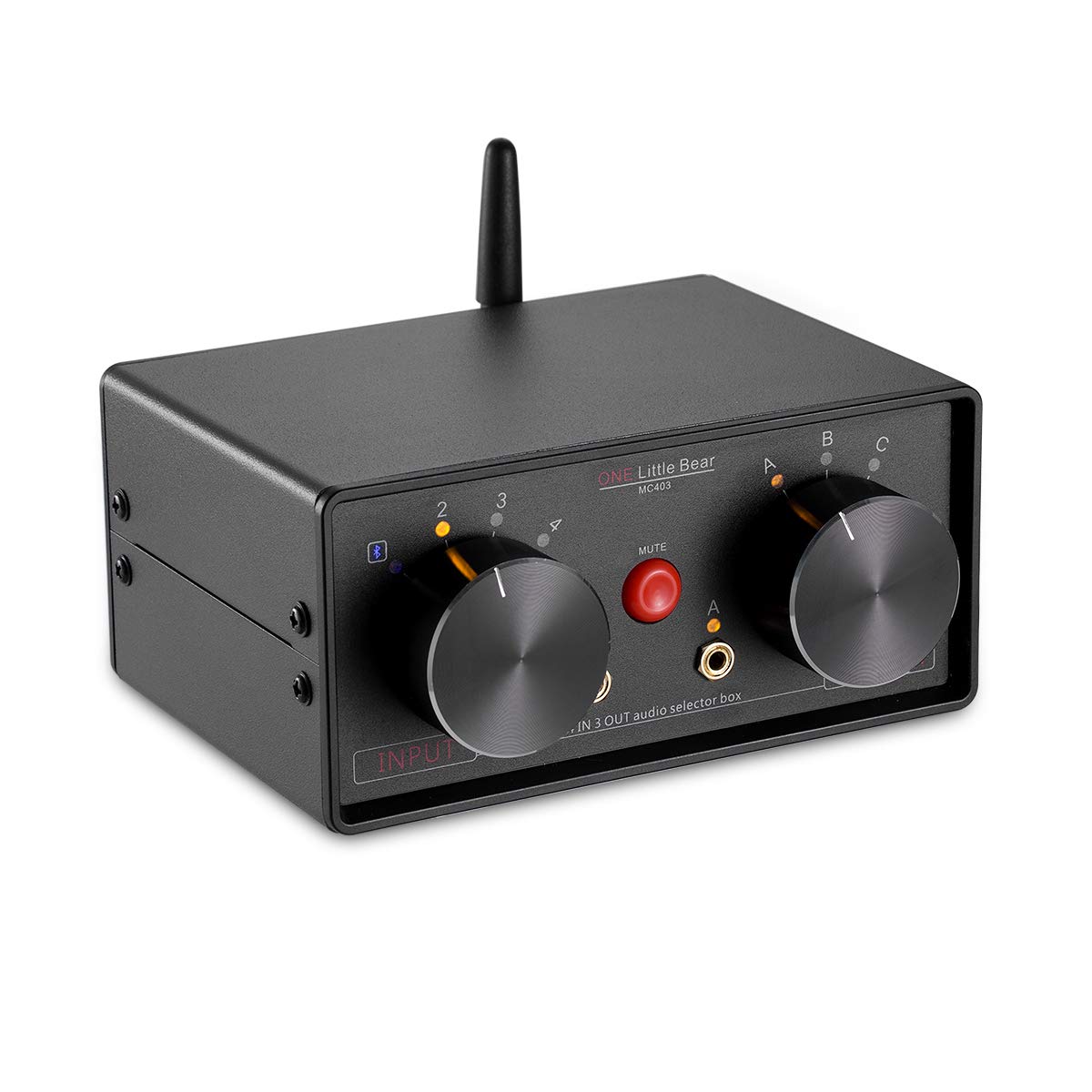
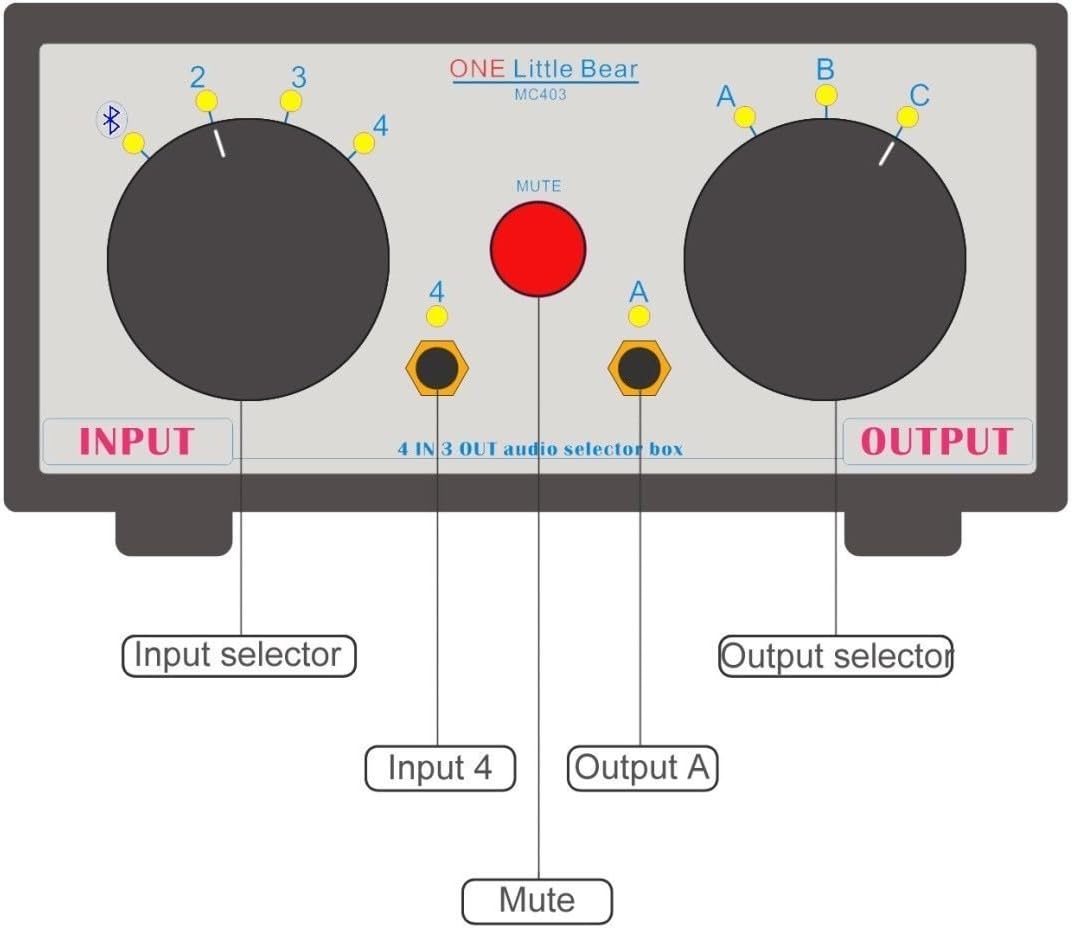
- Input Selector Knob: Selects between 4 audio inputs (1, 2, 3, or 4). Input 4 corresponds to the front 3.5mm jack and Bluetooth.
- Output Selector Knob: Selects between 3 audio outputs (A, B, or C). Output A corresponds to the front 3.5mm jack.
- MUTE Button: Press to mute/unmute the audio output.
- 3.5mm Input Jack (Input 4): For connecting 3.5mm audio sources.
- 3.5mm Output Jack (Output A): For connecting 3.5mm audio devices like headphones or speakers.
Rear Panel


- RCA Inputs (2 & 3): For connecting RCA audio sources.
- RCA Outputs (B & C): For connecting RCA audio devices like amplifiers or active speakers.
- DC IN (5Vdc, 200mA): Power input for the Bluetooth function and indicator LED. A standard cellphone charger can be used.
- Bluetooth Antenna Port: For attaching the included Bluetooth antenna.
- ON/OFF Switch: Activates or deactivates the Bluetooth function.
Setup
- Attach Bluetooth Antenna: Carefully hold the black part of the antenna upright. Screw the antenna onto the Bluetooth antenna port on the rear panel until it is securely fastened. Do not twist the entire antenna to tighten the screw.
- Connect Power (Optional for Bluetooth): If you intend to use the Bluetooth function, connect the provided 5V DC power adapter to the "DC IN" port on the rear panel. Plug the adapter into a power outlet.

Figure 5: Power Adapter Connection. This image shows the MC403 with its power adapter connected to the DC IN port on the rear. - Connect Audio Sources:
- For RCA sources (e.g., CD player, DVD player), connect them to the "INPUT 2" or "INPUT 3" RCA jacks on the rear panel.
- For 3.5mm AUX sources (e.g., smartphone, tablet, laptop), connect them to the "INPUT 4" 3.5mm jack on the front panel.
- Bluetooth is also an input option (Input 4).
- Connect Audio Outputs:
- For RCA outputs (e.g., amplifier, active speakers), connect them to the "OUTPUT B" or "OUTPUT C" RCA jacks on the rear panel.
- For 3.5mm AUX outputs (e.g., headphones, small active speakers), connect them to the "OUTPUT A" 3.5mm jack on the front panel.

Operating Instructions
- Power On: If using Bluetooth, ensure the power adapter is connected and the ON/OFF switch on the rear panel is set to "ON".
- Select Input: Rotate the Input Selector Knob on the front panel to choose your desired audio source (1, 2, 3, or 4).
- Select Output: Rotate the Output Selector Knob on the front panel to direct the audio to your desired output device (A, B, or C).
- Mute Function: Press the red MUTE button to temporarily silence the audio output. Press it again to unmute.
- Passive Operation: The RCA and 3.5mm AUX inputs/outputs function passively without power. Power is only required for Bluetooth functionality and the indicator LED.
Bluetooth Pairing
To use the Bluetooth receiver function:
- Ensure the power adapter is connected and the Bluetooth ON/OFF switch on the rear panel is set to "ON".
- Turn on the Bluetooth function on your mobile phone or other Bluetooth-enabled device.
- Search for available Bluetooth devices.
- Locate and select the device named "WIN-668". No pairing code is required.
- Once paired, you can play music from your mobile device via Bluetooth through the MC403.
Note: The Bluetooth receiver output power is 20mW. It can directly drive headphones with an impedance of 12-120 ohms. Ensure your mobile phone's volume is set appropriately.
Maintenance
- Clean the device with a soft, dry cloth. Do not use liquid cleaners or aerosols.
- Keep the device free from dust and debris.
- When not in use for extended periods, disconnect the power adapter.
Troubleshooting
| Problem | Possible Cause | Solution |
|---|---|---|
| No audio output. |
|
|
| Bluetooth not connecting or "WIN-668" not found. |
|
|
| Humming or buzzing noise. |
|
|
| Bluetooth antenna feels wobbly. | Antenna not properly secured or overtightened. | When installing, hold the black part of the antenna and only twist the base to tighten. Do not force the entire antenna. If it's already wobbly, avoid further twisting to prevent internal damage. |
Specifications
| Feature | Detail |
|---|---|
| Model | MC403 |
| Inputs | 2 x RCA, 1 x 3.5mm AUX, 1 x Bluetooth |
| Outputs | 2 x RCA, 1 x 3.5mm AUX |
| Bluetooth Version | 4.0 (Stereo Audio Receiver) |
| Bluetooth Output Power | 20mW (for headphones 12-120 ohms) |
| Power Supply | DC 5V, 200mA (for Bluetooth and LED) |
| Dimensions (W x D x H) | 150mm x 105mm x 68mm (approx.) |
| Weight | 485g (approx.) |
| Connector Type | 3.5mm Jack, RCA |
| Compatible Devices | DVD-Player, Television, Laptop, Smartphone, Tablet |

Support
Nobsound is committed to providing the highest level of customer service. If you encounter any issues or have questions regarding your Little Bear MC403 Audio Selector Box, please contact us via email. We aim to respond within 24 hours.
For further assistance, please visit the official Nobsound store: Nobsound Store
