1. Introduction
The Panasonic Private Viera UN-15CTD8-W is a 15V-inch portable LCD television designed for flexible viewing throughout your home. This model features a waterproof monitor, built-in battery for extended use, and a tuner unit with a 500GB HDD for recording. It supports various internet video services and offers easy operation via a touch panel and adjustable stand.
2. Setup
2.1 Tuner Unit Connection
The tuner unit is the core component that receives broadcast signals and manages recordings. It must be connected to a power source and an antenna cable.
- Connect the power cord to the tuner unit and a wall outlet.
- Connect the antenna cable from your wall antenna jack to the tuner unit's antenna input.
- Ensure all connections are secure.
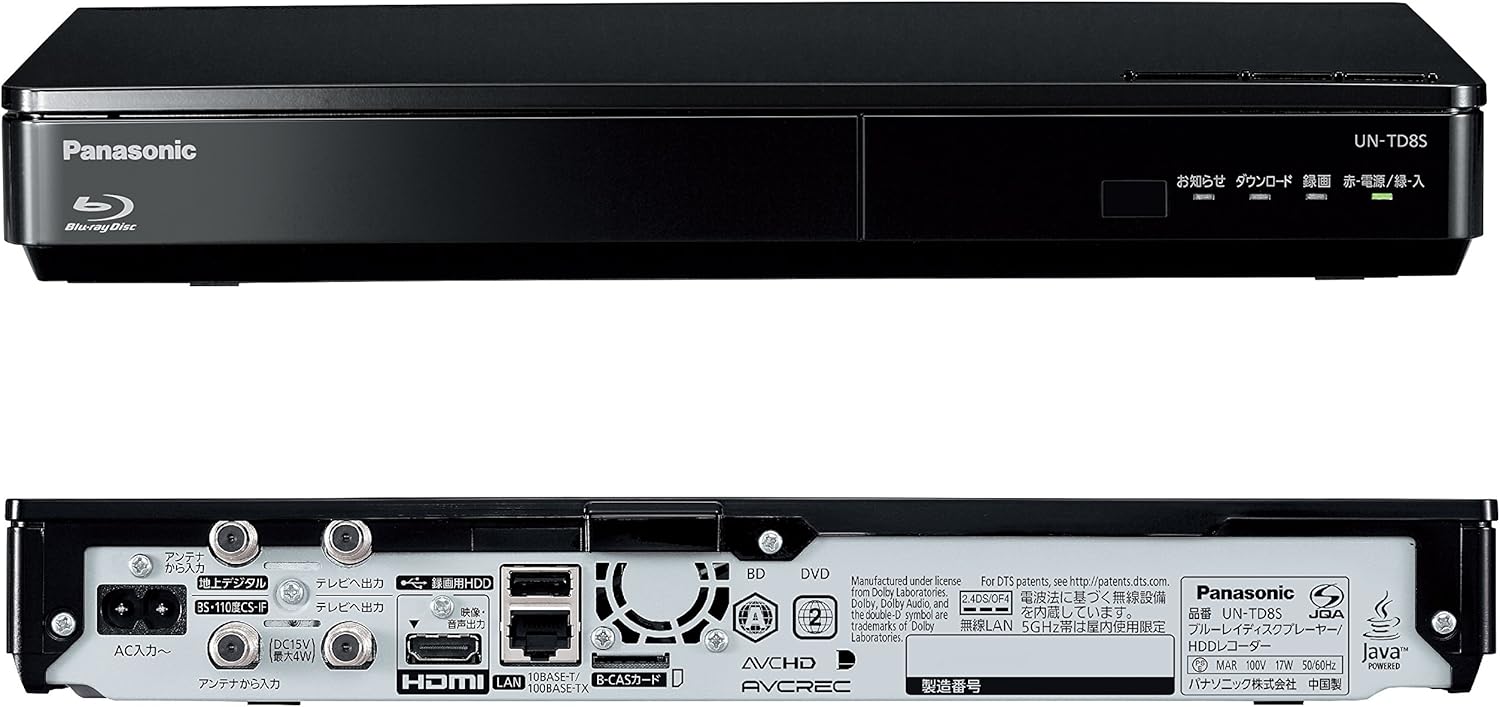
Image: Rear view of the tuner unit showing power and antenna connections.
2.2 Monitor Initial Setup
Once the tuner unit is connected, the monitor can be used wirelessly. The monitor and tuner unit communicate via Wi-Fi.
- Power on the monitor unit.
- Follow the on-screen instructions to pair the monitor with the tuner unit. This typically involves selecting the tuner unit from a list of available devices.
- Adjust initial settings such as language, time, and network preferences.
3. Operating Instructions
3.1 Basic Monitor Operation
The monitor features a touch panel for easy navigation and control.
- Power On/Off: Press the power button on the monitor.
- Channel/Volume: Use the on-screen touch controls or physical buttons (if available) to change channels and adjust volume.
- Menu Navigation: Tap the screen to access menus and settings.

Image: The monitor's touch panel allows for easy interaction, even in environments like a kitchen.
3.2 Monitor Placement and Portability
The monitor unit is designed for portability and can be used in various locations without an antenna cable.
- Adjustable Stand: The monitor features a 4-step adjustable stand for optimal viewing angles.
- Hanging Support: The stand can also be used to hang the monitor in suitable locations.
- Wireless Viewing: Enjoy TV broadcasts, recorded content, and streaming services anywhere within the Wi-Fi range of your tuner unit.

Image: The monitor can be placed in various rooms like a child's room, bedroom, study, or kitchen, and its angle can be adjusted or hung.
3.3 Recording and Playback
The tuner unit includes a 500GB HDD for recording TV programs and supports Blu-ray/DVD playback.
- HDD Recording: Record up to approximately 672.5 hours of TV programs (in 15x recording mode).
- Blu-ray/DVD Playback: Insert a Blu-ray or DVD disc into the tuner unit for playback on the monitor.

Image: Enjoy recorded programs or Blu-ray/DVD content anywhere, including the bath or bedroom.
3.4 Internet Services and External Devices
The Private Viera supports various internet video distribution services and can connect to external devices.
- Streaming Services: Access services like YouTube and DAZN directly on the monitor.
- Chromecast Function: Cast internet videos (e.g., YouTube) from your smartphone to the monitor.
- HDMI Input: The monitor has an HDMI input terminal on the rear for connecting external devices such as game consoles or streaming sticks (e.g., Fire TV series). Note: The HDMI input terminal is not waterproof. Do not use external devices in humid or steamy environments like bathrooms.
- Smartphone Integration (Dokodemo Diga App): Use the "Dokodemo Diga" app on your smartphone to watch recorded programs or live broadcasts from outside your home.
4. Maintenance
4.1 Cleaning the Monitor
The monitor unit is waterproof (JIS IPX6/IPX7 equivalent) and can be cleaned with water.
- Ensure the headphone output and HDMI input terminal covers are securely closed before cleaning.
- Use a soft cloth or sponge with a diluted neutral kitchen detergent for cleaning.
- Rinse thoroughly with water.
Image: The waterproof monitor can be easily cleaned under running water.
5. Troubleshooting
If you encounter issues, please refer to the following common troubleshooting steps:
- No Power: Check if the power cords for both the tuner and monitor units are securely connected to working outlets. Ensure the monitor's battery is charged.
- No Signal/Poor Reception: Verify the antenna cable connection to the tuner unit. Ensure the tuner unit is placed in an area with good signal reception. Wireless signal strength between the tuner and monitor can be affected by building structure or surrounding environment.
- Monitor Not Connecting to Tuner: Ensure both units are powered on and within range. Try restarting both devices.
- Touch Panel Unresponsive: Clean the screen. If the issue persists, try restarting the monitor.
- Battery Life Shorter Than Expected: Battery life varies depending on usage conditions, screen brightness, and other settings. Ensure Eco charging is off for maximum battery life.
For more detailed troubleshooting or issues not covered here, please consult the full product manual or contact customer support.
6. Specifications
| Feature | Specification |
|---|---|
| Screen Size | 15V-inch |
| Display Type | LCD |
| Tuner Type | Terrestrial Digital, BS, CS |
| HDD Capacity | 500 GB |
| Waterproof Rating | IPX6/IPX7 equivalent |
| Battery Life (TV viewing) | Approx. 3 hours (with headphones, 'User' picture quality, brightness '-5', Eco charge 'Off') |
| Battery Charging Time | Approx. 4 hours (at 20°C, power off) |
| Monitor Speaker Output | 800mW + 800mW (8Ω) |
| Monitor Dimensions (W×H×D) | 382mm × 253mm × 35.7mm (excluding stand/protrusions) |
| Tuner Dimensions (W×H×D) | 316mm × 46mm × 180mm (excluding protrusions) |
| Monitor Weight | Approx. 1.5kg |
| Tuner Weight | Approx. 1.5kg |
| HDMI Ports | 1 |
| USB Ports | 1 |
| LAN Ports | 1 |
| Supported Internet Services | DAZN, YouTube |
| Special Features | Chromecast |
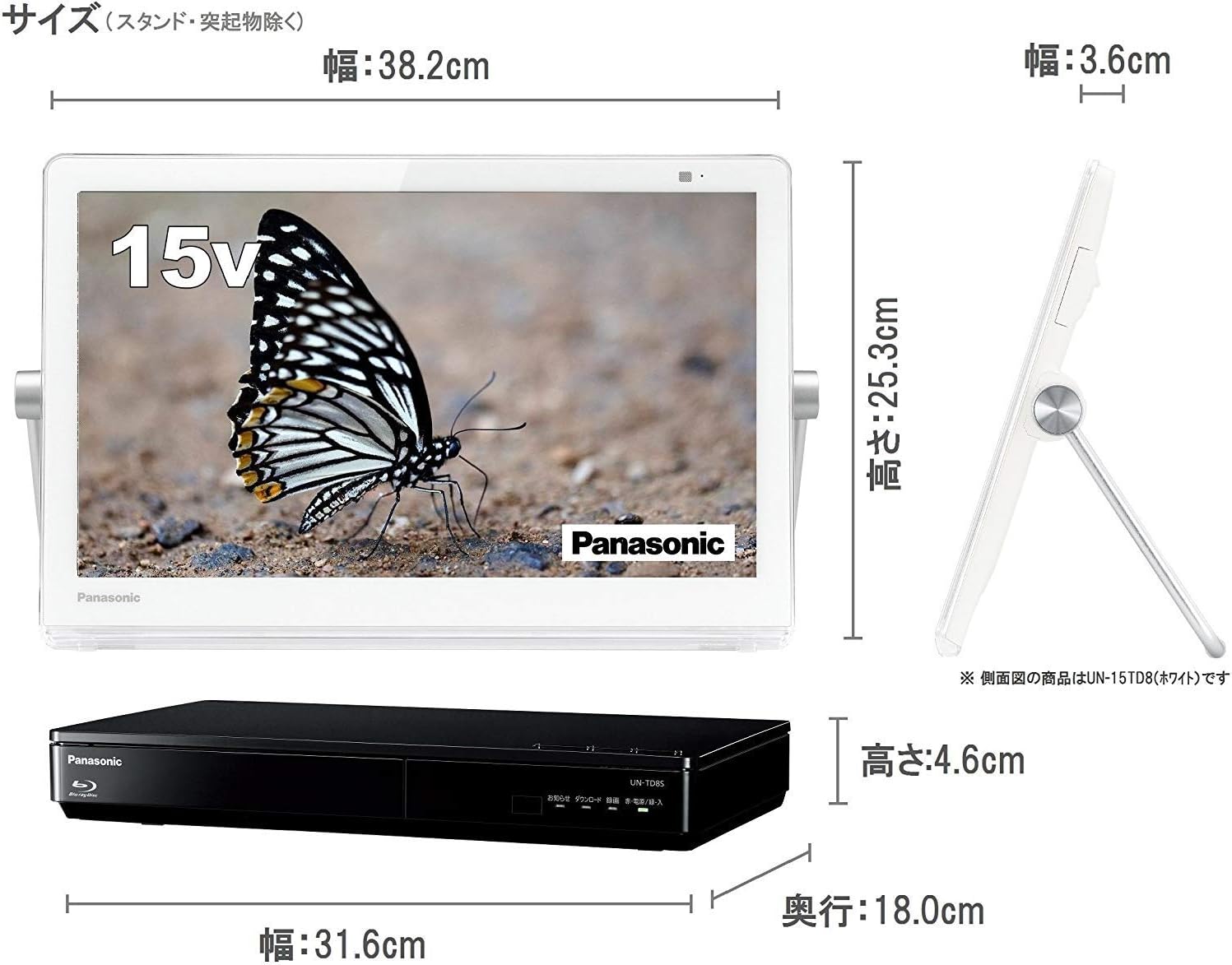
Image: Detailed dimensions of the monitor and tuner unit.

Image: Recommended viewing distance for the 15V-inch screen is approximately 0.6 meters.
7. Warranty and Support
For inquiries regarding repairs of Panasonic products, please contact the Panasonic Repair Consultation Desk.
- Telephone: 0120-878-554
- Reception Hours: 9:00 AM - 7:00 PM (9:00 AM - 5:30 PM on Sundays, holidays, year-end, and New Year holidays)
- You can also search for "Panasonic Repair" on the internet for more information.