
Cata OMD 7009 X
Cata OMD 7009 X Electric Oven Instruction Manual
Model: OMD 7009 X
1. Introduction
Thank you for choosing the Cata OMD 7009 X Electric Oven. This manual provides essential information for the safe and efficient use, installation, and maintenance of your appliance. Please read these instructions carefully before using the oven and keep them for future reference.
The Cata OMD 7009 X is a built-in electric oven designed for domestic use, offering a 70-liter capacity and a temperature range of 30°C to 250°C. It features a sleek black and stainless steel finish and an AquaSmart cleaning system.
2. Safety Instructions
Always adhere to the following safety precautions to prevent personal injury or damage to the appliance.
- Electrical Safety: Ensure the oven is correctly earthed and connected to a suitable power supply. Do not use adapters or extension cords.
- Children and Vulnerable Persons: This appliance can be used by children aged 8 years and above and persons with reduced physical, sensory or mental capabilities or lack of experience and knowledge if they have been given supervision or instruction concerning use of the appliance in a safe way and understand the hazards involved. Children shall not play with the appliance. Cleaning and user maintenance shall not be made by children without supervision.
- Hot Surfaces: The oven and its accessible parts become hot during use. Exercise caution to avoid touching heating elements. Use oven mitts when handling hot dishes or oven accessories.
- Cleaning: Always disconnect the appliance from the power supply before cleaning. Do not use harsh abrasive cleaners or sharp metal scrapers to clean the oven door glass as they can scratch the surface, which may result in shattering of the glass.
- Flammable Materials: Do not store flammable materials in or near the oven.
- Ventilation: Ensure adequate ventilation around the oven during operation.
- Servicing: Do not attempt to repair or modify the oven yourself. Contact qualified service personnel for all repairs.
3. Installation and Setup
The Cata OMD 7009 X oven is designed for built-in installation. Proper installation is crucial for safe and efficient operation.
3.1 Unpacking
Carefully remove the oven from its packaging. Inspect the appliance for any damage incurred during transit. Report any damage to your retailer immediately. Retain packaging materials for potential future transport or disposal.
3.2 Placement and Ventilation
Install the oven into a suitable cabinet opening. Ensure there is sufficient space for ventilation around the appliance as indicated in the installation diagram. The cabinet material must be heat-resistant.

Figure 1: Installation dimensions for the Cata OMD 7009 X electric oven. This diagram illustrates the minimum required cabinet opening dimensions for proper fitting and ventilation. All measurements are in millimeters.
3.3 Electrical Connection
The electrical connection must be performed by a qualified electrician in accordance with local wiring regulations. Ensure the voltage and frequency ratings on the oven's rating plate match your household's power supply. The oven must be properly earthed.
4. Operating Instructions
Familiarize yourself with the oven's controls before first use.
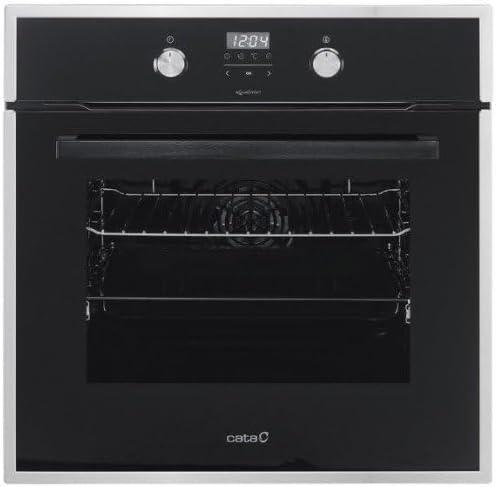
Figure 2: Front view of the Cata OMD 7009 X electric oven, showing the control panel with two rotary knobs and a digital display. The left knob typically controls cooking functions, and the right knob controls temperature and time settings.
4.1 First Use
Before cooking food, heat the empty oven for approximately 30 minutes at maximum temperature (250°C) to burn off any manufacturing residues. Ensure the kitchen is well-ventilated during this process. A slight odor may be present; this is normal.
4.2 Setting the Time
Upon initial power-up or after a power cut, the digital display will flash. Refer to the specific instructions in your oven's quick start guide for setting the current time using the control knobs.
4.3 Selecting a Cooking Function
Turn the left rotary knob to select the desired cooking function (e.g., conventional heating, fan-assisted, grill). The selected function will typically be indicated on the digital display or by an icon.
4.4 Setting the Temperature
Turn the right rotary knob to set the desired cooking temperature, ranging from 30°C to 250°C. The temperature will be displayed digitally.
4.5 Setting the Cooking Time
Depending on the model, the right rotary knob or dedicated buttons may be used to set a cooking duration. The oven will automatically switch off once the set time has elapsed.
4.6 Preheating
For best results, preheat the oven to the desired temperature before placing food inside. The oven will indicate when the set temperature has been reached.
5. Maintenance and Cleaning
Regular cleaning and maintenance ensure the longevity and optimal performance of your oven.
5.1 General Cleaning
- Always ensure the oven is cool and disconnected from the power supply before cleaning.
- Clean the interior and exterior surfaces with a soft cloth and mild detergent. Avoid abrasive cleaners or scouring pads.
- Remove oven racks and accessories for separate cleaning in warm soapy water.
- Wipe down the oven door glass with a soft cloth and glass cleaner.
5.2 AquaSmart Cleaning System
The Cata OMD 7009 X features an AquaSmart cleaning system. To use this function:
- Pour approximately 200ml of water into the bottom of the oven cavity.
- Select the AquaSmart cleaning function (refer to your oven's specific controls for activation).
- Allow the cycle to complete. The steam generated will soften food residues.
- Once the oven has cooled, wipe away softened residues with a damp cloth.
6. Troubleshooting
Before contacting customer service, review the following common issues and solutions.
| Problem | Possible Cause | Solution |
|---|---|---|
| Oven does not heat up. | No power supply; oven not switched on; fuse blown; timer not set. | Check power connection; ensure oven is switched on; check household fuse box; set the timer. |
| Food not cooking evenly. | Incorrect temperature or cooking time; food placed incorrectly; dirty oven. | Adjust temperature/time; ensure food is centered; clean oven interior. |
| Oven light not working. | Bulb is faulty. | Replace the oven bulb (ensure oven is cool and disconnected from power). |
| Excessive smoke during cooking. | Food spills or grease build-up. | Clean the oven thoroughly, especially the bottom and heating elements. |
7. Specifications
- Brand: Cata
- Model: OMD 7009 X
- Model Number: 7034503
- Type: Electric Oven
- Capacity: 70 Liters
- Temperature Range: 30 - 250 °C
- Dimensions (H x W x D): 59.5 x 59.5 x 55.3 cm (approximate, refer to installation diagram for precise cutout dimensions)
- Weight: 29 kg (63.93 lbs)
- Fuel Type: Electric
- Energy Class: A
- GTIN (Global Trade Item Number): 08422248077101
8. Warranty and Support
For warranty information, please refer to the warranty card included with your purchase or contact your retailer. In case of technical issues or if you require assistance, please contact Cata customer support or an authorized service center. Do not attempt to repair the appliance yourself.
For further assistance, visit the official Cata website or contact their customer service department.
Related documentsOMD 7009 X


Ask a question about this manual
Ask about setup, troubleshooting, compatibility, parts, safety, or missing instructions. Manuals+ will review the question and use this page’s manual context to help answer it.