
1. Introduction
Thank you for choosing the Rii RK907 Ultra-Slim Compact USB Wired Keyboard. This manual provides essential information for setting up, operating, and maintaining your new keyboard. Designed for both Mac and PC users, including Windows 10, 8, 7, Vista, and XP, this keyboard offers a reliable and comfortable typing experience for everyday use.
2. Product Overview
The Rii RK907 keyboard is a full-size, wired keyboard featuring low-profile chiclet keys and a dedicated number pad. Its slim design and plug-and-play functionality make it an ideal choice for various computing environments.
Key Features:
- Wired USB Connection: Ensures stable and reliable performance without the need for batteries or wireless pairing.
- Low-Profile Chiclet Keys: Provides a quiet and comfortable typing experience.
- Full-Size Layout with Number Pad: Includes a complete set of keys, including a numeric keypad for efficient data entry.
- Caps Indicators: Visual indicators for Num Lock, Caps Lock, and Scroll Lock status.
- Foldable Stands: Integrated stands allow for an adjustable typing angle to enhance comfort.
- Multimedia Hotkeys: 12 dedicated multimedia shortcuts for quick access to common functions.
Product Images:

Image: Two Rii RK907 keyboards, highlighting their full-size layout and sleek design.

Image: The Rii RK907 keyboard in use, connected to a computer monitor, illustrating its compact footprint on a desk.

Image: A detailed view of the keyboard's low-profile keys, emphasizing their design for comfortable and quiet typing.
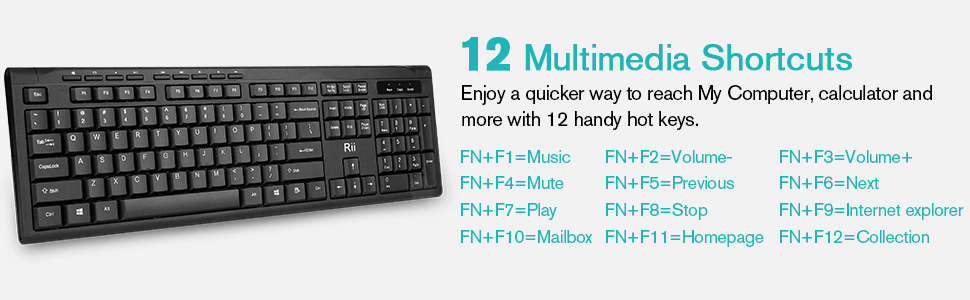
Image: Illustration of the 12 multimedia shortcut keys, detailing their functions for quick access to various computer controls.
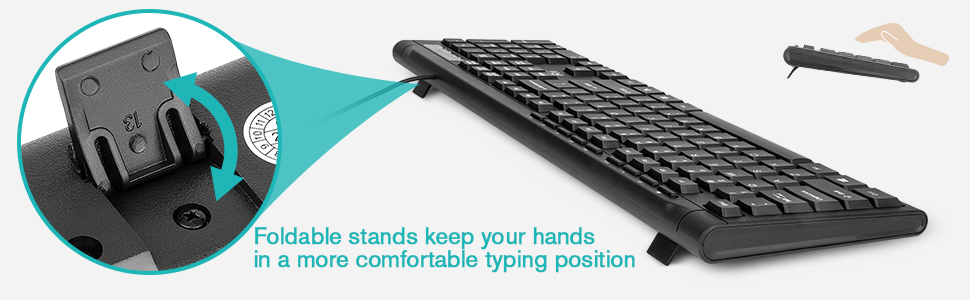
Image: A close-up of the keyboard's foldable stands, showing how they can be deployed to provide an ergonomic typing angle.
3. Setup
The Rii RK907 keyboard is designed for simple plug-and-play installation. No additional drivers are typically required for basic functionality.
Installation Steps:
- Locate an available USB-A port on your computer (desktop, laptop, or compatible gaming console).
- Insert the USB connector of the Rii RK907 keyboard firmly into the USB port.
- Your operating system should automatically detect and install the necessary drivers. This process may take a few moments.
- Once installation is complete, the keyboard is ready for use.
Compatibility:
This keyboard is compatible with a wide range of operating systems, including:
- Windows 10
- Windows 8
- Windows 7
- Windows Vista
- Windows XP
- Mac OS (functionality may vary for specific keys, refer to OS settings for customization)
4. Operating Instructions
Basic Typing:
The keyboard features a standard QWERTY layout. Simply begin typing as you would with any conventional keyboard.
Multimedia Shortcuts:
The Rii RK907 includes 12 multimedia hotkeys accessible via the Fn key combined with the F1-F12 function keys. These provide quick access to media controls and other common functions:
| Key Combination | Function |
|---|---|
| Fn + F1 | Music Player |
| Fn + F2 | Volume Down |
| Fn + F3 | Volume Up |
| Fn + F4 | Mute |
| Fn + F5 | Previous Track |
| Fn + F6 | Next Track |
| Fn + F7 | Play/Pause |
| Fn + F8 | Stop |
| Fn + F9 | Internet Explorer (Web Browser) |
| Fn + F10 | Mailbox |
| Fn + F11 | Homepage |
| Fn + F12 | Collection (My Computer/Files) |
Indicator Lights:
Located above the numeric keypad, these lights indicate the status of certain keyboard functions:
- Num Lock: Illuminates when the numeric keypad is active. Press the Num Lock key to toggle on/off.
- Caps Lock: Illuminates when Caps Lock is active, meaning all typed letters will be uppercase. Press the Caps Lock key to toggle on/off.
- Scroll Lock: Illuminates when Scroll Lock is active. Its function varies depending on the application. Press the Scroll Lock key to toggle on/off.
5. Maintenance
Proper care will extend the lifespan of your Rii RK907 keyboard.
Cleaning:
- Disconnect the keyboard from your computer before cleaning.
- Use a soft, lint-free cloth slightly dampened with water or a mild, non-abrasive cleaner to wipe the surface.
- For dust and debris between keys, use compressed air or a small brush.
- Avoid spraying liquids directly onto the keyboard.
Storage:
When not in use, store the keyboard in a clean, dry environment away from extreme temperatures and direct sunlight.
6. Troubleshooting
If you encounter issues with your Rii RK907 keyboard, try the following solutions:
Keyboard Not Responding:
- Check USB Connection: Ensure the USB cable is securely plugged into a functioning USB port on your computer. Try a different USB port.
- Restart Computer: Sometimes a simple system restart can resolve connectivity issues.
- Test on Another Computer: If possible, connect the keyboard to another computer to determine if the issue is with the keyboard or your original system.
- Check Device Manager (Windows): Open Device Manager, locate 'Keyboards', and check for any error indicators. You may need to update or reinstall the keyboard drivers.
Keys Not Functioning Correctly:
- Clean Keys: Ensure no debris is lodged under the affected keys. Refer to the Maintenance section for cleaning instructions.
- Software Interference: Temporarily disable any third-party keyboard utilities or gaming software that might be interfering with key inputs.
7. Specifications
| Feature | Detail |
|---|---|
| Model Number | Rii RK907 |
| Product Dimensions | 17.52 x 5.71 x 0.79 inches (445 x 145 x 20 mm) |
| Item Weight | 1.01 pounds (0.46 kg) |
| Connectivity Technology | USB, USB-A (Wired) |
| Number of Keys | 104 |
| Keyboard Description | Multimedia |
| Special Feature | Foldable Stands |
| Compatible Devices | PC, Mac, Gaming Console |
| Color | Black (RK907-2Pcs variant) |
| Keystroke Lifespan | 10,000,000 times (approx.) |

Image: Detailed dimensions of the Rii RK907 keyboard for reference.
8. Warranty and Support
The Rii RK907 keyboard comes with a standard manufacturer's warranty. For specific warranty terms and conditions, please refer to the product packaging or contact Rii customer support directly. Keep your purchase receipt for warranty claims.
For further assistance or technical support, please visit the official Rii website or contact their customer service department. Contact information can typically be found on the product packaging or the manufacturer's website.