1. Introduction
This manual provides essential information for the installation, operation, and maintenance of your FSA Powerbox Alloy 2x11 Road Chainset. Please read these instructions carefully before use to ensure proper function and longevity of the product. Retain this manual for future reference.
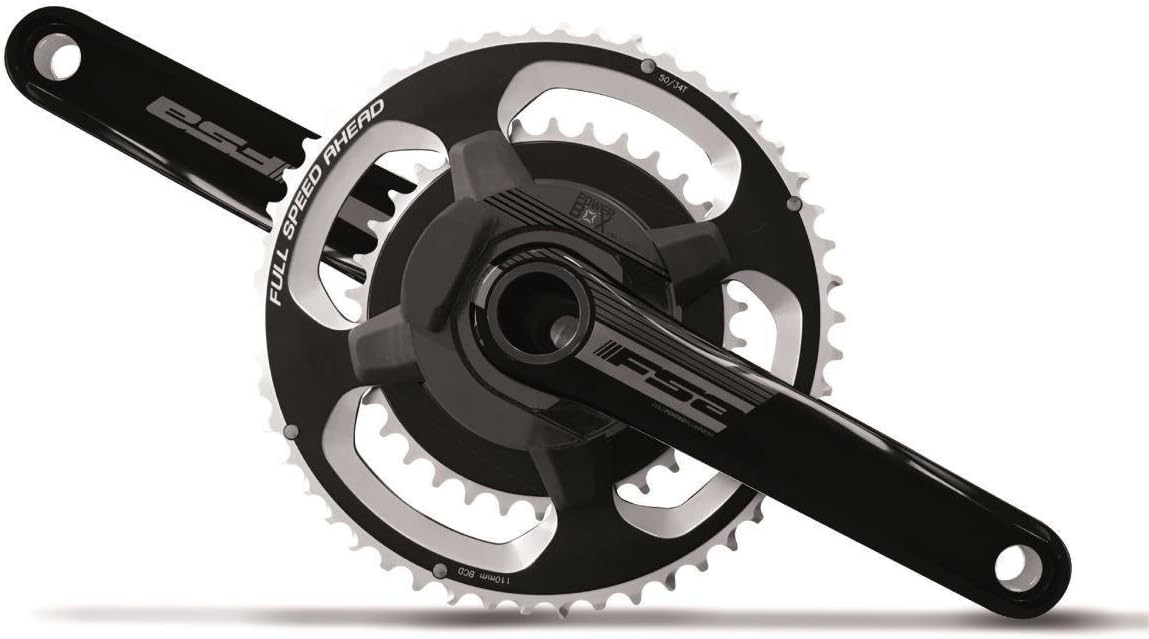
Image 1.1: The FSA Powerbox Alloy 2x11 Road Chainset, featuring black crank arms and chainrings with silver teeth.
2. Product Features
2.1. Chainset Components
- Crank Arms: Cold forged AL6061/T6 aluminum for durability and strength.
- Axle: 386Evo 30mm AL7050 alloy axle, designed for broad frame compatibility. Note: A separate bottom bracket (BB) purchase may be required for BB90 frames.
- Chainrings: AL7075 100% CNC machined for precision shifting and performance.
- Chainring Bolts: Chromalloy construction for secure fastening.
- Compatibility: Designed to work with Shimano and SRAM 10-11 speed drivetrain systems.
- Weight: Approximately 751g (specific configuration).
2.2. Power2max Power Meter Capabilities
- simple2use Features:
- Auto Zero: Automatic re-zeroing after 3 seconds or more of non-pedaling, eliminating the need for manual calibration.
- No Cadence Magnet: Integrated accelerometer precisely calculates cadence without an external magnet.
- User-Replaceable Battery: Battery can be changed by the user after approximately 300-400 hours of use.
- Precision: Achieves an accuracy of ±2% or better, accounting for environmental factors.
- Manufacturing: Designed, engineered, and manufactured in Germany to high quality standards.
- ANT+ Connectivity: Utilizes the ANT+ standard for wireless data transmission to compatible bike computers.
- Bluetooth Ready: Can be upgraded via firmware purchase to support Bluetooth wireless communication in addition to ANT+.
- Upgradeable Software: Software features, such as left-right balance, can be upgraded.
3. Setup and Installation
Proper installation is crucial for the performance and safety of your chainset. It is highly recommended that installation be performed by a qualified bicycle mechanic. If you choose to install it yourself, ensure you have the correct tools and follow the instructions provided with your bottom bracket and bicycle frame.
3.1. Pre-Installation Checks
- Verify compatibility of the 386Evo 30mm axle with your bicycle frame's bottom bracket shell. For BB90 frames, a specific bottom bracket must be purchased separately.
- Ensure your drivetrain is a Shimano or SRAM 10-11 speed system for optimal performance.
- Inspect all components for any signs of damage before installation.
3.2. General Installation Steps (Consult specific BB and frame manuals)
- Install the appropriate bottom bracket into your bicycle frame according to the manufacturer's instructions.
- Apply a thin layer of grease to the spindle of the chainset.
- Carefully slide the drive-side crank arm (with chainrings) through the bottom bracket.
- Install the non-drive side crank arm onto the spindle, ensuring proper alignment.
- Tighten the crank arm fixing bolt(s) to the torque specifications provided by FSA or your bottom bracket manufacturer. Over-tightening or under-tightening can lead to damage or unsafe operation.
- Ensure chainrings are correctly oriented and chainring bolts are securely tightened.
4. Operating Instructions
The Power2max power meter integrated into your FSA chainset is designed for ease of use.
4.1. Initial Setup and Pairing
- Wake Up the Power Meter: Rotate the crank arms a few times to wake up the power meter.
- Pair with Bike Computer: Refer to your bike computer's manual for instructions on pairing ANT+ or Bluetooth (if upgraded) power meters. The Power2max will appear as a discoverable device.
- Zero Offset (Calibration): While the Power2max features Auto Zero, it is good practice to perform a manual zero offset before your first ride and periodically thereafter. Ensure the bike is stationary and no weight is on the pedals during this process. Consult your bike computer's manual for how to initiate a zero offset.
4.2. During Operation
- Auto Zero: The power meter automatically re-zeros when you stop pedaling for 3 seconds or more, ensuring accurate readings without manual intervention during your ride.
- Cadence Measurement: Cadence is measured internally via an accelerometer, eliminating the need for a separate magnet.
- Data Transmission: Power and cadence data are transmitted wirelessly via ANT+ (and optionally Bluetooth) to your paired bike computer.
5. Maintenance
Regular maintenance ensures the optimal performance and lifespan of your FSA Powerbox Alloy 2x11 Road Chainset.
5.1. Cleaning
- Clean the chainset and chainrings regularly with a mild degreaser and brush, then rinse with water and dry thoroughly.
- Avoid high-pressure washing directly on the power meter unit or bearings.
5.2. Battery Replacement
The Power2max power meter battery typically lasts 300 to 400 hours of use. When the battery is low, your bike computer will usually display a warning.
- Identify the battery compartment on the power meter unit.
- Carefully open the compartment using the appropriate tool (e.g., a coin or small screwdriver).
- Remove the old battery and insert a new, compatible battery, ensuring correct polarity.
- Securely close the battery compartment, ensuring the seal is intact to maintain water resistance.
5.3. Inspection
- Periodically check chainring bolts for tightness.
- Inspect chainrings for wear; worn chainrings can affect shifting performance and chain life.
- Check crank arms for any signs of cracks or damage.
6. Troubleshooting
If you encounter issues with your FSA Powerbox Alloy 2x11 Road Chainset, consider the following:
- No Power Reading:
- Ensure the power meter is awake (rotate cranks).
- Check battery level and replace if necessary.
- Verify proper pairing with your bike computer.
- Perform a manual zero offset.
- Inaccurate Readings:
- Perform a manual zero offset.
- Ensure the power meter firmware is up to date (check Power2max website).
- Shifting Issues:
- Check chainring wear.
- Ensure chainring bolts are tight.
- Verify front derailleur adjustment.
For persistent issues or complex mechanical problems, it is recommended to consult a professional bicycle mechanic or contact FSA customer support.
7. Specifications
| Attribute | Value |
|---|---|
| Brand | FSA |
| Model Name | Powerbox Alloy 2x11 |
| Part Number | 328-0002554010 |
| Material | AL6061/T6 Aluminum (crank arms), AL7050 Alloy (axle), AL7075 (chainrings) |
| Axle Type | 386Evo 30mm |
| Chainring Configuration | 50/34T |
| Crank Arm Length | 172.5 mm |
| Drivetrain Compatibility | Shimano and SRAM 10-11 speed systems |
| Power Meter Accuracy | ±2% or better |
| Wireless Connectivity | ANT+ (Bluetooth upgradeable) |
| Estimated Weight | 751g |
| Color | Black |
| Model Year | 2018 |
8. Warranty and Support
For warranty information, please refer to the official FSA website or the documentation provided with your purchase. For technical support, spare parts, or service inquiries, please contact FSA customer service directly or visit their official website for authorized service centers.
Online Resources: For the most up-to-date information, firmware updates, and detailed technical guides, please visit the official FSA and Power2max websites.
9. Official Product Videos
No official product videos from the seller are available for this item at this time.


