
Introduction
This manual provides detailed instructions for the safe and efficient use of your aooshine Bedside Table Lamp USB. This modern desk lamp features a solid wood base, a fabric shade, and a convenient USB charging port. Please read this manual thoroughly before installation and operation, and retain it for future reference.
Safety Instructions
- Ensure the lamp is unplugged from the power outlet before assembly, cleaning, or replacing the bulb.
- Do not use bulbs exceeding the maximum wattage specified (Max 60 watts).
- Keep the wooden base away from water to prevent damage.
- This lamp is designed for indoor use only.
- Do not attempt to modify or repair the lamp yourself. Contact qualified service personnel for assistance.
Package Contents
Verify that all components are present upon opening the package:
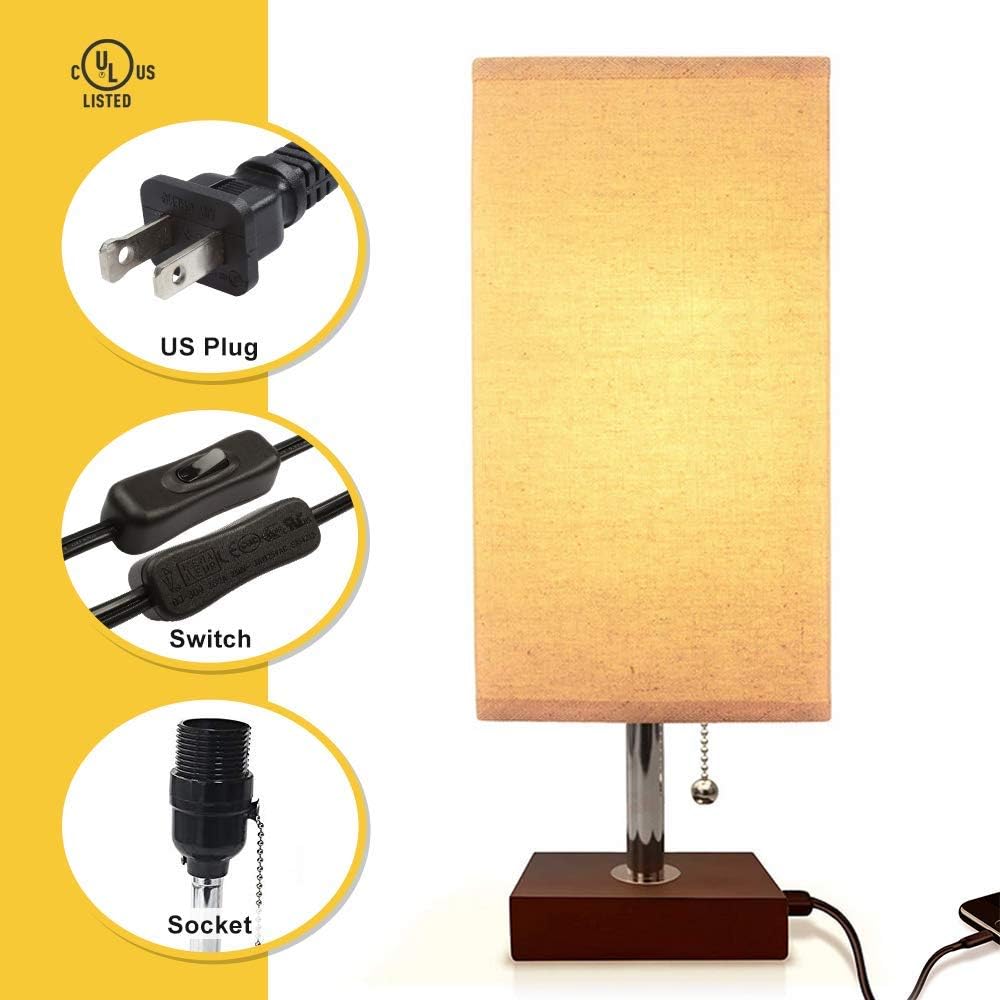
- 1 x aooshine Bedside Table Lamp (Base with USB port, lamp holder, pull chain, power cord)
- 1 x Fabric Lampshade
- (Bulb not included)
Specifications
| Product Dimensions (Overall) | 5.3"D x 5.3"W x 14.5"H (13.5cm D x 13.5cm W x 37cm H) |
| Base Dimensions | 4.3"D x 4.3"W x 1.2"H (11cm D x 11cm W x 3cm H) |
| Shade Dimensions | 5.3"D x 5.3"W x 10"H (13.5cm D x 13.5cm W x 25.5cm H) |
| Cord Length | 1.6m |
| Bulb Base | E26 (Bulb not included) |
| Max Wattage | 60 watts |
| USB Output | 5V/2A |
| Input Voltage | AC85-265V |
| Material | Solid Wood Base, Fabric Shade |
| Switch Type | Rocker Switch (on cord) & Pull Chain |

Setup
Follow these steps to assemble your aooshine Bedside Table Lamp:
- Unscrew the Fixing Ring: Carefully unscrew the fixing ring from the lamp holder on the base.
- Place the Lampshade: Position the fabric lampshade onto the lamp holder.
- Secure the Lampshade: Screw the fixing ring back onto the lamp holder to secure the lampshade in place. Ensure it is tightened firmly.
- Install the Bulb: Insert an E26 base bulb (not included, maximum 60 watts) into the lamp holder.
- Connect to Power: Plug the lamp's power cord into a standard electrical outlet.

Operation
Your aooshine Bedside Table Lamp offers two primary functions: lighting and USB charging.
Lighting Function:
- Main Power Switch: Locate the rocker switch on the power cord. Ensure this switch is in the "ON" position for the lamp and USB port to function.
- Pull Chain: Once the main power switch is on, use the pull chain located on the lamp holder to turn the light ON or OFF.
USB Charging Port:
- The 5V/2A USB charging port is located on the lamp base.
- To use the USB port, the rocker switch on the power cord must be in the "ON" position.
- The USB port will continue to charge your devices even if the lamp's light is turned off via the pull chain.
- Connect your electronic devices (e.g., mobile phones, tablets) to the USB port using their respective charging cables.


Maintenance
- Cleaning: Ensure the lamp is unplugged before cleaning. Wipe the base with a soft, dry cloth. For the fabric shade, use a lint roller or a soft brush to remove dust. Do not use liquid cleaners or abrasive materials.
- Moisture Protection: Keep the lamp, especially the wooden base, away from water and high humidity environments to prevent damage.
- Bulb Replacement: Always unplug the lamp before replacing the bulb. Allow the old bulb to cool completely before removal. Use only E26 base bulbs, not exceeding 60 watts.
Troubleshooting
If you encounter issues with your lamp, refer to the following common problems and solutions:
- Lamp Does Not Turn On:
- Check if the power cord is securely plugged into the wall outlet.
- Ensure the rocker switch on the power cord is in the "ON" position.
- Verify that the bulb is correctly installed and not burnt out. Replace if necessary.
- Confirm the pull chain has been operated to turn the light on.
- USB Port Not Charging Devices:
- Ensure the rocker switch on the power cord is in the "ON" position. The USB port requires the main power switch to be active.
- Check the USB cable and the device being charged for proper connection.
- Try charging a different device or using a different USB cable to rule out device/cable issues.
- Flickering Light:
- Ensure the bulb is screwed in tightly.
- Try a different bulb to see if the issue persists.
Warranty and Support
aooshine is committed to providing quality products and excellent customer service. If you experience any issues or have questions regarding your lamp, please contact our customer support team. We are dedicated to ensuring your satisfaction.
For assistance, please refer to the contact information provided with your purchase or visit the official aooshine store on Amazon: aooshine Store.