
1. Introduction
Thank you for choosing the NRS Healthcare A-Series 4-Wheel Rollator. This manual provides essential information for the safe and effective use, assembly, and maintenance of your rollator. Please read it thoroughly before use and retain it for future reference.
The NRS Healthcare A-Series 4-Wheel Rollator is designed to provide mobility assistance, offering stability and support for individuals requiring walking aid. It features a lightweight aluminum frame, adjustable handles, a padded seat, and a storage bag.
2. Safety Information
- Always ensure all locking mechanisms are engaged before use.
- Do not exceed the maximum user weight of 135 kg (21.5 stone).
- Regularly check the brakes, wheels, and frame for any signs of wear or damage.
- Do not use the rollator on escalators or moving walkways.
- Exercise caution when navigating uneven surfaces, ramps, or curbs.
- Ensure the rollator is fully open and stable before placing weight on it.
- Do not sit on the rollator while it is in motion.
3. Setup and Assembly
The NRS Healthcare A-Series 4-Wheel Rollator requires minimal assembly. Follow these steps to prepare your rollator for use.
3.1 Unfolding the Rollator
- Carefully remove the rollator from its packaging.
- Place the rollator on a flat, stable surface.
- Pull the sides of the frame outwards until the rollator is fully open and the locking mechanism engages. Ensure it is stable before proceeding.
3.2 Adjusting Handle Height
Correct handle height is crucial for comfort and safety. Follow these instructions to set the appropriate height:
- Stand upright with your normal walking shoes on, feet shoulder-width apart.
- Allow your arms to hang naturally at your sides.
- Measure the distance from the floor to your wrist bone. This measurement indicates the ideal handle height.
- Locate the height adjustment pins on the rollator handles.
- Press the pin and slide the handle up or down until it aligns with your measured wrist height. Ensure the pin clicks securely into place.
- Repeat for the other handle, ensuring both are at the same height.
The handle height is adjustable between 83 cm (32.5 inches) and 98 cm (38.5 inches).
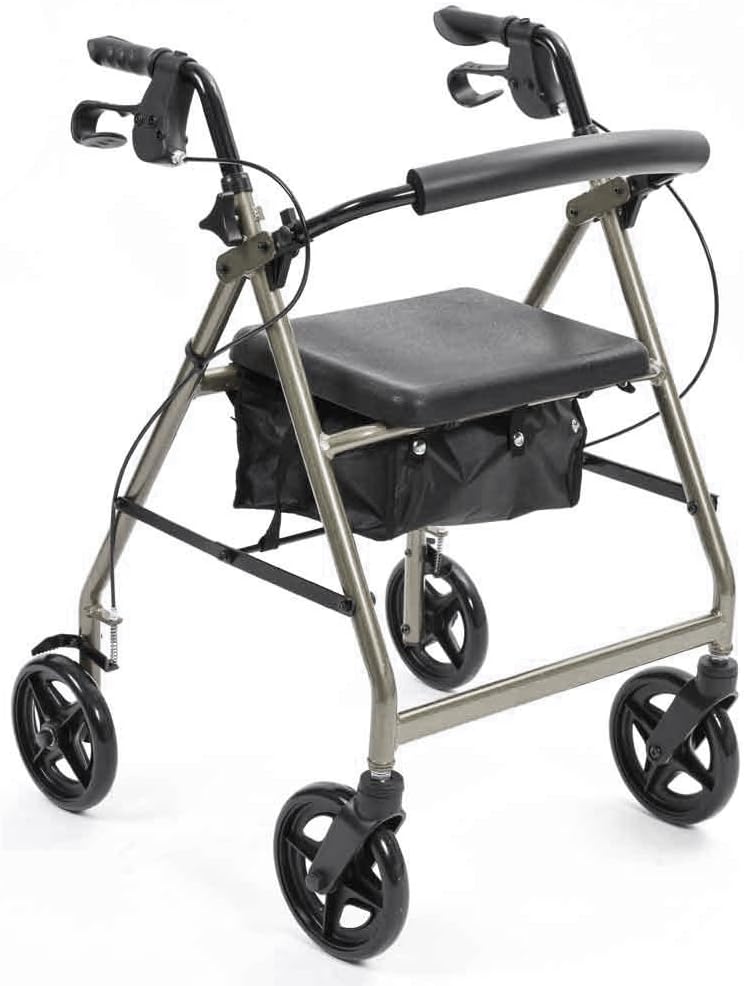
Image 1: The NRS Healthcare A-Series 4-Wheel Rollator in its fully assembled state, showcasing its silver frame, black padded seat, and ergonomic handles. This image provides a general overview of the product.
4. Operating Instructions
4.1 Walking with the Rollator
- Stand behind the rollator, holding both handles firmly.
- Push the rollator forward a short distance, then step forward, keeping your body close to the rollator for stability.
- Maintain a steady pace and ensure all four wheels remain in contact with the ground.

Image 2: A person using the NRS Healthcare A-Series 4-Wheel Rollator outdoors, demonstrating proper posture and use while walking.
4.2 Using the Brakes
The rollator is equipped with two types of braking functions: active braking and parking braking.
- Active Braking: To slow down or stop, gently squeeze both brake levers towards the handles. Release to disengage.
- Parking Brake: To engage the parking brake, push both brake levers downwards until they lock into place. This will prevent the rollator from moving. To release, pull the levers upwards.

Image 3: A close-up view of the ergonomic brake lever on the rollator handle. This image highlights the design for easy grip and operation of both active and parking brake functions.
4.3 Using the Seat
The padded seat and backrest provide a comfortable resting spot.
- Before sitting, ensure the parking brakes are fully engaged to prevent the rollator from moving.
- Turn around and slowly lower yourself onto the seat.
- Use the padded backrest for support.
- Do not attempt to move the rollator while seated.
4.4 Using the Storage Bag
A hidden zippered storage bag is located under the seat for personal items. To access, lift the seat.
5. Maintenance and Care
- Cleaning: Wipe down the frame, seat, and handles regularly with a damp cloth and mild detergent. Avoid abrasive cleaners.
- Inspection: Periodically check all nuts, bolts, and screws to ensure they are tight. Inspect the wheels for wear and tear, and ensure the brakes are functioning correctly.
- Storage: When not in use, store the rollator in a dry place, away from direct sunlight and extreme temperatures. The rollator can be folded for compact storage and transport.

Image 4: The NRS Healthcare A-Series 4-Wheel Rollator shown in its folded position, demonstrating its compact design for easy storage and transportation.
6. Troubleshooting
| Problem | Possible Cause | Solution |
|---|---|---|
| Rollator feels unstable. | Handles not adjusted correctly or locking mechanisms not engaged. | Ensure handles are at the correct height and adjustment pins are securely locked. Verify the frame is fully open and locked. |
| Brakes are not effective. | Brake cables may be loose or worn. | Check brake cable tension. If necessary, consult a qualified technician for adjustment or replacement. |
| Wheels do not roll smoothly. | Debris in wheels or worn bearings. | Clean wheels of any debris. If the problem persists, contact customer support. |
7. Product Specifications
- Model Number: P11279
- Brand: NRS Healthcare
- Material: Aluminium
- Color: Silver
- Handle Height Adjustment: 83 cm - 98 cm (32.5" - 38.5")
- Seat Height: 58 cm (22.75")
- Overall Width: 62 cm (24.5")
- Width Between Handles: 45 cm (17.75")
- Folded Height: 99 cm (39")
- Folded Width: 62 cm (24.5")
- Seat Dimensions: W35 cm x D30 cm (13.7" x 11.7")
- Wheel Diameter: 18 cm (7")
- Product Weight: 6.5 kg (14 lbs)
- Maximum User Weight: 135 kg (21.5 st)
- Product Dimensions (unfolded): 62.5 x 22 x 83 cm
- Country of Origin: China
8. Warranty and Support
For warranty information or technical support, please refer to the documentation provided with your purchase or contact NRS Healthcare customer service. Contact details can typically be found on the manufacturer's official website or on your purchase receipt.
Manufacturer: NRS Healthcare


