
1. Introduction
This document serves as the instruction manual for the Bousnic Replacement Remote, designed for use with Bousnic P-Collar 320 and P-Collar 320B dog training receiver collars. This product includes only the remote control. Receiver collars, charging cables, and other accessories are not included and must be acquired separately if needed.
The remote features an intuitive LCD display and provides various training modes to assist in effective dog training.
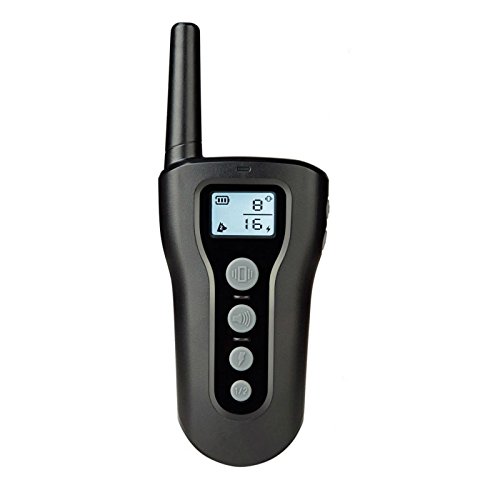
Image: Bousnic Replacement Remote Control with LCD display.
2. Safety Information
- Important Notice: The remote control is not waterproof. To prevent damage, keep it away from water and moisture.
- Ensure the remote is handled with care to avoid drops or impacts that could damage internal components.
- Store the remote in a safe place, out of reach of pets, to prevent chewing or damage.
3. Setup
The Bousnic Replacement Remote comes with a built-in Lithium Polymer battery. Before first use, it is recommended to fully charge the remote. A charging cable is not included with this replacement remote.
Charging the Remote
- Connect a compatible charging cable (not included) to the remote's charging port.
- Plug the other end of the charging cable into a USB power adapter (not included) or a computer's USB port.
- The battery indicator on the LCD display will show charging status. Once fully charged, disconnect the remote from the charger.
4. Pairing Instructions
To ensure proper functionality, the replacement remote must be paired with your existing Bousnic receiver collar. Follow these steps:
- Turn on the remote and select the desired channel (e.g., channel 1 or 2).
- Turn off the receiver collar by pressing and holding its power button until the red indicator light turns off.
- Press and hold the receiver collar's power button for a few seconds until the green light on the receiver starts flashing. This indicates the receiver has entered pairing mode.
- While the receiver's green light is flashing, press either the beep button or the vibration button on the remote.
- Press the beep button or the vibration button again to confirm successful pairing. If paired correctly, you will hear a beep tone or feel a vibration from the receiver collar.

Image: Illustration of receiver collar modes (Beep, Vibration, Static Shock).
5. Operating Instructions
The Bousnic remote offers multiple training modes to suit your dog's needs. The LCD display shows the selected mode, intensity level, and battery status.
Available Modes:
- Vibration Mode: Delivers a gentle vibration to the receiver collar. The intensity can typically be adjusted.
- Beep Mode: Emits an audible tone from the receiver collar. This is often used as a warning or for positive reinforcement.
- Static Shock Mode: Provides a static stimulation. The intensity levels are adjustable to ensure humane training. Use this mode responsibly and at the lowest effective level.
Switching Modes and Adjusting Intensity:
Refer to the buttons on your remote for mode selection and intensity adjustment. Typically, there are dedicated buttons for each mode and up/down buttons to change intensity levels, which are displayed on the LCD screen.

Image: Bousnic remote control demonstrating a 1000 ft control range.
6. Maintenance
- Cleaning: Wipe the remote with a soft, dry cloth. Do not use harsh chemicals or abrasive cleaners.
- Storage: Store the remote in a cool, dry place when not in use. Avoid extreme temperatures.
- Battery Care: To prolong battery life, avoid fully discharging the remote frequently. Charge it regularly, especially if it will be stored for an extended period.
7. Troubleshooting
Remote Not Responding:
- Check Battery: Ensure the remote's battery is sufficiently charged. Recharge if necessary.
- Wake Up Remote: Some remotes may enter a sleep mode to conserve battery. Press any button to wake it up before attempting to use a training function.
Pairing Issues:
- Repeat Pairing Steps: Carefully follow the pairing instructions in Section 4 again. Ensure the receiver collar is in pairing mode (green light flashing) when you press a function button on the remote.
- Check Receiver Battery: Ensure the receiver collar has sufficient battery power.
- Proximity: Ensure the remote and receiver collar are close to each other during the pairing process.
8. Specifications
| Feature | Detail |
|---|---|
| Brand | BOUSNIC |
| Compatible Models | P-Collar 320, P-Collar 320B |
| Item Weight | 3.2 ounces |
| Item Package Dimensions (L x W x H) | 6.61 x 4.45 x 1.81 inches |
| Batteries | 1 Lithium Polymer battery (included) |
| Included Components | Remote Control (only) |
| Manufacturer | Bousnic |
| Date First Available | April 8, 2018 |
9. Warranty and Support
For information regarding product warranty, returns, or technical support, please refer to the original product packaging or contact Bousnic customer service directly. Contact details can typically be found on the manufacturer's official website or through your purchase platform.
