Introduction
This manual provides detailed instructions for the safe and effective use of your Huepar TPD14 56-inch Extendable Height Tripod. Designed for precision and versatility, this tripod is compatible with laser levels, digital cameras, lenses, camcorders, binoculars, and telescopes. Please read this manual thoroughly before operation.
Package Contents
Verify that all items are present in your package:
- TPD14 Tripod x 1
- Quick Installation Board x 1
- 5/8"-11 UNF Adapter Nut x 1
- Storage Bag x 1

Image: The Huepar TPD14 Tripod, quick release plate, 5/8"-11 adapter nut, and storage bag are shown as included items.
Product Features
- Quick Release Plate with 1/4"-20 Screw Mount: Easily attach and detach devices. Includes a 5/8"-11 UNF adapter nut for broader compatibility.
- Adjustable 4-Section Legs and Center Column: Offers a height range from 0.48m to 1.43m (approx. 19 to 56 inches). Features quick-release leg flip-locks for rapid adjustment.
- 3-Way Flexible Pan Head: Provides 360-degree horizontal rotation and 90-degree vertical tilts. Equipped with a built-in bubble view level for precise angle adjustment.
- Rotatable Rubber Feet: Large, rotatable rubber feet ensure stability on various surfaces and allow for angle adjustments.
- Multi-function Hook: Located at the bottom of the center column, this hook allows for hanging additional weight to increase tripod stability, especially in windy conditions or on uneven terrain.
- Durable Construction: Made from anodized aluminum tubing and ABS environmental plastic, ensuring a lightweight yet sturdy design with a 10kg (22.05 lbs) load capacity.

Image: An annotated diagram highlighting key components of the Huepar TPD14 Tripod, including the quick release plate, pan head, leg flip-locks, and multi-function hook.
Setup Instructions
- Unpacking: Remove the tripod from its storage bag.
- Extend Legs: Release the leg flip-locks on each of the four-section legs and extend them to the desired length. Securely close the flip-locks.
- Stabilize Tripod: Spread the tripod legs to form a stable base. Ensure the center brace locking circle is engaged to prevent accidental collapse.
- Attach Quick Release Plate: If not already attached, screw the 1/4"-20 screw mount quick release plate onto your device (laser level, camera, etc.). For devices requiring a 5/8"-11 thread, use the provided adapter nut.
- Mount Device: Open the quick release plate lock knob on the tripod head. Insert the quick release plate with your device into the tripod head and secure it by closing the lock knob.

Image: The Huepar TPD14 Tripod shown fully extended, demonstrating its maximum height and stable stance.
Video: This video demonstrates the unboxing, assembly, and basic setup of the Huepar TPD14 Adjustable Tripod, including extending legs and attaching a device.
Operating Instructions
- Adjusting Height: Use the center column lock knob to raise or lower the center column for fine height adjustments. For larger adjustments, use the leg flip-locks.
- Horizontal Rotation (Pan): Loosen the 360-degree rotating lock knob on the pan head to rotate your device horizontally. Tighten the knob to secure the position.
- Vertical Tilt: Use the vertical tilt lock knob (handle) to adjust the device's vertical angle (up to 90 degrees). Tighten the handle to lock the tilt.
- Leveling: Utilize the built-in bubble view level on the pan head to ensure your device is perfectly level. Adjust the legs or pan head as needed.
- Enhanced Stability: For added stability, especially outdoors, hang a counterweight (e.g., your tool bag) from the multi-function hook located at the bottom of the center column.
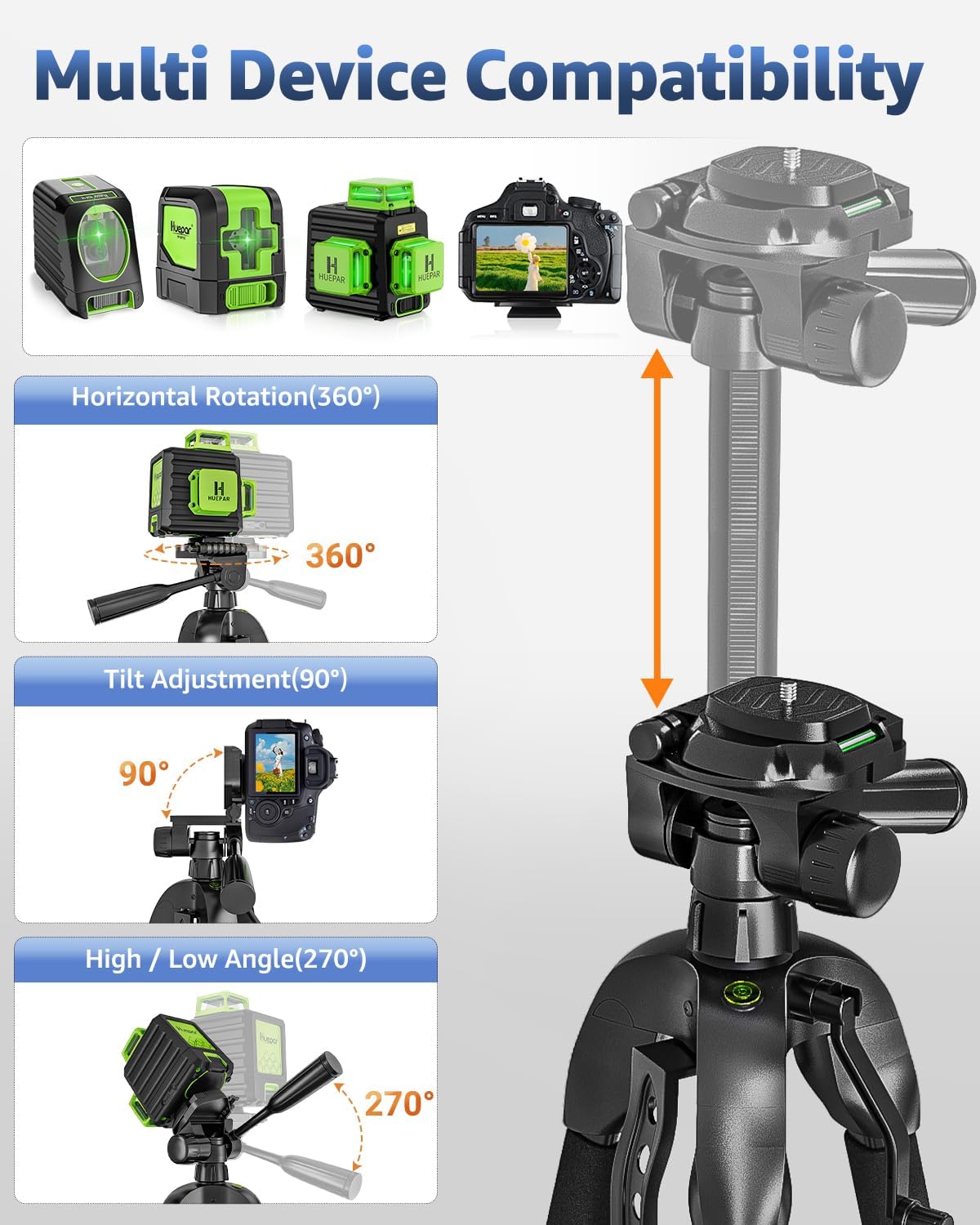
Image: The tripod head is shown with various devices like laser levels and cameras, illustrating its multi-device compatibility and adjustable angles.

Image: A visual guide demonstrating the horizontal rotation, flipping down, flip up, and right-angle flip capabilities of the tripod's pan head.
Maintenance
- Cleaning: Wipe down the tripod with a soft, dry cloth after each use to remove dust and debris. For stubborn dirt, use a slightly damp cloth and mild soap, then dry thoroughly.
- Lubrication: Periodically check moving parts and apply a small amount of silicone-based lubricant if movement becomes stiff. Avoid oil-based lubricants as they can attract dirt.
- Storage: Store the tripod in its provided storage bag in a cool, dry place away from direct sunlight and extreme temperatures.
- Inspection: Regularly inspect all screws, locks, and joints for tightness and wear. Tighten any loose screws and replace worn parts if necessary.
Troubleshooting
If you encounter any issues with your Huepar TPD14 Tripod, please consider the following:
- Instability: Ensure all leg flip-locks are securely closed and the center brace locking circle is engaged. For outdoor use, consider hanging a counterweight from the multi-function hook.
- Stiff Adjustments: Check for any debris in the locking mechanisms. If clean, apply a small amount of silicone lubricant to the moving parts.
- Device Not Level: Verify that the tripod is placed on a flat surface and use the built-in bubble level to make fine adjustments to the pan head.
For further assistance, please contact Huepar customer support.
Specifications
| Feature | Detail |
|---|---|
| Model Name | TPD14 |
| Maximum Height | 146 Centimeters (approx. 56 inches) |
| Minimum Height | 48 Centimeters (approx. 19 inches) |
| Load Capacity | 10 kg (22.05 lbs) |
| Item Weight | 1.16 kg (2.75 lbs) |
| Material | Aluminum, ABS Plastic |
| Thread Mount | 1/4"-20 UNC (convertible to 5/8"-11 UNF with adapter) |
| Pan Head Type | 3-Way Flexible Pan Head |

Image: A visual representation of the Huepar TPD14 Tripod at various heights, detailing its net weight, load-carrying capacity, and pipe diameter material.
Warranty and Support
Huepar products are designed for reliability and efficiency. This product comes with a standard warranty.
- Product Registration: Become a member through product registration to enjoy extended and enhanced product warranty benefits.
- Technical Support: Huepar offers lifetime free technical support for all its products.
- Service: For any issues or inquiries, please contact our support team. Refer to the contact information provided with your product or visit the official Huepar website.

Image: A graphic detailing Huepar's after-sale service support, including warranty periods for different product types, zero service fees, zero shipping fees, and lifetime free technical support.


