
Sencor STM 635
Sencor STM 635 Stand Mixer User Manual
Model: STM 635 | Brand: Sencor
1. Introduction
Thank you for choosing the Sencor STM 635 Stand Mixer. This appliance is designed to simplify your kitchen tasks, offering powerful performance and versatile functionality for mixing, kneading, whisking, blending, and grinding. Please read this manual carefully before first use to ensure safe and optimal operation of your new appliance. Keep this manual for future reference.

Image: The Sencor STM 635 Stand Mixer in green, shown with its main body, stainless steel bowl, and various attachments including the dough hook, flat beater, whisk, blender, and meat grinder.
2. Important Safety Instructions
Always follow basic safety precautions when using electrical appliances to reduce the risk of fire, electric shock, and/or injury to persons, including the following:
- Read all instructions before using the appliance.
- Do not immerse the motor unit in water or other liquids.
- Unplug from outlet when not in use, before putting on or taking off parts, and before cleaning.
- Avoid contact with moving parts. Keep hands, hair, and clothing, as well as spatulas and other utensils, away from moving beaters during operation to prevent injury and/or damage to the mixer.
- The use of attachments not recommended or sold by the manufacturer may cause fire, electric shock, or injury.
- Do not let cord hang over edge of table or counter.
- Do not operate any appliance with a damaged cord or plug or after the appliance malfunctions, or has been dropped or damaged in any manner.
- Close supervision is necessary when any appliance is used by or near children.
- This appliance is intended for household use only.
3. Package Contents
Carefully unpack your Sencor STM 635 Stand Mixer and check that all items are present and in good condition. If any items are missing or damaged, please contact your retailer.
- Sencor STM 635 Motor Unit
- 4.5 Liter Stainless Steel Mixing Bowl
- Dough Hook
- Flat Beater
- Wire Whisk
- Transparent Splash Guard with Filling Hole
- Bowl Storage Lid
- 1.5 Liter Glass Blender Jug (optional attachment)
- Meat Grinder Attachment with various discs (optional attachment)
- Instruction Manual

Image: A collection of accessories for the Sencor STM 635 Stand Mixer, including the dough hook, flat beater, wire whisk, blender jug, and meat grinder components.
4. Setup and Assembly
Before first use, clean all parts that will come into contact with food. Refer to the 'Maintenance and Cleaning' section for details.
4.1 Attaching the Mixing Bowl
- Place the motor unit on a stable, flat, and dry surface.
- Lift the mixer head by pressing the release lever.
- Place the stainless steel mixing bowl into the base, aligning the grooves, and turn it clockwise until it locks securely into place.
- Lower the mixer head until it clicks into position.

Image: The Sencor STM 635 Stand Mixer with the stainless steel mixing bowl and transparent splash guard attached, ready for use.
4.2 Attaching Accessories (Dough Hook, Flat Beater, Whisk)
- Ensure the mixer is unplugged.
- Lift the mixer head.
- Insert the desired accessory (dough hook, flat beater, or whisk) onto the shaft, pushing upwards and turning slightly until it locks into place.
- Lower the mixer head.

Image: The Sencor STM 635 Stand Mixer with the wire whisk attachment installed, demonstrating the planetary mixing action.
4.3 Attaching the Splash Guard
- After attaching the bowl and accessory, place the transparent splash guard over the bowl.
- Ensure the opening in the splash guard is positioned conveniently for adding ingredients.

Image: The Sencor STM 635 Stand Mixer with the transparent splash guard in place over the mixing bowl.
5. Operating Instructions
The Sencor STM 635 features a Smart Power & Energy system with 7 speeds and a pulse function for optimal mixing results.
5.1 Basic Operation (Mixing, Kneading, Whisking)
- Ensure the mixer is properly assembled with the desired accessory and bowl.
- Add ingredients to the mixing bowl. Do not overfill the bowl.
- Plug the power cord into a suitable electrical outlet.
- Turn the speed control knob to the desired setting (1-7). Start with a low speed and gradually increase as needed.
- For quick bursts of power, use the pulse (P) setting.
- When finished, turn the speed control knob to '0' (off) and unplug the appliance.
- Lift the mixer head and remove the accessory and bowl.
5.2 Using the Blender Attachment
The blender attachment is ideal for smoothies, soups, and sauces.
- Ensure the mixer is unplugged.
- Remove the cover from the top drive shaft on the mixer head.
- Place the blender jug onto the drive shaft, aligning the grooves, and turn to lock.
- Add ingredients to the blender jug. Do not exceed the MAX fill line.
- Securely place the lid on the blender jug.
- Plug in the mixer and select a suitable speed (usually higher speeds for blending).
- After use, turn off, unplug, and carefully remove the blender jug.
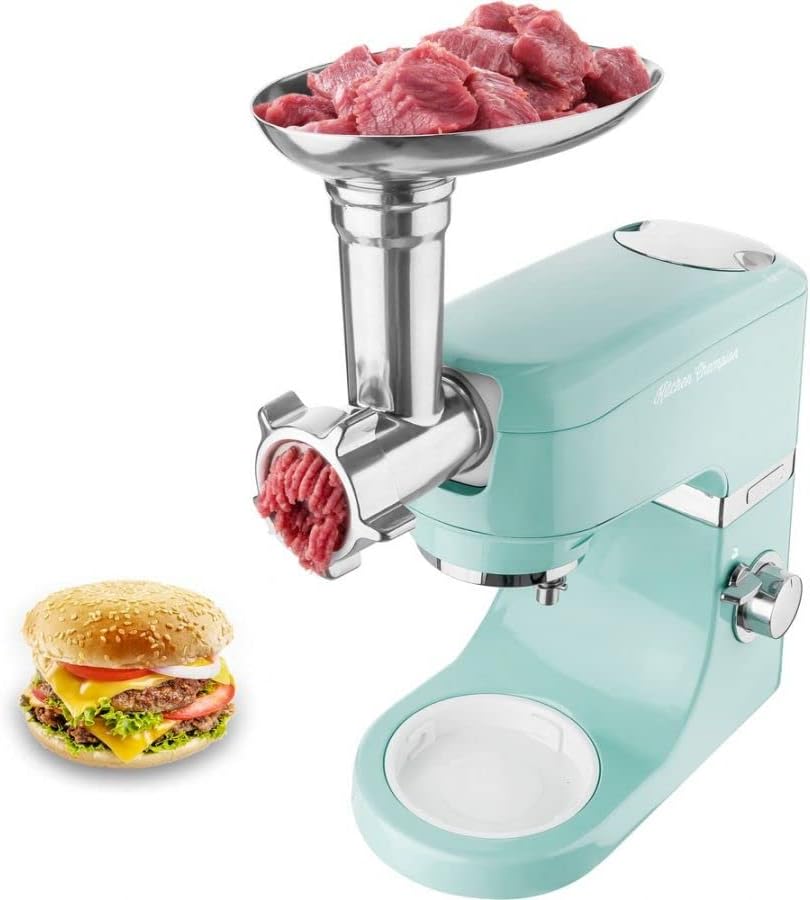
Image: The Sencor STM 635 Stand Mixer with the glass blender jug attached to the top of the mixer head.
5.3 Using the Meat Grinder Attachment
The meat grinder attachment allows you to prepare fresh ground meat for various dishes.
- Ensure the mixer is unplugged.
- Remove the cover from the front drive shaft on the mixer body.
- Assemble the meat grinder components (auger, blade, grinding disc) and insert the assembled unit into the front drive shaft, turning to lock.
- Place a bowl under the grinder outlet to collect the ground meat.
- Cut meat into small pieces that fit into the feed tube.
- Plug in the mixer and select a suitable speed (usually medium to high).
- Feed meat into the tube using the food pusher. Never use your fingers.
- After use, turn off, unplug, and carefully disassemble the meat grinder for cleaning.

Image: The Sencor STM 635 Stand Mixer with the meat grinder attachment installed on the front, showing ground meat being processed and a hamburger patty in the foreground.
6. Maintenance and Cleaning
Proper cleaning and maintenance will extend the life of your Sencor STM 635 Stand Mixer.
- Always unplug the appliance before cleaning.
- Motor Unit: Wipe the exterior of the motor unit with a damp cloth. Never immerse the motor unit in water or other liquids.
- Stainless Steel Bowl: The stainless steel bowl is dishwasher safe or can be washed by hand with warm soapy water.
- Accessories (Dough Hook, Flat Beater, Whisk): These accessories are generally dishwasher safe, but hand washing is recommended to preserve their finish.
- Blender Jug: Disassemble the blender jug and wash all parts with warm soapy water. The glass jug may be dishwasher safe, but check the manufacturer's instructions for specific care.
- Meat Grinder: Disassemble all parts of the meat grinder immediately after use. Wash thoroughly with warm soapy water. Some metal parts may discolor in the dishwasher; hand washing is recommended. Dry all parts completely to prevent rust.
- Splash Guard and Storage Lid: Wash with warm soapy water or place on the top rack of the dishwasher.
- Ensure all parts are completely dry before reassembling or storing.
7. Troubleshooting
If you encounter issues with your Sencor STM 635 Stand Mixer, refer to the table below for common problems and solutions.
| Problem | Possible Cause | Solution |
|---|---|---|
| Mixer does not turn on. | Not plugged in; power outage; mixer head not locked down. | Check power connection; check circuit breaker; ensure mixer head is fully lowered and locked. |
| Accessory not mixing properly. | Accessory not fully attached; too much/too little ingredient. | Ensure accessory is securely locked; adjust ingredient quantity. |
| Motor sounds strained. | Overloaded; mixture too thick; incorrect speed. | Reduce load; add liquid to mixture; increase speed gradually. |
| Attachments get stuck (e.g., dough hook). | Residue buildup; improper attachment. | Ensure thorough cleaning after each use; verify correct attachment procedure. |
8. Specifications
Technical specifications for the Sencor STM 635 Stand Mixer:
| Feature | Specification |
|---|---|
| Model | STM 635 |
| Brand | Sencor |
| Power Input | 1000W |
| Mixing Bowl Capacity | 4.5 Liters (Stainless Steel) |
| Blender Jug Capacity | 1.5 Liters (Glass) |
| Speed Settings | 7 Speeds + Pulse Function |
| Mixing System | Planetary Mixing |
| Dimensions (Product) | 35 x 24.5 x 32.3 cm (approx.) |
| Weight (Product) | 9.7 kg (approx.) |
| Material | Stainless Steel, Plastic |
9. Warranty and Support
Sencor provides a 6-year warranty on the motor of the STM 635 Stand Mixer, ensuring long-term reliability and performance. For other components, standard warranty terms apply as per local regulations.
For technical support, warranty claims, or spare parts, please contact Sencor customer service or your authorized retailer. Keep your proof of purchase for warranty validation.
You can find more information and contact details on the official Sencor website: www.sencor.com
Related documentsSTM 635


Ask a question about this manual
Ask about setup, troubleshooting, compatibility, parts, safety, or missing instructions. Manuals+ will review the question and use this page’s manual context to help answer it.