
1. Introduction
Thank you for purchasing the XPCLEOYZ Spider Moving Head Light. This portable stage light is designed to create dynamic and vibrant lighting effects for various events, including KTV rooms, home parties, DJ sets, clubs, and ballrooms. Featuring 8x3W RGBW LEDs and multiple control modes, it offers versatility and ease of use. Please read this manual thoroughly before operation to ensure proper setup, safe use, and optimal performance.
2. Safety Information
WARNING: To prevent fire or shock hazard, do not expose this appliance to rain or moisture.
- Always connect the unit to a grounded power outlet.
- Ensure the voltage of the power source matches the voltage requirements of the light (240 Volts).
- Do not open the housing. There are no user-serviceable parts inside. Refer all servicing to qualified personnel.
- Avoid direct eye exposure to the light source.
- Ensure proper ventilation around the unit to prevent overheating. Do not block ventilation openings.
- Mount the light securely using appropriate brackets and safety cables.
- Disconnect from power before cleaning or servicing.
- This product is for indoor use only.
3. Package Contents
Verify that all items are present and in good condition upon opening the package:
- XPCLEOYZ Spider Moving Head Light Unit (2-Pack)
- Power Cable
- Mounting Bracket
- User Manual (this document)

Image: Two XPCLEOYZ Spider Moving Head Lights, illustrating their compact design and vibrant RGBW LED output.
4. Product Features
- Multiple Lighting Effects: Provides 8pcs LED and RGBW color jumping, gradual color change, and strobe mode to create unique changing and swaying lighting effects.
- Quick Dual Sweeper Effect: Features 60-degree to 150-degree tilt from smooth Stepper Motors, with each side's 4 LEDs moving independently.
- Multiple Control Modes: Supports DMX 512 signal control, master-slave control, sound activated mode, and auto run mode for versatile operation.
- 4-Button Control Panel: Equipped with a control panel on the bottom for direct control and mode selection.
- Portable Size: Designed for easy installation and transport.

Image: A collage demonstrating the various color outputs and lighting effects achievable with the Spider Moving Head Light.
5. Setup
5.1 Mounting the Light
The Spider Moving Head Light can be mounted in various positions (e.g., truss, ceiling, wall, or placed on a flat surface). Always ensure the mounting surface or structure can support the weight of the fixture(s) and any additional equipment.
- Attach the included mounting bracket to the light using the provided screws.
- Securely fasten the light to your desired mounting point using appropriate clamps or hardware (not included).
- Always use a safety cable (not included) as a secondary attachment to prevent accidental drops.
5.2 Power Connection
Connect the supplied power cable to the "POWER IN" port on the back of the light and then to a suitable grounded power outlet (AC 240V).

Image: A diagram illustrating the dimensions of the light and the location of the DMX In/Out and Power In ports.
6. Operating Modes and Controls
The Spider Moving Head Light offers several control options via its 4-button control panel and DMX 512 input.
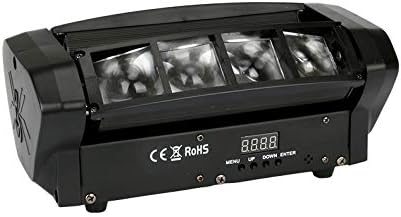
Image: A close-up of the control panel, showing the display and the MENU, UP, DOWN, and ENTER buttons.
6.1 Control Panel Operation
Use the control panel to select from the following operating modes:
- MENU: Press to cycle through the main menu options.
- UP: Increases the value or moves up through menu options.
- DOWN: Decreases the value or moves down through menu options.
- ENTER: Confirms the selected option or value.
6.2 Available Modes
Use the control panel to select from the following operating modes:
- Auto Run Mode: The light will cycle through pre-programmed patterns and color changes automatically.
- Sound Activated Mode: The light will react to ambient sound, changing patterns and colors in sync with music or other audio.
- Master-Slave Mode: Connect multiple Spider Moving Head Lights via DMX cables. Set one unit as "Master" and others as "Slave." The slave units will mirror the master's operation.
- DMX 512 Control Mode: For professional control, connect the light to a DMX controller. This allows for precise control over individual parameters such as pan, tilt, color, strobe, and dimming. Refer to the DMX channel chart (typically provided in a separate DMX manual or online) for specific channel assignments.

Image: Multiple Spider Moving Head Lights creating dynamic red, green, and blue light beams in a dark environment, showcasing their effect.

Image: A four-panel image illustrating various light patterns and color combinations projected onto a surface by the Spider Moving Head Light.
7. Maintenance
Regular maintenance ensures the longevity and optimal performance of your Spider Moving Head Light.
- Cleaning: Periodically clean the exterior of the light with a soft, dry cloth. For lenses, use a soft cloth and a non-abrasive cleaner designed for optics. Ensure the unit is unplugged before cleaning.
- Ventilation: Keep ventilation openings clear of dust and debris.
- Inspection: Regularly inspect power cables and DMX cables for any signs of damage. Replace damaged cables immediately.
- Storage: When not in use for extended periods, store the light in a dry, dust-free environment.
8. Troubleshooting
| Problem | Possible Cause | Solution |
|---|---|---|
| Light does not power on. | No power supply; faulty cable; unit malfunction. | Check power connection and outlet. Try a different power cable. If problem persists, contact support. |
| No light output. | Mode not selected; DMX signal issue; LED failure. | Ensure a mode (Auto, Sound, DMX) is selected. Check DMX connections and controller settings. |
| Light not responding to DMX. | Incorrect DMX address; faulty DMX cable; DMX controller issue. | Verify DMX address matches controller. Check DMX cable integrity. Test with a different DMX controller if possible. |
| Movement is erratic or stuck. | Obstruction; internal motor issue. | Ensure no physical obstructions. Power cycle the unit. If problem persists, contact support. |
9. Specifications
| Parameter | Value |
|---|---|
| Brand | XPCLEOYZ |
| Model | B07C995YY7 |
| Color | 2Pack (Black) |
| Light Source Type | Light Emitting Diode (LED) |
| Number of Light Sources | 8 |
| Light Source Wattage | 3 Watts per LED (Total 24 Watts) |
| Voltage | 240 Volts |
| Amperage | 0.17 Amps |
| Material | Metal, Acrylonitrile Butadiene Styrene (ABS) |
| Product Dimensions (L x W x H) | 5.9" x 5.1" x 11" (14.99 cm x 12.95 cm x 27.94 cm) |
| Item Weight | 9.58 pounds (4.35 kg) |
| Control Modes | DMX 512, Master-Slave, Sound Activated, Auto Run |
| Tilt Angle | 60 to 150 degrees |
| Mounting Type | Bracket Mount |
10. Warranty and Support
Your XPCLEOYZ Spider Moving Head Light comes with a carefree 12-month warranty from the date of purchase. This warranty covers manufacturing defects and ensures friendly customer service.
For technical support, warranty claims, or any questions regarding your product, please contact XPCLEOYZ customer service through the retailer's platform or visit the official XPCLEOYZ store page on Amazon:
Visit the XPCLEOYZ Store on Amazon
Please have your purchase receipt and product model number (B07C995YY7) ready when contacting support.