
1. Introduction
This manual provides essential information for the safe and effective use of the Walfront MC-901 High Voltage Pulse Inverter Module. This module is designed to generate high voltage pulse current based on the coil principle, suitable for electrical experiments and scientific projects. Please read this manual thoroughly before operation.

Figure 1: Walfront MC-901 High Voltage Pulse Inverter Module. The module is a black cylindrical component with red and green wires for input, and red wires for high voltage output.
2. Safety Information
WARNING: This product generates extremely high voltage. Improper use can result in serious injury or death. Always exercise extreme caution and follow all safety guidelines.
- High Voltage No-Load Avoidance: The high voltage module should avoid operation without a load. Ensure the high voltage output wires are properly spaced for discharge before applying power.
- Discharge Distance: The high voltage wire discharge distance is proportional to the input battery voltage and capacity. Test the arc distance from short to long. Do not exceed the maximum arc distance, as this can damage the module due to unreleased high-pressure energy.
- Heat Management: The module generates internal heat during operation. It is not designed for continuous, long-term use. Allow adequate cooling time between operations.
- Insulation: Ensure all connections, especially high voltage outputs, are properly insulated to prevent accidental contact.
- Supervision: This module is intended for educational and experimental purposes. Adult supervision is required for minors.
- Polarity: Pay close attention to input polarity. Incorrect polarity can damage the module. (Note: Some users have reported confusion regarding polarity; typically, red is positive and green is negative for DC input, but always verify if possible or test carefully with low voltage first).
3. Product Overview
3.1 Components
The Walfront MC-901 module consists of a cylindrical housing with input and output wires.
- Input Wires: Typically red and green wires for power input.
- Output Wires: Two red wires for high voltage pulse output.

Figure 2: The MC-901 module showing the input wires (green and red, twisted) and output wires (two red, coiled).
3.2 Features
- Generates high voltage pulse current.
- Compact design (88.5 x 26mm).
- Simple circuit design based on the coil principle.
- Suitable for electrical experiments and educational purposes.
4. Specifications
| Parameter | Value |
|---|---|
| Module Type | MC-901 |
| Input Voltage | 3.7V - 7.4V DC |
| Input Current | 0.5A - 2.5A |
| Input Wire Length | Approximately 9 cm |
| High Voltage Type | Pulse DC Type |
| Output Voltage | 800KV - 1000KV (0.8MV - 1MV) |
| Output Current | 0.5A - 1A |
| Output Wire Length | Approximately 15 cm |
| Bipolar Discharge Distance | 0.5 cm - 1.5 cm |
| Dimensions (L x D) | 88.5 mm x 26 mm (3.48 x 1.02 inches) |
| Weight | Approximately 60 grams (2.11 ounces) |
5. Setup
Before connecting, ensure you have a suitable power source within the specified input voltage range (3.7V-7.4V DC) and capable of supplying the required current (0.5A-2.5A).
- Identify Input Wires: The module has two input wires, typically one red and one green, twisted together. The red wire is generally positive (+), and the green wire is negative (-). Confirm polarity if possible with a multimeter before connecting.
- Connect Power Source: Connect the positive terminal of your power source to the red input wire and the negative terminal to the green input wire. Ensure connections are secure and insulated.
- Prepare Output Wires: The two red wires are the high voltage output. Before applying power, adjust the distance between these two output wires to the desired discharge gap (0.5 cm to 1.5 cm). Ensure they are not touching and are positioned safely away from any conductive materials or personnel.
- Mounting: Secure the module in a stable, non-conductive enclosure or mounting to prevent accidental contact and ensure proper heat dissipation.
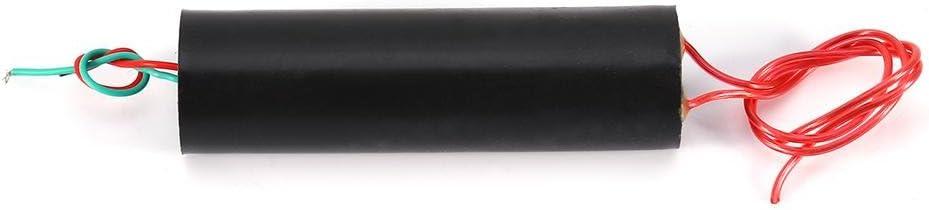
Figure 3: A view of the module showing the input wires (green and red) and the output wires (red). Proper connection and spacing are crucial for safe operation.
6. Operating Instructions
Once the module is set up and all safety precautions are in place, you can proceed with operation.
- Verify Connections: Double-check all input and output connections for security and proper insulation.
- Apply Power: Carefully apply power to the input terminals. The module will immediately begin generating high voltage pulses across the output wires.
- Observe Discharge: An arc should form between the high voltage output wires if the distance is appropriate. Adjust the distance as needed, always starting with a shorter gap and gradually increasing.
- Limited Operation Time: Due to internal heat generation, avoid operating the module for extended periods. Short bursts of operation are recommended, followed by cooling periods.
- Power Off: To cease operation, disconnect the input power source.
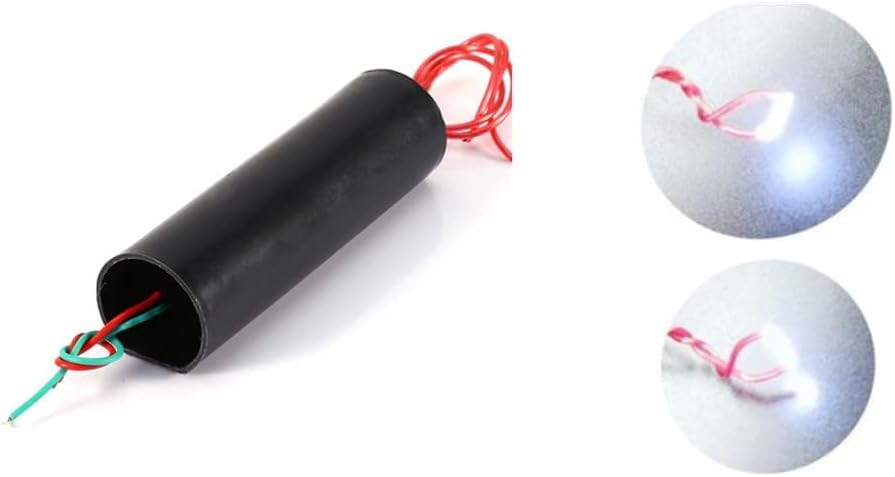
Figure 4: The module in operation, demonstrating the high voltage arc between the output terminals. This image shows the bright discharge created by the module.
7. Maintenance
The Walfront MC-901 module is a sealed unit and requires minimal maintenance. However, proper handling and storage are essential for its longevity.
- Cleaning: Keep the module clean and free from dust and debris. Use a dry, soft cloth for cleaning. Do not use liquids or solvents.
- Storage: Store the module in a cool, dry place away from direct sunlight and moisture.
- Inspection: Periodically inspect the input and output wires for any signs of damage, fraying, or compromised insulation. Replace or repair damaged wiring immediately.
- Avoid Physical Shock: Protect the module from drops or impacts, which can damage internal components.
8. Troubleshooting
If you encounter issues with your Walfront MC-901 module, consider the following troubleshooting steps:
- No Output Arc:
- Check Power Input: Ensure the input voltage is within the 3.7V-7.4V range and the power source can supply sufficient current (0.5A-2.5A).
- Verify Polarity: Confirm that the input wires are connected with correct polarity (red to positive, green to negative).
- Output Wire Spacing: Adjust the distance between the high voltage output wires. If the gap is too wide, an arc may not form. Start with a smaller gap (e.g., 0.5 cm) and gradually increase.
- Damaged Wires: Inspect input and output wires for breaks or poor connections.
- Module Overheating:
- Reduce Operation Time: The module is not designed for continuous operation. Limit usage to short bursts and allow it to cool down.
- Check Input Voltage/Current: Operating outside the specified input range can cause excessive heat.
- Weak or Inconsistent Arc:
- Power Source Capacity: Ensure your power source has enough capacity (mAh) and can deliver the required current consistently.
- Battery Charge: If using batteries, ensure they are fully charged.
If problems persist after following these steps, contact Walfront customer support for further assistance.
9. Warranty and Support
9.1 Warranty Information
Specific warranty details for the Walfront MC-901 module are not provided in this manual. Please refer to your purchase documentation or contact the retailer/manufacturer directly for warranty terms and conditions.
9.2 Customer Support
For technical support, inquiries, or assistance with your Walfront product, please visit the official Walfront store or contact their customer service department. You can find more information at the Walfront Amazon Store.