
Bestron AVC850A
Bestron Cordless Handheld Vacuum Cleaner User Manual
Model: AVC850A
Introduction
Thank you for choosing the Bestron Cordless Handheld Vacuum Cleaner. This manual provides essential information for the safe and efficient operation, maintenance, and troubleshooting of your new appliance. Please read it thoroughly before first use and keep it for future reference.

Figure 1: Bestron Cordless Handheld Vacuum Cleaner (Model AVC850A) fully assembled with the extension rod and floor nozzle.
Safety Instructions
- Always ensure the vacuum cleaner is switched off and unplugged before cleaning or performing maintenance.
- Do not use the appliance to vacuum water or other liquids, hot ashes, or sharp objects.
- Keep hair, loose clothing, fingers, and all parts of the body away from openings and moving parts.
- Do not operate the vacuum cleaner if it has been dropped, damaged, left outdoors, or dropped into water.
- This appliance is intended for indoor household use only.
- Use only manufacturer-recommended attachments.
Product Components
The Bestron Cordless Handheld Vacuum Cleaner comes with several components for versatile cleaning:
- Main Unit (Handheld Vacuum)
- Telescopic Extension Rod
- Floor Nozzle with 180° Rotatable Turbo Brush
- Wall Mount with Accessory Storage
- Power Adapter
- Crevice Tool
- Brush Attachment
- Other specialized accessories (total of 5 accessories included)
Setup
Assembly
- Charging the Battery: Before first use, fully charge the vacuum cleaner. Connect the power adapter to the charging port on the main unit and plug it into a wall outlet. The charging indicator light will illuminate.
- Attaching the Extension Rod: Align the extension rod with the main unit's suction inlet and push firmly until it clicks into place.
- Attaching the Floor Nozzle: Connect the floor nozzle to the end of the extension rod, ensuring it clicks securely.
- Using as Handheld: For handheld use, attach desired accessories (crevice tool, brush attachment) directly to the main unit's suction inlet.
Wall Mount Installation
The included wall mount provides convenient storage and accessory organization.
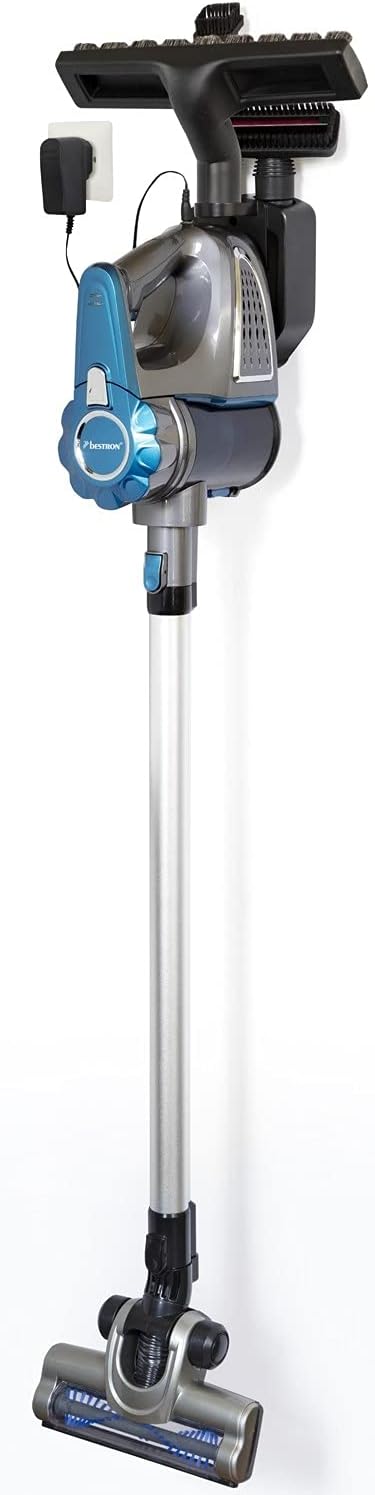
Figure 2: The vacuum cleaner stored on its wall mount, which also holds accessories and provides a charging point.
- Choose a suitable location near a power outlet.
- Mark the drilling points for the wall mount.
- Drill holes and secure the wall mount using appropriate screws and wall plugs.
- Hang the vacuum cleaner on the mount and store accessories in the designated slots.
Operating Instructions
Powering On/Off and Suction Levels
- Press the power button to turn the vacuum cleaner on.
- The vacuum features 2 suction levels. Press the suction level button to switch between standard and maximum suction power.
- Press the power button again to turn the vacuum cleaner off.
Using the Vacuum Cleaner
The Bestron vacuum cleaner can be used in two primary configurations:
1. With Extension Rod and Floor Nozzle (for floors, walls, ceilings)

Figure 3: Cleaning under furniture using the vacuum cleaner with the extension rod and floor nozzle.
- Ensure the extension rod and floor nozzle are securely attached.
- Adjust the telescopic tube (up to 67cm) for comfortable reach.
- The 180° rotatable turbo nozzle allows for easy maneuverability around obstacles and into tight spaces.
2. As a Handheld Vacuum (for furniture, car interiors, tight spots)

Figure 4: Using the vacuum cleaner in handheld mode to clean upholstery.
- Detach the extension rod and floor nozzle.
- Attach the desired accessory (crevice tool for narrow gaps, brush attachment for upholstery or delicate surfaces) directly to the main unit.
- The lightweight design and practical handle make it easy to clean hard-to-reach areas.
Maintenance
Emptying the Dust Container
The dust container has a capacity of 0.6 liters and should be emptied regularly to maintain optimal suction performance.

Figure 5: Detaching and emptying the dust container into a waste bin.
- Ensure the vacuum cleaner is switched off.
- Locate the dust container release button/latch on the main unit.
- Press the button and carefully detach the dust container.
- Hold the dust container over a trash bin and open its bottom flap to release the collected debris.
- Close the flap and reattach the dust container to the main unit, ensuring it clicks securely.
Cleaning the Filter
The filter is removable and washable. Regular cleaning is crucial for maintaining suction power and appliance longevity.
- After emptying the dust container, remove the filter assembly.
- Separate the filter components.
- Rinse the filter under cold running water until the water runs clear. Do not use detergents or hot water.
- Allow the filter to air dry completely for at least 24 hours before reassembling and placing it back into the vacuum cleaner. Do not use the vacuum cleaner with a wet filter.
General Cleaning
- Wipe the exterior of the vacuum cleaner with a soft, damp cloth. Do not use abrasive cleaners or solvents.
- Periodically check the floor nozzle for tangled hair or debris and remove as necessary.
Troubleshooting
| Problem | Possible Cause | Solution |
|---|---|---|
| Vacuum cleaner does not turn on. | Battery is not charged. | Charge the battery fully. |
| Power adapter not connected properly. | Ensure power adapter is securely plugged into the vacuum and wall outlet. | |
| Reduced suction power. | Dust container is full. | Empty the dust container. |
| Filter is dirty or clogged. | Clean or replace the filter. Ensure it is completely dry before reinserting. | |
| Nozzle or hose is blocked. | Check for and remove any blockages in the floor nozzle, extension rod, or main unit's suction inlet. | |
| Unusual noise during operation. | Blockage in the brush roll or air path. | Turn off and unplug the vacuum. Inspect the brush roll and air passages for obstructions and remove them. |
If the problem persists after attempting these solutions, please contact customer support.
Specifications
| Brand | Bestron |
| Model Name | AVC850A |
| Type | Cordless Handheld Vacuum Cleaner with Rod |
| Color | Blue/ Grey |
| Power | 120 Watts |
| Capacity | 0.6 Liters (Dust Container) |
| Filter Type | Cartridge, Washable |
| Battery Type | Lithium Ion (Included, Replaceable) |
| Runtime | Up to 30 minutes |
| Noise Level | 75 dB |
| Product Dimensions (L x W x H) | 4.33" x 8.07" x 12.01" (Main Unit) |
| Item Weight | 2.65 pounds |
| Telescopic Tube Length | Adjustable (up to 67cm) |
| Number of Suction Levels | 2 |
| Included Components | Vacuum cleaner, wall holder, 5 accessories, power adapter |
Warranty and Support
Bestron products are manufactured to high quality standards. In the unlikely event of a defect, please refer to your purchase receipt for warranty terms and conditions.
Spare Part Availability: EU spare parts are available for a duration of 5 years from the date of purchase.
For technical support, service, or questions regarding your Bestron Cordless Handheld Vacuum Cleaner, please contact Bestron customer service through their official website or the retailer where the product was purchased.
Related documentsAVC850A

Ask a question about this manual
Ask about setup, troubleshooting, compatibility, parts, safety, or missing instructions. Manuals+ will review the question and use this page’s manual context to help answer it.