1. Introduction
This manual provides comprehensive instructions for the Hononjo Universal Air Conditioner Remote Control, model 43219-33380. This remote is designed to directly control the majority of Midea brand air conditioner models without complex setup. It includes essential functions such as timing, electrical heating, swing, and fan control.

Figure 1.1: Hononjo Universal Air Conditioner Remote Control. This image displays the remote's design, including its display screen and button layout.
The remote features luminous buttons for easy operation in low-light conditions and is designed for comfortable handling. It is a direct replacement for many original Midea A/C remotes.
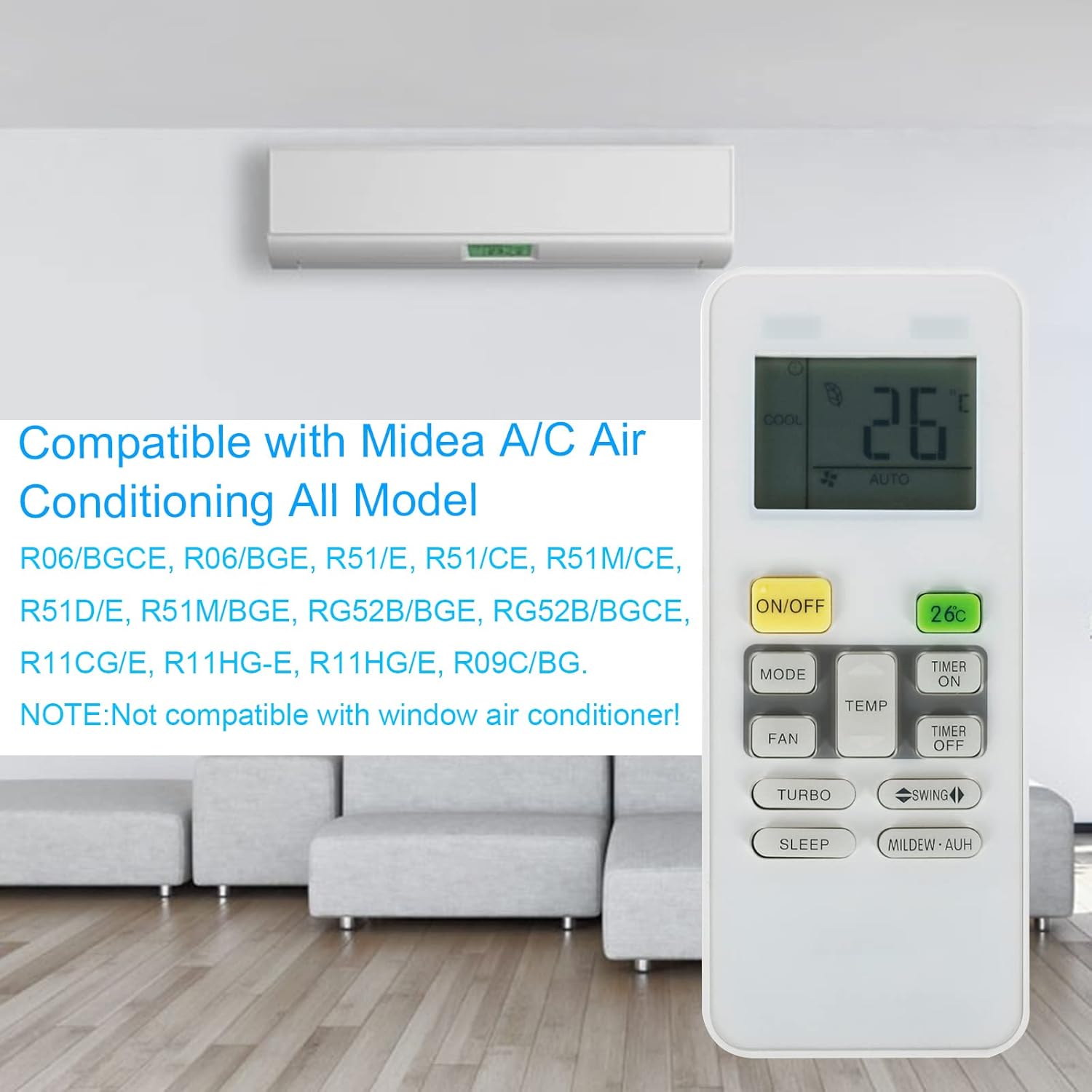
Figure 1.2: Compatible Midea A/C Models. This image lists the specific Midea air conditioner models that are compatible with this universal remote control.
2. Setup
2.1 Battery Installation
This remote control requires 9 AAA batteries for operation.
- Open the battery compartment cover on the back of the remote control.
- Insert 9 AAA batteries, ensuring correct polarity (+ and -).
- Close the battery compartment cover securely.
2.2 One-Button Direct Search (If initial setup fails)
While this remote is designed to work with most Midea A/C units without setup, if it does not control your unit directly, use the "One-button direct search" method to find the correct code.
- Power on your A/C unit manually and point the remote at it.
- Press the "Power" button continually on the remote.
- Release the "Power" button when you hear a "DI" sound from the A/C unit and it turns on or off automatically.
- Verify that other functions (e.g., temperature, mode) work correctly. If so, the setup is complete.

Figure 2.1: One-Button Direct Search Instructions. This image visually guides the user through the process of setting up the remote using the one-button direct search method.
2.3 Resume Factory Settings
To restore the remote control to its factory default settings:
- Hold down the "Fan" button for approximately 10 seconds.
- Most of the A/C unit's state will be restored to the factory settings when the screen displays full brightness.
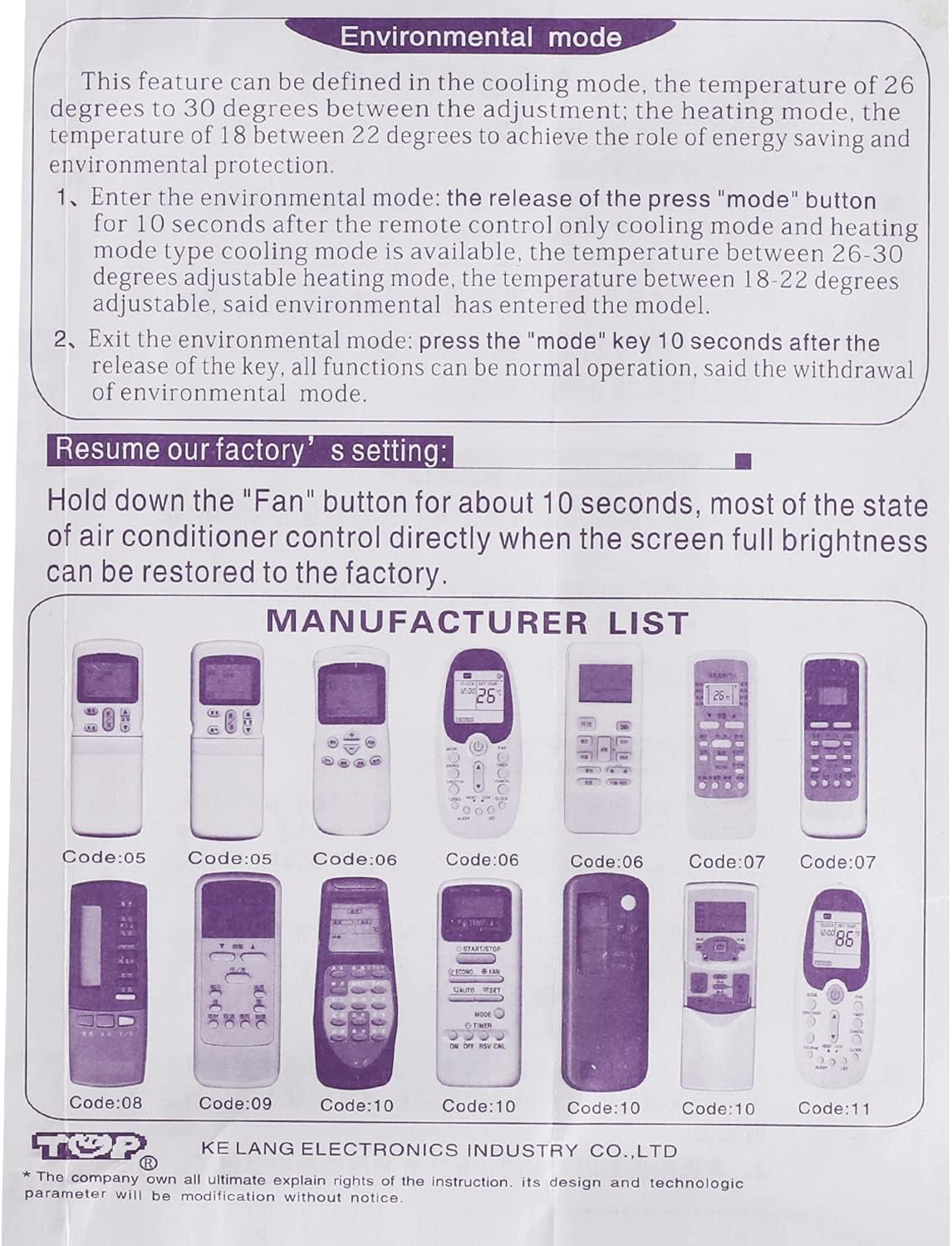
Figure 2.2: Original Manual Excerpt - Environmental Mode and Factory Reset. This image provides a direct scan of the relevant sections from the product's original instruction manual.
3. Operating Instructions
3.1 Basic Functions
- ON/OFF: Powers the A/C unit on or off.
- MODE: Cycles through operating modes (e.g., Cool, Heat, Fan, Dry, Auto).
- TEMP ▲/▼: Adjusts the temperature setting.
- FAN: Adjusts fan speed.
- TIMER ON/OFF: Sets a timer for the unit to turn on or off.
- TURBO: Activates rapid cooling/heating.
- SWING: Controls the louver swing direction.
- SLEEP: Activates sleep mode for quiet operation and energy saving.
- MILDEW-AUH: Activates mildew prevention function (specific to certain models).
3.2 Original Timing Operation
The remote supports original timing functions.
- Timing - ON:
When the remote is off, press the "Timing On" button for about 4 seconds. The LCD will display the icon of "1H" which is flashing. Press "TEMP ▲" or "TEMP ▼" to adjust the timing time. Then press "Timing On" button again to confirm and exit.
- Timing - OFF:
When the remote is on, press the "Timing Off" button for about 4 seconds. The LCD will display the icon of "1H" which is flashing. Press "TEMP ▲" or "TEMP ▼" to adjust the timing time. Then press "Timing Off" button again to confirm and exit.
Note:
- This product adopts original timing function. Please switch the remote to on state to set the time if your product cannot work at off stage.
- The timing calculation method is the same as the original remote control.

Figure 3.1: Original Manual Excerpt - Introduction and Timing Operation. This image provides a direct scan of the relevant sections from the product's original instruction manual.
3.3 Environmental Mode
This feature allows for energy-saving operation within specific temperature ranges.
- Entering Environmental Mode:
Press and hold the "MODE" button for 10 seconds. In this mode, only cooling (26-30 degrees Celsius) and heating (18-22 degrees Celsius) modes are available, adjusted for energy saving.
- Exiting Environmental Mode:
Press and hold the "MODE" button for 10 seconds again. All functions will return to normal operation.

Figure 3.2: Environmental Mode Operation. This image illustrates the steps to activate and deactivate the environmental mode for energy-efficient operation.
4. Maintenance
To ensure the longevity and optimal performance of your remote control, follow these maintenance guidelines:
- Cleaning: Wipe the remote with a soft, dry cloth. Do not use liquid cleaners or abrasive materials.
- Battery Replacement: Replace all batteries when the remote's performance degrades or the display becomes dim. Do not mix old and new batteries, or different types of batteries.
- Storage: If the remote will not be used for an extended period, remove the batteries to prevent leakage and corrosion. Store in a cool, dry place.
- Avoid Exposure: Keep the remote away from direct sunlight, extreme temperatures, and high humidity.
5. Troubleshooting
- Remote not responding to A/C unit:
- Ensure the remote has fresh batteries and they are inserted with correct polarity.
- Point the remote directly at the A/C unit's receiver. Ensure there are no obstructions.
- If the remote does not work directly, perform the "One-Button Direct Search" as described in Section 2.2.
- Verify that your A/C model is listed as compatible (refer to Figure 1.2).
- Display shows only Celsius:
- This remote control may display temperature only in Celsius. There is no known method to switch to Fahrenheit on this specific model.
- Buttons not working or sticky:
- Check for dirt or debris around the buttons. Clean the remote as per maintenance instructions.
- Replace batteries.
6. Specifications
| Product Dimensions | 3.94 x 0.47 x 1.97 inches |
| Item Weight | 2.4 ounces |
| Model Number | 43219-33380 |
| Batteries Required | 9 AAA batteries (not included) |
| Brand | Hononjo |
| Color | White |
| Special Feature | Ergonomic, Universal Air Conditioner Remote Control, Luminous Buttons |
| Max Number of Supported Devices | 1 |
| Compatible Devices | Air Conditioner (Midea models R06/BGCE, R06/BGE, R51/E, R51/CE, R51M/CE, R51D/E, R51M/BGE, RG52B/BGE, RG52B/BGCE, R11CG/E, R11HG-E, R11HG/E, R09C/BG) |

Figure 6.1: Key Features of the Remote Control. This image illustrates the design and functional advantages of the remote, such as its lightweight build and infrared technology.
7. Warranty Information
No specific warranty information is provided with this product in the available documentation. For details regarding warranty coverage, please refer to the product packaging or contact the manufacturer directly.
8. Customer Support
For further assistance, technical support, or inquiries regarding your Hononjo Universal Air Conditioner Remote Control, please contact the manufacturer or your point of purchase.
You may also visit the Hononjo Store on Amazon for more information: Hononjo Store


