Introduction
This manual provides essential instructions for the safe and efficient operation of your Mainstay MG10BFK-B 4-Slice Toaster Oven. Please read it thoroughly before first use and retain it for future reference. Proper use and maintenance will ensure optimal performance and longevity of your appliance.

Image Description: The Mainstay MG10BFK-B 4-Slice Toaster Oven is shown on a light-colored kitchen counter with a white tiled backsplash. The black toaster oven is compact and features a glass door.
Important Safety Instructions
When using electrical appliances, basic safety precautions should always be followed to reduce the risk of fire, electric shock, and injury to persons, including the following:
- Read all instructions before operating the toaster oven.
- Do not touch hot surfaces. Use handles or knobs.
- Close supervision is necessary when any appliance is used by or near children.
- To protect against electrical shock, do not immerse cord, plug, or appliance in water or other liquid.
- Unplug from outlet when not in use and before cleaning. Allow to cool before putting on or taking off parts.
- Do not operate any appliance with a damaged cord or plug, or after the appliance malfunctions or has been damaged in any manner.
- The use of accessory attachments not recommended by the appliance manufacturer may cause injuries.
- Do not use outdoors.
- Do not let cord hang over edge of table or counter, or touch hot surfaces.
- Do not place on or near a hot gas or electric burner, or in a heated oven.
- Extreme caution must be used when moving an appliance containing hot oil or other hot liquids.
- To disconnect, turn any control to 'OFF', then remove plug from wall outlet.
- Do not use appliance for other than intended use.
- Oversize foods or metal utensils must not be inserted in a toaster oven as they may create a fire or risk of electric shock.
- A fire may occur if the toaster oven is covered or touching flammable material, including curtains, draperies, walls, and the like, when in operation.
- Do not place any materials other than oven-safe accessories in the oven when not in use.
- Do not place paper, cardboard, plastic, or other flammable materials in the oven.
- Do not clean with metal scouring pads. Pieces can break off the pad and touch electrical parts, creating a risk of electric shock.
- Do not store any materials, other than manufacturer's recommended accessories, in this oven when not in use.
- Always wear protective, insulated oven mitts when inserting or removing items from the hot oven.
Parts and Features
Familiarize yourself with the components of your Mainstay MG10BFK-B 4-Slice Toaster Oven.

Image Description: Front view of the Mainstay MG10BFK-B 4-Slice Toaster Oven. It features a transparent glass door, an interior baking rack, and a baking pan. On the right side, there are two black rotary control knobs: the top one for 'Temp/Mode' (with settings for Broil, Bake, Toast/450°F, and temperatures from 150°F to 450°F) and the bottom one for 'Time (Min)' (with settings from 0 to 30 minutes, plus 'Stay On', 'Light', 'Med', 'Dark' for toast). A red power indicator light is located above the top knob.
- Temperature/Mode Control Knob: Used to select the desired cooking function (Broil, Bake, Toast) and set the temperature.
- Time Control Knob: Used to set the cooking duration up to 30 minutes. It also includes a 'Stay On' option for continuous operation and toast shade settings (Light, Med, Dark).
- Power Indicator Light: Illuminates when the toaster oven is operating.
- Glass Door: Provides visibility of food during cooking and helps retain heat.
- Removable Baking Rack: Designed to hold food items for toasting, baking, or broiling.
- Removable Baking Pan: Used for baking, broiling, and collecting drips.
- Crumb Tray (not visible in image but standard): Located at the bottom, it collects crumbs and food particles for easy cleaning.

Image Description: The Mainstay MG10BFK-B 4-Slice Toaster Oven is shown with its glass door open. The interior is visible, along with the heating elements. Next to the oven, the removable baking rack and baking pan are displayed separately, highlighting the included accessories.
Setup and First Use
Follow these steps to prepare your toaster oven for its first use:
- Unpack: Carefully remove all packaging materials, including any protective films or inserts, from the toaster oven and its accessories.
- Placement: Place the toaster oven on a stable, level, and heat-resistant surface. Ensure there is adequate space (at least 4-6 inches) on all sides and above the unit for proper ventilation. Do not place it directly against a wall or under cabinets.
- Initial Cleaning: Wash the baking rack and baking pan in warm, soapy water. Rinse thoroughly and dry completely. Wipe the interior and exterior surfaces of the oven with a damp cloth. Do not use abrasive cleaners.
- First Burn-Off: Before cooking food, operate the empty oven for approximately 10-15 minutes at 450°F (230°C) on the 'Bake' setting. This process helps to burn off any manufacturing residues and odors. A slight odor or small amount of smoke is normal during this initial operation. Ensure the area is well-ventilated.
- Cool Down: Allow the unit to cool completely before its first use with food.
Operating Instructions
General Operation
- Prepare Food: Place your food item on the baking rack or in the baking pan.
- Close Door: Ensure the glass door is fully closed.
- Select Function and Temperature: Turn the 'Temp/Mode' knob to the desired cooking function (Toast, Bake, Broil) and set the appropriate temperature.
- Set Time: Turn the 'Time (Min)' knob to the desired cooking duration. The power indicator light will illuminate, indicating the oven is operating.
- Automatic Shut-off: When the set time expires, the oven will automatically turn off, and a bell may sound.
- Manual Shut-off: To stop cooking manually before the timer expires, turn the 'Time (Min)' knob to the 'OFF' position.
Toasting
- Place up to four slices of bread directly on the baking rack.
- Turn the 'Temp/Mode' knob to 'Toast/450°F'.
- Turn the 'Time (Min)' knob to the desired toast shade (Light, Med, Dark). The oven will automatically turn off when toasting is complete.
Baking
- Place food in the baking pan or an oven-safe dish on the baking rack.
- Turn the 'Temp/Mode' knob to 'Bake' and select the desired temperature (e.g., 250°F - 450°F).
- Turn the 'Time (Min)' knob to the desired baking time. For continuous baking, turn the knob to 'Stay On' and monitor food closely to prevent overcooking.
Broiling
- Place food in the baking pan. For best results, position the baking rack closer to the top heating element.
- Turn the 'Temp/Mode' knob to 'Broil'.
- Turn the 'Time (Min)' knob to the desired broiling time. Broiling often requires shorter cooking times and close monitoring to prevent burning.
Maintenance and Cleaning
Regular cleaning will help maintain the performance and appearance of your toaster oven.
- Unplug and Cool: Always unplug the toaster oven from the electrical outlet and allow it to cool completely before cleaning.
- Clean Accessories: Remove the baking rack and baking pan. Wash them in warm, soapy water. Rinse thoroughly and dry completely before returning them to the oven.
- Clean Interior: Wipe the interior walls with a damp cloth and a mild, non-abrasive detergent. Avoid using harsh chemicals or abrasive cleaning tools that could damage the interior finish.
- Clean Exterior: Clean the exterior surfaces with a damp cloth. Do not immerse the toaster oven in water or any other liquid.
- Crumb Tray: Regularly remove and clean the crumb tray (located at the bottom of the oven) to prevent the buildup of crumbs and grease, which can be a fire hazard.
Troubleshooting
If you encounter any issues with your toaster oven, refer to the following table for common problems and solutions.
| Problem | Solution |
|---|---|
| Oven does not turn on. | Ensure the unit is securely plugged into a working electrical outlet. Verify that the 'Time (Min)' knob is set to a cooking duration or 'Stay On' and not 'OFF'. |
| Food is not cooking evenly. | Preheat the oven for a few minutes before placing food inside. Ensure food is placed centrally on the baking rack. For larger items, rotate food halfway through cooking if necessary. |
| Excessive smoke or unusual odor during operation. | This may be due to food residue or grease buildup on the heating elements or interior surfaces. Unplug the oven, allow it to cool, and clean the interior and accessories thoroughly. If the issue persists after cleaning, discontinue use and contact customer support. |
| Toast is too light or too dark. | Adjust the 'Time (Min)' knob to a lighter or darker setting for subsequent toasting cycles. Toasting results can vary based on bread type and freshness. |
Specifications
- Model: MG10BFK-B
- Brand: Mainstay
- Power: 1000 Watts
- Capacity: 4-slice / Approximately 4 Quarts
- Functions: Toast, Bake, Broil
- Dimensions (W x D x H): 39.37 cm x 22.86 cm x 30.48 cm (15.5 in x 9 in x 12 in)
- Power Source: Electric
- Color: Black
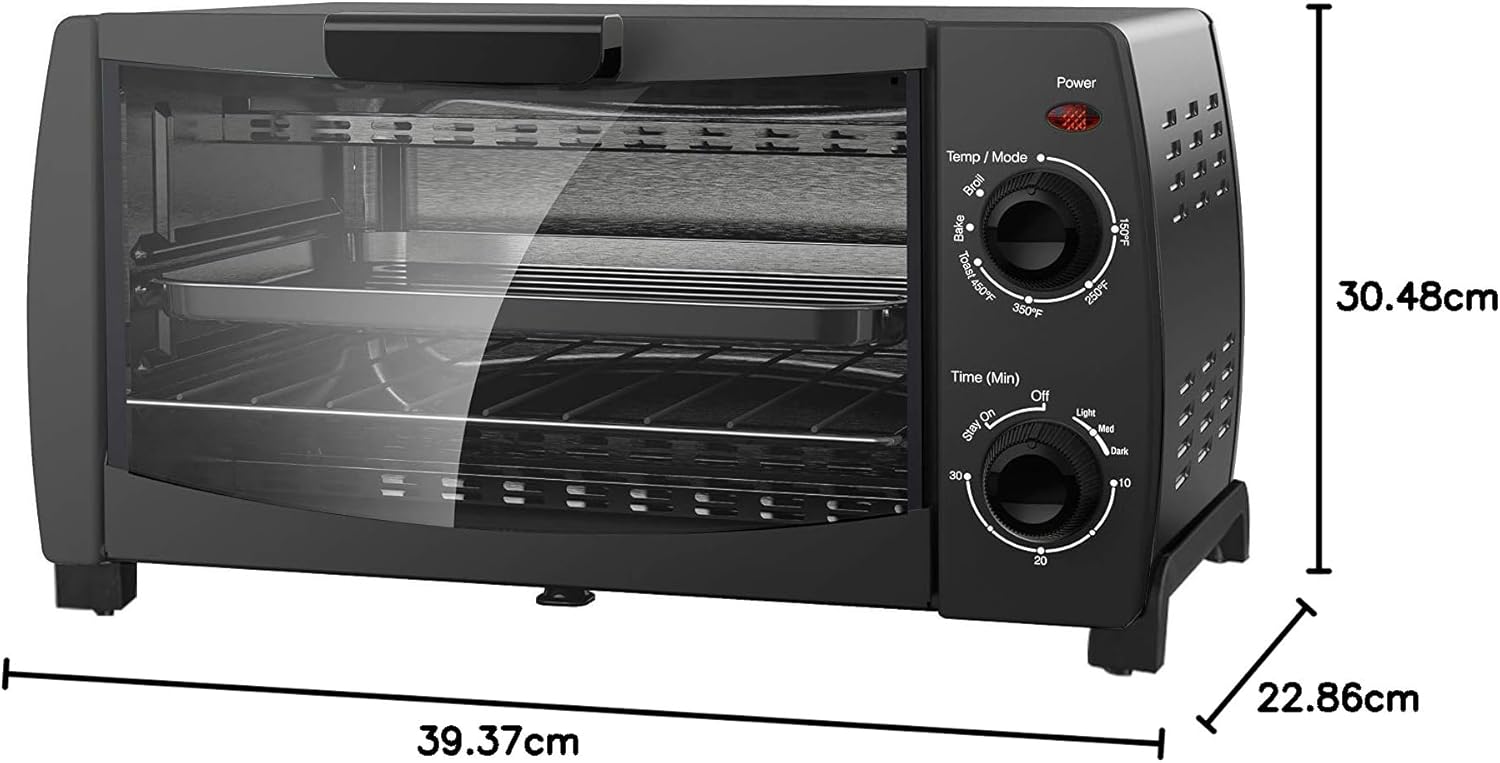
Image Description: A diagram showing the dimensions of the Mainstay MG10BFK-B 4-Slice Toaster Oven. The width is indicated as 39.37 cm, the depth as 22.86 cm, and the height as 30.48 cm.
Warranty and Support
For detailed warranty information, please refer to the warranty card included with your original purchase. If you require customer support, have questions about your product, or need assistance with troubleshooting beyond what is provided in this manual, please contact Mainstay customer service. Keep your purchase receipt as proof of purchase for any warranty claims.


