
1. Introduction
The Luminous Regalia 900 is a wall-mounted smart power backup system designed to provide reliable and efficient power during outages. Featuring an integrated Lithium-ion battery with a capacity of 0.96KWh, this system offers a modern and compact solution for your power backup needs. This manual provides essential information for the safe installation, operation, and maintenance of your Regalia 900 system.
2. Safety Instructions
Read all safety instructions carefully before installing or operating the Luminous Regalia 900. Failure to follow these instructions may result in electric shock, fire, or serious injury.
- Professional Installation: Installation should only be performed by qualified and certified electricians.
- Indoor Use Only: This system is designed for indoor use in a dry, well-ventilated area. Avoid exposure to moisture, direct sunlight, or extreme temperatures.
- Ventilation: Ensure adequate clearance around the unit for proper ventilation to prevent overheating.
- Electrical Connections: Verify all electrical connections are secure and correctly wired according to local electrical codes.
- Grounding: The system must be properly grounded to prevent electrical hazards.
- Do Not Disassemble: Do not attempt to open or disassemble the unit. There are no user-serviceable parts inside. Contact qualified service personnel for repairs.
- Emergency Shutdown: Familiarize yourself with the location of the main power switch for emergency shutdown.
3. Package Contents
Upon unpacking, verify that all items are present and undamaged:
- 1 x Luminous Regalia 900 Inverter Unit
- 1 x User Manual (this document)
- Mounting Hardware (if applicable, check packaging)
4. Product Overview
4.1 Key Features
- Wall-Mounted Design: Space-saving and aesthetically integrated into your home environment.
- Integrated Lithium-ion Battery: Provides 0.96KWh of power backup, offering a long lifespan and maintenance-free operation.
- Smart Power Backup System: Advanced technology for efficient power management.
- Mobile Connectivity: Monitor and control the system via a dedicated mobile application (availability may vary by region and model).
- Solar Ready: Designed for potential integration with solar power systems (additional components may be required).
4.2 Unit Components
The Luminous Regalia 900 unit comprises the main inverter, an integrated Lithium-ion battery, and a control panel/display for status indication. Specific port locations and indicators are detailed in the installation diagram.
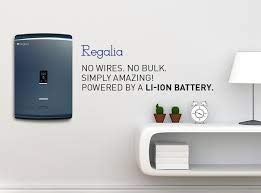
Figure 1: Luminous Regalia 900 Wall Mounted Smart Power Backup System. This image displays the compact, black, wall-mounted unit with its sleek design, indicating its primary function as a home power backup solution.
5. Setup and Installation
The Luminous Regalia 900 requires professional installation due to its electrical nature and wall-mounting requirements. It is strongly recommended to engage a certified electrician for this process.
5.1 Site Selection
- Choose a dry, cool, and well-ventilated indoor location.
- Ensure the wall can support the unit's weight (approximately 40 kg).
- Avoid areas with direct sunlight, high humidity, or flammable materials.
5.2 Mounting the Unit
- Mark the drilling points on the wall using the provided mounting template (if included).
- Drill holes and insert appropriate wall anchors.
- Securely mount the Regalia 900 unit to the wall using the provided screws.
5.3 Electrical Connections
All electrical wiring must be performed by a qualified electrician. Refer to the detailed wiring diagram provided with the product packaging for specific connection points for mains input, load output, and grounding.
- Connect the main AC input from your household electrical supply.
- Connect the AC output to the circuits or appliances you wish to power during outages.
- Ensure a proper earth ground connection.
For visual guidance, search for official Luminous Regalia 900 installation videos on platforms like YouTube.
6. Operating Instructions
6.1 Initial Power-Up
- After installation, ensure all connections are secure.
- Switch on the main AC supply to the unit.
- Press the power button on the Regalia 900 unit. The display will illuminate, indicating system status.
- Allow the system to perform its self-test and initial battery charging cycle.
6.2 Normal Operation
In normal operation, the Regalia 900 charges its internal battery and passes mains power to your connected appliances. During a power outage, it automatically switches to battery backup mode, providing uninterrupted power.
- Display Indicators: The unit's display provides information on battery charge level, input/output voltage, load, and operational mode. Refer to the product's specific display guide for detailed icon meanings.
- Mobile App: If available, download the Luminous mobile application to monitor system status, battery health, and control certain functions remotely. Follow the app's instructions for pairing with your Regalia 900.
6.3 Shutdown
To safely shut down the system:
- Ensure no critical loads are running on battery power.
- Press and hold the power button until the unit powers off.
- Switch off the main AC supply to the unit.
7. Maintenance
The Luminous Regalia 900, with its Lithium-ion battery, is designed for minimal maintenance.
- Cleaning: Periodically wipe the exterior of the unit with a soft, dry cloth. Do not use liquid cleaners or solvents.
- Ventilation: Ensure that the ventilation openings are clear of dust and obstructions.
- Battery: The integrated Lithium-ion battery is maintenance-free and does not require water top-ups. Avoid deep discharges where possible to prolong battery life.
- Inspections: Annually, have a qualified electrician inspect the system's electrical connections and overall condition.
8. Troubleshooting
This section addresses common issues you might encounter. For problems not listed here, or if solutions do not resolve the issue, contact Luminous customer support.
| Problem | Possible Cause | Solution |
|---|---|---|
| Unit does not power on. | No AC input; loose power connection; internal fault. | Check main AC supply and circuit breaker. Ensure power cable is securely connected. If problem persists, contact support. |
| No power output during outage. | Battery discharged; overload; internal fault. | Check battery charge level on display. Reduce connected load. If issue continues, contact support. |
| Display is blank or unresponsive. | Software glitch; internal component failure. | Try restarting the unit by cycling the main power. If the display remains blank, contact support. |
| Battery backup time is shorter than expected. | High load; battery degradation; incomplete charging. | Reduce the number of connected appliances. Ensure the unit is receiving stable AC power for full charging. Contact support for battery health check. |
9. Specifications
| Feature | Detail |
|---|---|
| Model Name | Regalia 900 |
| Item Model Number | F19390012951 |
| Manufacturer | Luminous Power TECHNOLOGIES Pvt. Ltd. |
| Battery Type | Integrated Lithium-ion |
| Battery Capacity | 0.96KWh |
| Item Weight | 40 kg 100 g |
| Item Dimensions (LxWxH) | 46 x 70 x 19 Centimeters |
| Included Components | 1 Inverter |
| Generic Name | Solar & Wind Power (Note: This refers to the product category, not necessarily direct solar integration without additional components.) |
10. Warranty and Support
10.1 Warranty Information
The Luminous Regalia 900 comes with a 2-year warranty from the date of purchase. This warranty covers manufacturing defects and malfunctions under normal use. Please retain your purchase receipt for warranty claims.
Note: The warranty may not cover damages resulting from improper installation, misuse, unauthorized repairs, or acts of nature. Refer to the full warranty terms provided with your product.
10.2 Customer Support
For technical assistance, service requests, or warranty claims, please contact Luminous customer support:
- Toll-Free Number: 18001033039
- Manufacturer Address: Luminous Power TECHNOLOGIES Pvt. Ltd., VILLAGE DEV NAGAR PO GAGRET TEHAMB DISTT. UNA HIMACHAL PRADESH - 177201
- Online Support: Visit the official Luminous website for further support options and FAQs.


