
Blackmagic Design CINECAMPOCHDMFT4K
Blackmagic Design Pocket Cinema Camera 4K (CINECAMPOCHDMFT4K) Instruction Manual
Comprehensive guide for setup, operation, and maintenance of your CINECAMPOCHDMFT4K.
Product Overview
The Blackmagic Design Pocket Cinema Camera 4K (model CINECAMPOCHDMFT4K) is a handheld digital film camera designed for professional video production. It features a 4/3" CMOS sensor, 13 stops of dynamic range, and dual native ISO up to 25,600, enabling high-quality video capture in various lighting conditions. The camera supports recording in industry-standard formats such as Apple ProRes and 12-bit Blackmagic RAW.
Key features include:
- Incredible Image Quality: 4/3" image sensor with 4096 x 2160 native resolution, active MFT lens mount, 13 stops dynamic range, and dual native ISO up to 25,600.
- Multiple Recording Options: Records to SD/UHS-II and CFast 2.0 cards, or external SSD via USB-C.
- Versatile File Formats: Supports Apple ProRes (up to 4K) and 12-bit Blackmagic RAW. Includes DaVinci Resolve Studio activation key.
- User-Friendly Design: Lightweight carbon fiber polycarbonate composite body with a multifunction handgrip and a large, bright 5" LCD display.
- Extensive Connectivity: Full-size HDMI, mini XLR with 48-volt phantom power, 3.5mm microphone and headphones connections, USB-C, and Bluetooth.
Package Contents
The Blackmagic Design Pocket Cinema Camera 4K package includes:
- Blackmagic Design Pocket Cinema Camera 4K body
- DaVinci Resolve Studio activation key
- Lens turret dust cap
- 30W power supply with locking connector and international adapters
- LP-E6 battery
Setup Guide
1. Battery Installation
The camera uses an LP-E6 battery. To install:
- Locate the battery compartment on the bottom of the camera.
- Open the battery compartment cover.
- Insert the LP-E6 battery, ensuring correct orientation.
- Close the battery compartment cover securely.

Figure 1: Rear view of the camera, showing the battery compartment location.
2. Memory Card Insertion
The camera supports SD/UHS-II and CFast 2.0 cards. To insert:
- Locate the memory card slots on the side of the camera.
- Open the memory card slot cover.
- Insert the SD or CFast card into the appropriate slot until it clicks into place.
- Close the memory card slot cover.

Figure 2: Side view of the camera, illustrating the memory card slots.
3. Lens Attachment
The camera features an active Micro Four Thirds (MFT) lens mount. To attach a lens:
- Remove the lens turret dust cap from the camera body.
- Align the red dot on the lens with the red dot on the camera's lens mount.
- Gently insert the lens into the mount and rotate it clockwise until it clicks into place.
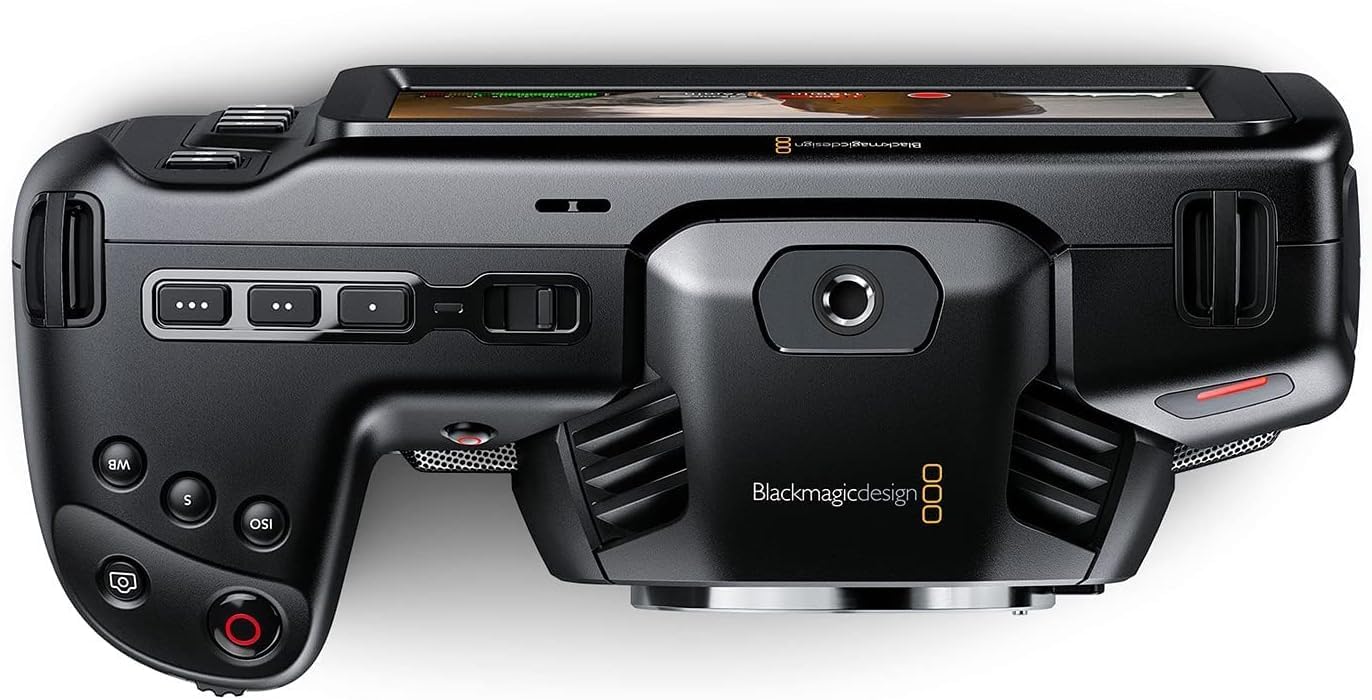
Figure 3: Front view of the camera, highlighting the MFT lens mount.
4. Power Connection
For extended operation, connect the included 30W power supply:
- Connect the appropriate international adapter to the power supply.
- Plug the power supply into a wall outlet.
- Connect the locking DC power connector to the 12V input port on the camera.

Figure 4: Side view of the camera, showing the 12V power input and other connectivity options.
Operating Instructions
1. Powering On/Off
To power on the camera, slide the "ON/OFF" switch located on the top left side of the camera body. To power off, slide the switch back to the "OFF" position.
2. Basic Controls and Touchscreen Interface
The camera features a large 5" touchscreen LCD for intuitive control. Physical buttons are also available for quick access to essential functions such as ISO, Shutter, White Balance, and Record.

Figure 5: Camera screen showing various recording settings and options.
3. Recording Settings
Access recording settings via the touchscreen menu. You can select:
- Codec and Quality: Choose between Blackmagic RAW (Constant Bitrate, Constant Quality Q0, Q5) or Apple ProRes (422 HQ, 422, 422 LT, 422 Proxy).
- Resolution: Options include 4K DCI (4096x2160), 4K 2.4:1 (4096x1720), Ultra HD (3840x2160), 2.8K Anamorphic (2880x2160), 2.6K 16:9 (2688x1512), and HD (1920x1080).
- Frame Rate: Up to 60fps in 4K and 120fps in HD.

Figure 6: Detailed view of the camera's menu for selecting recording codecs and resolutions.
4. Audio Input
The camera offers versatile audio input options:
- Mini XLR: For professional microphones, with 48-volt phantom power support.
- 3.5mm Input: For external microphones or line-level audio.
- Built-in Stereo Microphones: For convenient on-camera audio capture.
- 3.5mm Headphone Jack: For audio monitoring.
5. External Monitoring and Storage
Connect external monitors via the full-size HDMI port. For extended recording, use the USB-C port to connect external SSD media.
Maintenance
- Cleaning: Use a soft, dry cloth to clean the camera body. For the lens and sensor, use specialized cleaning kits and follow manufacturer guidelines.
- Storage: Store the camera in a dry, dust-free environment, ideally in a protective case when not in use. Remove batteries during long-term storage.
- Firmware Updates: Regularly check the Blackmagic Design website for firmware updates to ensure optimal performance and access to new features.
Troubleshooting
If you encounter issues with your camera, consider the following general troubleshooting steps:
- Power Issues: Ensure the battery is fully charged or the power adapter is securely connected. Check battery orientation.
- Recording Problems: Verify that memory cards are correctly inserted and have sufficient free space. Check selected codec and resolution settings for compatibility with your workflow.
- Image Quality: Ensure the lens is clean and properly attached. Check ISO settings for excessive noise in low light.
- Software: If using DaVinci Resolve Studio, ensure it is updated to the latest version.
For more detailed troubleshooting, refer to the comprehensive manual available on the Blackmagic Design support website.
Specifications
| Product Dimensions | 7.01 x 3.37 x 3.78 inches |
| Item Weight | 1.53 pounds |
| Item Model Number | CINECAMPOCHDMFT4K |
| Brand | Blackmagic Design |
| Photo Sensor Technology | CCD |
| Video Capture Resolution | 4K |
| Maximum Aperture | 2.8 Millimeters |
| Flash Memory Type | SD |
| Video Capture Format | Blackmagic RAW, ProRes 422 |
| Supported Audio Format | AAC, MP3, PCM |
| Screen Size | 5 Inches |
| Connectivity Technology | USB |
| Batteries | 1 A batteries required (included) |
Warranty and Support
For warranty information and technical support, please refer to the official Blackmagic Design website or contact their customer service directly. Keep your purchase receipt as proof of purchase for warranty claims.
Online resources and additional documentation can be found at: Blackmagic Design Support
Related documentsCINECAMPOCHDMFT4K


Ask a question about this manual
Ask about setup, troubleshooting, compatibility, parts, safety, or missing instructions. Manuals+ will review the question and use this page’s manual context to help answer it.