Introduction
This manual provides essential information for the safe and effective use of your NRS Healthcare A-Series 4-Wheel Rollator. Designed with a sturdy, lightweight aluminium frame, this rollator offers mobility support with features such as height-adjustable handles, a padded seat, and a convenient storage pocket. Please read these instructions carefully before assembly and first use to ensure proper function and safety.
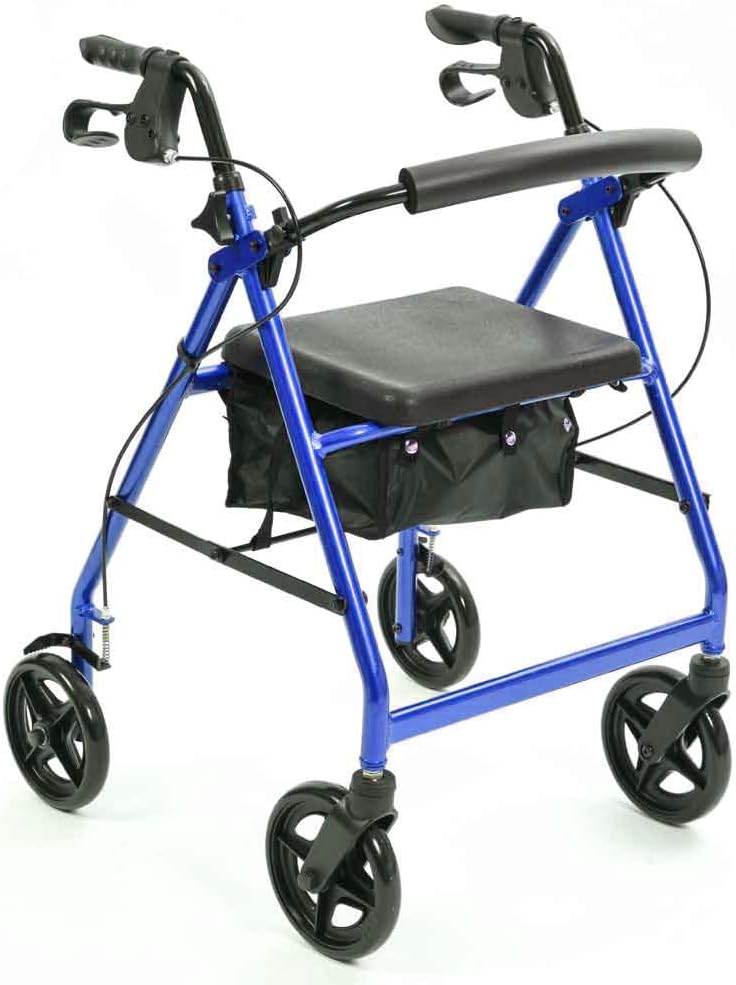
Figure 1: The NRS Healthcare A-Series 4-Wheel Rollator in blue, showcasing its overall design and features.
Setup and Assembly
The NRS Healthcare A-Series 4-Wheel Rollator is designed for straightforward setup. Follow these steps to prepare your rollator for use:
- Unfold the Rollator: Carefully remove the rollator from its packaging. Gently pull the sides apart until the frame locks into its open position. Ensure all locking mechanisms are engaged before proceeding.
- Adjust Handle Height:
To determine the correct handle height, stand naturally with your arms held at your sides, wearing your usual shoes. Measure the distance from the floor to your wrist bone. This measurement should correspond to the top of the handgrip. The handle height is adjustable between 83 cm (32.5") and 98 cm (38.5").
Locate the height adjustment pins on the rollator's upright tubes. Press the pin and slide the handle up or down to the desired height. Ensure the pin fully re-engages in one of the adjustment holes on both sides for secure positioning.
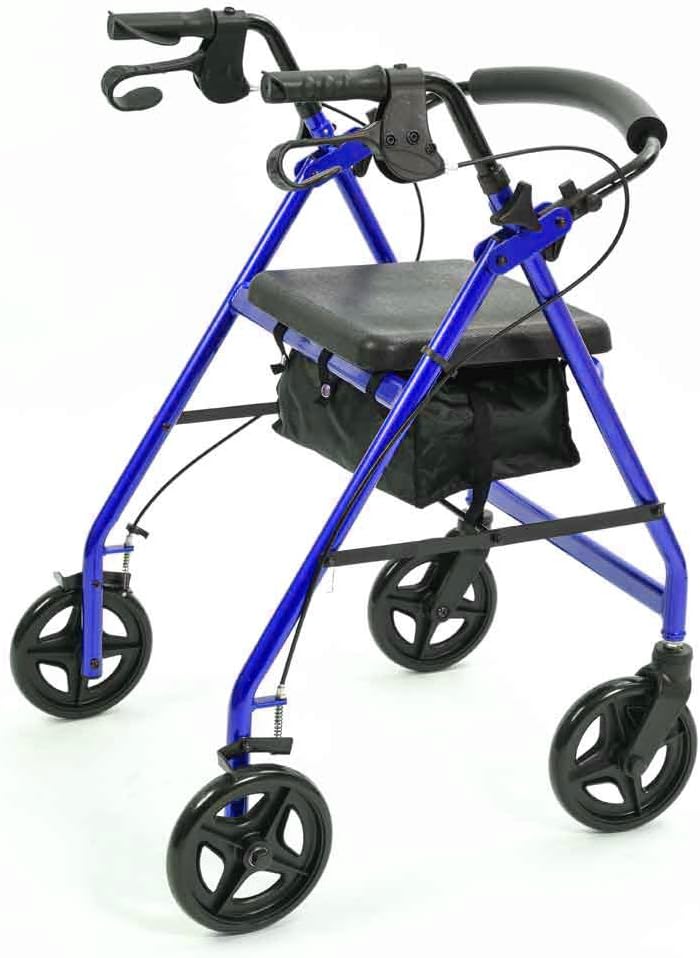
Figure 2: Detail of the handle height adjustment and ergonomic handgrip with brake lever.
- Familiarize Yourself with the Brakes: The rollator features handgrips with integrated brake levers. Squeeze the levers towards the handgrips to engage the brakes for slowing down or stopping.
- Engage Parking Levers: To secure the rollator in a stationary position, push the brake levers down until they click into the locked (parking) position. This prevents the rollator from moving when you are sitting or standing. Pull the levers up to release the parking brake.
- Check Wheels: Ensure all four wheels rotate freely and are securely attached. The 7-inch diameter wheels are designed for smooth movement.

Figure 3: Detail of one of the durable wheels, essential for smooth mobility.
Operating Instructions
Proper operation of your rollator ensures safety and comfort during use.
- Walking with the Rollator:
Push the rollator slightly ahead of you, maintaining a comfortable distance. Keep your body upright and walk within the frame of the rollator, not behind it. Ensure the brakes are not engaged unless you intend to stop.

Figure 4: Correct posture for walking with the rollator, demonstrating stability.
- Using the Brakes:
To slow down or stop, gently squeeze both brake levers simultaneously. For parking, push the levers down until they lock. Always engage the parking brakes when sitting on the seat or when the rollator is stationary.
- Utilizing the Seat:
The rollator features a padded seat and backrest for comfortable resting. Before sitting, always ensure the parking brakes are fully engaged to prevent the rollator from moving. Sit down slowly and carefully.
- Accessing the Storage Pocket:
A hidden zipped pocket is located under the seat for secure storage of personal items. Simply lift the padded seat to access this compartment. There is also a handy concealed bag for carrying shopping or other items.

Figure 5: The convenient under-seat storage bag, accessible by lifting the seat.
- Folding for Storage and Transport:
To fold the rollator, ensure the storage bag is empty. Press the release button (if applicable) and pull the handle upwards, allowing the sides to collapse inwards. This makes the rollator compact for convenient storage or transportation.
Maintenance
Regular maintenance will prolong the life of your rollator and ensure its safe operation.
- Cleaning: Wipe down the frame and seat with a damp cloth and mild detergent. Avoid abrasive cleaners. Dry thoroughly after cleaning.
- Brake Check: Periodically check the brake cables and levers to ensure they are functioning correctly. The brakes should engage smoothly and hold the rollator securely when parked. If the brakes feel loose or ineffective, consult a qualified technician.
- Wheel Inspection: Inspect the wheels regularly for wear and tear. Ensure they rotate freely and are free from debris. Check that all wheel fasteners are tight.
- Frame Integrity: Routinely check the frame for any signs of damage, cracks, or loose connections. Do not use the rollator if any part of the frame is compromised.
- Storage: Store the rollator in a dry place, away from extreme temperatures and direct sunlight, when not in use.
Troubleshooting
Here are some common issues and their potential solutions:
- Rollator does not fold easily:
Ensure the storage bag is empty and not obstructing the folding mechanism. Check for any debris or objects caught in the folding joints. Apply gentle, even pressure when attempting to fold.
- Brakes feel loose or do not engage properly:
The brake cables may need adjustment. This is typically done by tightening or loosening the cable tension at the brake lever or near the wheel. If you are unsure how to adjust them, consult a qualified technician or the manufacturer's support.
- Wheels are not rolling smoothly:
Check for hair, lint, or other debris wrapped around the wheel axles. Clean the wheels thoroughly. If the issue persists, the bearings may be worn and require professional inspection.
- Rollator feels unstable:
Ensure all height adjustment pins are fully engaged and locked on both sides. Verify that the frame is fully unfolded and locked into position. Do not exceed the maximum user weight capacity.
Specifications
Key specifications for the NRS Healthcare A-Series 4-Wheel Rollator:
| Feature | Measurement |
|---|---|
| Handle Height (Adjustable) | 83 cm - 98 cm (32.5" - 38.5") |
| Seat Height | 58 cm (22.75") |
| Overall Width | 62 cm (24.5") |
| Width between Handles | 45 cm (17.75") |
| Folded Height | 99 cm (39") |
| Folded Width | 62 cm (24.5") |
| Seat Size (W x D) | 35 cm x 30 cm (13.75" x 11.75") |
| Wheel Diameter | 18 cm (7") |
| Product Weight | 6.5 kg (14 lb) |
| Maximum User Weight | 135 kg (21.5 st) |
| Material | Aluminium |
| Model Number | P11267 |
Warranty and Support
For information regarding product warranty, please refer to the documentation provided at the time of purchase or contact the retailer/manufacturer directly. NRS Healthcare is committed to providing quality products and support.
For technical assistance, spare parts, or further inquiries, please contact NRS Healthcare customer service through their official website or the contact details provided with your purchase.


