
Introduction
This manual provides comprehensive instructions for the setup, operation, and maintenance of your Emerson OEM 0766075020 TV/VCR Combo Remote Control. Please read this manual thoroughly before use to ensure proper functionality and to maximize your product experience. This remote is designed for use with specific Emerson TV/VCR combo units, including models VT0954 and VT0955, and is also compatible with certain Orion and Sansui models as listed in the specifications.
Setup
1. Battery Installation
The remote control requires two (2) AAA batteries for operation. Ensure correct polarity when inserting the batteries.
- Locate the battery compartment cover on the back of the remote control.
- Slide the cover downwards or press the latch and lift to open.
- Insert two new AAA batteries, matching the (+) and (-) terminals as indicated inside the compartment.
- Replace the battery compartment cover, ensuring it clicks securely into place.
Note: Remove batteries if the remote control will not be used for an extended period to prevent leakage.
2. Initial Use
This remote control is an OEM (Original Equipment Manufacturer) replacement and is typically pre-programmed for compatible Emerson TV/VCR combo units. No additional programming steps are usually required. Simply point the remote control towards your TV/VCR combo unit and press a function button to test its operation.
Operating Instructions
Familiarize yourself with the layout and function of each button on your remote control. Refer to the image below for a visual guide.
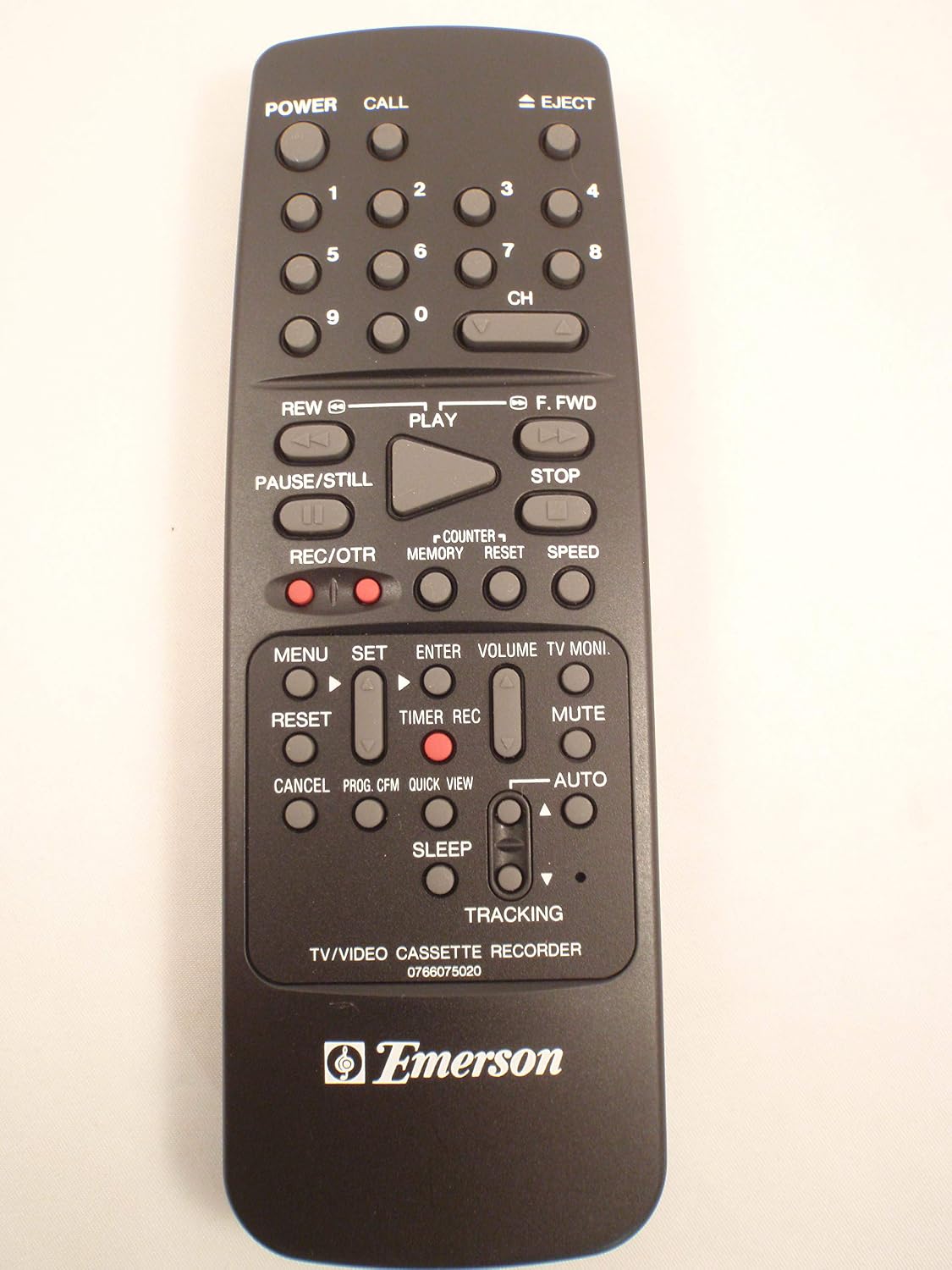
Figure 1: Overview of the Emerson OEM 0766075020 TV/VCR Combo Remote Control. This image displays the full layout of the remote, including all buttons for power, channel, volume, playback, and special functions.
Button Functions
- POWER: Turns the TV/VCR combo unit on or off.
- CALL: Recalls the previously viewed channel.
- EJECT: Ejects the videotape from the VCR.
- Number Buttons (0-9): Used to directly select channels or input numerical values.
- CH (Channel Up/Down): Changes the TV channel up or down.
- REW (Rewind): Rewinds the videotape.
- PLAY: Starts playback of a videotape.
- F.FWD (Fast Forward): Fast forwards the videotape.
- PAUSE/STILL: Pauses playback or displays a still frame.
- STOP: Stops playback or recording.
- REC/OTR (Record/One-Touch Record): Initiates recording. Press once for One-Touch Recording.
- COUNTER: Displays the tape counter.
- MEMORY: Sets or recalls a memory point on the tape counter.
- RESET: Resets the tape counter.
- SPEED: Adjusts VCR playback speed (if supported by the unit).
- MENU: Accesses the TV/VCR menu system.
- SET: Confirms selections within the menu.
- ENTER: Confirms selections or enters data.
- VOLUME (Up/Down): Adjusts the TV volume.
- TV MONI. (TV Monitor): Switches between TV and VCR input modes.
- RESET (Menu): Resets menu settings (context-dependent).
- TIMER REC: Sets up timer recording.
- MUTE: Mutes or unmutes the TV audio.
- CANCEL: Cancels menu selections or operations.
- PROG. CFM (Program Confirm): Confirms program settings.
- QUICK VIEW: Provides a quick preview function (if supported).
- AUTO: Automatic function (context-dependent, e.g., auto tracking).
- SLEEP: Sets the sleep timer.
- TRACKING (Up/Down): Adjusts the VCR tracking for optimal picture quality during playback.

Figure 2: Detailed view of the lower section of the remote control, highlighting buttons for menu navigation, recording, volume, and tracking adjustments.
Maintenance
Battery Replacement
When the remote control's range decreases or buttons become unresponsive, it is time to replace the batteries. Follow the battery installation steps outlined in the "Setup" section.
- Always replace both AAA batteries at the same time.
- Do not mix old and new batteries, or different types of batteries.
- Dispose of used batteries according to local regulations.
Cleaning
To clean the remote control, use a soft, dry cloth. For stubborn dirt, slightly dampen the cloth with water or a mild cleaning solution. Do not use abrasive cleaners or immerse the remote in liquid.
Storage
Store the remote control in a cool, dry place away from direct sunlight and extreme temperatures. If storing for an extended period, remove the batteries.
Troubleshooting
| Problem | Possible Cause | Solution |
|---|---|---|
| Remote control is not working. |
|
|
| Buttons are unresponsive or require multiple presses. |
|
|
| Limited operating range. |
|
|
If issues persist after trying these solutions, please refer to the support information provided with your original TV/VCR combo unit.
Specifications
- Brand: Emerson
- Model Number: 0766075020
- Compatible OEM Models: EMERSON VT0954, VT0955
- Compatible Substitute Models: 0766075040, 076B075040, 766075040 (Orion TVCR0950A, TVCR0950B, TVCR0950C, TVCR0950D; Sansui COM0950A, COM0950B)
- Connectivity Technology: Infrared
- Controller Type: Button Control
- Power Source: 2 x AAA Batteries (not included)
- Special Feature: Ergonomic design
Warranty and Support
Specific warranty information for this OEM replacement remote control may vary depending on the retailer or original purchase terms. Please refer to your purchase documentation or contact your point of sale for details regarding warranty coverage.
For technical support related to the functionality of your TV/VCR combo unit, please consult the original manual provided with your unit or contact the manufacturer of your TV/VCR combo.


