
NueMedics BD16356
NueMedics TENS 24 Pulse Massager User Manual
Model: BD16356
NueMedics - Ease Your Tension
1. Introduction
The NueMedics TENS 24 Pulse Massager is a versatile muscle stimulator designed for effective pain relief. Utilizing Transcutaneous Electrical Nerve Stimulation (TENS) technology, it delivers low-voltage pulses to stimulate nerve fibers, helping to block pain signals and increase natural endorphins. With 24 pre-programmed massage modes and a rechargeable internal lithium battery, this device offers a convenient and drug-free method for managing various types of body pain and discomfort.
This manual provides detailed instructions for the safe and effective use of your NueMedics TENS 24 device.
2. What's Included
Your NueMedics TENS 24 package includes the following components:
- 1x NueMedics TENS 24 Controller
- 6 Large Electrodes (Pads)
- 2 Electrode Cables
- User's Manual
- 1x TYPE-C Charger Cable
- 1x Wall Charger
- 1x Pad and Wire Holder
- 1x Treatment Points Chart
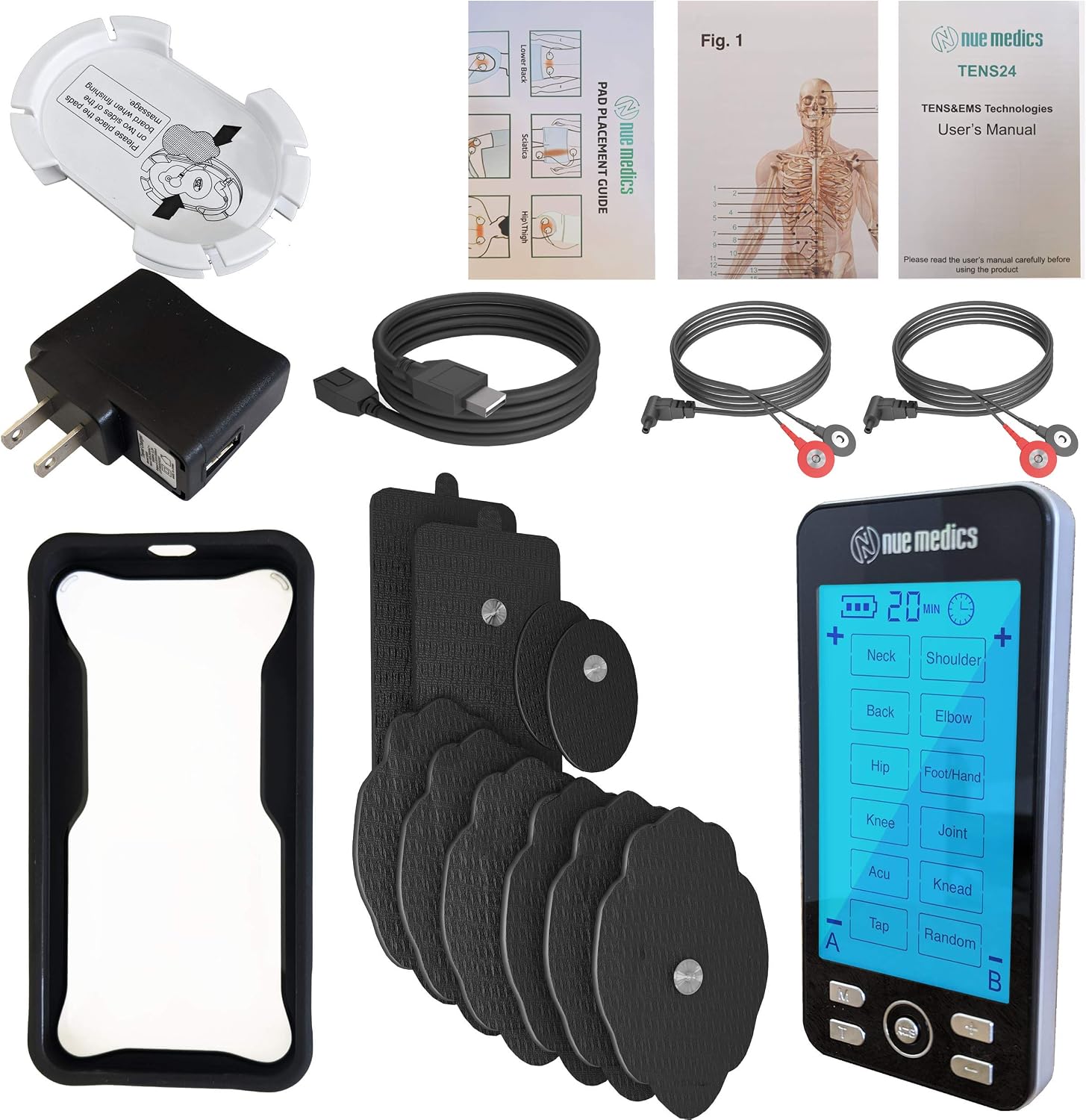
Figure 2.1: All components included with the NueMedics TENS 24 Pulse Massager.
3. Safety Information
Please read and understand all safety precautions before using the device.
- Always follow the manufacturer's instructions for use.
- Ensure all pads are securely placed on the skin before operating the device.
- As a safety feature, the intensity button will remain locked until all pads are securely placed on the skin. Please be sure that all wires attached to the device and all pads placed well before you turn on the device.
- If you experience any discomfort, stop using the device immediately and consult a healthcare professional.
- Statements regarding dietary supplements have not been evaluated by the FDA and are not intended to diagnose, treat, cure, or prevent any disease or health condition.
4. Setup
- Charge the Device: Before first use, fully charge the NueMedics TENS 24 unit using the provided TYPE-C charger cable and wall charger. The battery indicator on the LCD screen will show charging progress.
- Connect Electrodes: Connect the electrode cables to the electrode pads. Ensure a secure connection.
- Attach Pads to Skin: Peel off the protective film from the electrode pads. Apply the pads firmly to clean, dry skin in the desired treatment area. For optimal results, place pads on either side of the area of discomfort, ensuring they do not touch each other. Refer to the included Treatment Points Chart for recommended placements.
- Connect Cables to Device: Insert the other end of the electrode cables into the A and/or B output ports located at the top of the NueMedics TENS 24 controller.

Figure 4.1: The NueMedics TENS 24 device connected to electrode pads.

Figure 4.2: Example pad placement guide for various body areas.
5. Operating Instructions
- Power On/Off: Slide the ON/OFF switch located on the side of the device to turn it on or off.
- Select Mode: Press the 'M' (Mode) button to cycle through the 24 available massage modes. The selected mode will be displayed on the LCD screen. Modes include: Neck, Shoulder, Back, Elbow, Hip, Foot/Hand, Knee, Joint, Acu, Knead, Tap, and Random.
- Adjust Intensity: Use the '+' and '-' buttons to increase or decrease the intensity level for each channel (A and B). Start with a low intensity and gradually increase until you feel a comfortable, stimulating sensation.
- Set Timer: Press the 'T' (Time) button to adjust the treatment duration. The default duration is 20 minutes, which can be increased or decreased.
- Select Channel (A/B): If using two sets of pads, press the 'A/B' button to switch between controlling the intensity for Channel A or Channel B independently.
- Begin Treatment: Once settings are configured, the device will begin the selected treatment.
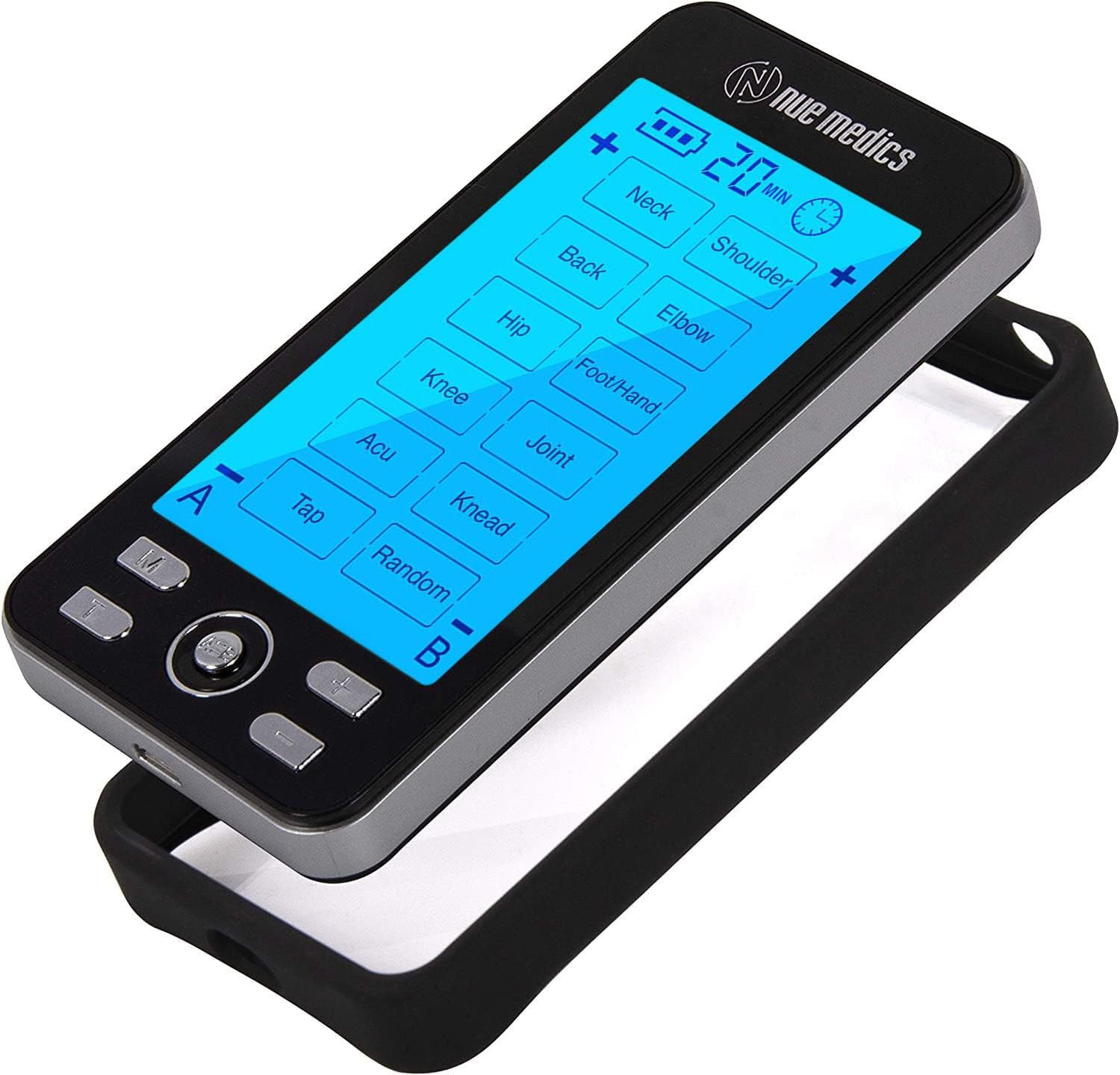
Figure 5.1: Overview of the NueMedics TENS 24 device controls.

Figure 5.2: The device offers modes for various pain points across the body.
6. Maintenance
- Cleaning: After each use, gently wipe the electrode pads with a damp cloth to remove any residue. Ensure the device itself is clean and dry.
- Storage: Store the device and pads in a cool, dry place away from direct sunlight. Use the provided pad and wire holder to keep the pads clean and extend their lifespan. The device also comes with a protective cover case for safe storage and transport.
- Recharging: Recharge the internal lithium battery as needed. The device provides up to 20 hours of continuous use on a full charge.

Figure 6.1: The device includes a protective cover case for storage.
7. Troubleshooting
If you encounter issues with your NueMedics TENS 24 device, please refer to the following common solutions:
- Device Not Turning On: Ensure the device is fully charged. Connect it to the charger and allow sufficient time for charging.
- No Sensation/Weak Sensation:
- Check that the electrode pads are firmly attached to clean, dry skin.
- Verify that all electrode cables are securely connected to both the pads and the device.
- Increase the intensity level gradually using the '+' button. Remember, the intensity button will remain locked until all pads are securely placed on the skin.
- Ensure the pads are not worn out. Replace them if they no longer stick well.
- Pads Not Sticking: Clean the skin thoroughly before application. If pads are old or have lost their adhesiveness, replace them with new ones.
- Discomfort During Use: Reduce the intensity level. Reposition the electrode pads. If discomfort persists, discontinue use and consult a healthcare professional.
For further assistance, please contact customer support.
8. Specifications
| Feature | Detail |
|---|---|
| Brand | NueMedics |
| Model Number | BD16356 |
| Item Weight | 15.84 ounces |
| Material | Plastic |
| Power Source | Battery Powered |
| Battery Type | 1 Lithium Polymer battery required |
| Package Dimensions | 5.75 x 3.6 x 3.07 inches |
| Date First Available | January 31, 2018 |
| Manufacturer | NueMedics |
9. Warranty & Support
Your NueMedics TENS 24 Pulse Massager comes with a LIFETIME WARRANTY.
To activate your limited lifetime warranty, please visit: www.nuemedics.com/24warranty
For any questions or concerns, you may contact NueMedics support:
- Email: support@nuemedics.com
- Toll Free Number: (888) 434-6866
Ask a question about this manual
Ask about setup, troubleshooting, compatibility, parts, safety, or missing instructions. Manuals+ will review the question and use this page’s manual context to help answer it.