
1. Introduction and Overview
The Garmin Approach Z80 is an advanced golf laser range finder designed to provide precise distance measurements and comprehensive course information. It combines the accuracy of a laser range finder with the convenience of 2D course overlays, offering a unique perspective on over 41,000 preloaded courses worldwide.

Figure 1: Front-side view of the Garmin Approach Z80 Golf Laser Range Finder.
When activating the laser, the device provides highly accurate distances to the pin, typically within 10 inches. Simultaneously, it displays accurate distances to hazards, streamlining play by eliminating the need for separate measurements. The Approach Z80 automatically identifies the current hole to present relevant course layout and visual data.
Video 1: Official product overview of the Garmin Approach Z80, highlighting its key features and functionality.
2. What's in the Box
Upon unboxing your Garmin Approach Z80, you should find the following items:
- Garmin Approach Z80 Laser Range Finder
- Carry case with carabiner
- MicroUSB cable
- Instruction Manual
3. Product Features
The Garmin Approach Z80 offers a range of features designed to enhance your golf experience:
- Highly Accurate Laser: Provides distance measurements within 10 inches to the flag, up to 350 yards/320 meters.
- Full-Color 2-D CourseView Mapping: Overlaid on the viewfinder for more than 41,000 courses worldwide.
- Image Stabilization: Reduces shakiness, making it easier to find and range the flag.
- Green View Feature: Automatically displays distances to the front and back of the green.
- PlaysLike Distance Feature: Adjusts distances based on uphill or downhill slope; can be turned on or off for tournament play.
- Laser Range Arc Feature: Draws an arc on the 2-D course view map at the distance the laser ranged, showing everything in play at that distance.
- PinPointer Mode: Provides a compass to show the exact direction of the pin, useful for blind shots.
- Hazard View: Allows scrolling through key spots on the hole (water, bunkers, doglegs) to see distances to the front or back of each hazard.
4. Setup
Follow these steps to set up your Garmin Approach Z80:
- Unpack the Device: Carefully remove all items from the packaging and ensure all components listed in Section 2 are present.
- Charge the Device: Connect the microUSB cable to the charging port on the device and to a power source. Allow the device to fully charge before first use. The device features a rechargeable Lithium-Ion battery.
- Power On: Press and hold the power button (refer to Figure 2 for button location) to turn on the device.
- Initial Configuration: Follow the on-screen prompts to select your preferred language and measurement units (yards/meters).
- App Connection (Optional): For enhanced features like stat tracking, leaderboards, and wind direction data, download the Garmin Golf app on your smartphone and pair it with your Approach Z80.

Figure 2: Top view of the Garmin Approach Z80, illustrating the power and mode buttons.
5. Operating Instructions
The Garmin Approach Z80 is designed for intuitive operation. Here are instructions for its primary functions:
5.1 Measuring Distance
- Aiming: Look through the viewfinder and align the aiming circle with your target (e.g., the flagstick).
- Activate Laser: Press the laser button (typically the main button on top) to activate the laser. The device will provide a vibration pulse when it locks onto the target.
- Read Measurement: The distance to the target will be displayed in the viewfinder, along with 2D course overlays.
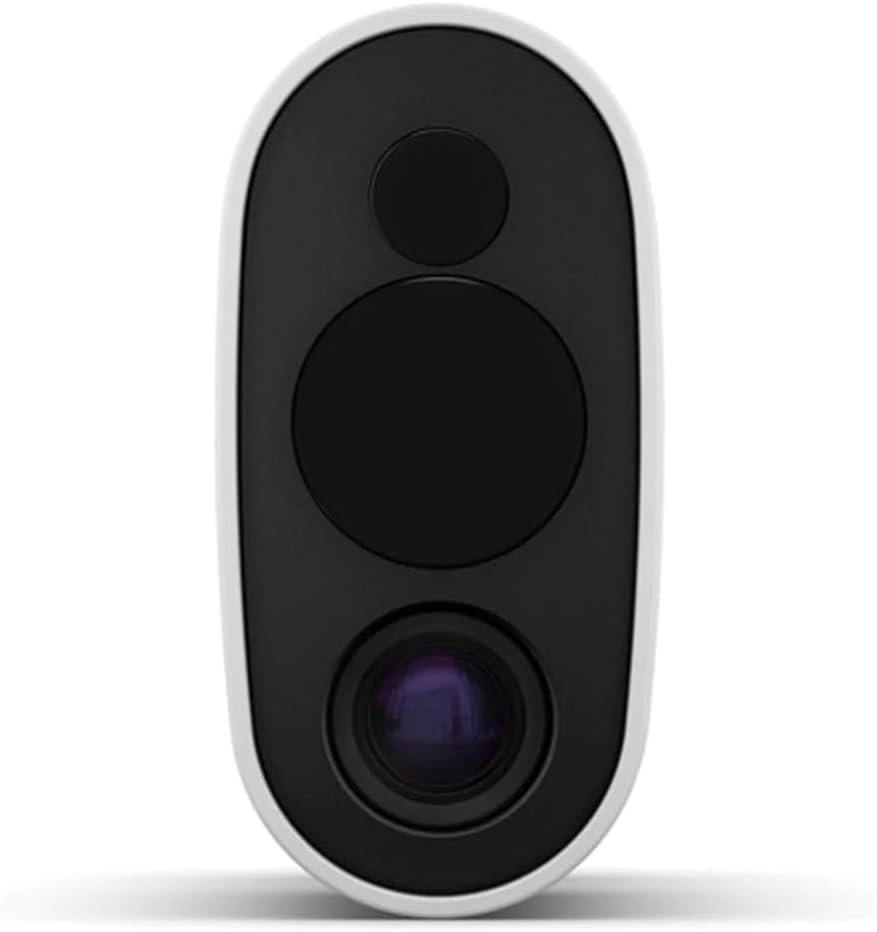
Figure 3: Front view of the Garmin Approach Z80, highlighting the laser and optical lenses.
5.2 Course View and Green View
The device automatically detects the course and hole you are playing. The full-color 2D CourseView mapping and Green View overlay will appear in the viewfinder, showing distances to the front and back of the green.
5.3 PlaysLike Distance
The PlaysLike Distance feature adjusts the displayed distance to account for uphill or downhill slopes. This feature can be toggled on or off via the device settings to comply with tournament rules.
5.4 PinPointer Mode
For blind shots where the pin is not visible, activate PinPointer mode. The device will display a compass in the viewfinder, guiding you to the pin's exact location.
5.5 Hazard View
Use the Hazard View to scroll through various hazards on the hole. The device will show distances to the front and back of each hazard, aiding in strategic shot planning.
6. Maintenance
Proper maintenance ensures the longevity and optimal performance of your Garmin Approach Z80.
6.1 Charging
The device uses a rechargeable Lithium-Ion battery. Charge it using the provided microUSB cable. A full charge provides approximately 15 hours of use. It is recommended to charge the device after every 2-3 rounds of golf to ensure it is ready for use.
6.2 Cleaning
Regularly clean the lenses with a soft, lint-free cloth. Avoid using abrasive materials or harsh chemicals that could damage the optics. Wipe the device body with a damp cloth as needed.
6.3 Water Resistance
The Approach Z80 has an International Protection Rating of IP54, meaning it is water-resistant. It can withstand splashes and light rain, but it should not be submerged in water.
7. Troubleshooting
If you encounter issues with your Garmin Approach Z80, consider the following:
- Device Not Powering On: Ensure the device is fully charged. Connect it to a power source and wait a few minutes before attempting to power it on again.
- Inaccurate Distances: Verify that the lenses are clean and free from smudges or debris. Ensure you are aiming steadily at the target.
- Slow Lock-On: In some conditions, the device may take a few seconds to lock onto the flag. Maintain a steady aim.
- GPS Calibration: For optimal GPS performance, turn on the device as soon as you arrive at the course to allow it to calibrate.
- Battery Draining Quickly: Ensure the device is fully charged before each round. If battery life significantly degrades, contact Garmin support.
- Buttons Unresponsive: If buttons feel soft or unresponsive, ensure no debris is lodged around them. If the issue persists, contact support.
8. Specifications
| Specification | Detail |
|---|---|
| Brand | Garmin |
| Model Number | 010-01771-00 |
| Product Dimensions | 4.8 x 1.7 x 3.1 inches |
| Item Weight | 8 ounces |
| Color | White |
| Material | Plastic |
| Battery Type | Lithium-Ion (rechargeable) |
| Measuring Range | 10 feet to 350 yards |
| Water Resistance Level | Water Resistant (IP54) |
| UPC | 753759209384 |
9. Warranty and Support
The Garmin Approach Z80 comes with a standard manufacturer's warranty. For detailed warranty information, product registration, or technical support, please visit the official Garmin website or contact their customer service. Keep your proof of purchase for warranty claims.
For additional resources and product updates, visit the Garmin Store on Amazon.