
Introduction
This manual provides comprehensive instructions for the setup, operation, and maintenance of your Serta Motion Custom I and II Adjustable Bed Replacement Remote Control. Please read this manual thoroughly before use to ensure proper functionality and to maximize your product experience.
This remote control is an authentic replacement part designed for Serta Motion Custom I and Motion Custom II adjustable bed bases. While the physical appearance may differ slightly from your original remote (e.g., white color, absence of Serta logo), all functions remain identical.
Setup: Pairing Your Remote Control
To ensure your replacement remote control functions correctly with your adjustable bed, it must be paired with the bed's control box. Follow these steps carefully:
- Locate the Control Box: The control box is typically found underneath your adjustable bed frame. It is usually a black box with a small button on it.
- Ensure Power: Confirm that your adjustable bed is plugged into a working power outlet.
- Initiate Pairing Mode: Press the small, clear rubber button located on the control box twice. The light on the control box should illuminate, indicating it is in pairing mode.
- Pair the Remote: Within a few seconds of the control box light illuminating, press and hold the button on the back of your new replacement remote control. Hold the button until the bed responds or the remote's indicator light (if present) confirms pairing.
- Test Functionality: Once paired, test all functions on the remote control to ensure proper operation.
If you encounter difficulties, ensure the bed is powered and repeat the steps. Some users find it helpful to perform this process with the bed slightly raised for easier access to the control box.

Image 1: Serta Motion Custom I and II Replacement Remote Control. This image displays the front face of the remote control, which is white with various buttons for bed adjustments and massage functions.
Operating Your Remote Control
The Serta Motion Custom I and II replacement remote control provides intuitive access to all adjustable bed functions. Refer to the diagram below for button identification and their corresponding actions.
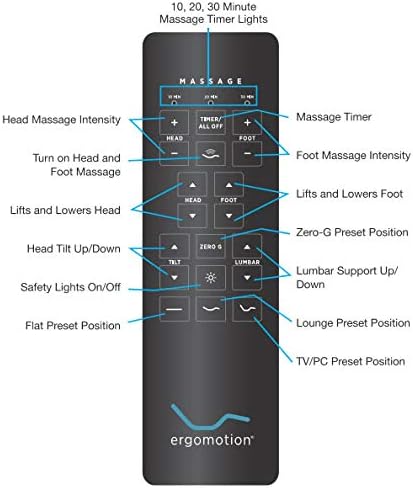
Image 2: Annotated diagram of the Serta Motion Custom I and II remote control, detailing each button's function for easy reference.
Button Functions:
- Massage Controls:
- 10 MIN, 20 MIN, 30 MIN: Activate the massage timer for the specified duration.
- TIMER/ALL OFF: Turns off all active massage functions or cycles through timer settings.
- HEAD (+/-): Adjusts the intensity of the head massage.
- FOOT (+/-): Adjusts the intensity of the foot massage.
- Wavy Lines (Head/Foot): Turns on/off head and foot massage.
- Bed Position Adjustments:
- HEAD (Up/Down Arrows): Lifts or lowers the head section of the bed.
- FOOT (Up/Down Arrows): Lifts or lowers the foot section of the bed.
- ZERO G: Activates the Zero Gravity preset position, designed to relieve pressure.
- TILT (Up/Down Arrows): Adjusts the head tilt position.
- LUMBAR (Up/Down Arrows): Adjusts the lumbar support level.
- Flat Preset: Returns the bed to a completely flat position.
- Lounge Preset: Activates a comfortable lounge preset position.
- TV/PC Preset: Activates a preset position optimized for watching TV or using a computer.
- Safety Lights:
- Light Bulb Icon: Turns the under-bed safety lights on or off.
Maintenance
Battery Replacement:
The remote control operates on batteries (type typically AAA or similar, check the battery compartment for specifics). If the remote's response becomes sluggish or stops working, replace the batteries. To replace:
- Locate the battery compartment cover on the back of the remote.
- Slide or unclip the cover to open.
- Remove old batteries and insert new ones, ensuring correct polarity (+/-).
- Replace the battery compartment cover securely.
Cleaning:
To clean the remote control, use a soft, dry cloth. For stubborn marks, a slightly damp cloth with mild soap can be used, followed by immediate drying. Avoid using abrasive cleaners or excessive moisture, as this can damage the electronics.
Troubleshooting
| Problem | Possible Cause | Solution |
|---|---|---|
| Remote not responding. |
|
|
| Bed only moves slightly or intermittently. |
|
|
| Specific functions not working (e.g., massage). |
|
|
Specifications
- Brand: Serta
- Model Compatibility: Serta Motion Custom I and II Adjustable Beds
- Color: White
- Special Feature: Ergonomic design
- Max Number of Supported Devices: 1 (per remote)
- Part Type: Genuine OEM Replacement Remote Control
Warranty and Support
This replacement remote control is designed to be a genuine part for your Serta adjustable bed. For specific warranty information regarding your adjustable bed base or the replacement remote, please refer to the documentation that came with your original adjustable bed or contact Serta customer service directly.
For further assistance or if troubleshooting steps do not resolve your issue, please contact the retailer where you purchased the remote or Serta customer support. Have your product model and purchase information ready for faster service.
Note: Protection plans may be available for purchase separately. Refer to your purchase details for more information.