
EPEVER Tracer4210AN-G3
EPEVER MPPT Solar Charge Controller 40A (Tracer4210AN-G3) Instruction Manual
Brand: EPEVER | Model: Tracer4210AN-G3
1. Introduction
This manual provides detailed instructions for the installation, operation, maintenance, and troubleshooting of your EPEVER MPPT Solar Charge Controller 40A (Tracer4210AN-G3). Please read this manual thoroughly before installation and operation to ensure proper functionality and safety.
Important Safety Notice: Read carefully all the instructions and warnings in the manual before installation.
2. Product Overview
The EPEVER MPPT Solar Charge Controller 40A (Tracer4210AN-G3) is an advanced Maximum Power Point Tracking (MPPT) charge controller designed for off-grid solar systems. It features automatic 12V/24V system voltage recognition, a maximum PV input of 100V, and supports up to 520W for 12V battery systems or 1040W for 24V battery systems. Its common negative grounding design and upgraded ultra-quiet operation ensure efficient and reliable performance.
2.1. Physical Appearance

Figure 1: Front view of the EPEVER MPPT Solar Charge Controller 40A.

Figure 2: Top and bottom views of the controller, showing heat sink and terminal connections.
2.2. Dimensions

Figure 3: Detailed dimensions of the Tracer4210AN-G3 controller (252x180x63mm).
2.3. Included Components
- 1 x 40A MPPT Solar Charge Controller (Tracer4210AN-G3)
- 1 x Temperature sensor (Model: RT-MF58R47K3.81A)
- 1 x English Manual
3. Setup
3.1. Tools and Materials Required
- 12V/24V Battery (e.g., lead-acid or lithium-ion)
- Two pieces of wires for battery connection
- CC-USB-RS485-150U Communication Cable
- Screwdriver
- Laptop or PC (Windows OS recommended for software)
3.2. Wiring Connections
Follow the connection order carefully to avoid damage. Always connect the battery first.
- Connect the positive battery terminal to the charge controller terminal marked 'Battery +'.
- Connect the negative battery terminal to the charge controller terminal marked 'Battery -'.
- Tighten the screws securely to ensure good contact.
- Verify that the LCD display on the controller powers on, indicating successful battery connection.

Figure 4: Basic wiring diagram for the solar charge controller, showing connections to battery, PV panel, and DC load.
3.3. Driver Installation for PC Communication
To communicate with the charge controller via your PC, you need to install the appropriate driver for the CC-USB-RS485-150U communication cable.
- Ensure the charge controller is powered on and the communication cable is plugged into both the controller's RS485 port and your PC's USB port.
- Locate the installation folder for the PC software (e.g., 'PCSOFTWAREFORTHESOLARCHARGECONTROLLER').
- Navigate to the 'PCTools' folder, then open the 'USBDriver' folder.
- Right-click on the 'Setup.bat' file and select 'Run as administrator'. This will automatically install the communication cable driver.
- Verify the installation by opening Device Manager on your PC. Look under 'Ports (COM & LPT)' for a device like 'XR21B1411 USB UART (COMx)', where 'x' is the assigned COM port number.
- Right-click on this device, select 'Properties', and navigate to the 'Port Settings' tab.
- If your cable label is 'CC-USB-RS485-150U', ensure the 'RS-485' checkbox is checked. Otherwise, leave it unchecked.
- Click 'Advanced' to confirm the COM port number (e.g., COM3). Remember this number for software configuration.
4. Operating the Controller
4.1. LCD Display Navigation
The controller features an LCD display for monitoring parameters and configuring settings. Use the buttons below the display to navigate through menus and adjust values.
4.2. Setting Battery Type
The controller supports various battery types. It is crucial to set the correct battery type for optimal charging and battery longevity.
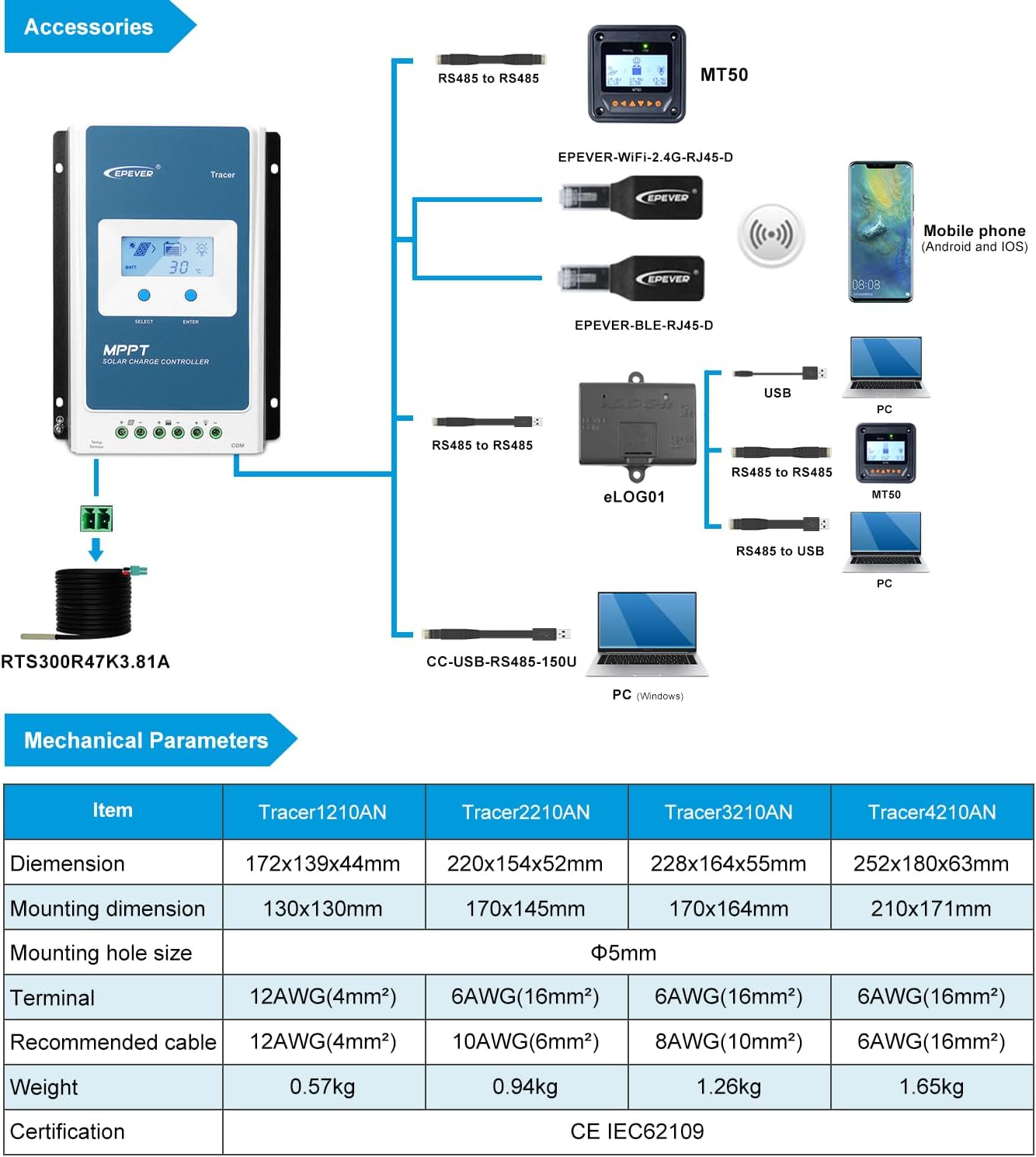
Figure 5: LCD display showing various battery type settings (Sealed, Gel, Flooded, LiFePO4, Li(NiCoMn)O2, User-defined).
4.3. Real-Time Monitoring via PC Software
The PC software allows for comprehensive real-time monitoring and parameter adjustment.
- Open the 'Solar Station' software on your PC.
- Go to the 'Port Config' menu and select 'Port Configuration'.
- In the 'Serial Port Setting' window, ensure the 'Port' dropdown matches the COM port number identified in Device Manager (e.g., COM3).
- Click the 'Add' button to add the station to your list.
- Close the 'Serial Port Setting' dialogue.
- From the main software interface, go to 'System' menu and choose 'Add Station'.
- Define the parameters of your station, ensuring you select the correct COM port from the 'Controller' tab within the station information.
- Click 'Add' to save the station.
- Once the station is successfully added, click 'Start monitoring' to begin receiving real-time data from your charge controller.
Video 1: Demonstrates how to connect the EPEVER MPPT charge controller via PC software for monitoring and configuration.
5. Maintenance
Regular maintenance ensures the longevity and optimal performance of your EPEVER MPPT Solar Charge Controller.
- Keep the controller clean and free from dust and debris.
- Periodically check all wiring connections for tightness and corrosion.
- Ensure proper ventilation around the controller to prevent overheating.
- Monitor system parameters regularly using the LCD or PC software to detect any anomalies.
- Inspect the temperature sensor for proper placement and connection.
6. Troubleshooting
This section outlines common issues and their potential solutions. For more complex problems, contact technical support.
| Problem | Cause / Solution |
|---|---|
| PV Overcurrent/Power | Ensure the open-circuit voltage of the PV array does not exceed the maximum PV open-circuit voltage. Otherwise the controller may be damaged. |
| PV Short Circuit | When not in PV charging state, the controller will not be damaged in case of a short-circuiting in the PV array. |
| PV Reverse Polarity | When the polarity of the PV array is reversed, the controller may not be damaged and can continue to operate normally after the polarity is corrected. NOTE: If the PV array is reverse connected to the controller, 1.5 times rated controller power (watts) from the PV array, will damage the controller. |
| Night Reverse Charging | Prevents the battery from discharging through the PV module at night. |
| Battery Reverse Polarity | Fully protected against battery reverse polarity; no damage to the controller will result. Correct the miswire to resume normal operation. |
| Battery Over Voltage | When the battery voltage reaches the over voltage disconnect voltage, it will automatically stop battery charging to prevent battery damage caused by over-charging. |
| Battery Over Discharge | When the battery voltage reaches the low voltage disconnect voltage, it will automatically stop battery discharging to prevent battery damage caused by over-discharging. (Any controller connected loads will be disconnected. Loads directly connected to the battery will not be affected and may continue to discharge the battery.) |
| Battery Overheating | The controller can detect the battery temperature through an external temperature sensor. The controller stops working when its temperature exceeds 65 °C and begins working when its temperature is below 55 °C. |
| Lithium Battery Low Temperature Protection | When the temperature detected by the optional temperature sensor is lower than the Low Temperature Protection Threshold (LTPT), the controller will stop charging and discharging automatically. When the detected temperature is higher than the LTPT, the controller will be working automatically (The LTPT is 0 °C by default and can be set within the range of 10 ~ -40 °C). |
| Load Short Circuit | When the load is short circuited (The short circuit current is ≥ 2 times the rated controller load current), the controller will automatically cut off the output. If the load reconnects automatically five times (delay of 5s, 10s, 15s, 20s, 25s), it needs to be cleared by pressing the Load button, restarting the controller or switching from Night to the Day (nighttime = 3 hours). |
| Load Overload | When the load is overloading (The overload current is ≥ 1.05 times the rated load current), the controller will automatically cut off the output. If the load reconnects automatically five times (delay of 5s, 10s, 15s, 20s, 25s), it needs to be cleared by pressing the Load button restarting the controller, switching from Night to Day (nighttime = 3 hours). |
| Controller Overheating* | The controller is able to detect the temperature inside the battery through an optional remote sensor. The controller stops working when its temperature exceeds 85 °C and begins to working when its temperature is below 75 °C. |
| TVS High Voltage Transients | The internal circuitry of the controller is designed with Transient Voltage Suppressors (TVS) which can only protect against high-voltage surge pulses with less energy. If the controller is to be used in an area with frequent lightning strikes, it is recommended to install an external surge arrester. |
*When the internal temperature is 81°C, the reducing power charging mode which reduce the charging power of 5%,10%,20%,40% every increase 1°Cis turned on. If the internal temperature is greater than 85°C, the controller will stop charging. But while the temperature decline to be below 75°C, the controller will resume.
7. Specifications
| Feature | Value |
|---|---|
| Model | Tracer4210AN (Upgraded version) |
| Rated Charge and Discharge Current | 40A |
| Nominal System Voltage | 12V/24V DC auto work |
| Max. PV Input Power | 520W for 12V battery system or 1040W for 24V battery system |
| Max. PV Open Circuit Voltage | 100V (at minimum operating environment temperature) 92V (at 25℃ environment temperature) |
| Supported Lead-acid Battery Types | Sealed, Gel(AGM), Flooded, User(9~17V@12V; 18~34V@ 24V) |
| Supported Li-ion Battery Types | LiFePO4 (4s/12V; 8s/24V), Li(NiCoMn)O2 (3s/12V; 6s/24V), User(9~34V) |
| Grounding | Common negative |
| MPPT Voltage Range | (Battery voltage + 2V) to 72V |
| Tracking Efficiency | ≥99.5% |
| Max. Conversion Efficiency | 98% |
| Working Environment Temperature | -25℃~+50℃ (100% input and output) |
| Storage Temperature | -20°C -- +70°C/-4°F -- 158°F |
| LCD Backlight Time | 60s (Default), Range: 0-999s (0s: the backlight is ON all the time) |
| RS485 Interface | 5VDC/200mA |
| Controller Terminals | #6 AWG (16mm2) |
| Recommended Wire Cable | #6 AWG (16mm2) |
| Dimension | 252*180*63mm (9.92 x 7.09 x 2.48 inches) |
| Weight | 1.65 KG (3.63 pounds) |
| Display Type | LCD |
| Enclosure | IP30 |
8. Optional Accessories
Enhance the functionality and monitoring capabilities of your EPEVER MPPT Solar Charge Controller with these optional accessories:
- MT50/MT52 Remote Meter: For remote display and parameter setting.
- WiFi Adapter: For wireless monitoring and control via mobile app.
- BLE (Bluetooth Low Energy) Adapter: For Bluetooth connectivity and mobile app control.
- eLOG01: External logger for data storage.
- USB-RS485 Cable (CC-USB-RS485-150U): For PC communication and software configuration.
9. Warranty and Support
EPEVER products are backed by a commitment to quality and customer satisfaction. As an official authorized sales agent for the EPEVER brand, GolandCentury offers the latest versions of controllers and accessories.
Our dedicated technical support team provides free assistance to ensure you have a seamless experience with your solar products. For any technical inquiries or support needs, please contact our service centers located in Chicago (USA), Munich (Germany), Toronto (Canada), and Melbourne (Australia).
Related documentsTracer4210AN-G3


Ask a question about this manual
Ask about setup, troubleshooting, compatibility, parts, safety, or missing instructions. Manuals+ will review the question and use this page’s manual context to help answer it.