
Introduction
This manual provides detailed instructions for the SYNOKE HJLWT0019 Digital Sports Watch. Please read this manual carefully to ensure proper use and to fully understand the watch's features and functions. Keep this manual for future reference.
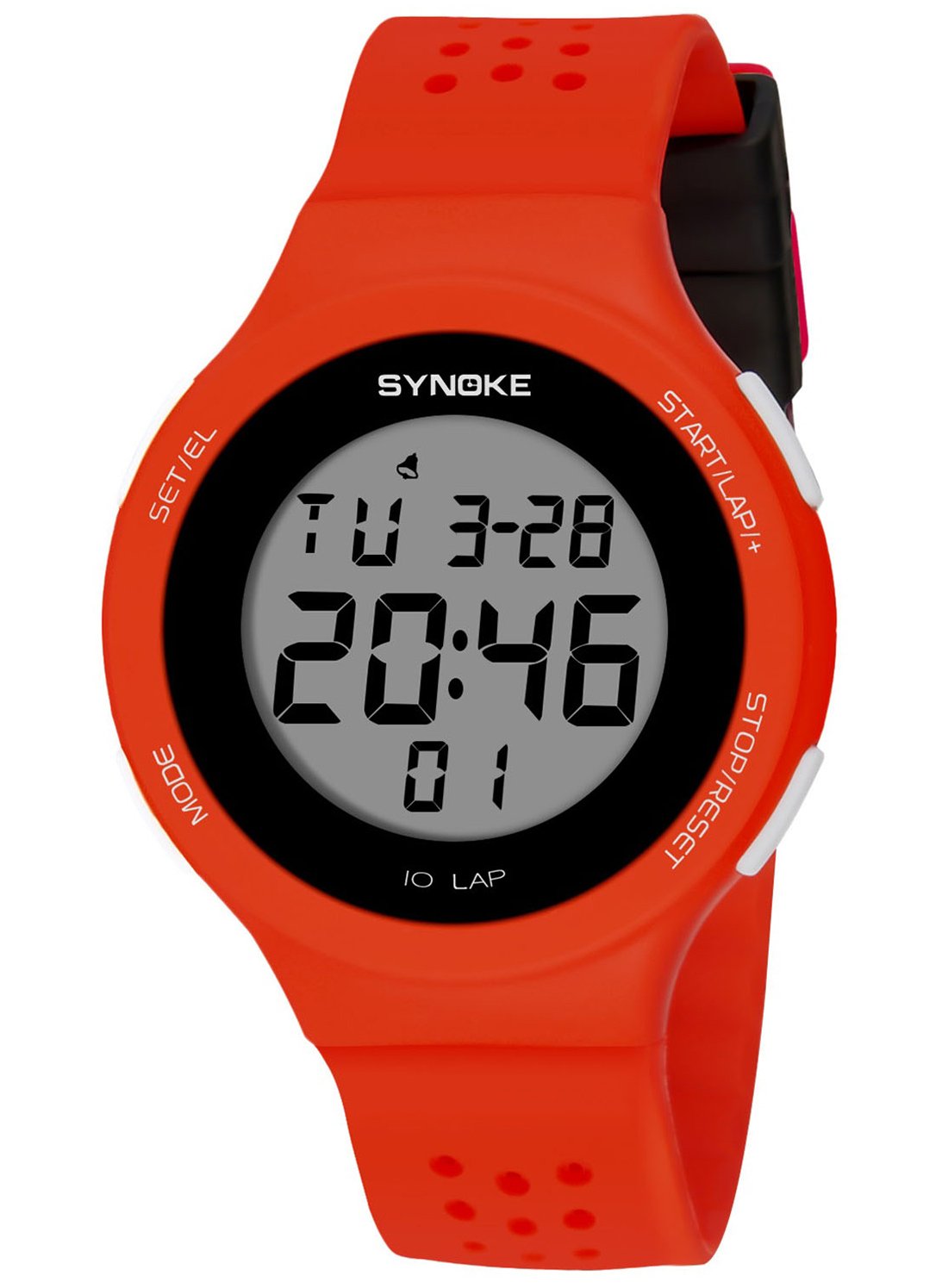
Figure 1: SYNOKE HJLWT0019 Digital Sports Watch
Product Features
- Digital Display: Clear and easy-to-read digital time and date display.
- Backlight: EL light for visibility in low-light conditions.
- Timekeeping: Displays hour, minute, second, day of the week, date, and month.
- 12/24-Hour Format: Switchable time display format.
- Alarm Function: Daily alarm with hourly chime option.
- Stopwatch: 1/100 second chronograph with split time function.
- Water Resistance: 50 meters (5 ATM) water resistant.
- Durable Construction: Shock-resistant design with high-quality plastic/resin materials.
- Comfortable Wear: Lightweight and thin design with a soft, adjustable strap.

Figure 2: Key Features Overview
Setup and Basic Operation
Button Functions
The watch features four buttons for various operations:
- MODE (Bottom Left): Cycles through display modes (Time, Stopwatch, Alarm).
- SET/EL (Top Left): Used for setting adjustments and activating the EL backlight.
- START/LAP+ (Top Right): Starts/stops stopwatch, adjusts values during setting, and activates split time.
- STOP/RESET (Bottom Right): Stops stopwatch, resets values, and confirms settings.

Figure 3: Watch Buttons and Labels
Setting Time and Date
- From the normal time display, press the MODE button three times to enter the time setting mode. The seconds will flash.
- Press the STOP/RESET button to cycle through the setting items: seconds → hours → minutes → month → date → day of the week.
- Use the START/LAP+ button to adjust the flashing value.
- Once all settings are correct, press the MODE button to exit the setting mode and return to the normal time display.
12/24-Hour Format
In the time setting mode (seconds flashing), press the START/LAP+ button to toggle between 12-hour (P for PM) and 24-hour formats.
Using the Backlight (EL Light)
Press the SET/EL button at any time to illuminate the display for a few seconds, improving visibility in dark environments.
Operating Functions
Stopwatch Function
- From the normal time display, press the MODE button once to enter stopwatch mode. The display will show "0:00:00".
- Press START/LAP+ to start the stopwatch.
- Press START/LAP+ again to pause the stopwatch.
- Press STOP/RESET to reset the stopwatch to "0:00:00".
- To record split times: While the stopwatch is running, press STOP/RESET to display the split time. The stopwatch continues to run in the background. Press STOP/RESET again to return to the running stopwatch display.
- To exit stopwatch mode, press the MODE button.
Alarm Function
- From the normal time display, press the MODE button twice to enter alarm setting mode. The hour digits will flash.
- Press the STOP/RESET button to select between setting hours and minutes.
- Use the START/LAP+ button to adjust the flashing value (hour or minute).
- Once the desired alarm time is set, press the MODE button to exit alarm setting mode.
- To turn the alarm ON/OFF: In normal time display, press and hold START/LAP+, then press MODE. An alarm icon will appear/disappear to indicate its status.
- To activate/deactivate the hourly chime: In normal time display, press and hold STOP/RESET, then press MODE. All days of the week will appear/disappear to indicate its status.
Maintenance and Care
- Cleaning: Wipe the watch regularly with a soft, dry cloth. For stubborn dirt, use a slightly damp cloth and then dry thoroughly. Avoid harsh chemicals or abrasive cleaners.
- Water Resistance: The watch is 50m water resistant. This means it is suitable for showering, swimming, and shallow diving. DO NOT press any buttons while the watch is submerged in water. DO NOT expose the watch to hot water or steam (e.g., hot showers, saunas, hot tubs) as this can compromise the water seals.
- Temperature: Avoid exposing the watch to extreme temperatures (very hot or very cold) for extended periods, as this can affect battery life and display performance.
- Impact: While shock-resistant, avoid strong impacts or dropping the watch to prevent damage to internal components or the casing.
- Battery Replacement: The watch uses a CR2025 battery. When the display becomes dim or functions become erratic, it may be time to replace the battery. It is recommended to have battery replacement performed by a qualified watch technician to ensure water resistance is maintained.
- Storage: When not in use for extended periods, store the watch in a cool, dry place away from direct sunlight and strong magnetic fields.
Troubleshooting
| Problem | Possible Cause | Solution |
|---|---|---|
| Display is blank or dim. | Low battery. | Replace the battery (CR2025). |
| Buttons are unresponsive. | Temporary software glitch or low battery. | Try pressing all buttons firmly. If issue persists, replace battery. |
| Water inside the watch. | Buttons pressed underwater, exposure to hot water/steam, or damaged seals. | Immediately take the watch to a professional for inspection and repair. Do not attempt to dry it yourself. Avoid pressing buttons underwater or exposing to hot water. |
| Time/Date is incorrect. | Time/date not set correctly or battery is low. | Refer to "Setting Time and Date" section. Replace battery if necessary. |
Specifications
| Feature | Detail |
|---|---|
| Model Number | HJLWT0019 |
| Brand | SYNOKE |
| Display Type | Digital |
| Movement | Quartz |
| Case Material | High Quality ABS Plastic |
| Strap Material | High Quality Plastic / Acrylic Resin |
| Mirror Material | Resin Mirror |
| Clasp Type | Hook and Buckle (Fold Clasp with Safety) |
| Water Resistance | 50 Meters (5 ATM) |
| Battery Type | CR2025 |
| Case Thickness | 10.14 mm |
| Dial Diameter | 43.94 mm |
| Band Width | 20 mm |
| Watch Length | 245 mm |
| Adjustable Wrist Perimeter | 164 - 220 mm |
| Weight | 37.1 g |
| Special Features | Backlight, Chronograph, Date, Month, Calendar, Alarm, 12/24-hour format, Shock-resistant. |

Figure 4: Detailed Product Specifications
Warranty and Support
Warranty Information
This product includes a warranty card. Please refer to the warranty card provided in the packaging for specific terms, conditions, and duration of the warranty. Keep your purchase receipt as proof of purchase.
Customer Support
If you encounter any issues not covered in this manual or require further assistance, please contact SYNOKE customer support through your retailer or the official SYNOKE website. Provide your model number (HJLWT0019) and a detailed description of the problem when seeking support.


