
W-KING T6 Mini
W-King T6 Mini Wireless Bluetooth Speaker User Manual
Comprehensive guide for setup, operation, and maintenance of your W-King T6 Mini Bluetooth Speaker.
1. Introduction
The W-King T6 Mini is a compact and versatile wireless Bluetooth speaker designed to deliver rich sound with modern aesthetics. It features a sleek design with an LED stripe light and a soft silicone strap for portability. This manual provides detailed instructions to help you get the most out of your speaker, covering everything from initial setup to advanced features and troubleshooting.
Key features include Bluetooth 2.1 connectivity, a built-in microphone for hands-free calls, FM radio support, and the ability to play music from a TF card. It also includes a 3.5mm audio port for wired connections.
2. Product Overview
Familiarize yourself with the W-King T6 Mini Bluetooth Speaker's components and design.
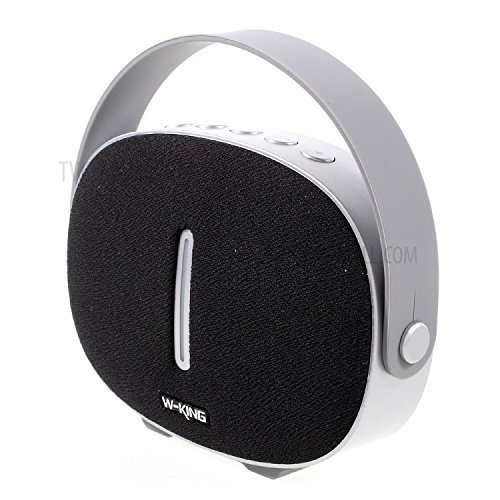
Figure 2.1: Angled view of the W-King T6 Mini Bluetooth Speaker, showcasing its black fabric front, silver frame, and integrated silicone strap handle.
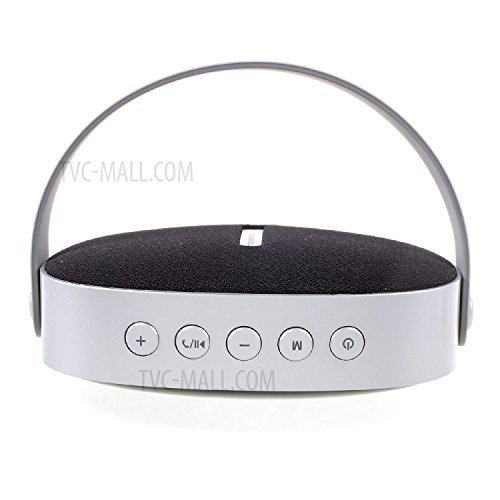
Figure 2.2: Top view of the speaker, highlighting the control panel with buttons for volume, call management, mode selection, and power.
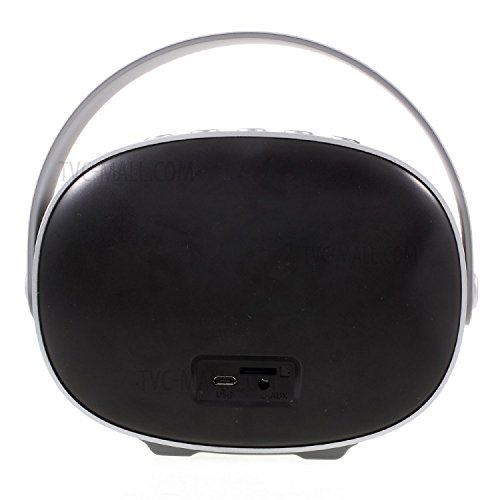
Figure 2.3: Rear view of the speaker, displaying the USB charging port, TF card slot, and AUX input port.
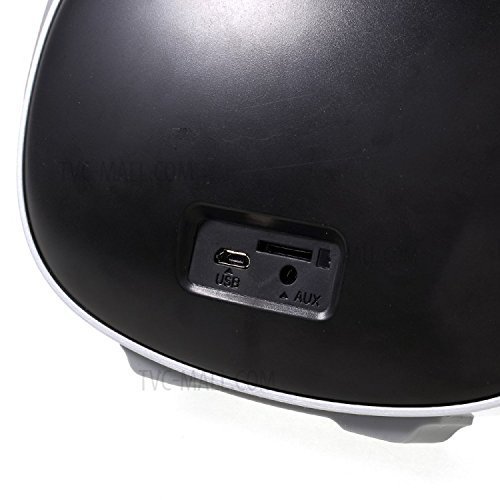
Figure 2.4: A closer look at the rear ports, including the micro USB charging port, TF (MicroSD) card slot, and 3.5mm AUX audio input.

Figure 2.5: Side profile of the speaker, showing the textured fabric surface and the integrated handle mechanism.
3. Setup Guide
3.1. Unboxing
Upon opening the package, ensure all components are present:
- W-King T6 Mini Bluetooth Speaker
- USB Charging Cable
- 3.5mm Audio Cable (AUX)
- User Manual (this document)
3.2. Charging the Speaker
Before first use, fully charge the speaker. The built-in lithium battery is 3.7V/2000mAh.
- Connect the small end of the USB charging cable to the micro USB port on the back of the speaker (refer to Figure 2.3).
- Connect the standard USB end of the cable to a USB wall adapter (not included) or a computer's USB port.
- The LED indicator light will show charging status (specific color/behavior may vary, refer to quick start guide if provided).
- Charging typically takes 2-3 hours. The indicator light will change or turn off when fully charged.
3.3. Powering On/Off
- To Power On: Press and hold the Power button (
 ) located on the top panel (refer to Figure 2.2) for approximately 3 seconds until you hear an audible prompt or see the LED indicator light up.
 - To Power Off: Press and hold the Power button again for approximately 3 seconds until you hear an audible prompt or the LED indicator turns off.
3.4. Bluetooth Pairing
Pair your W-King T6 Mini with your Bluetooth-enabled device (smartphone, tablet, etc.).
- Ensure the speaker is powered on and in Bluetooth pairing mode. The LED indicator will typically flash rapidly, indicating it's ready to pair.
- On your device, go to Settings > Bluetooth and enable Bluetooth.
- Search for available devices. You should see "W-King T6 Mini" or a similar name in the list.
- Select "W-King T6 Mini" to connect. Once connected, the speaker will provide an audible confirmation, and the LED indicator will typically stop flashing and remain solid.
- If prompted for a password, enter "0000" (four zeros).
Note: The speaker will automatically attempt to reconnect to the last paired device when powered on.
3.5. Wired Connection (AUX Mode)
For devices without Bluetooth, use the 3.5mm audio cable.
- Connect one end of the 3.5mm audio cable to the AUX port on the back of the speaker (refer to Figure 2.3).
- Connect the other end to the headphone jack or audio output port of your device.
- The speaker should automatically switch to AUX mode. If not, press the Mode button (labeled 'M' on Figure 2.2) to cycle through modes until AUX is selected.
3.6. TF Card Playback
Play music directly from a TF (MicroSD) card.
- Insert a TF card (not included) with MP3 or other compatible audio files into the TF card slot on the back of the speaker (refer to Figure 2.3). Ensure the card is inserted correctly until it clicks into place.
- The speaker should automatically switch to TF card mode and begin playing music. If not, press the Mode button (labeled 'M') to cycle through modes until TF card mode is selected.
3.7. FM Radio
Listen to FM radio stations.
- Press the Mode button (labeled 'M') to switch to FM radio mode.
- To auto-scan and save available stations, press and hold the Play/Pause button (
 ) for a few seconds. The speaker will scan and store stations.
 - Use the Previous Track (-) and Next Track (+) buttons to navigate between saved stations.
4. Operating Instructions
4.1. Button Functions (Refer to Figure 2.2)
- + Button: Short press for Volume Up. Long press for Next Track/Next FM Station.
- - Button: Short press for Volume Down. Long press for Previous Track/Previous FM Station.
- /
 Button:
- Short press to Play/Pause music.
- Short press to Answer/End phone calls.
- Long press to Reject an incoming call.
- Double press to Redial the last number (in Bluetooth mode).
- M Button (Mode): Short press to cycle through modes: Bluetooth, TF Card, FM Radio, AUX.
- Button (Power): Long press to Power On/Off.
4.2. Hands-Free Calling
When connected via Bluetooth, the built-in microphone allows for hands-free communication.
- Answering a Call: When a call comes in, press the Play/Pause/Call button once.
- Ending a Call: During a call, press the Play/Pause/Call button once.
- Rejecting a Call: When a call comes in, press and hold the Play/Pause/Call button for 2 seconds.
- Redialing: In Bluetooth mode, double-press the Play/Pause/Call button to redial the last number.
5. Maintenance
Proper care ensures the longevity and optimal performance of your speaker.
5.1. Cleaning
- Use a soft, dry, lint-free cloth to wipe the speaker's surface.
- Do not use abrasive cleaners, alcohol, benzene, or other chemical solvents, as these may damage the casing or fabric.
- Avoid getting moisture into any openings.
5.2. Storage
- Store the speaker in a cool, dry place away from direct sunlight and extreme temperatures.
- If storing for an extended period, charge the battery to about 50% every few months to prevent deep discharge and prolong battery life.
5.3. Battery Care
- Avoid fully discharging the battery frequently.
- Do not expose the speaker to temperatures above 60°C (140°F) or below -10°C (14°F).
- Use only the provided or certified charging cables.
6. Troubleshooting
If you encounter issues with your W-King T6 Mini speaker, refer to the following common problems and solutions:
| Problem | Possible Cause | Solution |
|---|---|---|
| Speaker does not power on. | Low battery; Power button not held long enough. | Charge the speaker fully. Press and hold the Power button for 3 seconds. |
| No sound. | Volume too low; Incorrect mode; Device not connected. | Increase speaker and device volume. Ensure correct mode (Bluetooth, AUX, TF). Reconnect Bluetooth or check AUX cable. |
| Bluetooth not connecting. | Speaker not in pairing mode; Device Bluetooth off; Too far from speaker. | Ensure speaker is in pairing mode (flashing LED). Turn device Bluetooth off/on. Move device closer (within 10 meters). Forget device on phone and re-pair. |
| Poor sound quality / Distortion. | Volume too high; Interference; Low battery. | Reduce volume on speaker and device. Move away from other electronic devices. Charge the speaker. |
| FM radio not clear. | Weak signal; Environmental interference. | Relocate the speaker to an area with better reception. Re-scan for stations. |
7. Specifications
| Feature | Detail |
|---|---|
| Model Name | T6 Mini |
| Speaker Unit | Φ 52mm 4Ω 6W |
| Battery | Lithium battery, 3.7V/2000mAh |
| Working Time | 6-10 hours (depending on volume and usage) |
| Product Dimensions (L x W x H) | 15.5 x 5.5 x 11.1 cm (5.5D x 15.5W x 11.1H Centimeters) |
| Item Weight | 400 Grams |
| Connectivity Technology | Bluetooth 2.1, Auxiliary (3.5mm), TF Card |
| Special Features | Built-in Microphone, FM Radio |
| Compatible Devices | iPhone, iPad, iPod, Samsung, Sony, Huawei etc. smartphones and tablets with Bluetooth-enabled devices; Other devices with 3.5mm audio port. |
| Audio Output Mode | Stereo |
| Impedance | 4 Ohm |
8. Warranty and Support
For warranty information and customer support, please refer to the documentation provided with your purchase or contact the retailer/manufacturer directly.
Legal Disclaimer: Customers are liable to check their local laws before purchasing and using the product.
For further assistance, please visit the official W-KING website or contact their customer service department. Contact details are typically found on the product packaging or the manufacturer's official website.
Ask a question about this manual
Ask about setup, troubleshooting, compatibility, parts, safety, or missing instructions. Manuals+ will review the question and use this page’s manual context to help answer it.