
Mission Darkness MDFB-MNW-M
Mission Darkness NeoLok Non-Window Faraday Bag for Tablets
User Instruction Manual
1. Introduction
The Mission Darkness NeoLok Non-Window Faraday Bag for Tablets is designed to provide comprehensive signal isolation for electronic devices. This manual outlines the proper use, features, and care instructions to ensure optimal performance and protection against hacking, tracking, spying, and data corruption.
2. Product Overview
The Mission Darkness NeoLok Non-Window Faraday Bag is a high-shielding enclosure specifically engineered to block all wireless signals, including WiFi (2.4 & 5GHz), Bluetooth, cell signals (including 5G networks), GPS, RFID, NFC, and radio signals from low MHz to 40GHz. It is constructed with durable, water-resistant ballistic nylon and features two layers of high-shielding TitanRF Faraday Fabric. The patented NeoLok magnetic closure system ensures a secure and easy seal.

Image: The Mission Darkness NeoLok Non-Window Faraday Bag, shown in its closed state, highlighting its sleek black design and secure closure mechanism.
3. Key Features
- RF Signal Shielding: Blocks WiFi (2.4 & 5GHz), Bluetooth, cell signals (including 5G), GPS, RFID, and radio signals from low MHz to 40GHz. This prevents remote triggering, data wiping, hacking, tracking, and spying.
- Military Grade Construction: Built with water-resistant ballistic nylon outer material and two interior layers of high-shielding TitanRF Faraday Fabric on all sides. Confirmed shielding effectiveness to MIL STD 188-125 and IEEE 299-2006 standards.
- Digital Privacy: Provides instant signal isolation for forensic investigations, executive travel, personal data security, EMP/CME protection, and EMF reduction.
- Universal Fit: Interior usage dimensions of 13" x 9" (33cm x 22.86cm) accommodate large tablets, multiple cell phones, two-way radios, hard drives, and similar size electronics.
- NeoLok Magnetic Closure: Patented magnetic closure system allows for effortless sealing via a double roll and strong magnetic seal, secured further by a quick-snap strap.
- Asset Tracking: Includes a unique serial number for easy asset tracking and transparent pockets for company information or evidence cards.

Image: Illustration of the NeoLok magnetic closure system and the bag's usable interior dimensions (13" x 9"), demonstrating its capacity for various devices.

Image: Cross-section view of the faraday bag illustrating its multi-layered construction, including ballistic nylon exterior and TitanRF Faraday Fabric interior, designed to meet military standards.
4. Setup and Operation
4.1 Inserting a Device
- Ensure the device is powered on if you wish to confirm signal blockage, or powered off for storage.
- Open the NeoLok Faraday Bag by unrolling the top flap.
- Carefully place your tablet, phone, or other electronic device completely inside the bag. Ensure no part of the device is protruding from the opening.
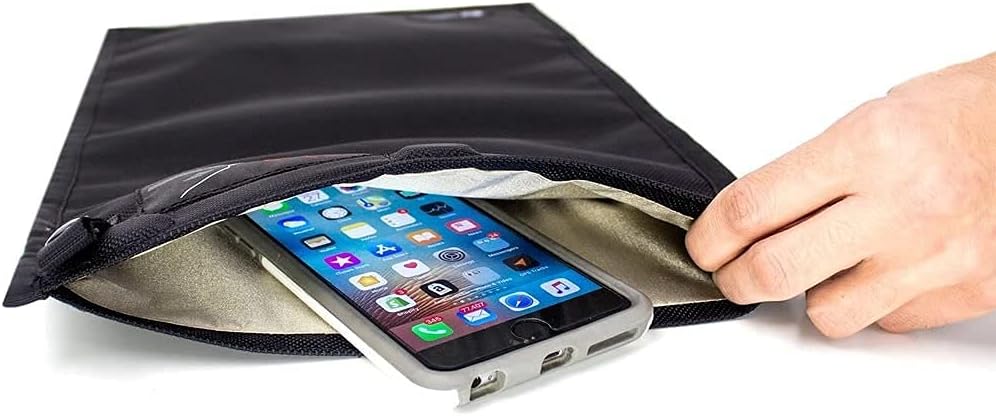
Image: A hand carefully inserting a smartphone into the open Mission Darkness NeoLok Faraday Bag, demonstrating the initial step of device placement.
4.2 Sealing the Bag
- Once the device is fully inside, roll the top opening of the bag down tightly at least two times. This action engages the NeoLok magnetic seal.
- Secure the rolled closure by fastening the quick-snap strap over the roll. This provides additional security and ensures the magnetic seal remains intact.
- For optimal shielding, ensure the bag is completely sealed and the strap is secured.
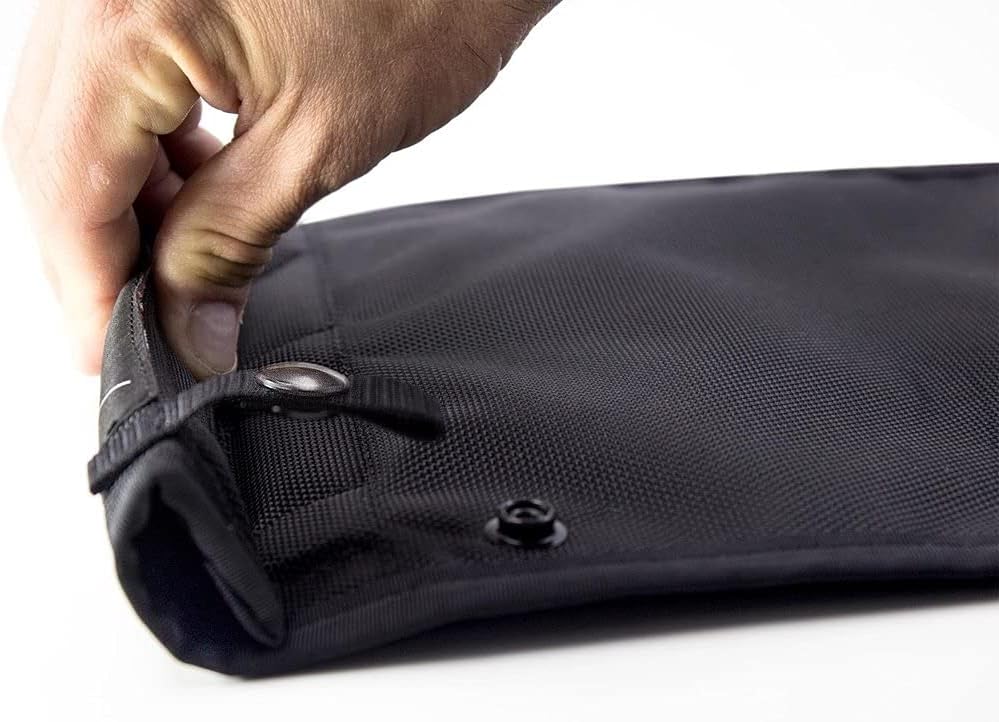
Image: A close-up view of the top of the faraday bag being rolled down, illustrating the engagement of the NeoLok magnetic closure and the securing snap strap.

Image: The Mission Darkness NeoLok Faraday Bag with a tablet partially visible, demonstrating its signal blocking capabilities with icons for WiFi, GPS, cell, Bluetooth, and RFID signals crossed out.
5. Maintenance
To ensure the longevity and effectiveness of your Mission Darkness NeoLok Faraday Bag, follow these maintenance guidelines:
- Cleaning: Wipe the exterior with a damp cloth if it becomes dirty. Do not machine wash or submerge the bag in water, as this can compromise the shielding fabric.
- Storage: Store the bag in a dry place away from extreme temperatures and direct sunlight. Avoid folding or creasing the bag excessively, especially the areas containing the faraday fabric, to prevent damage to the shielding material.
- Inspection: Periodically inspect the bag for any signs of wear, tear, or damage to the outer material or the internal faraday fabric. Any significant damage may reduce shielding effectiveness.
6. Troubleshooting
If you suspect your device is still receiving signals while inside the faraday bag, consider the following:
- Improper Seal: Ensure the bag's opening is rolled down tightly at least two times and the quick-snap strap is securely fastened. Even a small gap can allow signals to penetrate.
- Device Placement: Verify that the entire device, including antennas, is fully enclosed within the faraday fabric layers and not touching the opening.
- Bag Integrity: Check for any visible damage, punctures, or significant wear on the bag's exterior or interior lining. Damage to the faraday fabric will compromise its shielding capabilities.
- Testing: To confirm signal blockage, place a device with active Wi-Fi, Bluetooth, and cellular data inside the bag, seal it properly, and attempt to call the device or send a message. If the device does not receive the call/message, the bag is functioning correctly.

Image: A Mission Darkness Faraday Bag being used within a forensic analysis enclosure, demonstrating its application in secure digital investigations and the ease of opening with gloves.
7. Specifications
| Brand | Mission Darkness |
| Model Number | MDFB-MNW-M |
| Item Weight | 8 ounces |
| Product Dimensions (LxWxH) | 10 x 0.2 x 17 inches |
| Usable Interior Dimensions | 13" x 9" (33cm x 22.86cm) |
| Color | Black |
| Manufacturer | MOS Equipment |
| Compatible Devices | Tablets, Cell Phones, GPS, Radios, Cameras, Hard Drives |
| Shielding Effectiveness | MIL STD 188-125, IEEE 299-2006 |
8. Warranty and Support
For detailed warranty information and customer support, please refer to the official Mission Darkness website or contact MOS Equipment directly.
An official Instructions for Use (IFU) document is also available in PDF format:Download IFU (PDF)
Related documentsMDFB-MNW-M


Ask a question about this manual
Ask about setup, troubleshooting, compatibility, parts, safety, or missing instructions. Manuals+ will review the question and use this page’s manual context to help answer it.