
GPS Tracking Mart GV53MG
GTM Queclink GV53MG 4G GPS Tracker User Manual
Model: GV53MG | Brand: GPS Tracking Mart
1. Introduction
This user manual provides essential information for the installation, operation, and maintenance of your GTM Queclink GV53MG 4G GPS Tracker. The GV53MG is a compact, ultra-thin device designed for real-time vehicle and fleet tracking, offering advanced features such as geo-fencing, driving behavior monitoring, and secure data transmission. Please read this manual thoroughly before using the device to ensure proper functionality and safety.
2. Product Overview and Features
The GV53MG is an upgraded LTE Cat M1/NB2 version of the GV50MG, designed for broad network coverage and flexible deployment. Its compact size allows for covert and easy installation within vehicles.
Key Features:
- LTE Cat M1/NB2 Connectivity: Utilizes the latest low-power wide area network standards for extended coverage.
- Compact and Ultra-Thin Design: Facilitates covert and easy installation.
- Digital I/Os: Includes basic digital inputs for ignition detection and vehicle control, with an extra configurable I/O for flexible applications.
- AES-256 Encryption: Secures business-critical data and guards against unauthorized access.
- Geo-Fence Capabilities: Supports up to 20 circular and 20 polygon geo-fence regions with alarm notifications.
- Scheduled Reporting: Reports position and status at preset time intervals.
- Driving Behavior Monitoring: Detects aggressive driving behaviors such as harsh braking and acceleration.
- Crash Detection: Collects accident data for reconstruction and analysis.
- Low Power Alarm: Alerts based on internal 3-axis accelerometer.
- Remote Control: Over-the-Air (OTA) control of digital outputs.
- Internal Backup Battery: 190 mAh Li-Polymer battery for continued operation.
Product Visuals:
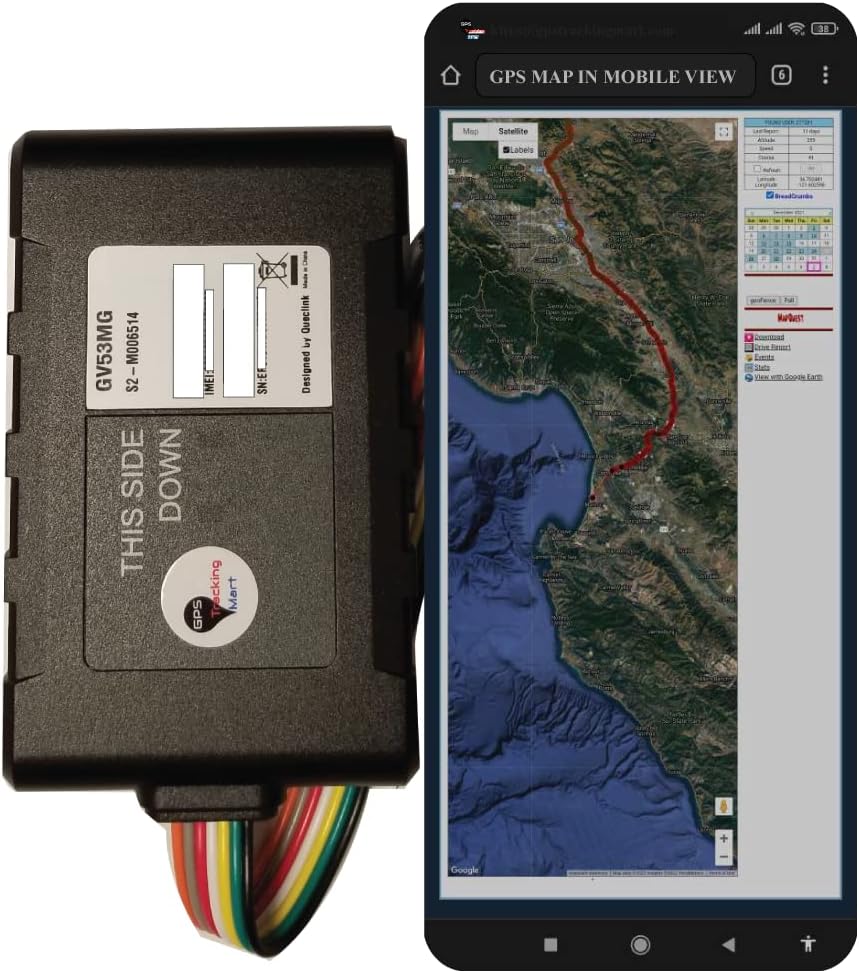
Image: The GV53MG GPS tracker shown alongside a mobile phone displaying its real-time map tracking interface.

Image: The GV53MG device with its multi-colored wiring harness, indicating connection points.

Image: A diagram highlighting key features of the GV53MG, including covert installation, cost-effectiveness, driving behavior monitoring, OTA control, scheduled reporting, geo-fences, crash detection, tow alarm, power alarm, and LED indicators.
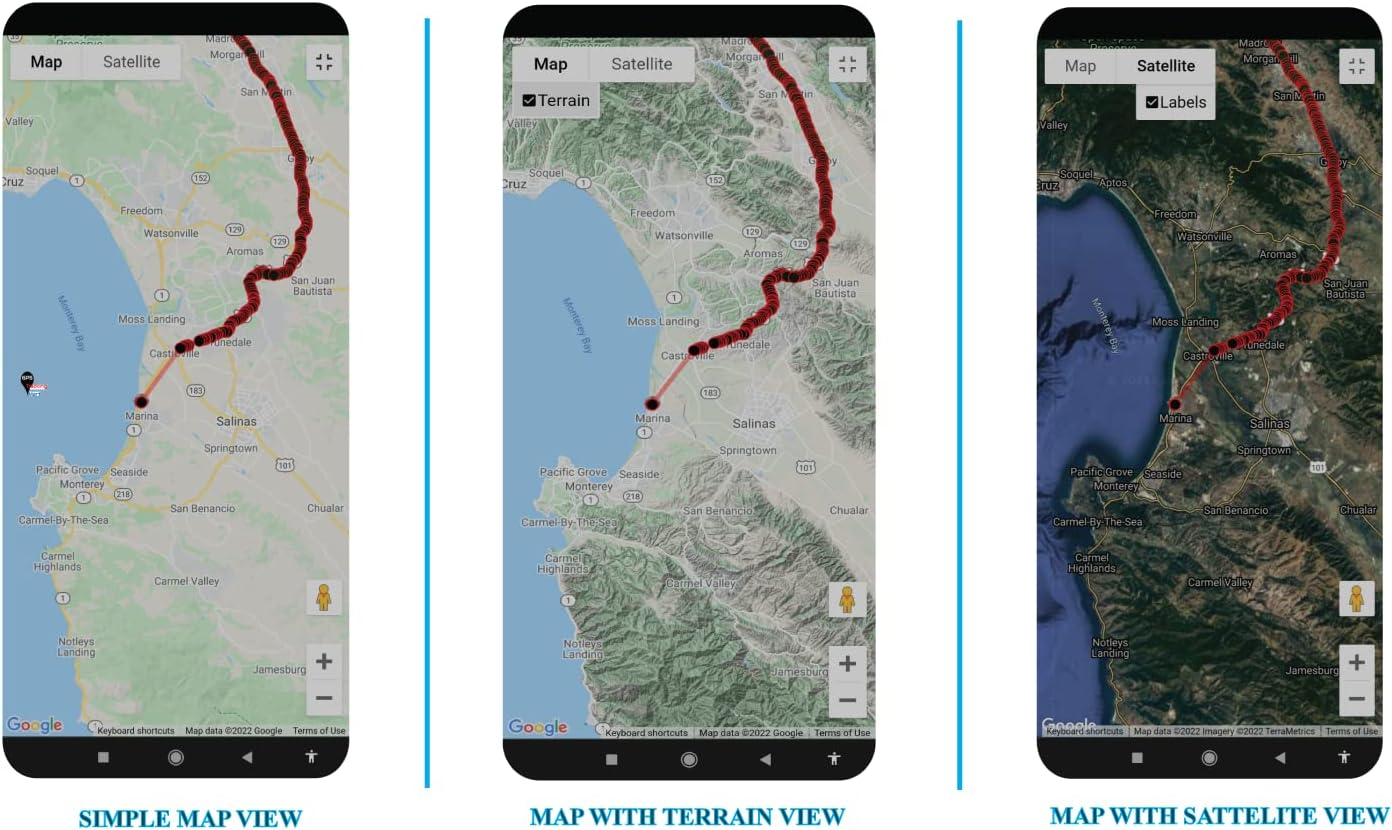
Image: Three distinct mobile map views (Simple, Terrain, and Satellite) demonstrating the tracking interface on a smartphone.

Image: Various desktop map views, including satellite, geo-fence activated, and simple map views, illustrating the comprehensive tracking platform.
3. Specifications
The following table details the technical specifications of the GV53MG GPS Tracker:
| Category | Specification |
|---|---|
| Model Number | GV53MG |
| Dimensions (L x W x H) | 3.43 x 2.17 x 0.49 inches (87mm x 55mm x 12.5mm) |
| Weight | 3.35 ounces (95g) |
| Internal Battery | Li-Polymer 190 mAh (included) |
| Operating Voltage | DC 8V to 32V |
| Operating Temperature | -30℃ to +80℃ (-40℃ to +85℃ for storage) |
| LTE Cat M1 Operating Bands | B1/B2/B3/B4/B5/B8/B12/B13/B18/B19/B20/B25/B27/B28/B66/B85 |
| LTE Cat NB2 Operating Bands | B1/B2/B3/B4/B5/B8/B12/B13/B18/B19/B20/B25/B28/B66/B71/B85 |
| Data Transmission | eMTC (DL) 300Kbps & eMTC (UL) 375Kbps |
| GPS Type | Qualcomm Gen 8C GNSS (u-blox All-in-One GNSS receiver) |
| Receiver Sensitivity (Cold start) | -148 dBm |
| Receiver Sensitivity (Tracking) | -159 dBm |
| Position Accuracy (CEP50) | < 2.5m (Autonomous) |
| TTFF (Open Sky) - Cold start | 30s average |
| TTFF (Open Sky) - Hot start | 1s average |
| Digital Inputs | One positive trigger for ignition detection |
| Digital Outputs | One open drain, 150 mA max drive current |
| Configurable I/Os | One special I/O (negative trigger digital input or open drain output) |
| Communication Port | One TTL UART port for upgrading and debugging |
| Antennas | Internal Cellular Antenna, Internal GPS patch antenna |
| Bluetooth | 2.4 GHz, BLE compatible, -88 dBm receiver sensitivity, up to 10 dBm RF Power |
| Transmit Protocol | TCP, UDP, SMS |
| Certifications | FCC, Verizon certified |

Image: A visual representation of the GV53MG's technical specifications, including dimensions and operating bands.
4. What's in the Box
Upon opening your GV53MG package, you should find the following items:
- GV53MG GPS Tracker Unit
- Extension Wire Harness
- User Manual (this document)
5. Setup and Installation
The GV53MG is designed for covert and easy installation. For optimal performance and safety, professional installation is recommended, especially for complex vehicle wiring.
5.1 Pre-Installation Steps:
- Service Activation: Before installation, ensure your tracking service is activated. Refer to the specific note/instruction insert that came with your GPS tracker for activation procedures.
- Vehicle Compatibility: Verify that your vehicle's electrical system is compatible with the GV53MG's operating voltage (DC 8V to 32V).
- Location Selection: Choose a discreet and secure location within the vehicle for installation. Ensure the location allows for good GPS signal reception (e.g., not completely enclosed by metal).
5.2 Wiring Instructions:
The GV53MG features multiple I/O interfaces for monitoring and control. The extension wire harness provides the necessary connections.
- Power Connection: Connect the main power wires of the device to a stable power source in the vehicle (e.g., directly to the vehicle battery or a constant 12V/24V supply). Ensure proper polarity.
- Ignition Detection: Connect the positive trigger digital input to the vehicle's ignition wire. This allows the device to detect when the vehicle is turned on or off.
- Digital Outputs: The device has one open drain digital output (150 mA max drive current) for vehicle control. This can be used for functions like remote immobilization (requires professional wiring and safety considerations).
- Configurable I/O: One special I/O can be configured as a negative trigger digital input or an open drain output. Consult the detailed wiring diagram provided with your device or contact support for specific applications.
- Secure Connections: Ensure all wire connections are secure, insulated, and protected from moisture and physical damage.

Image: A close-up of the GV53MG device with its multi-colored wiring harness connected, illustrating the various wire leads for installation.
5.3 Post-Installation:
- LED Indicators: Observe the LED indicators on the device (CEL and GPS) to confirm proper cellular and GPS signal acquisition. Refer to the device's quick start guide for LED status meanings.
- Test Functionality: After installation, test the device's tracking capabilities through your chosen tracking platform (web or mobile app) to ensure it is reporting location and status correctly.
6. Operating Instructions
Once installed and activated, the GV53MG operates automatically to provide real-time tracking and monitoring. Access to tracking data and device controls is typically done through a web-based platform or a dedicated mobile application provided by your service provider.
6.1 Real-Time Tracking:
Log in to your tracking platform to view the current location of your vehicle on a map. The platform will display historical routes, speed, and other relevant data.
6.2 Geo-Fencing:
Create virtual boundaries (geo-fences) on the map. You will receive alerts when the vehicle enters or exits these predefined areas. This feature is useful for managing fleet operations or securing assets.
6.3 Scheduled Reports:
Configure the device to send location and status reports at specific time intervals (e.g., every 30 seconds, every 5 minutes). This helps in maintaining a detailed log of vehicle activity.
6.4 Driving Behavior Monitoring:
The integrated 3-axis accelerometer detects harsh braking, rapid acceleration, and sharp turns. This data can be used to assess driver performance and promote safer driving habits.
6.5 Crash Detection:
In the event of a collision, the device can detect the impact and collect relevant data, which can be crucial for accident reconstruction and analysis.
6.6 Alarms and Notifications:
The GV53MG supports various alarms, including:
- Low Power Alarm: Notifies when the internal backup battery is low.
- Power On/Off Report: Alerts when the device is powered on or off.
- Special Alarm: Configurable alarms based on digital input triggers.
- Tow Alarm: Detects unauthorized movement of the vehicle when ignition is off.
6.7 Remote Control (OTA):
Certain digital outputs can be controlled remotely via the tracking platform, allowing for functions like remote vehicle immobilization (if configured and safely implemented).
7. Maintenance
The GV53MG is designed for reliable operation with minimal maintenance. Following these guidelines will help ensure its longevity and performance:
- Keep Clean: Periodically wipe the device with a dry, soft cloth to remove dust and debris. Avoid using harsh chemicals or solvents.
- Environmental Conditions: Ensure the device remains within its specified operating temperature range (-30℃ to +80℃). Avoid exposing it to extreme heat, cold, or direct sunlight for prolonged periods.
- Moisture Protection: The device is not waterproof. Protect it from water, rain, and high humidity.
- Connection Integrity: Periodically check the wiring connections to ensure they are secure and free from corrosion or damage. Loose connections can lead to intermittent operation.
- Backup Battery: The internal Li-Polymer 190 mAh battery provides backup power. It charges automatically when the device is connected to vehicle power. No user maintenance is required for the internal battery.
- Firmware Updates: Firmware updates may be released periodically to improve performance or add new features. These are typically performed Over-the-Air (OTA) by your service provider and do not require user intervention.
8. Troubleshooting
If you encounter issues with your GV53MG GPS Tracker, refer to the following common troubleshooting steps:
8.1 No GPS Signal / Inaccurate Location:
- Check Device Placement: Ensure the device is installed in a location with a clear view of the sky (e.g., under the dashboard, not deep within metal structures) to receive adequate GPS signals.
- Verify LED Status: Check the GPS LED indicator on the device. If it's not blinking or solid green (refer to your quick start guide for exact status), it may not be acquiring a signal.
- Move to Open Area: Test the device in an open area away from tall buildings, dense foliage, or underground structures that can obstruct GPS signals.
8.2 No Data Transmission / Device Offline:
- Check Power: Ensure the device is receiving power from the vehicle. Check the power connections and the vehicle's battery.
- Verify Cellular LED: Check the CEL LED indicator. If it's not indicating a stable cellular connection, there might be a network issue or SIM card problem (if applicable).
- Service Activation: Confirm that your tracking service subscription is active and not expired.
- Network Coverage: Ensure the vehicle is in an area with adequate 4G LTE Cat M1/NB2 cellular coverage.
8.3 Device Not Responding:
- Power Cycle: Disconnect the device from power for a few minutes, then reconnect it. This can resolve minor software glitches.
- Check Wiring: Inspect all wiring connections for looseness, damage, or incorrect installation.
8.4 Contact Support:
If the above steps do not resolve the issue, please contact GPS Tracking Mart customer support for further assistance. Provide your device's model number (GV53MG) and a detailed description of the problem.
9. Warranty and Support
For information regarding product warranty, please refer to the documentation provided at the time of purchase or contact GPS Tracking Mart directly. Your tracking service activation includes specific instructions for support and service inquiries.
Legal Disclaimer:
By purchasing this product, the customer agrees it is his or her responsibility to use the product and/or service in accordance with local, state, and federal laws. GPS Tracking Mart Co. will not be responsible in any way the customer uses this product and/or service. GPS Tracking Mart Co. will not be responsible for any lost property, damages of any kind during the use of the product and/or service.
Ask a question about this manual
Ask about setup, troubleshooting, compatibility, parts, safety, or missing instructions. Manuals+ will review the question and use this page’s manual context to help answer it.