
1. Product Overview
The OBO HANDS RFID NFC Copier is a versatile handheld device designed for reading and writing various RFID and NFC cards and tags. It features a 3.2-inch full-color screen and supports multiple frequencies, making it suitable for a wide range of applications. This manual provides detailed instructions for setup, operation, and troubleshooting to ensure optimal performance.
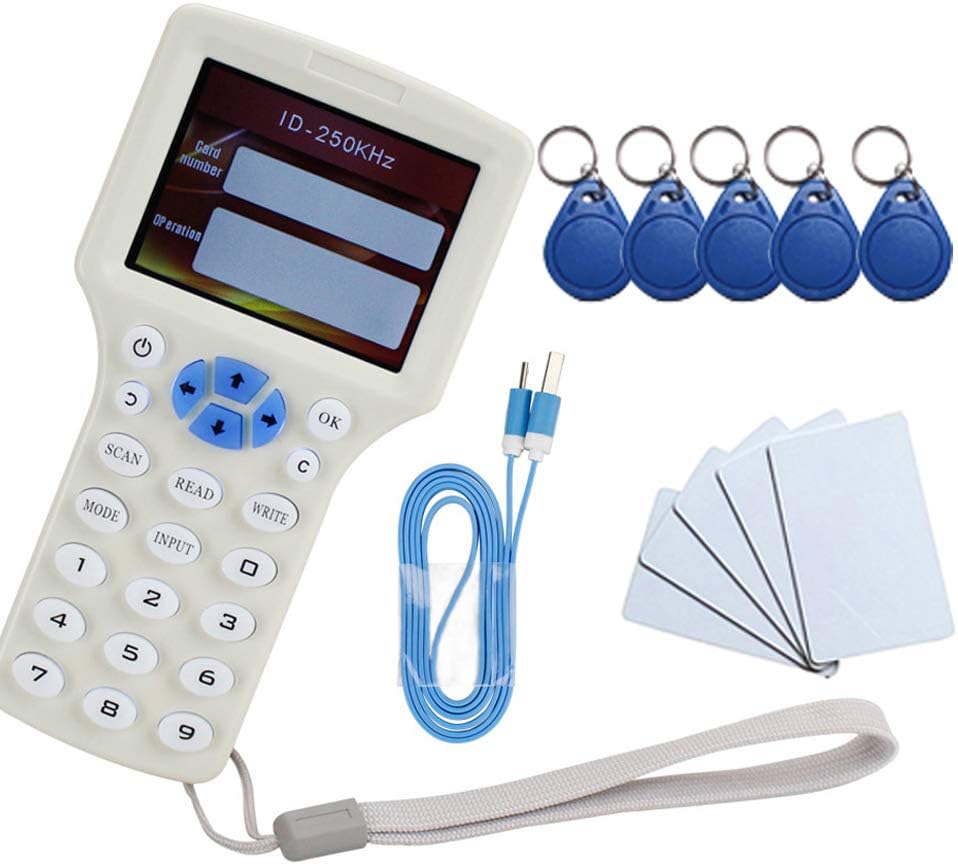
Figure 1.1: OBO HANDS RFID NFC Copier with included UID tags and cards.
2. Package Contents
- 1 x Handheld RFID NFC Copier Reader Writer
- 1 x USB cable
- 10 x UID Keyfob/Cards
3. Device Layout

Figure 3.1: Front view of the device with labeled controls.
- LCD: 3.2-inch full color screen for displaying information.
- Power Button: Used for startup and shutdown.
- Navigation Buttons (Up/Down/Left/Right): Used to move the selection cursor.
- OK Button: Confirms selections.
- Return Button: Navigates back.
- Scan Button: Initiates auto-scanning for card types and data.
- Mode Button: Switches between different frequency modes.
- Read Button: Reads data from a card.
- Write Button: Writes data to a card.
- Input Button: For manual card input.
- Number Pad (0-9): For entering numerical data.
- USB Port: For connecting to a computer and charging.

Figure 3.2: Back view showing battery compartment and induction card region.
- Battery Compartment: Houses the batteries (not specified, but typically AAA or AA).
- Induction Card Region: Area where cards are placed for reading/writing.
- Loudspeaker: Provides English voice broadcast for operations.
4. Setup
4.1 Powering On
- Ensure batteries are correctly installed in the battery compartment (refer to Figure 3.2).
- Press and hold the "on/off" button until the device powers on and displays the ZONSIN logo.
4.2 Connecting to a Computer (for 13.56MHz Encryption Cracking)
- Connect the copier to your computer using the provided USB cable.
- Press the "on/off" button. The copier will display a "Disclaimer" page.
- DO NOT press any button on the copier at this stage.
- Your computer should recognize the device as a removable disk. Open this disk.
- Inside the disk, you will find the manual and the necessary software.
- On your computer, first press the "OK" button to agree with the software's disclaimer.
- Then, agree with the copier's "Disclaimer" page by pressing "OK" on the device. This will establish a successful connection.
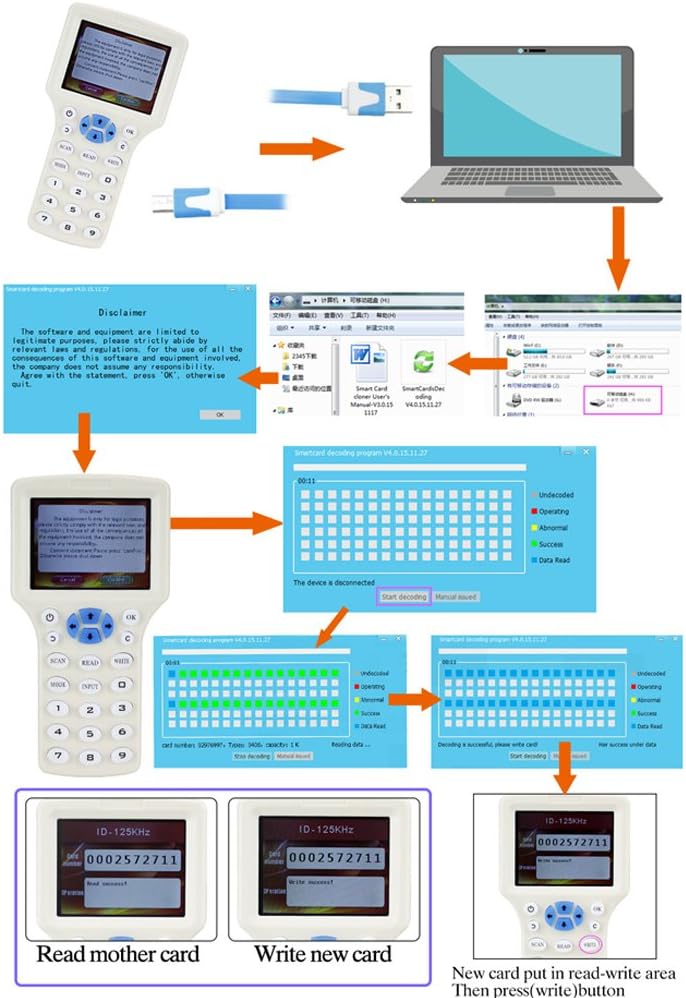
Figure 4.1: Connecting the device to a computer for software operations.
5. Operating Instructions
5.1 Understanding Frequencies and Card Types
The device supports various frequencies and card types. Use the MODE button to cycle through the supported frequencies. The device provides English voice broadcast for each frequency selected.

Figure 5.1: Examples of frequency displays on the copier screen.
- Supported reading and writing frequencies: 125KHz, 250KHz, 500KHz, 375KHz, 625KHz, 750KHz, 875KHz, 1000KHz, 13.56MHz (ISO14443A/B).
- Supported card writing types: T5577, EM4305, M-fre UID cards.
- Note: This device does not support HID cards.
5.2 How to Copy 125KHz RFID Cards
- Press the "on/off" button to power on the device.
- Place the original 125KHz card on the back side of the copier, within the induction card region.
- The copier will display the "Disclaimer" page. Press the "OK" button to proceed.
- With the card still in place, press the "SCAN" button. The copier will automatically scan and identify the 125KHz card, displaying its number on the screen.
- Remove the original card. Place a writable EM4305 key fob or card on the back side of the copier.
- Press the "WRITE" button. The data will be written to the new card. A "Write success!" message will be displayed.
Video 5.2.1: Demonstration of copying a 125KHz card.
This video illustrates the process of reading a 125KHz RFID card and then writing the data to a new writable card. It shows the device's screen displaying the card number and success messages for both read and write operations.
5.3 How to Crack Encrypted 13.56MHz Cards
For encrypted 13.56MHz cards, the cracking process requires connecting the copier to a computer and using the provided software.
- Ensure the copier is connected to your computer via the USB cable and the software is running (refer to Section 4.2).
- Place your original 13.56MHz encrypted card on the back side of the copier, within the read/write area.
- In the software on your computer, press the "scan" button to initiate the password cracking process.
- Allow 5 to 10 seconds for the passwords to be cracked successfully. The software will indicate completion.
- Remove the original card. Place one of the provided UID cards in the read/write area on the copier.
- In the software, press the "write" button. The cracked data will be written to the UID card.
6. Maintenance
- Keep the device clean and free from dust and moisture. Use a soft, dry cloth for cleaning.
- Avoid dropping the device or subjecting it to strong impacts.
- Store the device in a cool, dry place when not in use.
- If the device will not be used for an extended period, remove the batteries to prevent leakage.
- The device does not carry any virus; however, it is recommended to temporarily disable antivirus software when using the PC-connected features to avoid potential conflicts.
7. Troubleshooting
| Problem | Possible Cause | Solution |
|---|---|---|
| Cannot write HID Card | The device does not support HID cards. | This is a hardware limitation. The device is not designed to work with HID cards. |
| Read/Write fails repeatedly | Card not positioned correctly, interference, or card type incompatibility. | Ensure the card is placed firmly within the induction card region. Try repositioning the card. Attempt the read/write operation a few more times. Verify the card type is supported by the device. |
| Device not recognized by computer | Incorrect connection sequence, faulty USB cable, or driver issue. | Follow the connection steps in Section 4.2 precisely. Try a different USB cable. Ensure your computer's antivirus software is temporarily disabled if it interferes with the connection. |
| No display or device won't power on | Low or dead batteries, or incorrect battery installation. | Replace batteries with fresh ones. Ensure batteries are inserted with correct polarity. |
8. Specifications
| Feature | Detail |
|---|---|
| Model Name | 8595752142 |
| Display | HD 3.2-inch full color screen |
| Voice Broadcast | English voice broadcast |
| Supported Frequencies | 125KHz, 250KHz, 500KHz, 375KHz, 625KHz, 750KHz, 875KHz, 1000KHz, 13.56MHz (ISO14443A/B) |
| Supported Write Cards | T5577, EM4305, M-fre UID cards |
| Unsupported Cards | HID Cards |
| Connectivity | USB 1.1 |
| Item Weight | 8.2 ounces |
| Package Dimensions | 7.64 x 3.78 x 2.2 inches |
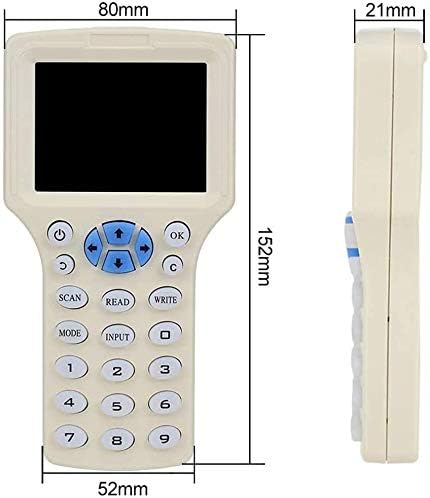
Figure 8.1: Device dimensions in millimeters.
9. Warranty and Support
For warranty information and technical support, please refer to the documentation included with your purchase or contact OBO HANDS customer service directly. Keep your purchase receipt as proof of purchase.
For additional assistance, you may visit the OBO HANDS Store on Amazon.