
Introduction
This manual provides detailed instructions for the safe and proper installation, operation, and maintenance of your Maclean MC778 Universal TV Wall Mount. Please read this manual thoroughly before installation and retain it for future reference.
The Maclean MC778 is designed for mounting LCD, LED, and Plasma televisions, as well as monitors, with screen sizes ranging from 26 to 55 inches and a maximum weight of 45 kg. It supports various VESA standards, including 75x75, 100x100, 200x200, and 400x400 mm.
Safety Information
- Weight Capacity: Do not exceed the maximum weight capacity of 45 kg (99 lbs). Overloading can result in serious injury or property damage.
- Screen Size: While the mount is recommended for 26-55 inch TVs, larger screens can be mounted if their weight does not exceed 45 kg and their VESA pattern is compatible.
- Wall Type: Ensure the mounting surface (wall) can safely support the combined weight of the mount and the television. Consult a qualified professional if unsure about your wall's structural integrity.
- Tools: Use appropriate tools for installation. Always wear safety glasses.
- Children: Keep children away from the installation area. Small parts can be a choking hazard.
- Damage: Do not install if the product or any components are damaged. Contact customer support for replacement parts.
- Professional Installation: If you have any doubts about installing this product, seek assistance from a professional installer.
Package Contents
Verify that all components are present before beginning installation. Refer to the image below for a visual representation of the included parts.

Image Description: This image displays all components included with the Maclean MC778 TV wall mount. It shows the main wall plate, two vertical TV brackets, various screws and washers for both wall and TV attachment, wall anchors, and a small spirit level for accurate installation.
- TV Wall Mount Assembly (Main Plate and TV Brackets)
- Mounting Hardware Kit (screws, washers, wall anchors for various wall types)
- Integrated Spirit Level
- Instruction Manual
Specifications
| Brand | Maclean |
| Model Number | MC-778 |
| Color | Black |
| Material | Metal |
| Maximum Load Capacity | 45 kg (99 lbs) |
| Recommended Screen Size | 26" - 55" (or larger if VESA compatible and within weight limit) |
| VESA Compatibility | 75x75, 100x100, 200x100, 200x200, 200x300, 300x300, 200x400, 300x400, 400x400 mm |
| Adjustable Tilt Angle | -15° to +15° |
| Distance from Wall | Approximately 70mm (fixed) |
| Integrated Features | Spirit Level |

Image Description: This graphic illustrates the VESA compatibility of the MC778 mount, showing supported patterns like 75x75mm, 100x100mm, 200x200mm, and 400x400mm. It also indicates compatibility with TV screen sizes from 26 to 65 inches, emphasizing that VESA and weight are the primary factors.
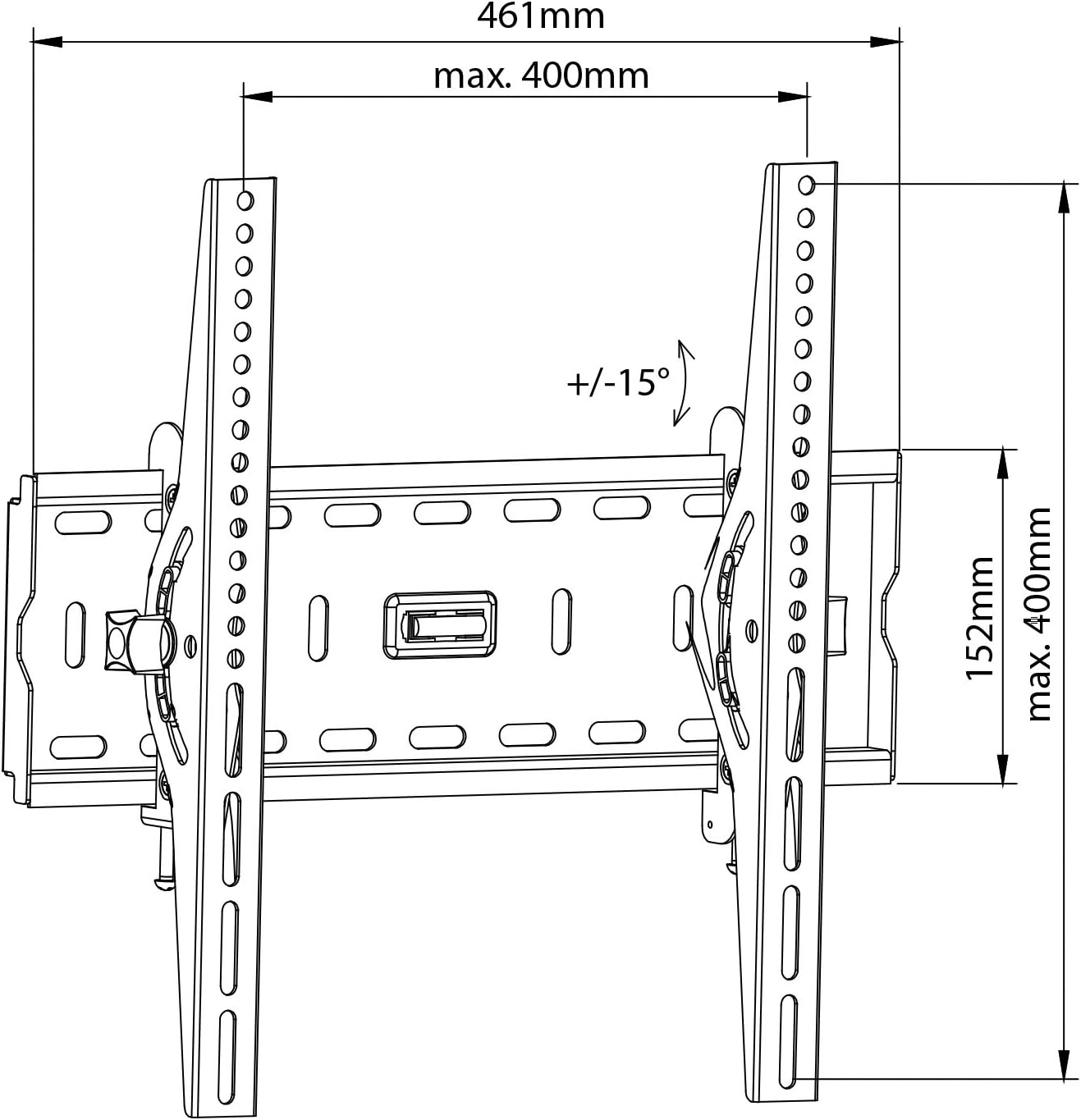
Image Description: A technical diagram of the Maclean MC778 TV wall mount, showing key dimensions such as the overall width (461mm), maximum horizontal VESA (400mm), vertical VESA (152mm to 400mm), and the tilt range of +/- 15 degrees.
Setup and Installation
Before you begin:
- Read all instructions carefully.
- Ensure you have all necessary tools (drill, stud finder, screwdriver, pencil, measuring tape).
- Identify your wall type (wood stud, concrete, brick, drywall with anchors). Different wall types require different mounting hardware and techniques.
- Determine the desired height and location for your TV.
Step 1: Attach TV Brackets to the TV
- Carefully place your TV face down on a soft, clean surface to prevent screen damage.
- Identify the VESA mounting holes on the back of your TV.
- Select the appropriate screws (M4, M6, or M8) and washers from the hardware kit that fit your TV's mounting holes. Ensure the screws are long enough to securely fasten the brackets but not so long that they damage internal components.
- Attach the two vertical TV brackets to the back of your TV using the selected screws and washers. Ensure they are securely tightened. The brackets should be oriented so the hooks face upwards.
Step 2: Mount the Wall Plate to the Wall
- Hold the wall plate against the wall at your desired mounting height. Use the integrated spirit level to ensure it is perfectly horizontal. Mark the drilling locations with a pencil.
- For Wood Stud Walls: Use a stud finder to locate the center of two adjacent wood studs. Drill pilot holes (recommended size in manual) into the studs. Secure the wall plate using the lag bolts and washers provided.
- For Concrete/Brick Walls: Drill pilot holes (recommended size in manual) into the solid concrete or brick. Insert the concrete anchors into the drilled holes. Secure the wall plate using the lag bolts and washers.
- For Drywall (with anchors): If mounting to drywall without studs, use appropriate heavy-duty drywall anchors (not always included, may need to be purchased separately based on TV weight). Follow the anchor manufacturer's instructions. Note: Mounting directly into drywall without anchors or studs is not recommended.
- Once the wall plate is securely fastened, double-check its stability and levelness using the integrated spirit level.

Image Description: A Maclean MC778 TV wall mount is shown installed on a wall in a modern living room, ready to receive a television. This image provides a visual context for the mounted product.
Step 3: Hang the TV on the Wall Plate
- With assistance, carefully lift the TV (with brackets attached) and hook the brackets onto the wall plate.
- Ensure both brackets are properly seated and engaged with the wall plate.
- Locate the safety screws or locking mechanisms on the bottom of the TV brackets. Tighten these screws to secure the TV to the wall plate and prevent accidental dislodgement.

Image Description: A side profile view of a television mounted with the Maclean MC778, illustrating the slim 70mm distance between the TV and the wall, highlighting its low-profile design.
Operating the Tilt Feature
The Maclean MC778 TV wall mount features an adjustable tilt mechanism, allowing you to angle your TV for optimal viewing.
- To adjust the tilt, locate the tilt adjustment knobs on the sides of the TV brackets.
- Loosen the knobs slightly.
- Gently tilt the TV to your desired angle, up to +15 degrees upwards or -15 degrees downwards.
- Once the desired angle is achieved, securely tighten the tilt adjustment knobs to lock the TV in place.

Image Description: This image demonstrates the adjustable tilt feature of the Maclean MC778 mount, showing a TV tilting both upwards and downwards by up to 15 degrees, illustrating the flexibility for viewing angle optimization.
Maintenance
- Regular Inspection: Periodically check all screws and connections to ensure they remain tight and secure.
- Cleaning: Clean the mount with a soft, dry cloth. Avoid abrasive cleaners or solvents that could damage the finish.
- Weight Changes: If you replace your TV with a heavier model, re-verify that the new TV's weight and VESA pattern are within the mount's specifications.
Troubleshooting
Issue: TV is not level after installation.
Solution: The Maclean MC778 includes an integrated spirit level for precise installation. If the TV is not level, carefully remove the TV from the mount. Re-check the wall plate's levelness using the spirit level and adjust if necessary by slightly loosening and re-tightening the wall screws. Ensure the wall plate is perfectly horizontal before re-hanging the TV.
Issue: TV feels unstable or wobbly.
Solution: Immediately remove the TV from the mount. Re-inspect all wall plate connections to the wall and TV bracket connections to the TV. Ensure all screws are securely tightened and that the wall anchors (if used) are properly installed and rated for the weight. If the issue persists, consult a professional installer.
Issue: Cannot adjust the tilt angle.
Solution: Ensure the tilt adjustment knobs on the sides of the TV brackets are sufficiently loosened before attempting to adjust the angle. After adjusting, tighten them firmly to lock the position.
Warranty and Support
Maclean offers a Lifetime Guarantee on the MC778 TV Wall Mount, reflecting its commitment to quality and durability. This warranty covers manufacturing defects and ensures the product's performance under normal use.

Image Description: A graphic highlighting key features of Maclean products, including "Certified quality," "Lifetime guarantee," "Three times strength tested," and "All mounting materials included," along with "Simply mounting instructions."
For technical support, warranty claims, or inquiries regarding replacement parts, please contact Maclean customer service through your retailer or the official Maclean website. Please have your model number (MC-778) and proof of purchase available when contacting support.