
1. Introduction
This manual provides essential information for the safe and efficient use of your Vertiv Liebert PST5-500MT120 Uninterruptible Power Supply (UPS). This 500VA/300W 120V standby UPS is designed to offer reliable and cost-effective protection for your household or business electronics, ensuring continuous operation during power disturbances and providing ample runtime for orderly shutdowns.
2. Safety Information
Please read and understand all safety instructions before installing or operating your UPS. Failure to follow these instructions may result in electric shock, fire, or serious injury.
- Do not open the UPS casing. There are no user-serviceable parts inside. Refer all servicing to qualified service personnel.
- Do not use the UPS in environments with excessive moisture or extreme temperatures.
- Ensure the UPS is connected to a grounded outlet.
- Disconnect the UPS from the power source before performing any maintenance or cleaning.
- This product contains chemicals known to the State of California to cause cancer and birth defects or other reproductive harm. Wash hands after handling.
3. Package Contents
Verify that all items are present in your package:
- 1 x Vertiv Liebert PST5 UPS Unit
- 1 x USB Type A to USB Type B Cable (2 meters / ~6.5 ft in length)
- User Manual (this document)
4. Product Overview
The Liebert PST5 UPS provides comprehensive power protection for your electronic devices. It features:
- 8 NEMA 5-15R Outlets: Four outlets provide battery backup and surge protection, while the other four offer surge protection only. Two outlets are widely spaced to accommodate transformer-block plugs.
- USB Communication Port: For connecting to a computer to enable notifications and controlled shutdown via free software.
- Tel/Network Data Line Protection: RJ45/11 ports for surge protection of data lines.
- Energy Star Certified: Meets eco-friendly requirements for energy efficiency.

Figure 4.1: Top view of the Vertiv Liebert PST5 UPS, highlighting the arrangement of outlets and the control panel.
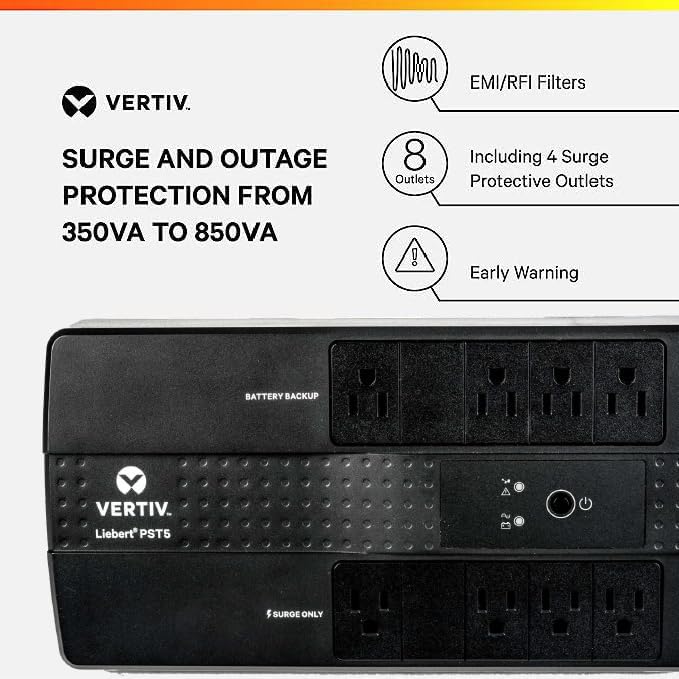
Figure 4.2: Key features of the UPS, including EMI/RFI filters, outlet types, and early warning system.
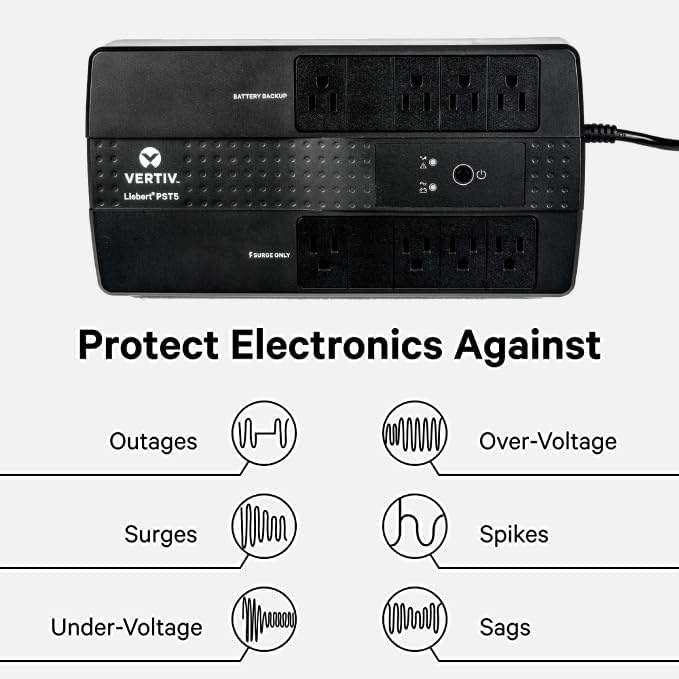
Figure 4.3: The UPS provides protection against various power disturbances such as outages, surges, and voltage fluctuations.

Figure 4.4: The Liebert PST5 UPS is suitable for protecting a wide range of electronics in home and office environments.
5. Setup
- Unpack and Inspect: Carefully remove the UPS from its packaging. Inspect for any shipping damage.
- Initial Charge: For optimal performance, charge the UPS for at least 8 hours before initial use. Connect the UPS to a standard 120V AC wall outlet.
- Connect Devices:
- Plug critical devices (e.g., computer, monitor, router) into the Battery Backup & Surge Protection outlets.
- Plug non-critical devices (e.g., printer, desk lamp) into the Surge Only outlets.
- USB Connection (Optional): Connect the provided USB cable from the UPS to your computer's USB port. Download and install the free software from the Vertiv website for advanced monitoring and controlled shutdown capabilities.
- Tel/Network Connection (Optional): Connect your telephone or network cable through the RJ45/11 ports on the UPS for additional surge protection.
Video 5.1: An official overview of the Liebert PST5 UPS, demonstrating its features and typical applications.
6. Operation
- Power On/Off: Press the power button on the front panel to turn the UPS on or off.
- Indicators:
- Green LED: Indicates the UPS is operating on utility power.
- Amber LED: Indicates the UPS is operating on battery power.
- Red LED: Indicates a fault or battery issue. Refer to the Troubleshooting section.
- LCD Display (if applicable): Some models feature an LCD display that shows real-time information such as input/output voltage, battery capacity, and load level. Use the display button to cycle through different information screens.
- Power Outage: During a power outage, the UPS will automatically switch to battery power. An audible alarm will sound to alert you. The duration of battery backup depends on the load connected.
- Controlled Shutdown: If the power outage is prolonged, use the installed software to perform an orderly shutdown of your computer to prevent data loss.
7. Maintenance
- Cleaning: Clean the exterior of the UPS with a soft, dry cloth. Do not use liquid or aerosol cleaners.
- Battery Care: The internal battery is designed for a long service life. To maximize battery life, avoid frequent deep discharges. The battery is covered by the 3-year warranty.
- Storage: If storing the UPS for an extended period, ensure it is fully charged and then disconnect it from the power source. Recharge every 3-6 months to prevent battery degradation.
8. Troubleshooting
| Problem | Possible Cause | Solution |
|---|---|---|
| UPS does not turn on. | No utility power; Battery discharged; UPS fault. | Ensure the UPS is plugged into a live outlet. Allow the battery to charge. If the problem persists, contact support. |
| UPS is beeping continuously. | Operating on battery power; Overload; Low battery. | This is normal during a power outage. Reduce connected load. Allow battery to recharge. The alarm can often be silenced by a short press of the power button, or through the software. |
| Red LED is lit. | Internal fault; Battery failure. | Disconnect all devices and turn off the UPS. Reconnect to power. If the light remains, contact support. |
| Short runtime on battery. | Battery not fully charged; Battery nearing end of life; Overload. | Ensure the UPS is fully charged. Reduce connected load. If the battery is old, it may need replacement (covered under warranty). |
9. Specifications
| Feature | Detail |
|---|---|
| Model Number | PST5-500MT120 |
| Capacity | 500VA / 300W |
| Input Voltage | 120V |
| Output Voltage | 120V |
| Outlets | 8 NEMA 5-15R (4 Battery Backup & Surge, 4 Surge Only) |
| Dimensions (L x W x H) | 6.2 x 12 x 3.8 inches |
| Item Weight | 1 pounds |
| Battery Type | Lead Acid (Product Specific) |
| Color | Black |
| Amperage | 4.16 A |
10. Warranty and Support
Your Vertiv Liebert PST5 UPS is backed by a 3-year full unit coverage including battery with advanced replacement warranty. This warranty ensures peace of mind and covers any defects in materials or workmanship under normal use.
For technical support, warranty claims, or to download the free controlled shutdown software, please visit the official Vertiv website or refer to the contact information provided in your product's packaging. Keep your purchase receipt for warranty validation.