
Introduction
This manual provides instructions for the BOMAZ Replacement Remote Control, designed for use with various Vivitek Projector models including D508, D510, D530, D535, D536, D548, D551, D553, D557W, and D55AH. This remote is a generic replacement and does not require any setup for immediate use.
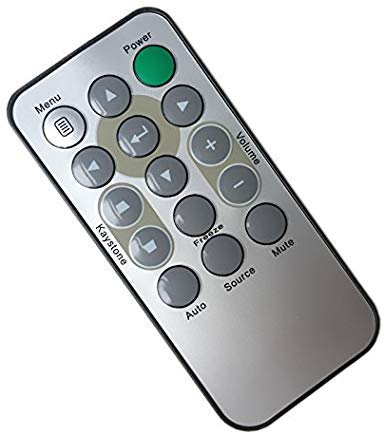
Figure 1: Front view of the BOMAZ Replacement Remote Control.
Setup
Battery Installation
The remote control requires a CR2025 coin cell battery. To install or replace the battery:
- Locate the battery compartment on the back of the remote control.
- Gently slide the battery tray out. The video demonstrates this process.
- Insert a new CR2025 battery with the positive (+) side facing up.
- Slide the battery tray back into the compartment until it clicks securely into place.
Video 1: Demonstrates the physical appearance of the remote control, including the battery compartment and how to access it. It shows the remote from various angles and highlights the button layout.
No additional setup or programming is required. The remote is ready for use once batteries are installed.
Operating Instructions
This remote control provides essential functions for your Vivitek Projector. Ensure the remote is pointed towards the projector's IR receiver for optimal performance.
Button Functions:
- Power (Green Button): Turns the projector on or off.
- Menu: Accesses the projector's on-screen menu.
- Navigation Arrows (Up, Down, Left, Right): Used to navigate through menu options.
- Enter (Center Button): Confirms selections within the menu.
- Volume (+/-): Adjusts the audio output volume.
- Keystone (Up/Down Arrows below navigation): Corrects image distortion (trapezoid effect).
- Auto: Initiates automatic image adjustment.
- Source: Cycles through available input sources (e.g., HDMI, VGA).
- Mute: Toggles audio mute on/off.
- Freeze: Pauses the current image display.
The operable distance for this remote is more than 8 meters.
Maintenance
Cleaning
To clean the remote control, use a soft, dry cloth. Do not use liquid cleaners or abrasive materials, as these may damage the remote's surface or internal components.
Battery Care
- Replace the battery when the remote's performance degrades or stops working.
- Remove batteries if the remote will not be used for an extended period to prevent leakage.
- Dispose of used batteries according to local regulations.
Troubleshooting
Remote Not Responding
- Check Batteries: Ensure the CR2025 battery is correctly installed with the positive (+) side up and is not depleted. Replace if necessary.
- Line of Sight: Make sure there are no obstructions between the remote control and the projector's IR receiver.
- Distance: Confirm you are within the operable distance of 8 meters.
- Projector IR Sensor: Ensure the projector's IR sensor is clean and not blocked.
Intermittent Functionality
- This could indicate a low battery. Try replacing the battery.
- Ensure consistent line of sight and proximity to the projector.
Specifications
| Feature | Detail |
|---|---|
| Brand | BOMAZ |
| Compatible Devices | Vivitek Projectors (D508, D510, D530, D535, D536, D548, D551, D553, D557W, D55AH) |
| Connectivity Technology | Infrared (IR) |
| Operable Distance | More than 8 meters |
| Material | ABS Material |
| Item Weight | 0.774 ounces |
| Package Dimensions | 7.76 x 5.04 x 0.55 inches |
| Battery Type | CR2025 (not included) |
Warranty & Support
Warranty Information
This product comes with a 30-day warranty. If you encounter any issues with the remote control within this period, please contact customer support for assistance.
Customer Support
For any questions, concerns, or support needs regarding your BOMAZ Replacement Remote Control, please contact the seller directly through the platform where the purchase was made. They are committed to resolving any problems you may experience.