
1. Introduction
The Moxa A52/230V-DB9 is a robust industrial-grade converter designed to facilitate reliable data communication between RS-232 and RS-422/485 interfaces. It features Automatic Data Direction Control (ADDC) for RS-485, ensuring seamless half-duplex operation without software intervention. This device also incorporates advanced surge protection and 25 KV ESD protection to safeguard connected equipment in harsh industrial environments. The A52/230V-DB9 model includes a DB9 cable and a 230V power adaptor for immediate deployment.
1.1. Package Contents
- Moxa A52/230V-DB9 RS-232 to RS-422/485 Converter Unit
- DB9 Cable
- 230V Power Adaptor
- User Manual (this document)
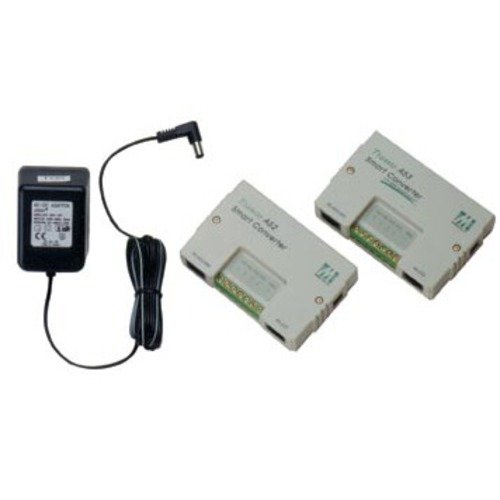
Figure 1: Moxa A52/230V-DB9 RS-232 to RS-422/485 Converter. This image displays the compact design of the converter unit, highlighting its various ports and indicators.
2. Safety Information
Please read and understand all safety instructions before operating the device. Failure to follow these instructions may result in damage to the device, personal injury, or property damage.
- Electrical Safety: Ensure the power adaptor used is the one supplied with the device or a compatible replacement with the correct voltage (230V) and current ratings. Do not expose the device to moisture or extreme temperatures.
- ESD Protection: While the device offers 25 KV ESD protection, it is recommended to follow standard electrostatic discharge (ESD) precautions when handling the converter, especially when connecting cables.
- Ventilation: Ensure adequate ventilation around the device to prevent overheating. Do not block any ventilation openings.
- Mounting: Mount the device securely to prevent accidental falls or disconnections.
3. Setup and Installation
Follow these steps to set up your Moxa A52/230V-DB9 converter.
3.1. Connecting the RS-232 Interface
- Locate the DB9 male connector on the A52/230V-DB9 converter.
- Connect the supplied DB9 cable to this port.
- Connect the other end of the DB9 cable to the RS-232 serial port of your host device (e.g., PC, PLC).
3.2. Connecting the RS-422/485 Interface
- Identify the terminal block connector on the converter for RS-422/485 connections.
- For RS-422 (4-wire full-duplex), connect the TxD+, TxD-, RxD+, and RxD- lines from your device to the corresponding terminals on the converter.
- For RS-485 (2-wire half-duplex), connect the Data+ and Data- lines from your device to the corresponding terminals on the converter. The A52/230V-DB9 features Automatic Data Direction Control (ADDC), eliminating the need for manual RTS control.
- Ensure proper grounding (GND) connections if required by your system.
3.3. Connecting Power
- Connect the 230V power adaptor to the power input jack on the A52/230V-DB9 converter.
- Plug the power adaptor into a standard 230V AC power outlet.
- Verify that the power indicator LED on the converter illuminates, indicating successful power-up.
4. Operating Instructions
The Moxa A52/230V-DB9 converter operates transparently once properly installed and powered. It functions as a bridge, converting data signals between RS-232 and RS-422/485 standards.
- Data Flow: Data transmitted from the RS-232 port will be converted and sent out via the RS-422/485 port, and vice-versa.
- Automatic Data Direction Control (ADDC): For RS-485 half-duplex communication, the ADDC feature automatically detects the direction of data flow, eliminating the need for software control or jumper settings. This ensures reliable data transmission without collision.
- LED Indicators: Observe the LED indicators (if present) for power status and data transmission activity. A steady power LED indicates the device is powered on. Flashing data LEDs indicate active data transmission or reception.
5. Maintenance
The Moxa A52/230V-DB9 converter is designed for minimal maintenance. Adhering to the following guidelines will help ensure its longevity and reliable operation:
- Cleaning: Use a soft, dry cloth to clean the exterior of the device. Do not use liquid or aerosol cleaners, as they may damage the internal components.
- Environmental Conditions: Operate the device within its specified temperature and humidity ranges. Avoid exposing it to direct sunlight, excessive dust, or corrosive environments.
- Cable Integrity: Periodically inspect all connected cables for signs of wear, damage, or loose connections. Replace damaged cables immediately.
6. Troubleshooting
If you encounter issues with your Moxa A52/230V-DB9 converter, refer to the following troubleshooting steps:
| Problem | Possible Cause | Solution |
|---|---|---|
| No power indicator LED | Power adaptor not connected or faulty; power outlet not active. | Ensure the power adaptor is securely connected to both the converter and a live 230V AC outlet. Test the outlet with another device. Replace adaptor if faulty. |
| No data transmission/reception | Incorrect wiring; incorrect serial port settings on host device; faulty cables; device malfunction. | Verify all RS-232 and RS-422/485 connections are correct according to the wiring diagrams. Check serial port settings (baud rate, data bits, parity, stop bits) on your host device. Test with known good cables. If problem persists, contact support. |
| Intermittent data communication | Loose connections; electrical interference; cable length exceeding limits. | Check all cable connections for tightness. Ensure proper grounding. Minimize sources of electrical noise. Verify cable lengths are within RS-422/485 specifications. |
If the issue persists after attempting these troubleshooting steps, please contact Moxa technical support for further assistance.
7. Specifications
| Feature | Description |
|---|---|
| Model | A52/230V-DB9 |
| Brand | Moxa |
| Function | RS-232 to RS-422/485 Converter |
| RS-485 Control | Automatic Data Direction Control (ADDC) |
| Protection | 25 KV ESD Protection, Surge Protection |
| Power Input | 230V AC (via included power adaptor) |
| Included Accessories | DB9 Cable, 230V Power Adaptor |
| Manufacturer | MOXA |
| ASIN | B07BX7GT87 |
| Date First Available | April 3, 2018 |
8. Warranty and Support
Moxa products are manufactured to high-quality standards and are backed by a manufacturer's warranty. For specific warranty terms and conditions applicable to your region and product, please refer to the official Moxa website or contact your local distributor.
For technical support, product inquiries, or service requests, please visit the official Moxa support portal or contact their customer service department. Have your product model number (A52/230V-DB9) and serial number (if applicable) ready when contacting support.
Moxa Official Website: www.moxa.com