
CANYON CND-SGM6N
Canyon Gaming Mouse CND-SGM6N User Manual
Model: CND-SGM6N | Brand: CANYON
Introduction
This manual provides comprehensive instructions for the setup, operation, maintenance, and troubleshooting of your Canyon Gaming Mouse CND-SGM6N. Please read this manual carefully before using the product to ensure optimal performance and longevity.

Image: Top-down view of the Canyon Gaming Mouse CND-SGM6N, showcasing its black and orange design with illuminated accents.
Setup
Package Contents
- Canyon Gaming Mouse CND-SGM6N
- User Manual (this document)
- Additional weights (pre-installed or separate, if applicable)
System Requirements
- Operating System: Windows XP/Vista/7/8/10 or macOS
- Available USB port
Connecting the Mouse
- Locate an available USB port on your computer.
- Insert the USB connector of the Canyon Gaming Mouse into the USB port.
- The operating system will automatically detect and install the necessary drivers. This process may take a few moments.
- Once installed, the mouse LED lighting will illuminate, indicating it is ready for use.

Image: Angled view of the Canyon Gaming Mouse CND-SGM6N, highlighting its ergonomic shape and side buttons.
Operating Instructions
Button Functions
The Canyon Gaming Mouse CND-SGM6N features 9 programmable buttons. Default functions are as follows:
| Button | Default Function |
|---|---|
| Left Click | Primary action |
| Right Click | Secondary action/Context menu |
| Scroll Wheel (Click) | Middle click/Auto-scroll |
| DPI Button (Top) | Cycle DPI settings |
| Forward Button (Side) | Browser forward |
| Back Button (Side) | Browser back |
| Additional Programmable Buttons | Customizable via software (if applicable) |
Adjusting DPI
Press the dedicated DPI button located on the top of the mouse to cycle through different DPI sensitivity levels. The LED indicator may change color or pattern to reflect the current DPI setting.
Adjusting Weight
The mouse features an adjustable weight system. To modify the mouse's weight:
- Locate the weight compartment on the underside of the mouse.
- Open the compartment cover.
- Add or remove the included weights to achieve your preferred mouse feel.
- Securely close the compartment cover.
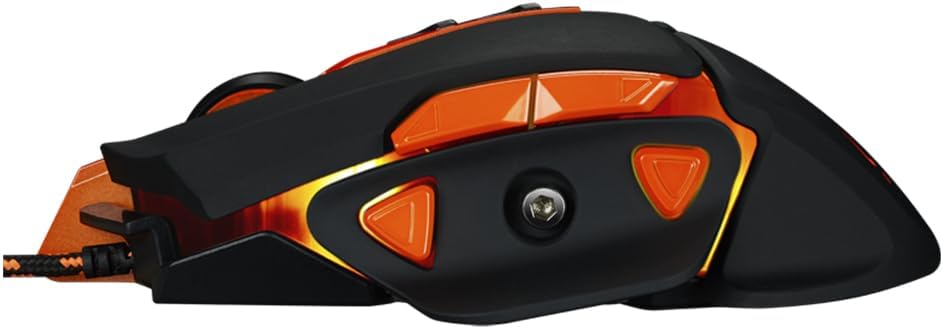
Image: Side view of the Canyon Gaming Mouse CND-SGM6N, showing the textured grip and side buttons.
Maintenance
Cleaning the Mouse
- Disconnect the mouse from your computer before cleaning.
- Use a soft, dry cloth to wipe the surface of the mouse.
- For stubborn dirt, slightly dampen the cloth with water or a mild, non-abrasive cleaner.
- Avoid using harsh chemicals, solvents, or abrasive materials, as these can damage the mouse's finish.
- Clean the optical sensor area on the underside of the mouse periodically with a cotton swab to ensure accurate tracking.
Storage
Store the mouse in a cool, dry place away from direct sunlight and extreme temperatures when not in use for extended periods.
Troubleshooting
| Problem | Possible Cause | Solution |
|---|---|---|
| Mouse not responding | Loose USB connection, faulty USB port, driver issue |
|
| Cursor movement is erratic or jumpy | Dirty optical sensor, unsuitable mouse pad surface |
|
| Buttons not working | Software conflict, physical damage |
|

Image: Top-down angled view of the Canyon Gaming Mouse CND-SGM6N, showing the scroll wheel and DPI buttons.
Specifications
| Feature | Detail |
|---|---|
| Model Number | CND-SGM6N |
| Brand | CANYON |
| Sensor Type | Optical (Sharp Sunplus) |
| DPI | Up to 6400 DPI |
| Number of Buttons | 9 (Programmable) |
| Connectivity | USB Wired |
| Special Features | Adjustable Weight, LED Lighting |
| Weight | 280 Grams (with weights) |
| Hand Orientation | Ambidextrous |
Warranty Information
CANYON products are covered by a manufacturer's warranty. Please refer to the warranty card included with your product or visit the official CANYON website for detailed warranty terms and conditions specific to your region.
Typically, the warranty covers defects in materials and workmanship under normal use. It does not cover damage caused by misuse, accident, unauthorized modification, or external causes.
Customer Support
For technical support, troubleshooting assistance, or warranty claims, please contact CANYON customer service through their official website or the contact information provided on the product packaging.
When contacting support, please have your product model number (CND-SGM6N) and purchase details ready.
- Official CANYON Website: https://canyon.eu/ (Example link, actual link might vary)
Related documentsCND-SGM6N


Ask a question about this manual
Ask about setup, troubleshooting, compatibility, parts, safety, or missing instructions. Manuals+ will review the question and use this page’s manual context to help answer it.