
1. Introduction
The Sunbuck AV-628BT is a versatile 5-channel stereo surround amplifier designed for various audio applications, including HiFi music listening, home theater setups, small PA systems, and karaoke events. It features multiple audio inputs, Bluetooth connectivity, FM/AM radio, and dedicated microphone inputs with adjustable effects, providing a comprehensive audio experience.
2. Safety Instructions
- Read all instructions carefully before operating the device.
- Do not expose this appliance to rain or moisture to prevent fire or shock hazards.
- Ensure proper ventilation. Do not block ventilation openings.
- Place the unit on a stable, level surface.
- Disconnect the power plug from the wall outlet if the unit is not in use for a long period.
- Do not attempt to service the unit yourself. Refer all servicing to qualified personnel.
- Use only the specified power voltage (220V).
- Ensure speaker impedance is between 4 and 16 ohms.
3. Package Contents
Please check that all items are present in the package:
- 1 x Sunbuck AV-628BT Amplifier
- 1 x Remote Control
- 1 x FM/AM Antenna
4. Product Features
- Multi-functional 5-channel stereo surround sound amplifier.
- Supports HiFi, home theater, PA, and karaoke applications.
- Multiple audio inputs: Stereo RCA (DVD, CD, LINE) and jack inputs.
- 5 speaker outputs for comprehensive surround sound.
- Two front microphone inputs for karaoke with adjustable volume and echo effect.
- Built-in FM/AM radio receiver.
- Bluetooth Version 4.0 for wireless audio streaming.
- Max total output power: 1120W (500W+500W+120W).
- Blue illuminated controls and LED display.
- Includes a remote control for convenient operation.
- Durable aluminum alloy construction.
5. Controls and Connections
5.1 Front Panel Overview
The front panel provides access to primary controls and microphone inputs.
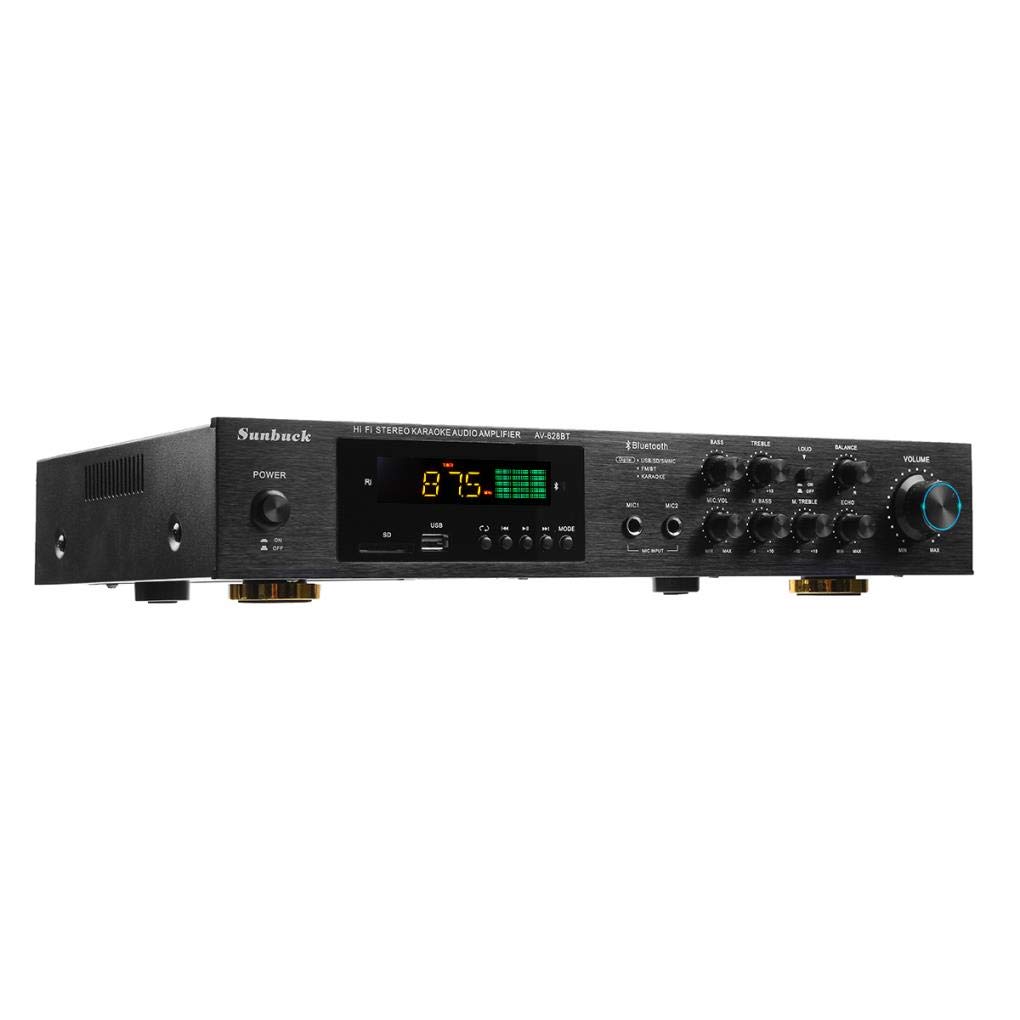
Figure 5.1: Front view of the Sunbuck AV-628BT amplifier, showing the main volume knob, input selectors, tone controls, and microphone inputs.

Figure 5.2: Close-up of the front panel controls, including Bass, Treble, Microphone Volume, Microphone Bass, Microphone Treble, Echo, Loudness switch, and Balance controls.

Figure 5.3: Close-up of the large, illuminated main volume knob.
5.2 Rear Panel Overview
The rear panel houses all audio input and speaker output connections, along with the FM antenna and power input.

Figure 5.4: Rear view of the Sunbuck AV-628BT amplifier, showing audio inputs, speaker outputs, FM antenna connection, and power input.
5.2.1 Audio Inputs
Connect your audio sources to these RCA inputs:
- DVD Input (L/R): For DVD players or other line-level sources.
- CD Input (L/R): For CD players or other line-level sources.
- LINE Input (L/R): General purpose line-level input for devices like computers or MP3 players.

Figure 5.5: Close-up of the RCA audio input section (DVD, CD, LINE).
5.2.2 Speaker Outputs
Connect your passive speakers to these terminals. Ensure correct polarity (+ to + and - to -) and that speaker impedance is within the 4-16 ohm range.
- Speaker Output (L/R): Main stereo speaker connections.
- SR, C, SL Speaker Output: Surround Right, Center, and Surround Left speaker connections.

Figure 5.6: Close-up of the speaker output terminals, including connections for SR (Surround Right), C (Center), and SL (Surround Left) speakers.
5.2.3 FM/AM Antenna
Connect the included FM/AM antenna to the designated terminal for radio reception.

Figure 5.7: The included FM/AM antenna for radio signal reception.
5.2.4 Power Input
Connect the power cord to this input and then to a suitable 220V AC power outlet.

Figure 5.8: The power plug for connecting the amplifier to a mains power supply.
6. Setup
- Speaker Connection: Connect your passive speakers to the corresponding speaker output terminals on the rear panel. Ensure correct polarity (+ to + and - to -) for all speakers.
- Audio Source Connection: Connect your audio devices (e.g., DVD player, CD player, computer) to the appropriate RCA audio input jacks (DVD, CD, LINE) on the rear panel.
- Antenna Connection: Connect the supplied FM/AM antenna to the FM ANT terminal on the rear panel for radio reception. Extend the antenna for better signal.
- Power Connection: Ensure the amplifier's power switch is in the OFF position. Connect the power cord to the amplifier's power input and then plug it into a 220V AC wall outlet.
- Initial Power On: Turn on the amplifier using the power button on the front panel or remote control.
7. Operating Instructions
- Power On/Off: Press the POWER button on the front panel or the remote control to turn the amplifier on or off.
- Input Selection: Use the input selector buttons on the front panel or the MODE button on the remote control to switch between different audio sources (DVD, CD, LINE, Bluetooth, FM/AM).
- Volume Adjustment: Rotate the large VOLUME knob on the front panel or use the VOL+ / VOL- buttons on the remote control to adjust the master volume.
- Tone Controls: Use the BASS and TREBLE knobs on the front panel to adjust the low and high frequencies of the audio output.
- Loudness Function: Toggle the LOUD switch on the front panel to enhance bass and treble at low volume levels.
- Balance Control: Use the BALANCE knob to adjust the relative volume between the left and right channels.
8. Bluetooth Connection
- Turn on the amplifier and select the Bluetooth input mode using the MODE button. The LED display will indicate "BT".
- Enable Bluetooth on your mobile device (smartphone, tablet, etc.).
- Search for available Bluetooth devices. You should find a device named "AV-628BT" or similar.
- Select "AV-628BT" to pair. Once paired, the amplifier will emit a confirmation sound.
- You can now play audio from your device through the amplifier.
9. FM/AM Radio Operation
- Ensure the FM/AM antenna is properly connected and extended.
- Select the FM/AM input mode using the MODE button. The display will show the radio frequency.
- Use the tuning buttons (often labeled PREV / NEXT or SCAN) on the front panel or remote control to scan for radio stations.
- The amplifier may automatically scan and save available stations. Refer to the remote control section for specific radio functions.
10. Karaoke Function
- Connect up to two microphones to the MIC1 and MIC2 input jacks on the front panel.
- Adjust the MIC.VOL knob to control the microphone volume.
- Use the M.BASS and M.TREBLE knobs to adjust the bass and treble frequencies for the microphones.
- Rotate the ECHO knob to add or reduce the echo effect on the microphone sound.
11. Remote Control
The included remote control allows for convenient operation of all amplifier functions from a distance.

Figure 11.1: The remote control for the Sunbuck AV-628BT amplifier, showing various function buttons.
- Power Button: Turns the amplifier on/off.
- MODE: Switches between input sources (DVD, CD, LINE, Bluetooth, FM/AM).
- MUTE: Mutes or unmutes the audio output.
- VOL+ / VOL-: Adjusts the master volume.
- EQ: Cycles through equalizer presets (if available).
- Play/Pause, Previous/Next: Controls playback for Bluetooth or USB/SD (if supported).
- SCN (Scan): Scans for radio stations in FM/AM mode.
- RPT (Repeat): Repeats current track/folder (if supported).
- Numeric Buttons (0-9): For direct track selection or radio frequency input.
12. Maintenance
- Cleaning: Use a soft, dry cloth to clean the exterior of the amplifier. Do not use liquid cleaners or solvents.
- Ventilation: Ensure that the ventilation openings are clear of dust and obstructions to prevent overheating.
- Storage: If storing the unit for an extended period, disconnect it from power and store it in a cool, dry place.
13. Troubleshooting
| Problem | Possible Cause | Solution |
|---|---|---|
| No power | Power cord not connected; Power outlet faulty; Amplifier power switch off. | Check power cord connection; Try a different outlet; Ensure power switch is ON. |
| No sound output | Incorrect input selected; Volume too low; Speakers not connected or faulty; Mute function active. | Select correct input source; Increase volume; Check speaker connections and cables; Deactivate MUTE. |
| Bluetooth not connecting | Amplifier not in Bluetooth mode; Device too far; Bluetooth on device is off. | Switch amplifier to Bluetooth mode; Move device closer; Enable Bluetooth on your device. |
| Poor radio reception | Antenna not connected or poorly positioned; Weak signal. | Connect and extend antenna fully; Reposition antenna for better signal. |
| Microphone not working | Microphone not connected; MIC.VOL too low; Microphone faulty. | Ensure microphone is securely connected; Increase MIC.VOL; Test with another microphone. |
14. Specifications
| Feature | Specification |
|---|---|
| Model | AV-628BT |
| Channels | 5.0 (5 sound channels) |
| Max Total Output Power | 1120W (500W + 500W + 120W) |
| RMS Power | 250W + 250W + 120W |
| Rated Voltage | 220V |
| Distortion Ratio | 0.01% |
| Speaker Impedance | 4-16 ohms |
| Bluetooth Version | 4.0 |
| Radio Support | FM/AM |
| Material | Aluminum Alloy |
15. Warranty and Support
This product comes with a standard manufacturer's warranty. Please refer to your purchase documentation for specific warranty terms and conditions. For technical support, troubleshooting assistance, or service inquiries, please contact your retailer or the manufacturer's customer service department.