
1. Introduction
This user manual provides comprehensive instructions for the Procomm SMA40 SMA Female to TNC Male Connector. Please read this manual carefully before using the product to ensure proper installation, operation, and maintenance. Keep this manual for future reference.
2. Product Overview
The Procomm SMA40 is a high-quality coaxial adapter designed to convert an SMA Female connection to a TNC Male connection. This connector is essential for bridging compatibility between devices with different connector types, commonly used in radio, antenna, modem, satellite equipment, and various wireless communication applications.
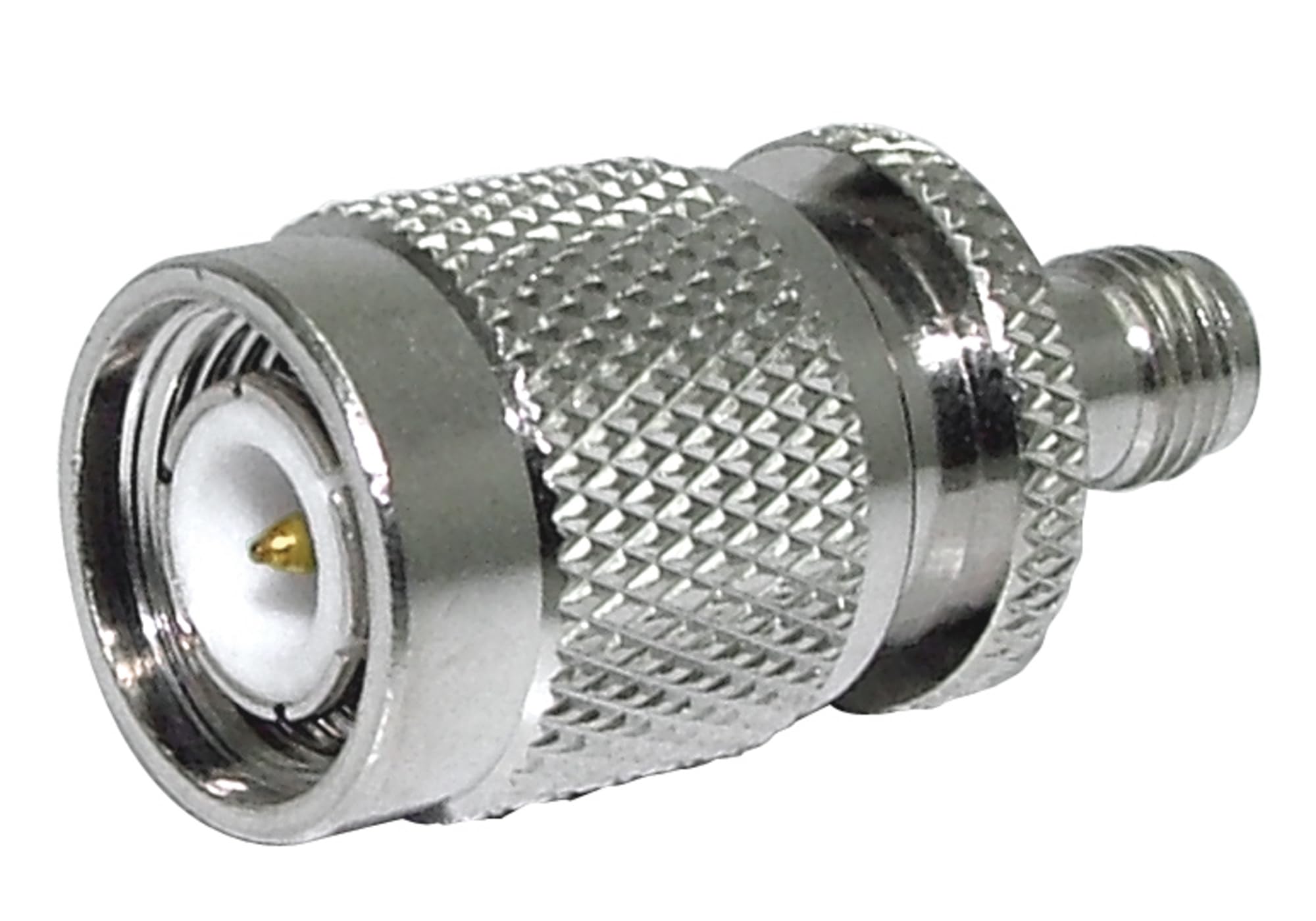
Figure 1: Procomm SMA40 SMA Female to TNC Male Connector. This image displays the physical appearance of the adapter, showing its SMA Female end and TNC Male end, designed for robust and reliable connections.
Key Features:
- Converts SMA Female to TNC Male.
- Durable construction for reliable performance.
- Suitable for various coaxial cable applications.
- Compact and lightweight design.
3. Package Contents
Upon unpacking, please ensure all items are present and in good condition:
- 1 x Procomm SMA40 SMA Female to TNC Male Connector
4. Specifications
| Feature | Detail |
|---|---|
| Brand | Procomm |
| Model Name | SMA40 |
| Connector Type | SMA Female to TNC Male |
| Cable Type | Coaxial |
| Compatible Devices | Antenna, Modem, Satellite Equipment, Wireless Communication Devices |
| Recommended Uses | Connecting electronic devices |
| Color | Multicolor |
| Connector Gender | Male-to-Female |
| Shape | Round |
| Unit Count | 1.0 Count |
| Indoor/Outdoor Usage | Outdoor |
| Dimensions (H x W x L) | 3 x 3 x 3 inches (Package Dimensions) |
| Weight | 0.1 lbs |
5. Setup and Installation
Follow these steps to properly connect the SMA40 adapter:
- Identify Connector Types: Ensure your devices have an SMA Male connector (to connect to the SMA Female end of the adapter) and a TNC Female connector (to connect to the TNC Male end of the adapter).
- Connect SMA Side: Carefully align the SMA Male connector from your device (e.g., antenna cable) with the SMA Female end of the SMA40 adapter. Gently push and then twist the connector's nut clockwise until it is finger-tight. Avoid over-tightening.
- Connect TNC Side: Align the TNC Male end of the SMA40 adapter with the TNC Female connector on your other device (e.g., radio, modem). Push the connector in and twist the outer sleeve clockwise until it locks securely.
- Verify Connection: Ensure both connections are secure and stable. A loose connection can lead to signal loss or degradation.
Caution: Do not force connections. Incorrect alignment can damage the connectors. Always ensure the correct gender and type of connectors are being mated.
6. Operating Instructions (Usage)
The Procomm SMA40 connector is a passive adapter and does not require any specific operational steps beyond proper installation. Once connected, it facilitates the signal transfer between the two different connector types. Its primary function is to ensure electrical continuity and impedance matching between the connected coaxial components.
- Ensure all connected devices are powered off before making or breaking connections to prevent potential damage.
- Once connected, the adapter allows for seamless signal transmission between SMA and TNC interfaces.
- Regularly check connections for tightness, especially in outdoor or high-vibration environments.
7. Maintenance
The SMA40 connector requires minimal maintenance to ensure long-term performance:
- Cleaning: If necessary, gently wipe the exterior of the connector with a clean, dry, lint-free cloth. Avoid using harsh chemicals or abrasive materials.
- Inspection: Periodically inspect the connectors for any signs of corrosion, bending, or physical damage. Ensure the threads are clean and free of debris.
- Storage: When not in use, store the adapter in a clean, dry environment, away from extreme temperatures and direct sunlight. Consider using protective caps if available to prevent dust and moisture ingress.
8. Troubleshooting
If you experience issues with your connection, consider the following troubleshooting steps:
- No Signal or Weak Signal:
- Ensure all connections (including the SMA40 adapter) are securely tightened.
- Check for any visible damage to the adapter or the connected cables.
- Verify that the correct connector types are being used (SMA Male to SMA Female, TNC Male to TNC Female).
- Test the connected devices and cables independently if possible to isolate the fault.
- Difficulty Connecting:
- Ensure proper alignment before attempting to twist or push connectors.
- Check for any debris or bent pins within the connectors.
- Do not force connections; if resistance is met, re-align and try again.
9. Warranty and Support
Procomm products are manufactured to high-quality standards. For specific warranty information, please refer to the documentation provided with your purchase or visit the official Procomm website. For technical support or inquiries, please contact your retailer or the manufacturer directly.
Please retain your proof of purchase for warranty claims.