1. Introduction
Thank you for choosing the ESR True Wireless Bluetooth Earbuds. These earbuds are designed to provide a high-quality audio experience with convenience and portability. This manual will guide you through the setup, operation, and maintenance of your new earbuds.

Image: ESR True Wireless Bluetooth Earbuds and their portable charging case.
2. Package Contents
Please check the box for the following items:
- True Wireless Bluetooth Earbuds (Left and Right)
- Portable Charging Case
- USB Charging Cable
- Multiple Sizes of Eartips
- User Manual (this document)

Image: The complete accessory set including earbuds, charging case, USB cable, and various eartips.
3. Product Overview
The ESR True Wireless Bluetooth Earbuds feature a compact design with intuitive controls and a portable charging case.

Image: An overview highlighting key features such as one-button control, intuitive pairing, stable connection, extended playtime, crystal clear sound, and noise reduction.
Key Components:
- Earbuds: Each earbud is lightweight (4.5g) and features a touch control surface and a dynamic graphene driver for clear audio.
- Charging Case: The compact case (60.5g) holds the earbuds securely with magnets and provides additional charges. It has an indicator light and a charging port.
4. Setup
4.1 Charging the Earbuds and Case
Before first use, fully charge the earbuds and the charging case.
- Place the earbuds into the charging case. Ensure they are correctly seated; magnets will pull them into place.
- Connect the charging case to a USB power source using the provided USB cable.
- The indicator light on the case will show charging status. A full charge for the case takes approximately 2.5 hours.
- Fully charged earbuds provide approximately 2.5 hours of music playback. The charging case provides an additional 3 full charges, totaling up to 10 hours of playtime.

Image: Earbuds placed in the charging case, illustrating charging times and total playtime.
4.2 Pairing with Your Device
The earbuds feature intuitive connection, automatically pairing when taken out of the case.
- Ensure Bluetooth is enabled on your smartphone or other compatible device.
- Open the charging case and remove both earbuds. They will automatically power on and enter pairing mode.
- On your device, go to Bluetooth settings and select "ESR T1" from the list of available devices.
- Once connected, you will hear an audible confirmation, and the earbuds will be ready for use.
- For subsequent uses, the earbuds will automatically connect to the last paired device when removed from the case.

Image: A smartphone displaying the Bluetooth settings screen, showing the ESR T1 earbuds as connected.
5. Operating Instructions
5.1 Touch Controls
The earbuds feature a single touch-sensitive area for various functions:
- Play/Pause: Single tap on either earbud.
- Next Track: Double tap on the right earbud.
- Previous Track: Double tap on the left earbud.
- Answer/End Call: Single tap on either earbud.
- Reject Call: Press and hold on either earbud.
- Activate Voice Assistant: Triple tap on either earbud.
5.2 Making Calls
The ESR True Wireless Earbuds support single-ear headset calling. During calls, the audio signal will typically be heard only in the left earbud. This is a common design for true wireless headphones.
5.3 Sound Quality and Noise Reduction
The earbuds are equipped with dynamic graphene drivers for crystal-clear sound, providing a full range of audio from strong bass to crisp highs. A closed back cover design contributes to passive noise reduction, helping to block out ambient noise.

Image: A cutaway diagram illustrating the ultrathin elastic graphene drivers responsible for dynamic music experience.

Image: An earbud in an ear, with a sound wave graphic indicating the passive noise reduction feature.
6. Maintenance
To ensure the longevity and optimal performance of your ESR True Wireless Earbuds, follow these maintenance guidelines:
- Cleaning: Regularly wipe the earbuds and charging case with a soft, dry, lint-free cloth. Do not use harsh chemicals or abrasive materials.
- Eartips: Remove and clean the eartips periodically with mild soap and water. Ensure they are completely dry before reattaching them to the earbuds.
- Storage: When not in use, store the earbuds in their charging case to protect them from dust and damage. Keep them in a cool, dry place away from extreme temperatures.
- Charging Contacts: If you experience charging issues, gently clean the charging contacts on both the earbuds and inside the case with a dry cotton swab.
7. Troubleshooting
If you encounter issues with your earbuds, please refer to the following common problems and solutions:
- No Sound/Connection Issues:
- Ensure both earbuds are charged.
- Verify Bluetooth is enabled on your device and the earbuds are selected.
- Try unpairing and re-pairing the earbuds with your device.
- Bluetooth signals can be temporarily disrupted by strong wireless signals or physical obstructions. Move closer to your device.
- Quiet Audio During Calls:
- Due to the earbuds' location on the side of the head, audio pickup may be quieter. Ensure the microphone is not obstructed.
- Adjust the volume on your connected device.
- Audio Delay (especially in games):
- When playing data-intensive mobile games, audio may sometimes be slightly delayed. This is a characteristic of Bluetooth audio transmission and not a defect.
- Try closing other applications running in the background on your device.
- Earbuds Not Charging:
- Ensure the charging cable is securely connected to both the case and the power source.
- Check if the charging contacts on the earbuds and inside the case are clean and free of debris.
- Try a different USB cable or power adapter.
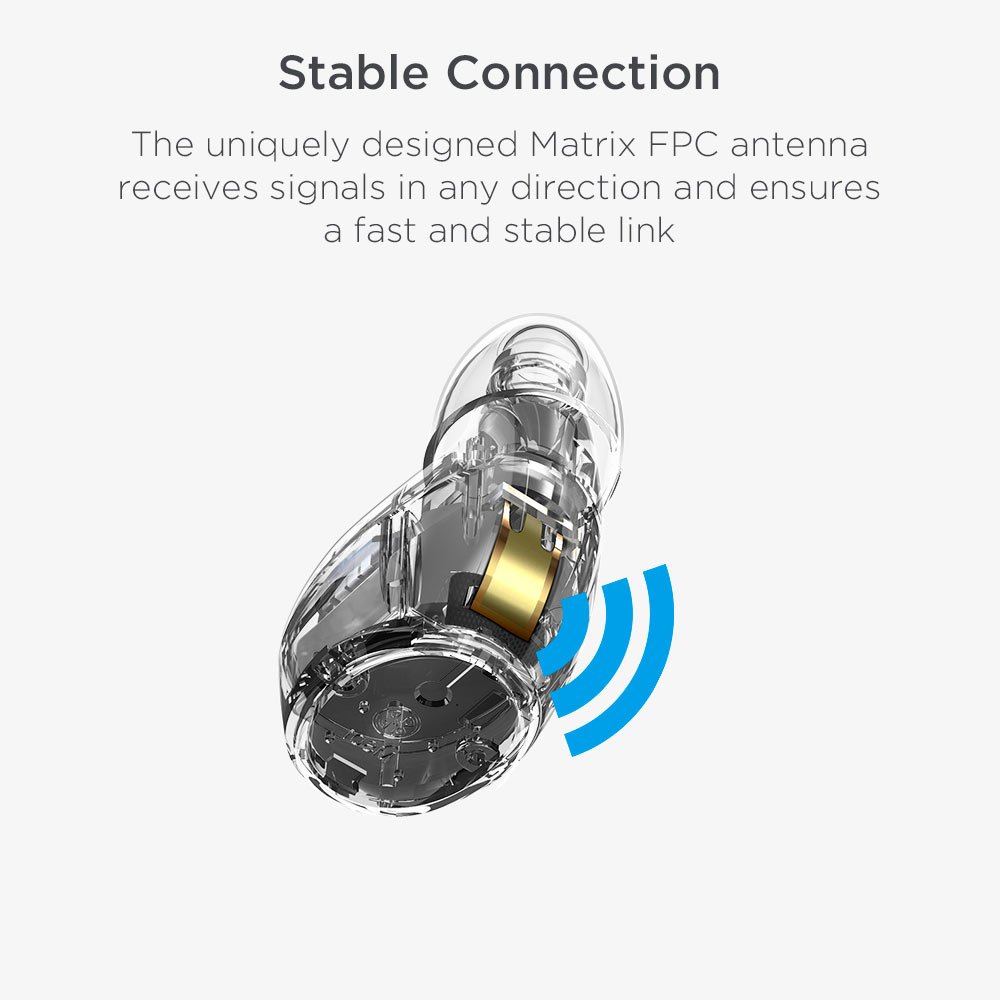
Image: A detailed view of the earbud's uniquely designed Matrix FPC antenna, which ensures a fast and stable Bluetooth connection.
8. Specifications
| Feature | Specification |
|---|---|
| Model Name | YD-WHITE |
| Connectivity Technology | Bluetooth |
| Bluetooth Version | 4.2 |
| Bluetooth Range | Up to 32 Feet (approx. 10 meters) |
| Earbud Battery Life | 2.5 Hours (music playback per charge) |
| Total Playtime (with case) | Up to 10 Hours |
| Charging Time (Case) | 2.5 Hours |
| Earbud Weight | 4.5g (0.16oz) per earbud |
| Charging Case Weight | 60.5g (2.13oz) |
| Control Method | Touch |
| Audio Driver Type | Dynamic Driver (Graphene) |
| Included Components | True Wireless Bluetooth Earbuds |
| Compatible Devices | Cellphones (iPhone, Samsung, Android) |
| Manufacturer | Electronic Silk Road Corp |
| Product Dimensions | 2.36 x 2.67 x 1.65 cm (earbuds); 68.04 g (total) |
9. Warranty and Support
ESR provides a Lifetime Warranty for the True Wireless Bluetooth Earbuds. This warranty covers manufacturing defects and ensures long-term support for your product.
For technical support, warranty claims, or any inquiries, please contact ESR customer service through the official ESR website or your point of purchase. Please have your product model number (YD-WHITE) and purchase details ready when contacting support.


