
Vivitar VIV-TR-122
Vivitar VIV-TR-122 7.5-inch Compact Tripod User Manual
Model: VIV-TR-122
1. Introduction
This manual provides instructions for the proper setup, operation, and maintenance of your Vivitar VIV-TR-122 7.5-inch Compact Tripod. This versatile accessory is designed for use with compact cameras and smartphones, functioning as both a stable tabletop tripod and a comfortable hand grip. Its lightweight and portable design makes it suitable for various photography and videography needs.
2. Product Components
The Vivitar VIV-TR-122 Compact Tripod includes the following main components:
- Tripod Base: The main three-legged structure providing stability.
- Universal 1/4-20 Thread Mount: A standard screw for attaching cameras or accessories.
- Smartphone Cradle: An adjustable holder designed to securely grip smartphones.
- Adjustable Ball Head: Allows for flexible positioning of the attached device.

Image 1: The Vivitar VIV-TR-122 Compact Tripod shown with a compact digital camera attached to its universal 1/4-20 thread mount.

Image 2: The Vivitar VIV-TR-122 Compact Tripod featuring the detachable smartphone cradle, ready for mobile device mounting.
3. Setup Instructions
3.1 Attaching a Camera
- Locate the 1/4-20 thread mount on the top of the tripod's ball head.
- Align the camera's tripod socket with the tripod's screw.
- Gently twist the camera clockwise onto the screw until it is securely fastened. Do not overtighten.
3.2 Attaching a Smartphone Cradle
- If a camera is attached, remove it first.
- Screw the smartphone cradle onto the 1/4-20 thread mount on the tripod's ball head.
- Ensure the cradle is firmly attached.
3.3 Inserting a Smartphone
- With the smartphone cradle attached, gently pull apart the spring-loaded arms of the cradle.
- Carefully place your smartphone between the arms. The cradle extends from 2.25 inches to 3.5 inches to accommodate various phone sizes.
- Release the arms, ensuring the phone is securely held and centered.
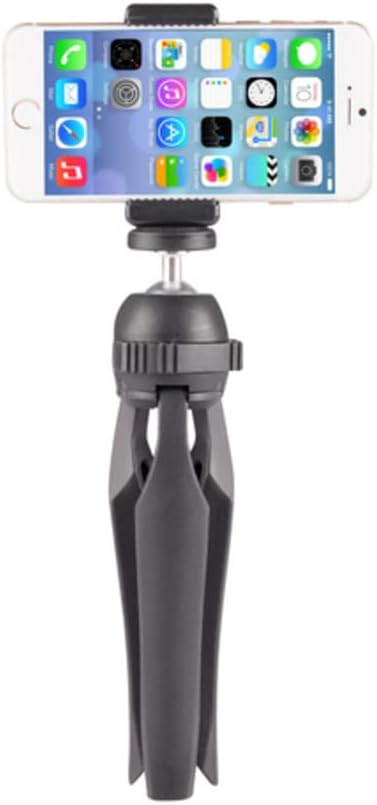
Image 3: The Vivitar VIV-TR-122 Compact Tripod with a smartphone securely mounted in its adjustable cradle, ready for use.
4. Operating Instructions
4.1 Using as a Tabletop Tripod
- Extend the three legs of the tripod fully.
- Place the tripod on a flat, stable surface. The non-slip feet provide enhanced stability.
- Adjust the angle of your camera or smartphone using the ball head. Loosen the locking knob, position your device, and then tighten the knob to secure it.
4.2 Using as a Hand Grip
- Fold the three legs of the tripod together.
- Grip the folded legs firmly to use the tripod as a comfortable hand grip for increased stability during handheld shooting.
- This mode is ideal for recording videos or taking photos while moving.
5. Maintenance
- Cleaning: Wipe the tripod with a soft, dry cloth. For stubborn dirt, a slightly damp cloth can be used, followed by immediate drying. Avoid harsh chemicals or abrasive cleaners.
- Storage: Store the tripod in a cool, dry place away from direct sunlight and extreme temperatures.
- Inspection: Periodically check all screws and moving parts to ensure they are secure and functioning correctly.
6. Troubleshooting
- Device not stable on tripod:
- Ensure the camera or smartphone cradle is securely tightened to the 1/4-20 thread mount.
- Verify that the ball head locking knob is fully tightened after adjusting the angle.
- For tabletop use, ensure the surface is flat and stable.
- Smartphone not fitting in cradle:
- The cradle supports devices with widths between 2.25 inches and 3.5 inches. Confirm your smartphone's dimensions are within this range.
- Ensure no obstructions are preventing the cradle arms from fully extending or gripping the phone.
7. Specifications
| Feature | Detail |
|---|---|
| Model Number | VIV-TR-122 |
| Brand | Vivitar |
| Product Dimensions | 10 x 4.41 x 1.93 inches |
| Item Weight | 6.3 ounces |
| Color | Black |
| Material | Plastic |
| Compatible Devices | Camera, Smartphone |
| Special Feature | Portable, Compact |
| Maximum Height | 3.5 Inches (smartphone cradle extension) |
| Minimum Height | 5.7 Centimeters |
| Tripod Head Type | Standard Tripod Head (Ball Head) |
| Number of Leg Sections | 1 |
8. Warranty and Support
Warranty information for your Vivitar VIV-TR-122 Compact Tripod is typically included with your purchase documentation. Please refer to the packaging or the official Vivitar website for detailed warranty terms and conditions.
For technical support, product inquiries, or further assistance, please visit the official Vivitar support website or contact their customer service department. Contact information can usually be found on the product packaging or the Vivitar brand website.
Ask a question about this manual
Ask about setup, troubleshooting, compatibility, parts, safety, or missing instructions. Manuals+ will review the question and use this page’s manual context to help answer it.