
1. Introduction
This manual provides essential information for the safe and effective operation of your XPCLEOYZ 150W RGBW 4-in-1 LED Moving Head DJ Light. Please read these instructions thoroughly before installation and use, and retain them for future reference. This device is designed to produce dynamic lighting effects for various events.
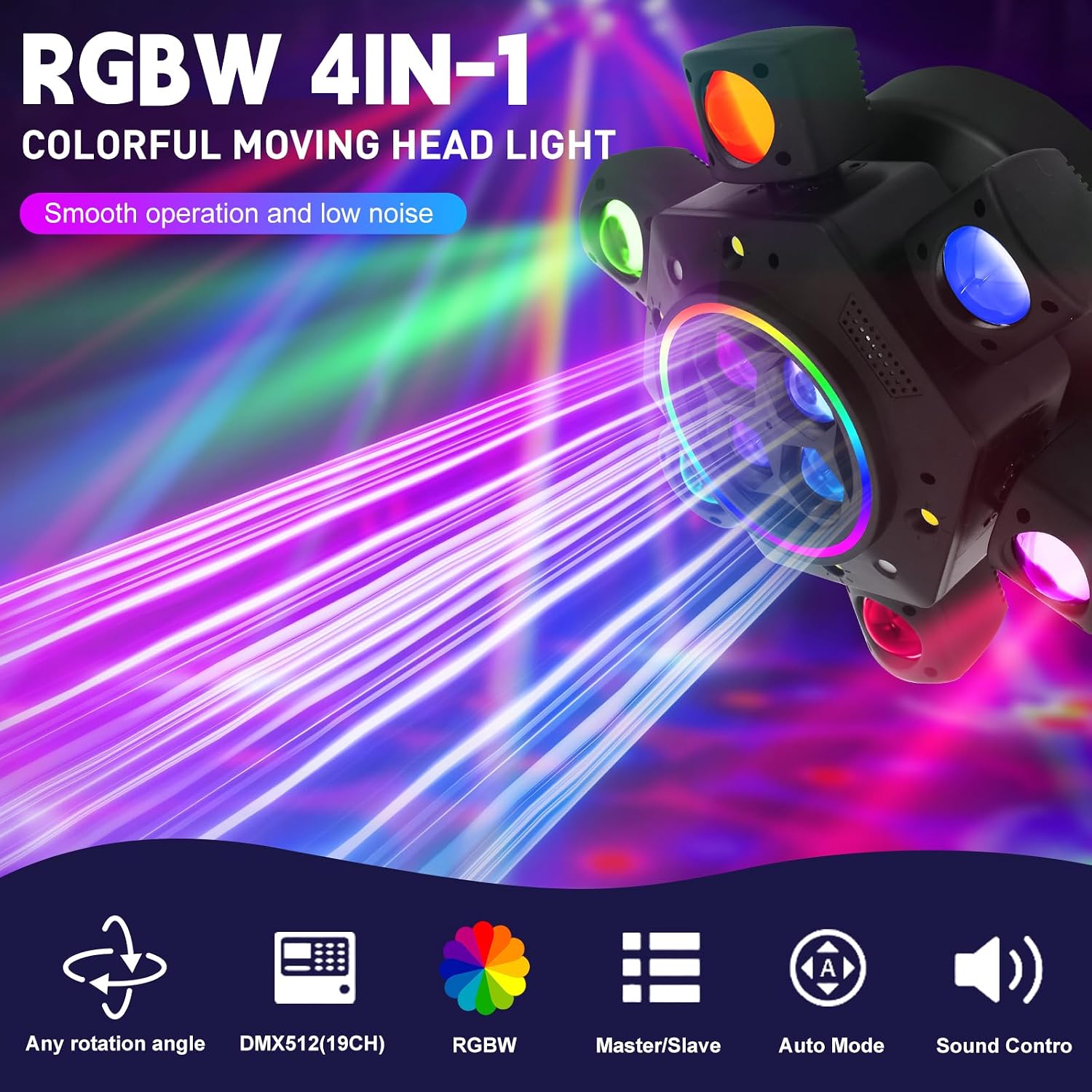
Figure 1.1: XPCLEOYZ 150W RGBW 4-in-1 LED Moving Head DJ Light. This image displays the light unit emitting multiple colored beams, highlighting its RGBW 4-in-1 capabilities and smooth operation.
2. Safety Information
- Electrical Safety: Ensure the power supply voltage matches the device's requirements. Always connect to a grounded outlet. Disconnect power before cleaning or servicing.
- Placement: Install the light in a well-ventilated area, away from heat sources, moisture, and flammable materials. Maintain adequate clearance around the unit for proper airflow.
- Handling: Avoid direct eye exposure to the light source. Do not operate if the housing or cables are damaged.
- Mounting: Securely mount the device using appropriate hardware. Ensure the mounting surface can support the weight of the fixture.
- Children: Keep the device out of reach of children.
3. Product Components and Features
The XPCLEOYZ Moving Head DJ Light features a robust design with multiple light sources and control options.
- LED Configuration: 4 central LEDs on the turntable, 6 LEDs on each of its 6 arms, plus 2 RG lighting effects.
- Dynamic Effects: Supports beam, strobe, sweeping, chasing, pulsing, and dimming effects.
- Rotation: Offers 540° horizontal (Pan) and 180° vertical (Tilt) rotation for wide coverage.
- Control Panel: Integrated display and buttons for direct control and mode selection.
- Connectivity: DMX IN/OUT ports for professional control, and a standard power input.
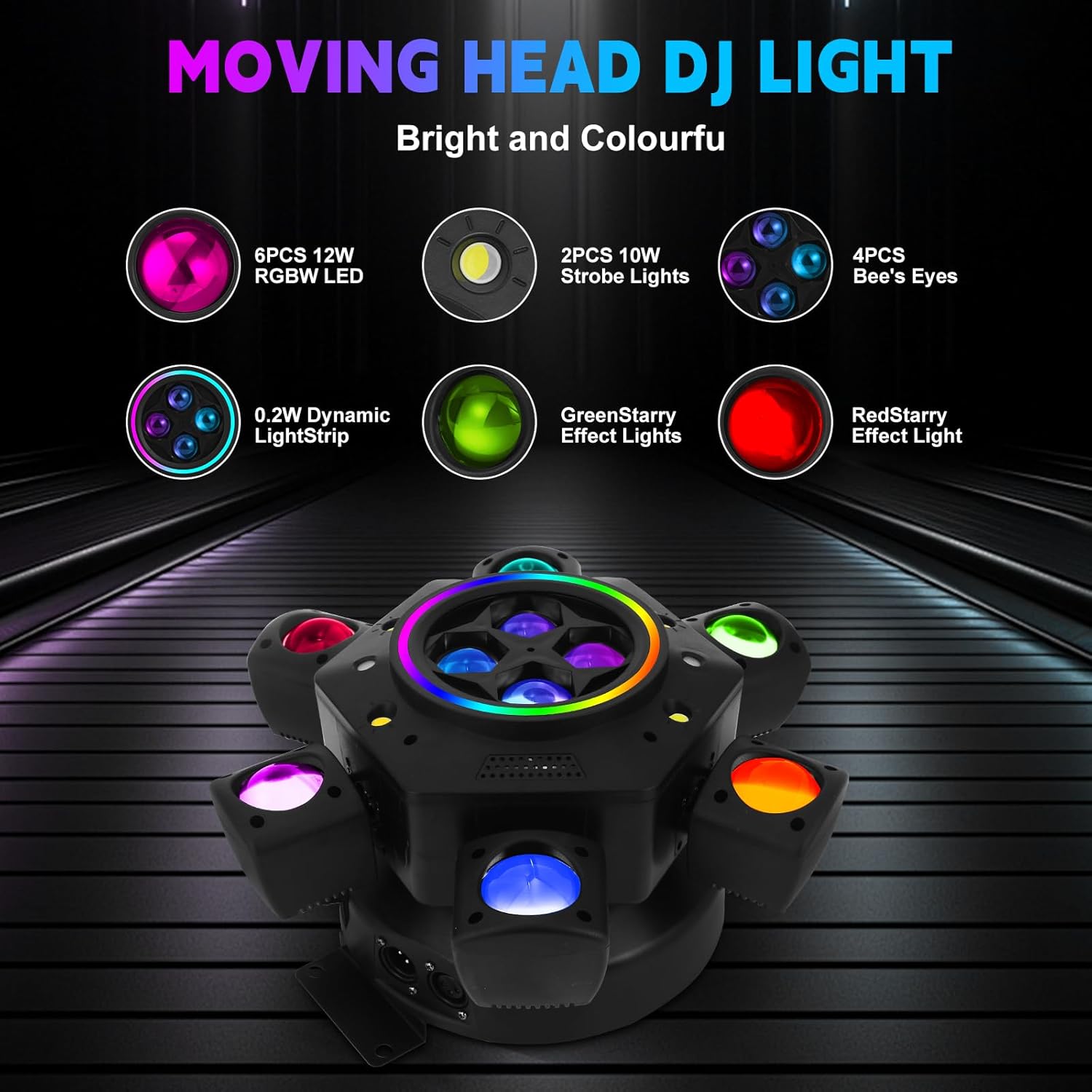
Figure 3.1: Internal and external components of the Moving Head DJ Light. This image highlights the 6PCS 12W RGBW LEDs, 2PCS 10W Strobe Lights, 4PCS Bee's Eyes, 0.2W Dynamic LightStrip, Green Starry Effect Lights, and Red Starry Effect Light.

Figure 3.2: Rotation angles of the Moving Head DJ Light. The diagram illustrates the 540° horizontal (pan) and 180° vertical (tilt) movement capabilities of the light head.

Figure 3.3: Product details including ventilation and multi-functional sockets. This image shows the top and bottom views of the light, highlighting the ventilation holes for heat dissipation and the various input/output sockets.
4. Setup and Installation
Follow these steps for proper setup and installation of your DJ light.
- Unpacking: Carefully remove all components from the packaging. Verify that all items listed in the packing list are present.
- Mounting: Attach the provided bracket securely to the moving head light. Mount the fixture on a ceiling, truss, or tent using appropriate mounting hardware (not included). Ensure the mounting point is stable and can support the device's weight.
- Power Connection: Connect the power cord to the "POWER IN" port on the device and then to a suitable power outlet.
- DMX Connection (Optional): For DMX control, connect a DMX cable from your DMX controller to the "DMX IN" port. If linking multiple units, connect from "DMX OUT" of the first unit to "DMX IN" of the next.

Figure 4.1: Control panel and connection ports. This image shows the 'ENTER', 'DISPLAY', 'UP', 'DOWN', 'MENU' buttons on the control panel, along with the DMX IN, DMX OUT, and POWER IN ports.

Figure 4.2: Packing list contents. This image displays the main light unit, two power cords, two hook accessories, and the instruction manual included in the package.
5. Operating Modes
The light offers four primary operating modes:
- DMX-512 Mode: This mode allows professional control over 22 channels, enabling precise manipulation of light effects, colors, and movement. Refer to the DMX channel chart (not provided in this manual) for specific channel functions.
- Sound-Activated Mode: The light responds to ambient sound and music, synchronizing its effects with the beat. This mode can be easily activated via the included remote control.
- Master/Slave Mode: Link multiple units together. Set one unit as the master, and others as slaves. Slave units will mirror the master's operations, creating synchronized lighting displays.
- Automatic Mode: The light cycles through pre-programmed lighting sequences and effects without external input.

Figure 5.1: Examples of RGBW 4-in-1 light effects. This image showcases different color combinations and patterns achievable with the light, including beams, washes, and mixed effects.

Figure 5.2: Further examples of mixed lighting effects. This image displays a variety of complex and dynamic light patterns, demonstrating the versatility of the fixture's output.
6. Remote Control Operation
The included remote control provides convenient access to various functions.
- ON/OFF: Powers the unit on or off.
- AUTO: Activates automatic mode.
- VOICE: Activates sound-activated mode.
- DMX: Switches to DMX control mode.
- SPEED +/-: Adjusts the speed of effects in automatic or sound-activated modes.
- MIC: Adjusts microphone sensitivity for sound-activated mode.
- MODES: Cycles through different pre-programmed modes.
- Numeric Buttons (0-9): Select specific programs or DMX channels (functionality may vary by mode).

Figure 6.1: Remote control and product dimensions. This image displays the layout of the remote control buttons and provides the overall dimensions of the light fixture (32cm/12.6in width, 15cm/5.9in height, 25cm/9.84in depth).
7. Maintenance
Regular maintenance ensures optimal performance and longevity of your DJ light.
- Cleaning: Periodically clean the lens and housing with a soft, dry cloth. Do not use abrasive cleaners or solvents. Ensure the device is powered off and unplugged before cleaning.
- Inspection: Regularly check power cables and DMX cables for any signs of damage. Ensure all mounting hardware is secure.
- Storage: When not in use, store the light in a dry, dust-free environment.
8. Troubleshooting
If you encounter issues, refer to the following common problems and solutions:
| Problem | Possible Cause | Solution |
|---|---|---|
| Light does not turn on. | No power, faulty cable, or internal issue. | Check power connection and outlet. Test with a different power cable. If problem persists, contact support. |
| DMX control not working. | Incorrect DMX cabling, wrong DMX address, or controller issue. | Verify DMX cable connections (IN/OUT). Ensure DMX address is correctly set on the fixture and matches the controller. Check DMX controller functionality. |
| Sound-activated mode not responding. | Microphone sensitivity too low, no sound input, or mode not active. | Increase microphone sensitivity via remote. Ensure sufficient sound is present. Verify sound-activated mode is selected. |
| Light effects are erratic or frozen. | Interference, software glitch, or overheating. | Power cycle the unit. Ensure adequate ventilation. If using DMX, check for signal integrity. |
9. Specifications
Technical specifications for the XPCLEOYZ Moving Head DJ Light.
| Feature | Detail |
|---|---|
| Model | B07BQ2JVVX |
| Brand | XPCLEOYZ |
| Light Source Type | Light Emitting Diode (LED) |
| Light Source Wattage | 150 watts |
| Number of Light Sources | 8 (4 central, 6 on each of 6 arms, plus 2 RG effects) |
| Beam Angle | 540 degrees (Pan), 180 degrees (Tilt) |
| Operating Modes | DMX-512 (22 channels), Sound-Activated, Master/Slave, Automatic |
| Control | DMX-512, Remote Control, Built-in Control Panel |
| Material | Acrylonitrile Butadiene Styrene (ABS), Alloy (Shade) |
| Item Dimensions (L x W x H) | 5.9"L x 5.1"W x 11"H |
| Power Source | Corded Electric |
| UPC | 726853501067 |
10. Warranty and Support
XPCLEOYZ is committed to providing quality products and customer service.
- Return Policy: This product is eligible for a 30-day return for refund or replacement, subject to the retailer's terms and conditions.
- Customer Support: For any questions or assistance regarding your XPCLEOYZ Moving Head DJ Light, please contact our after-sales support team via email. We aim to respond within 24 hours to help resolve any issues.